
Holdem Manager 3 review: poker tracker, HUD and setup guide
Built from the ground up by Poker Players for Poker Players. Holdem Manager 3 revolutionizes poker tracking software like never before. You’ll be in the game faster and post session analysis will be more efficient than ever.
- Hold’em & Omaha
- Standard & Graphical HUD
- Situational Views
- PostgreSQL free
- Windows 10/11 64-bit
Partner page. HotPokerDeals is a marketing partner of Holdem Manager. Feature descriptions, setup steps and screenshots on this page come from Holdem Manager’s official site and knowledge base.
What’s newHUDSituational ViewsReports & opponentsHM3 AppsMobile poker appsSupported sitesLicensesInstall & setupPC specsFAQ
2,000+
HUD stats in Holdem Manager 3
15
HUDs to select from after installing HM3
14
interface languages, Ukrainian included
15-day
trial with all cash games and tournament buy-ins supported
What’s new in Holdem Manager 3
Eight headline changes separate HM3 from Holdem Manager 2. Here is how Holdem Manager describes each one.
New feature
Situational Views
Holdem Manager 3 contains new Situational Views. These are a collection of views associated with common situations you encounter during every session.
Situational Views centralize several points of feedback that would have required you to open several different reports.

New design
User Interface
Holdem Manager 3 has a brand new design that is simpler and more intuitive. Enjoy fewer clicks to whichever report, filter or feature you want to use.
- Left side navigation: Reports, Situational Views, Opponents, Live Play, Favorites
- Main tool bar: Cash/Tournament switch, Hero, Start/Stop HUD and Alerts
- Language select with 14 languages

New in HM3
Graphical HUD
No intimidating tables of HUD stats. All of your opponents basic stats are readable at a glance in the new HM3 Graphical HUD.
New in HM3
Auto Complete Filters
With the new HMQL (Holdem Manager Query Language) you can quickly write powerful filters directly on any Report or Situational View. Just start typing and HMQL will then drop down a list of properties and options to help you build the filter you need.
New in HM3
Filter Editor
The HM3 filters controls are much more intuitive and easier to use. In addition, some of the filters now have a more visual interface that is both simpler and more efficient.
New in HM3
Tournament Detection
We have improved our algorithm that detects the correct tournament details and payouts. The improved automatic tournament detection means less manual editing of tournaments to update your results.
New in HM3
HUD Editor
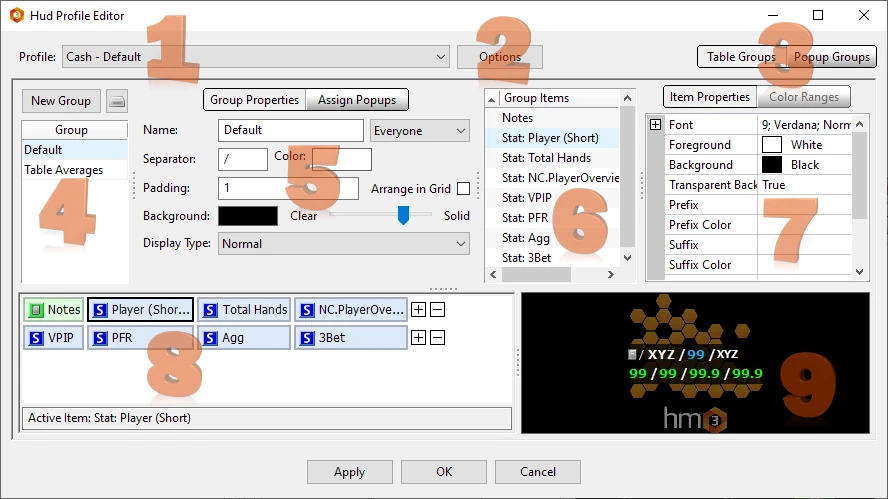
We completely redesigned the HUD Editor to simplify the experience while also still continuing to bring you advanced and powerful features. The Popup Editor is also more powerful and easier to use.
New in HM3
No Database Software
HM3 is now PostgreSQL free!!! Eliminating the requirement to install PostgreSQL avoids issues that were sometimes encountered in set-up and initial installations.

Official source: What’s new with HM3
Holdem Manager 3 HUD: Standard and Graphical
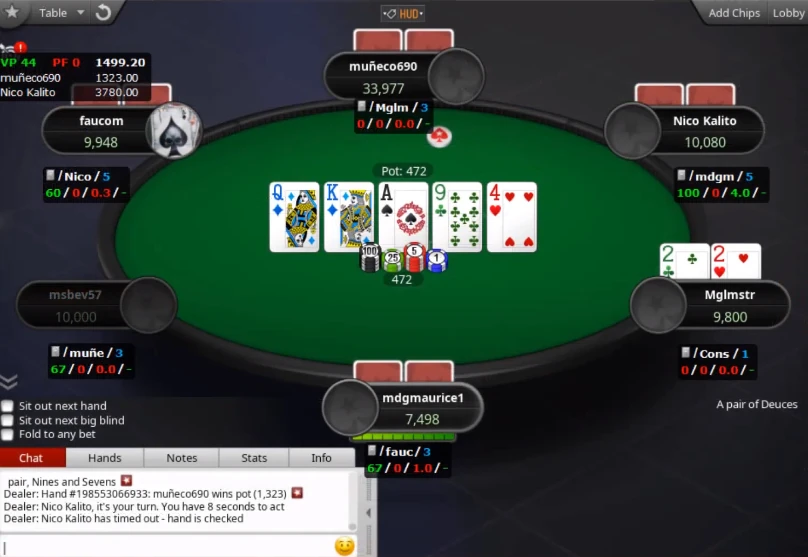
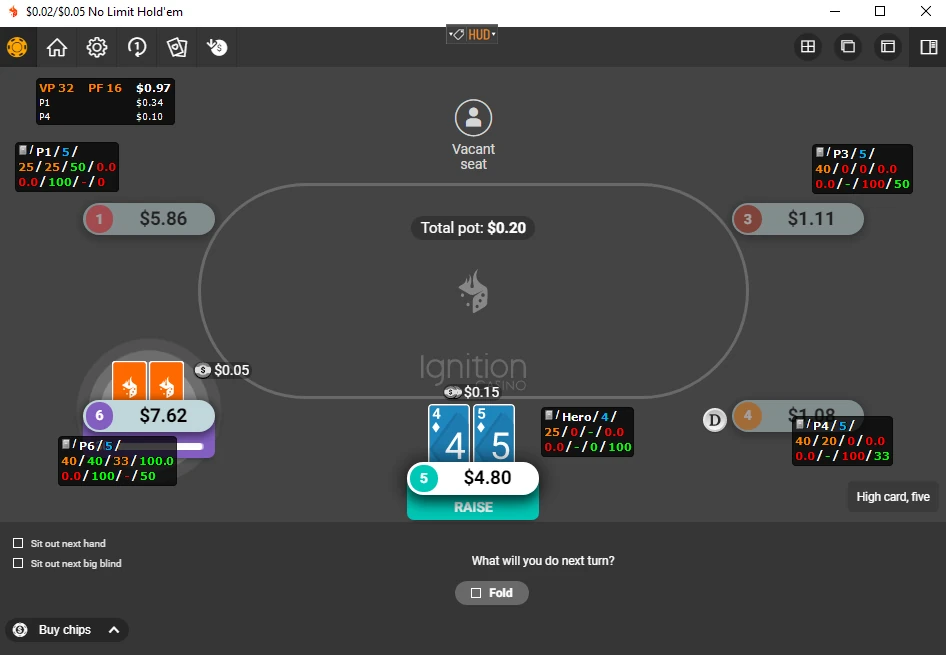
Heads Up Displays (HUD’s) overlay stats on live tables allowing you to see how your opponents play. You can use Standard HUD’s or the Graphical HUD. With over 2,000 HUD stats in Holdem Manager 3 you are sure to gain an edge on your opponents using HUD stats effectively.
Standard HUD
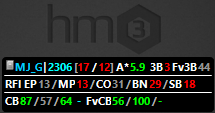
HM3 has 15 HUD’s to select from after installing HM3.
- Take note how the HUD’s vary with how many stats are displayed. Start with a small HUD, then work your way up to using more advanced HUD’s.
- Hover your mouse over any HUD stat and a HUD popup will display even more HUD stats.
Graphical HUD
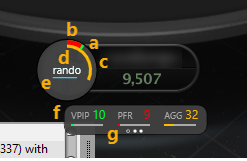
The Graphical HUD is a new visual HUD that comes with Holdem Manager 3. Enable the Graphical HUD by clicking HUD>Graphical HUD.
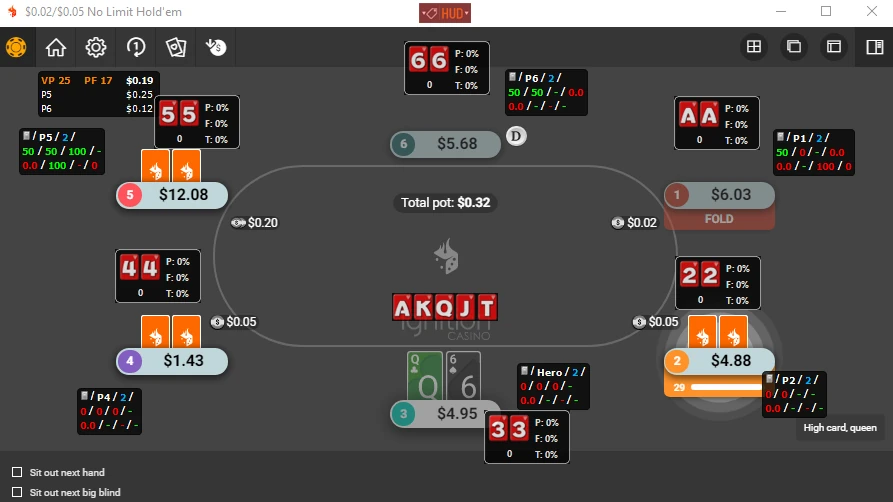
The circle part of the HUD shows main 3 stats: VPIP (a), PFR (b) and Aggression % (c) together with players Name (d) and blue line for number of hands (e). The stat line (f) displays stats as percentages like standard HUDs; switch between them using page buttons (circles/dots) at the bottom (g).
| Page button | Stats on the stat line |
|---|---|
| Left dot | VPIP, PFR, AGG |
| Center dot | 3Bet, Fold To 3Bet, 4Bet |
| Right dot | CBet, Fold To CBet, Raise CBet |
Control the HUD from the table
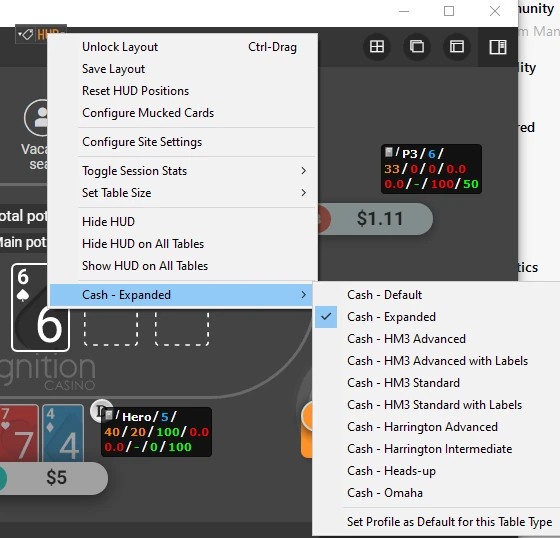
- Switch HUD profile. To change the HUD quickly on a live table, click the HUD Icon. Select a new HUD, then choose “Set Profile as Default for this Table Type”.
- Move HUD elements. If your HUD is locked, press CTRL+Left click/drag to move HUD elements. When positions are right, click Lock & Save Layout.
- Table averages. The table averages HUD element displays the average VPIP, PFR & pot size on the top line.
- Mucked cards. Mucked Cards allow you to see what players had in the previously played hand.
- Toggle session stats. Use session stats or lifetime stats for all players. Hero stats are always session stats.
- Review previous hands. Press the Price Tag icon to bring up a menu where you can review previously played hands.

HUD Only Mode
HUD Only Mode allows you to close Holdem Manager 3 while you are playing live and hands will still import into your database allowing you to use a fully functional HUD with Holdem Manager 3 closed. When Holdem Manager 3 is in HUD Only Mode, a HM3 icon will be in your computer’s system tray. This allows HM3 to use less PC resources while still providing a fully functional HUD.
Check the room’s rules first. Poker sites and club apps decide whether a live HUD is allowed, and some clubs add stricter rules. Read the terms before you install anything. Our guide to real-time assistance restrictions covers the usual limits.
Official source: HUD menu · Live Play HUD · HUD Only Mode
Situational Views: your spots on one screen
Situational Views break down the most common poker situations researched and provide a graphical representation of the data. This makes the data easier to read than a standard report and less filters can be used to achieve the exact data you are looking for.

3-Bet Situational View
The 3-Bet Situational View breaks down the most common 3-Bet poker situations researched and provides a graphical representation of the data.

C-Bet Situational View
The CBet Situational View breaks down the most common Continuation Bet poker situations researched and provides a graphical representation of the data.
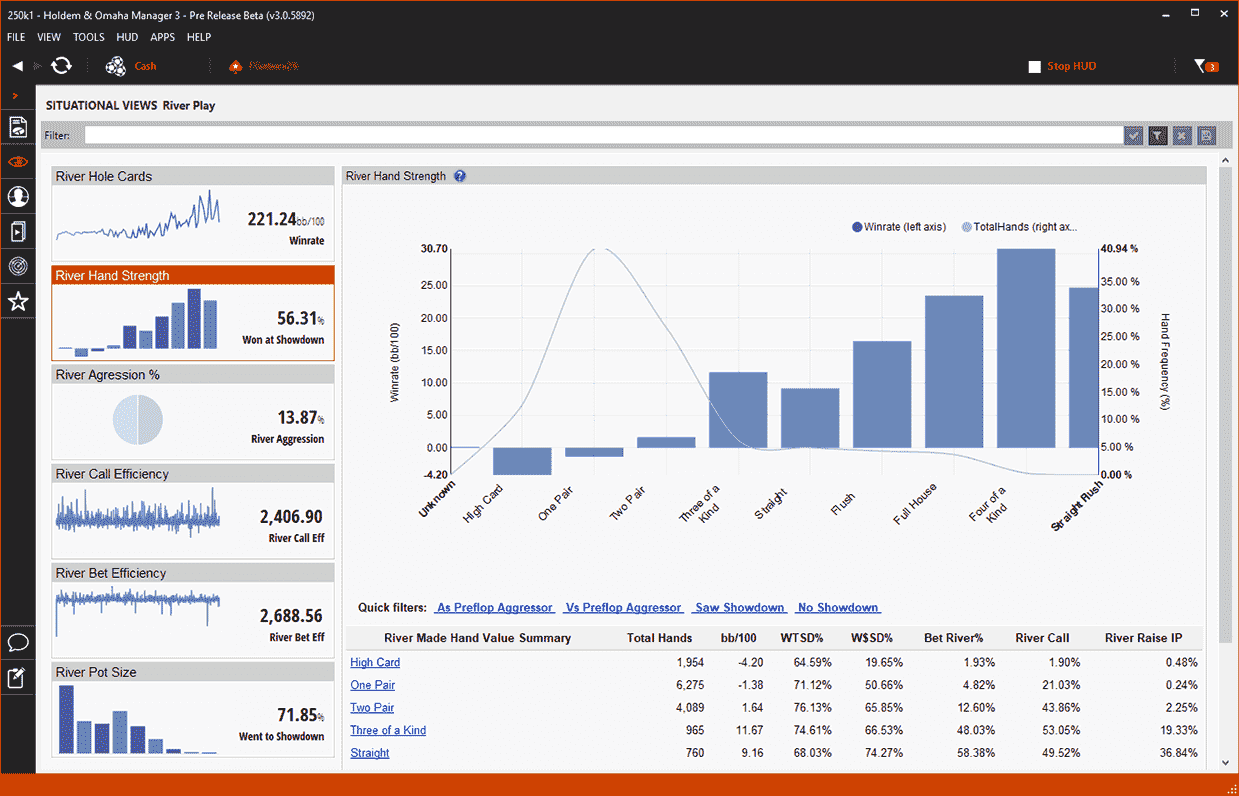
River Play Situational View
The River Play Situational View breaks down the most common River Play poker situations researched and provides a graphical representation of the data.
3-Bet view tiles
What each tile shows
- Results: your overall 3-Bet Winrate, split by In Position and Out of Position.
- Position: your overall 3-Bet Frequency. Orange Bars = 3-Bet % & Green Line = Winrate.
- Three Bet Range: your overall hand range when 3-Betting, with a Hole Card Heat Map.
- Three Bet Success: your overall 3-Bet Success by position.
- Flop Hand Strength: your overall Flop Winrate by made hand.
Also included
Tournament All-In Situational View
The Tournament: All-In Situational View breaks down the most common Tournament All-In poker situations researched and provides a graphical representation of the data.
- All Report Filters can be used in Situational Views.
- All Situational Views have data points that can be clicked to view more information.
- Click a position or a made hand to load the Holdem Manager 3 Hand View so you can replay and mark hands for review.
Official source: Situational Views
Reports, opponents and the hand replayer
The Reports in Holdem Manager 3 are a great way to analyze your poker game. HM3 has numerous Cash and Tournament specific Reports.
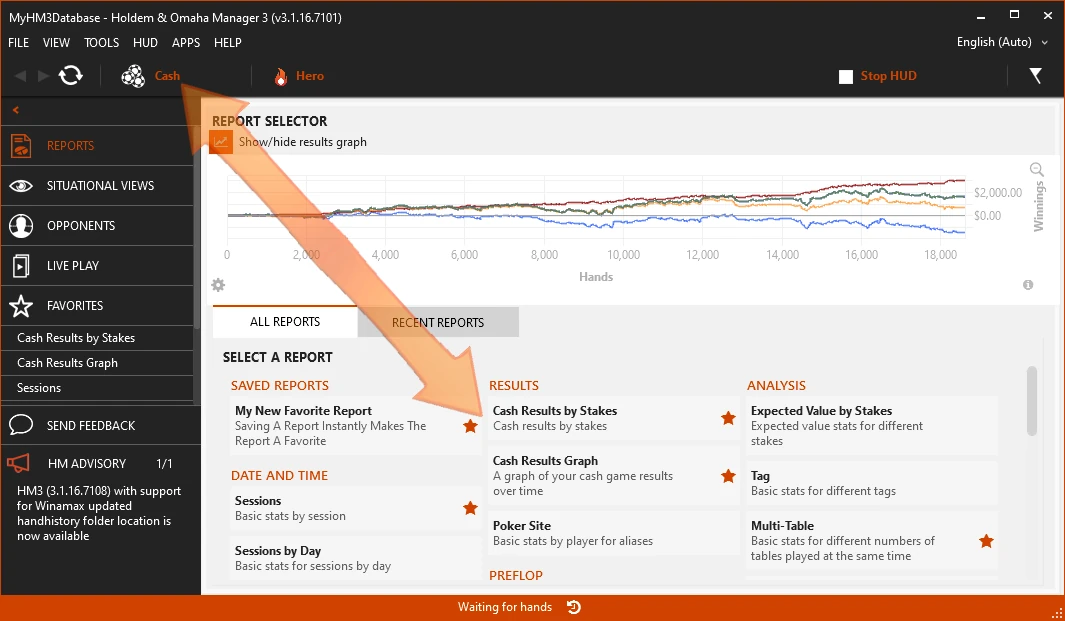
Cash and tournament reports
Start by selecting a Cash or Tournament Report. Using the Select Stats (Right Click) option or pressing the Book Icon in a Report will allow you to add any stat you want to a Report.
Right Click a row to save the report as a .csv file (Spreadsheet) or .html file.

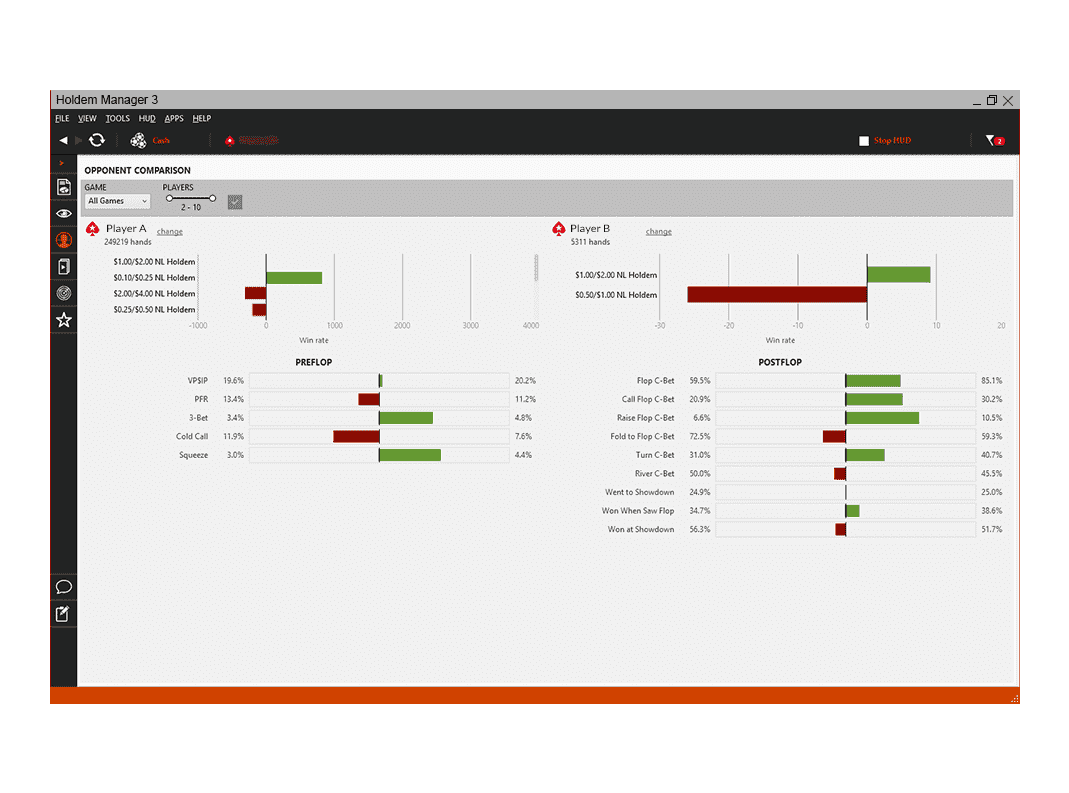
Three opponent reports
- Single Opponent Analysis allows you to quickly see how an opponent (Villain) plays.
- Compare Opponents is a great way to look at two players side by side to quickly spot differences in their playing style.
- Opponent List is a great way to quickly find profitable solid players in your database.
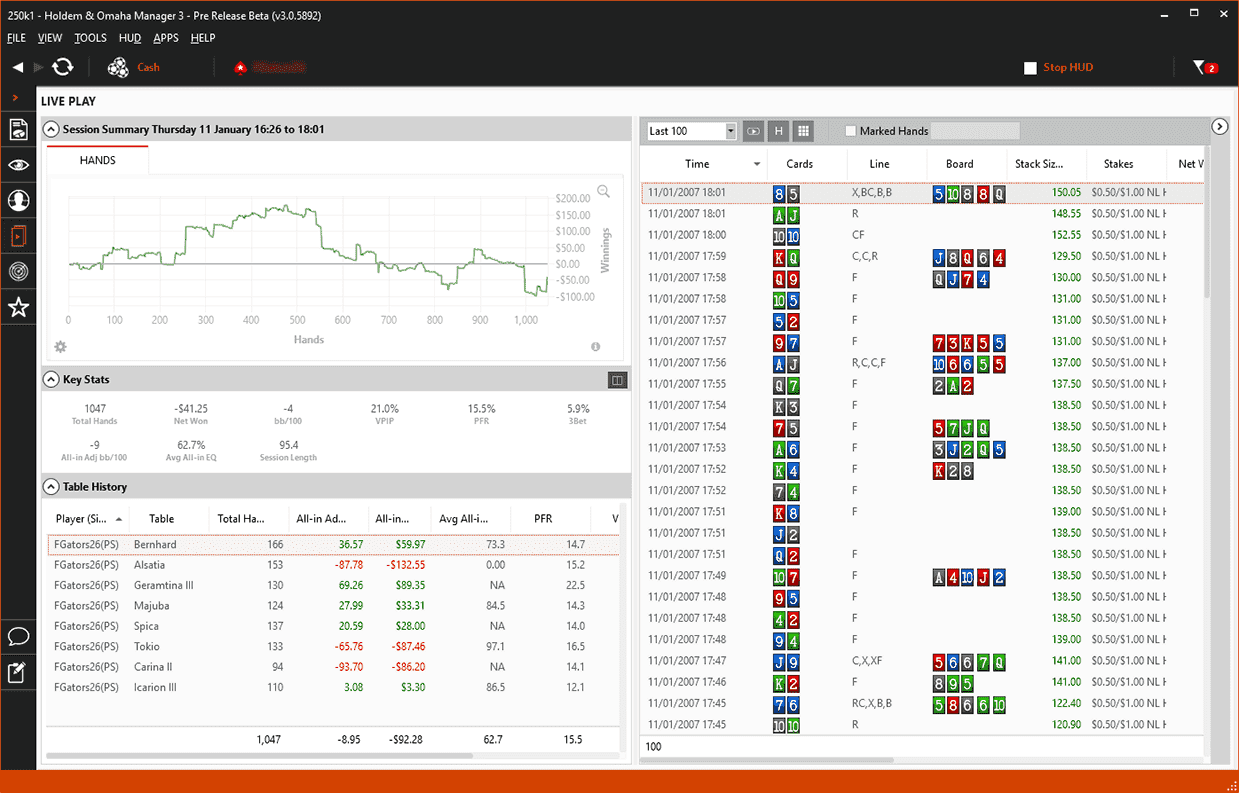
Live Play report
The Live Play Report displays current poker session information: Session Summary, Key Stats, Table History and the Hand View.
Use the drop-down on the top right of this view to switch between your current session and past sessions.
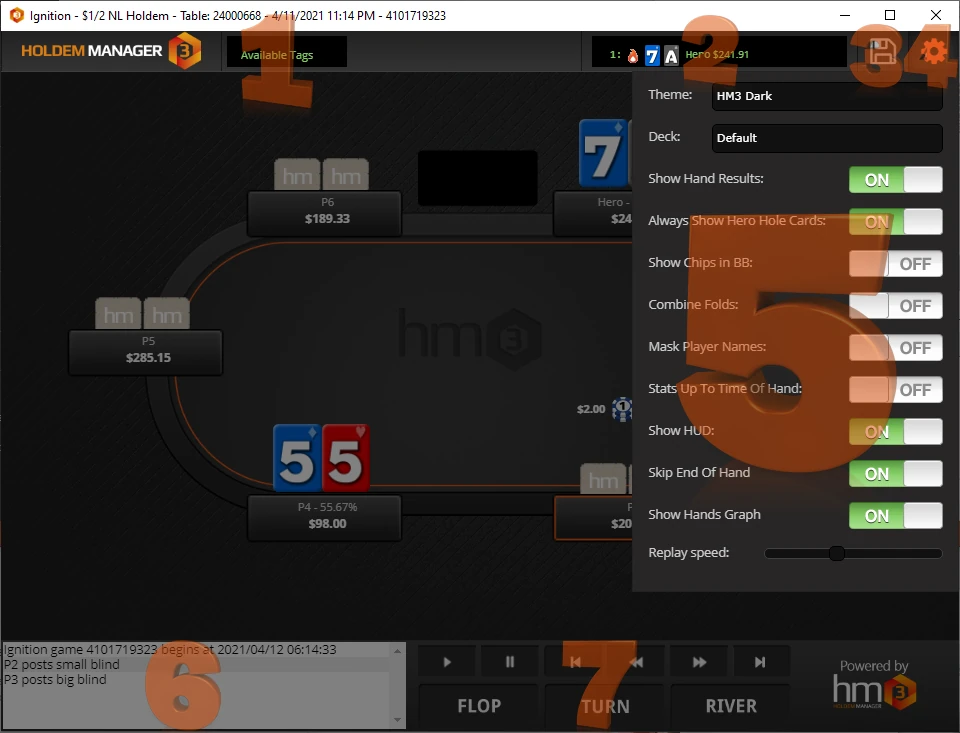
Replayer
Replayer and Hand History Viewer
The HM3 Replayer and Hand History Viewer are the two ways to view previously played hands.
- Theme: choose between HM3 and HM3 Dark replayer themes.
- Show Chips in BB, Mask Player Names and Stats Up To Time Of Hand.
- Use the left/right arrows to navigate through a hand and the up/down arrows to jump to next/previous hands.


Official source: Reports · Opponents · Live Play · Replayer
Add-ons
HM3 Apps
HM Apps add optional add-on functionality and features for Holdem Manager 3. 3rd Party developers create HM Apps using the new MVS API that is available for the first time with the release of Holdem Manager 3.
HM3 App
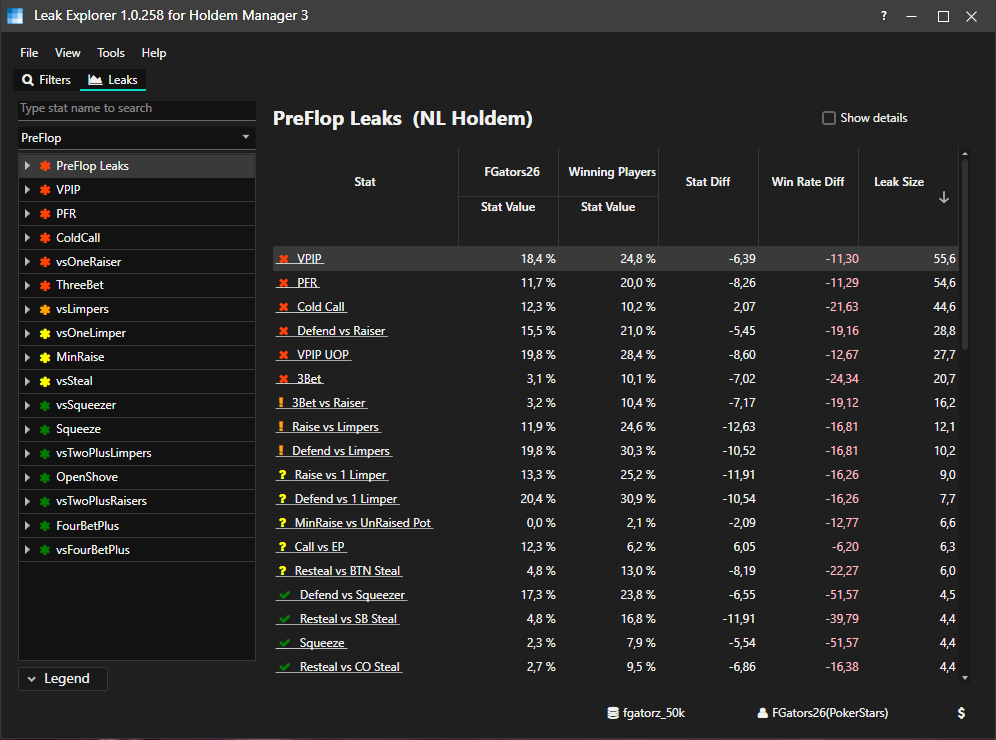
Leak Explorer
- Data driven leak finding at it’s best
- Compare your poker game with higher stake games (Prepare yourself before you move up in stakes)
- Instantly see all your poker leaks rated by severity
HM3 App
NoteCaddy
Opponent stats and notes can sometimes be overwhelming and we have a limited amount of time to process them. NoteCaddy solves this problem by deeply analyzing your hand histories and then combining all the data into a highly visual output.
HM3 App
TableNinja II
TableNinja II is designed to automate the repetitive and annoying parts of online poker so that you can focus on the tough decisions, play more tables, and take your game to the next level.
HM3 App
Ignition Hand Grabber
The Ignition Hand Grabber App generates hand history files as you play at Ignition, Bovada or Ozoon Poker. The App will launch automatically when you start Holdem Manager 3.
Range Wizard is also listed among the current HM3 Apps. You can view HM Apps you’ve purchased under Help > My Licenses > HM Apps. Note: HM Apps require a paid HM3 license with an active support and maintenance contract.
Official source: What are HM3 Apps · NoteCaddy FAQ · TableNinja II FAQ · Leak Explorer FAQ
Holdem Manager 3 for mobile poker apps
Club apps such as PokerBROS and PPPoker don’t save hand histories that HM3 can read on its own. Holdem Manager’s supported-sites list gives every one of them the same note.
Holdem Manager note
“Asia Hand Converter Software required for HUD”
That is the official line next to each of these apps in the HM3 supported poker sites list. A converter writes the hand histories and HM3 imports them like any other site.
Converters
Hand converters for HM3
Holdem Manager lists its own hand converters for these apps. Third-party converters can also write hand histories that HM3 imports: our EliteHUD review covers one that supports Holdem Manager 2/3 alongside PokerTracker 4 and Hand2Note.
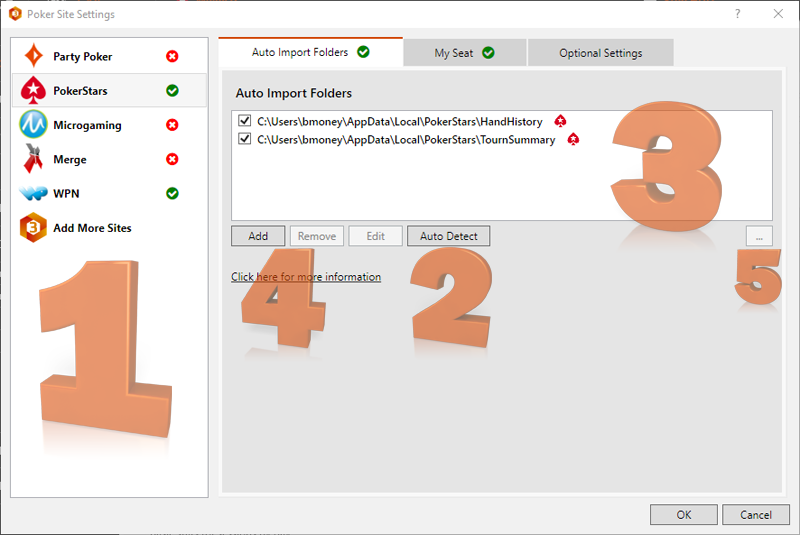
Whichever converter you use, point HM3 at the folder it writes to in Tools > Site Settings > Auto Import Folders.
Official source: Supported poker sites
Supported poker sites
HM3 imports live hands, imports downloaded hands and shows a HUD on these networks and sites.
| Poker site | Live hands | Downloaded hands | HUD | Poker site notes |
|---|---|---|---|---|
| PokerStars | Yes | Yes | Yes | Two color codes maximum for HUD color ranges. |
| PartyPoker | Yes | Yes | Yes | HUD not supported on .com clients. |
| WPN (Winning Poker Network) | Yes | Yes | Yes | – |
| Americas Cardroom | Yes | Yes | Yes | – |
| Ignition / Bovada / Bodog | Yes | Yes | Yes | Ignition Hand Converter Software required for HUD |
| 888 Poker | Yes | Yes | Yes | – |
| iPoker | Yes | Yes | Yes | – |
| Winamax Poker | Yes | Yes | Yes | – |
| Peoples Poker | Yes | Yes | Yes | – |
| Chico Poker | Yes | Yes | Yes | – |
| IDN | Yes | Yes | Yes | – |
| Merge Network | Yes | Yes | Yes | – |
| Revolution | Yes | Yes | Yes | – |
Swipe the table sideways →
Skins
Playing on a skin?
Skins are sites that fall into a Network name. For Example: If you play on Betfair, setup your poker site using the iPoker Network inside of Site Settings.
iPoker network
- Betfair
- William Hill
- Bet365
- PaddyPower Poker
- Betfred Poker
- Gala Poker
- Netbet
- Olympic Poker
- Dafa Poker
- Parimatch Poker
- BetnGo Poker
- Sports Interaction
- Expect Poker
- Winner Poker
Winning Poker & Chico networks
- Americas Cardroom
- True Poker
- Black Chip Poker
- Ya Poker
- PokerKing
- Tiger Gaming
- BetOnline
- SportsBetting
PokerStars skins include PokerStars.com, .net, .it, .fr, .es, .eu, .uk and the US state sites in Michigan, New Jersey and Pennsylvania.
Official source: Holdem Manager 3 supported poker sites · Poker site setup
Holdem Manager 3 licenses and versions
Licensing for Omaha & Holdem Manager 3 is as follows: a Free version, a 15-day Trial, and paid Small Stakes and All Stakes licenses.
Free
$0
Free version
- Cash NL & PL: up to $0.10 big blind
- Fixed limit: up to $0.20 big blind
- Tournament buy-ins: up to $5.00
- HUD: one table only
- Reports: up to 500 hands
- Free version message in reports and HUD
Trial
15 days
Full trial
- All cash games and tournament buy-ins are supported
- Trial message in reports and HUD
- No access to HM3 Apps
Small Stakes
$65
Single license · $100 for both Holdem & Omaha
- Cash NL & PL: up to $0.50 big blind
- Fixed limit: up to $1.00 big blind
- Tournament buy-ins: up to $22.00
- One year of Support & Maintenance included
All Stakes
$100
Single license · $160 for both Holdem & Omaha
- No licensing restrictions
- All cash games and tournament buy-ins are supported
- One year of Support & Maintenance included
Holdem Manager’s published license prices in US dollars. Holdem and Omaha are licensed separately, or together at the combined price.
Annual Support & Maintenance
First year included
All customers that purchase an HM3 license, as well as customers that upgrade from HM2, receive one year of Annual Support & Maintenance FREE.
There will never be a paid upgrade to HM3. The Annual Support & Maintenance was implemented in lieu of the paid upgrades.
If you don’t renew
HM3 keeps working
If you decide not to renew, you can continue using HM3 without restrictions with all updates released before Support & Maintenance has expired.
You will no longer have access to updates released after the expiration, such as support for new game types or poker site changes. You can simply resume your existing Support & Maintenance at any time.
Renewal after year one
Support & Maintenance pricing
- Holdem or Omaha Small Stakes: $44.99
- Holdem or Omaha Full Version: $69.99
- Holdem & Omaha Small Stakes: $69.99
- Holdem & Omaha Full Version: $99.99
- One Full Version + One Small Stakes: $84.99
Official source: Licensing explained · Annual Support & Maintenance
How to install and set up Holdem Manager 3
The setup wizard does most of the work. These are Holdem Manager’s own steps, from the installer to a HUD on a live table.
1
Install and log in
- Download Holdem Manager 3 and double click the installer file on your computer.
- Accept the End User License Agreement, click Next to use the default folder, then click INSTALL.
- HM3 will install the CefSharp browser, an embedded HTML browser that Holdem Manager 3 uses to display information.
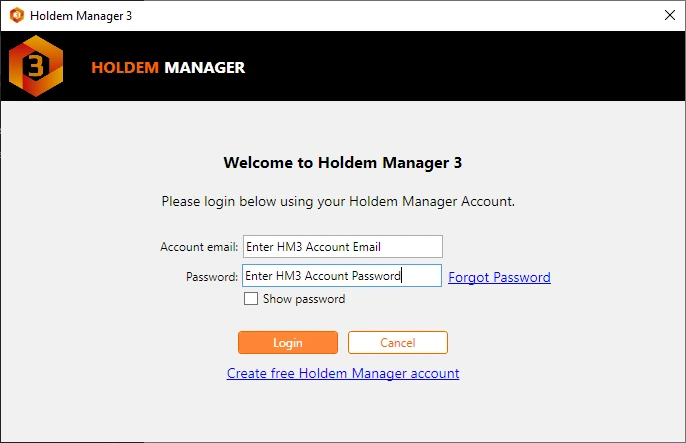
- Click Next on the “Welcome to Holdem Manager 3” screen, enter your holdemmanager.com account email and password and click Login.
Note: A Holdem Manager account is required to use Holdem Manager 3, even trial users.
2
Choose the Express Install
We STRONGLY RECOMMEND using the Express Install option. Using the express install will get you up and running inside of Holdem Manager 3 the quickest.
Clicking Yes on the next prompt will allow Holdem Manager 3 to search your computer for poker site hand history files.

3
Configure poker sites
The left side of this screen (NEW SITES) lists out all the Poker Sites Holdem Manager 3 detected on your computer. On the right side of this screen is (MORE SITES) and this shows other poker sites Holdem Manager 3 supports, but you don’t have installed. Click Next.

4
Set the Auto Import Folders
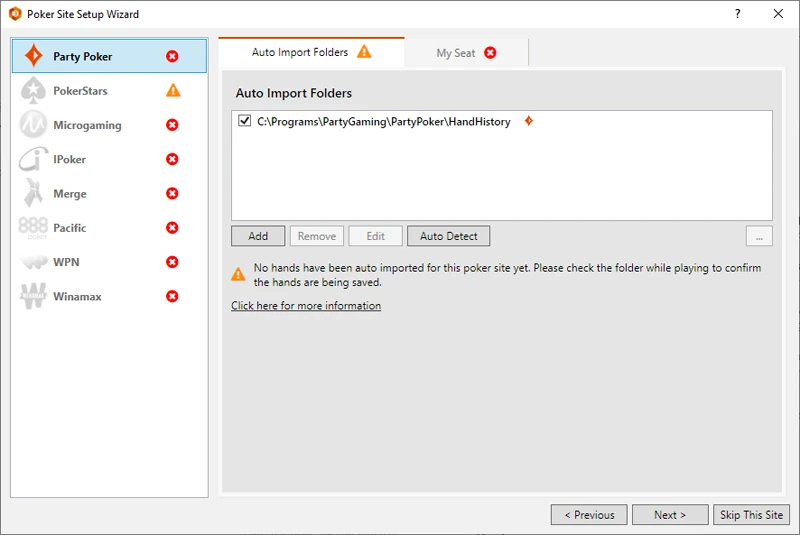
Auto Import folders are folders where your poker site saves hand history files. Hand history files must be setup correctly for Holdem Manager 3 to auto import hands allowing a HUD to be displayed on live tables.
If Auto Import Folders are not displayed, click Auto Detect or Add to add the poker site Auto Import Folders.
5
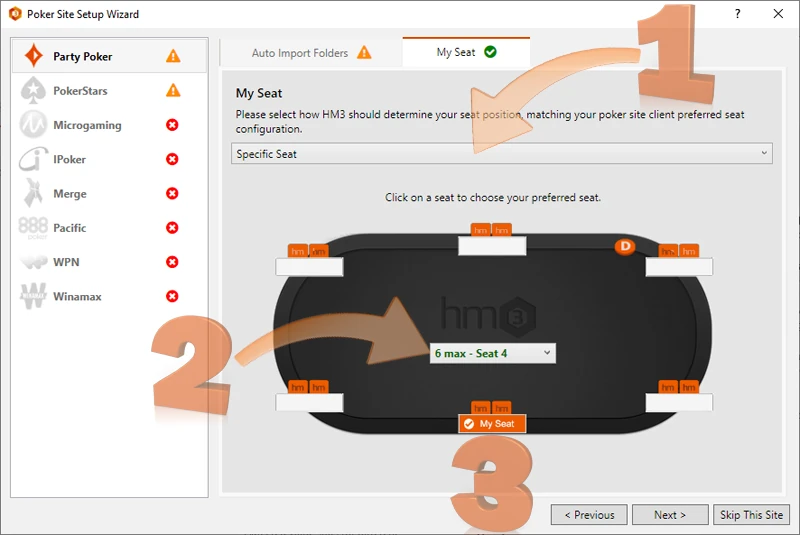
Set Preferred Seating
Preferred Seating allows your HUD to be displayed next to the correct player when opening tables.
- Select Specific Seat, Auto Center or Use Hand History Seat for your poker site.
- For Specific Seat, choose how many players are seated at the table.
- Click a seat to set it as your preferred seat. This is the same seat that you must setup in your poker software.
6
Set the Hero and import old hands
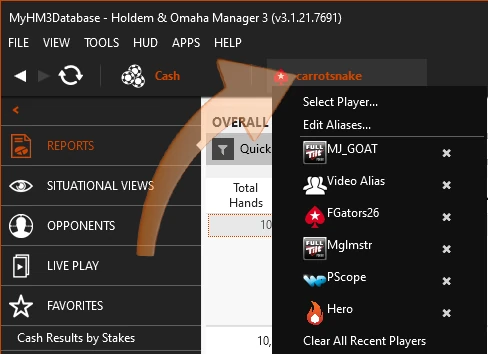
HM3 uses a Hero (Your Poker Site Screen Name) to display data throughout HM3. Click the current Hero Name, then click “Select Player…” to change the Hero used in HM3 Reports. Aliases allow you to combine multiple poker site player names into a single Hero.
To build your database, click File > Import Files or Import Folders. You can also import PokerTracker 4 and HM2 hands into HM3.
Quick test: Once HM3 is installed, open a poker site and play a few MICRO STAKE hands. You want to see a heads-up display. If you don’t, review Poker Site Setup; if player names don’t line up, review Preferred Seating.
Video guides from Holdem Manager: Fresh Install To HUD Working · Change Hero / Setup An Alias · HUD Troubleshooting Guide
Official source: Installing Holdem Manager 3 · Quick Start Guide
What are the PC specs to run Holdem Manager 3?
Heads-up: An upcoming release of Holdem Manager 3 moves to .NET 10. As part of that change, support for Windows 7, 8, and 8.1 will end, and the minimum hardware requirements are increasing. If you are on an older system, we recommend upgrading to Windows 10 (64-bit) or Windows 11 ahead of this release.
| Minimum | Recommended | Optimal | |
|---|---|---|---|
| Processor | Windows 11–compatible 64-bit CPU (Intel Core 8th generation or newer, or AMD Ryzen 2000 series or newer), at least 4 cores | Recent Intel Core i5 or AMD Ryzen 5 (or better) | Intel Core i7 / AMD Ryzen 7 (or better) |
| Memory | 8GB of RAM | 16GB of RAM | 32GB of RAM or greater |
| Operating system | Windows 10 64-bit, version 1809 or later | Windows 11 64-bit | Also supported: Windows on ARM (ARM64), including Windows 11 ARM in Parallels on Apple Silicon Macs |
| Storage | SSD strongly recommended | NVMe SSD is best | Mechanical drives no longer recommended (7200RPM or faster if one must be used) |
Swipe the table sideways →
Official source: PC specs to run Holdem Manager 3 · 32-bit end of life
Holdem Manager 3 compared with PokerTracker 4, Hand2Note 4 and DriveHUD 3
Holdem Manager 3 next to the three trackers players most often weigh it against. The gaps are in price model, Mac support and what comes in the box.
| Tool | Price | Runs on | Best for | Check first |
|---|---|---|---|---|
| Holdem Manager 3 | Free version, $65 Small Stakes, $100 All Stakes | Windows 10 and 11, 64-bit | Over 2,000 HUD stats, Graphical HUD, Situational Views | Club apps need a hand converter before the HUD works |
| PokerTracker 4 | From $64.99 once, 14-day trial | Windows and Mac | LeakTracker, NoteTracker and ICM tools in one database | Small Stakes stops at $0.25/$0.50 and $22 buy-ins |
| Hand2Note 4 | Learner $15.99, Pro $39 a month, paid yearly | Windows and Mac; emulator apps on Windows | Dynamic HUD, Action Profit, ClubGG HUD with no converter | Learner stops at a $0.25 big blind and 200k hands |
| DriveHUD 3 | Core $59.99, Ultimate $119.99 for the first year | Windows 10 or later, 8 GB RAM | GTO solver inside the tracker, leaks priced in bb/100, timing tells | Core covers $50 buy-ins and under; club apps need Ultimate+ |
HM3 is the cheapest way to start: the free version covers $0.10 cash games and $5 tournaments, and the paid licences are one-off. PokerTracker 4 costs about the same and adds a native Mac version. DriveHUD 3 is pricier in year one but includes a GTO solver and leak grading. Hand2Note is the subscription choice for players who want dynamic HUDs and club apps without a separate converter on ClubGG.
For club apps, HM3 reads converted hands from the Asian Hand Converter or EliteHUD. Study tools that work next to it: GTO Wizard and Jurojin for multi-tabling.
Holdem Manager 3 FAQ
Is there a free version of Holdem Manager 3?
Yes. The Free version covers cash no limit and pot limit games up to a $0.10 big blind, fixed limit up to $0.20 and tournament buy-ins up to $5.00. The HUD works on one table only, reports show up to 500 hands and a free version message appears in reports and HUD.
How long is the Holdem Manager 3 trial?
The trial lasts 15 days. All cash games and tournament buy-ins are supported, a trial message appears in reports and HUD, and HM3 Apps are not available during the trial.
Do I need to install PostgreSQL for HM3?
No. HM3 is PostgreSQL free. Eliminating the requirement to install PostgreSQL avoids issues that were sometimes encountered in set-up and initial installations.
Can I keep using HM3 if my Annual Support & Maintenance expires?
Yes. You can continue using HM3 without restrictions with all updates released before Support & Maintenance has expired. Updates released after that date, such as support for new game types or poker site changes, need an active plan.
Can I import my PokerTracker 4 or HM2 hands?
Yes. In PokerTracker 4, open Configure > Sites & Import Options and find the folder where processed files are moved to on the Preferences tab. Then open Holdem Manager 3, click File > Import Folder and select that folder. HM2 hands can be imported into HM3 as well.
Does Holdem Manager 3 run on a Mac?
HM3 is Windows software. Windows on ARM (ARM64) is supported, including Windows 11 ARM running in virtualization, such as Parallels on Apple Silicon (M1 and newer) Macs.
Can I use HM3 with PokerBROS, PPPoker or other club apps?
Holdem Manager lists these apps with the note “Asia Hand Converter Software required for HUD”. A converter writes the hand histories and HM3 imports them. Check each app’s and club’s rules on HUDs before you use one.
Can I close HM3 and keep the HUD running?
Yes, with HUD Only Mode. You can close Holdem Manager 3 while you are playing live and hands will still import into your database. HM3 stays in the system tray and uses less PC resources.
Can I sync my hands between two computers?
Yes. Holdem Manager’s guide uses a cloud folder such as Google Drive or Dropbox: share the HM3 archive folder (by default C:\HM3Archive, see Tools > Settings > Import) with the cloud service on both computers, then import it on the other PC.
Is Holdem Manager 3 free?
There is a free version for cash games up to a $0.10 big blind, fixed limit up to $0.20 and tournaments up to $5, with a HUD on one table. A 15-day trial unlocks all stakes.
Does Holdem Manager 3 work on Mac?
HM3 lists Windows 10 and 11, 64-bit. If you want a native Mac tracker, look at PokerTracker 4 or Poker Copilot.
Start with Holdem Manager 3
Download HM3, log in with your Holdem Manager account and let the Express Install find your hand history folders. The 15-day trial supports all cash games and tournament buy-ins.
Partner page: HotPokerDeals is a marketing partner of Holdem Manager. Texts, instructions and screenshots are from holdemmanager.com/hm3 and the Holdem Manager knowledge base. 18+ · Play responsibly.