 HAND2NOTE
Hand2Note review 2026: poker HUD and tracker for sharks
Start using HUD and stats right now, no extra configuration is needed.
Windows · Mac (Apple Silicon) · Mac (Intel) · 14-day free trial

- Supported games:
- Texas Hold’em
- 6+ Hold’em (Short Deck)
- Omaha
- Omaha 5 Cards
- Omaha 6 Cards
HotPokerDeals is an official Hand2Note partner. Product descriptions, instructions and screenshots on this page come from Hand2Note’s website and official manual. If you buy through our links, we may earn a commission at no extra cost to you.
Hand2Note 4 at a glance
Hand2Note is a poker HUD and tracker for desktop poker sites and Android poker apps run in an emulator. Here is how the developer describes it.
HAND2NOTE
Everything You Need To Boost Your Poker Strategy
Start simple with VPIP/PFR. Or let Hand2Note4’s powerful dynamic HUD aid your decision making. Whatever it is you want, our software is intuitive to use on PC and Android Emulators.
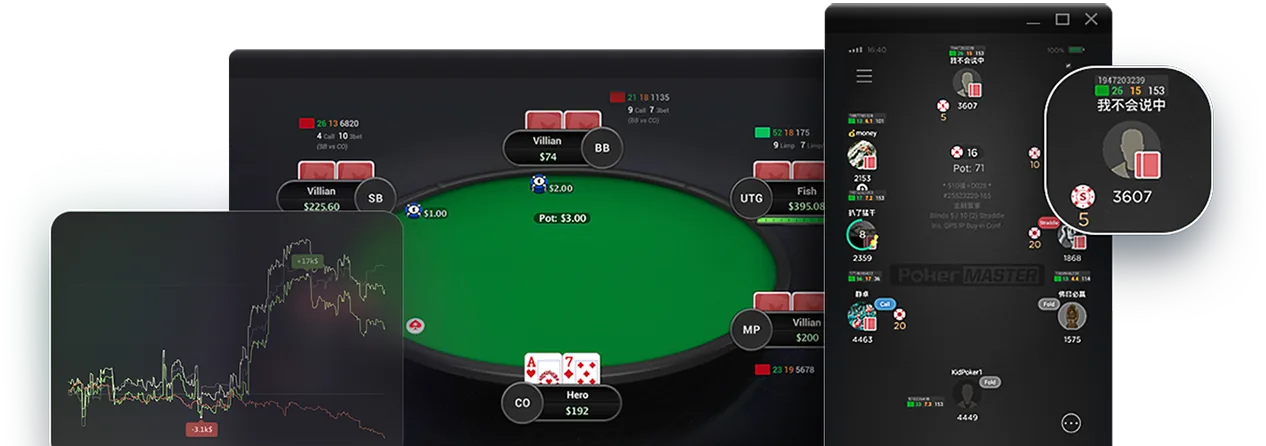
What’s New in Hand2Note 4
Sharpen the data picture
Tens of thousands are already using Hand2Note 3 to stay ahead of the competition. But what Hand2Note 4 will do is sharpen the data picture and help you make smarter, faster and better decisions and dominate the virtual felt.
Advanced Reports. In Hand2Note 4, there has been a rework of general statistics and charts. This makes identifying trends and patterns easier, so you can make more informed and data-driven decisions.
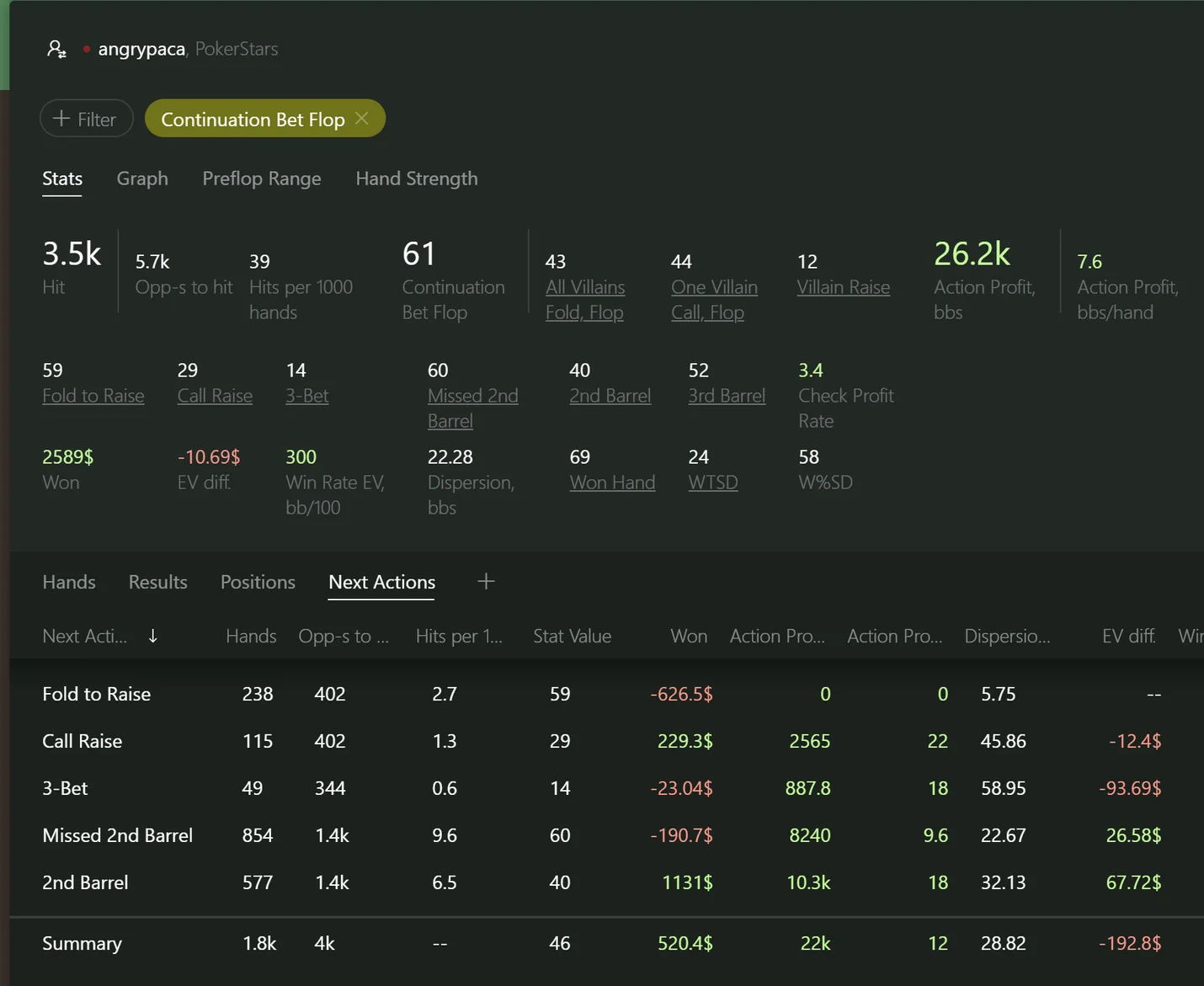
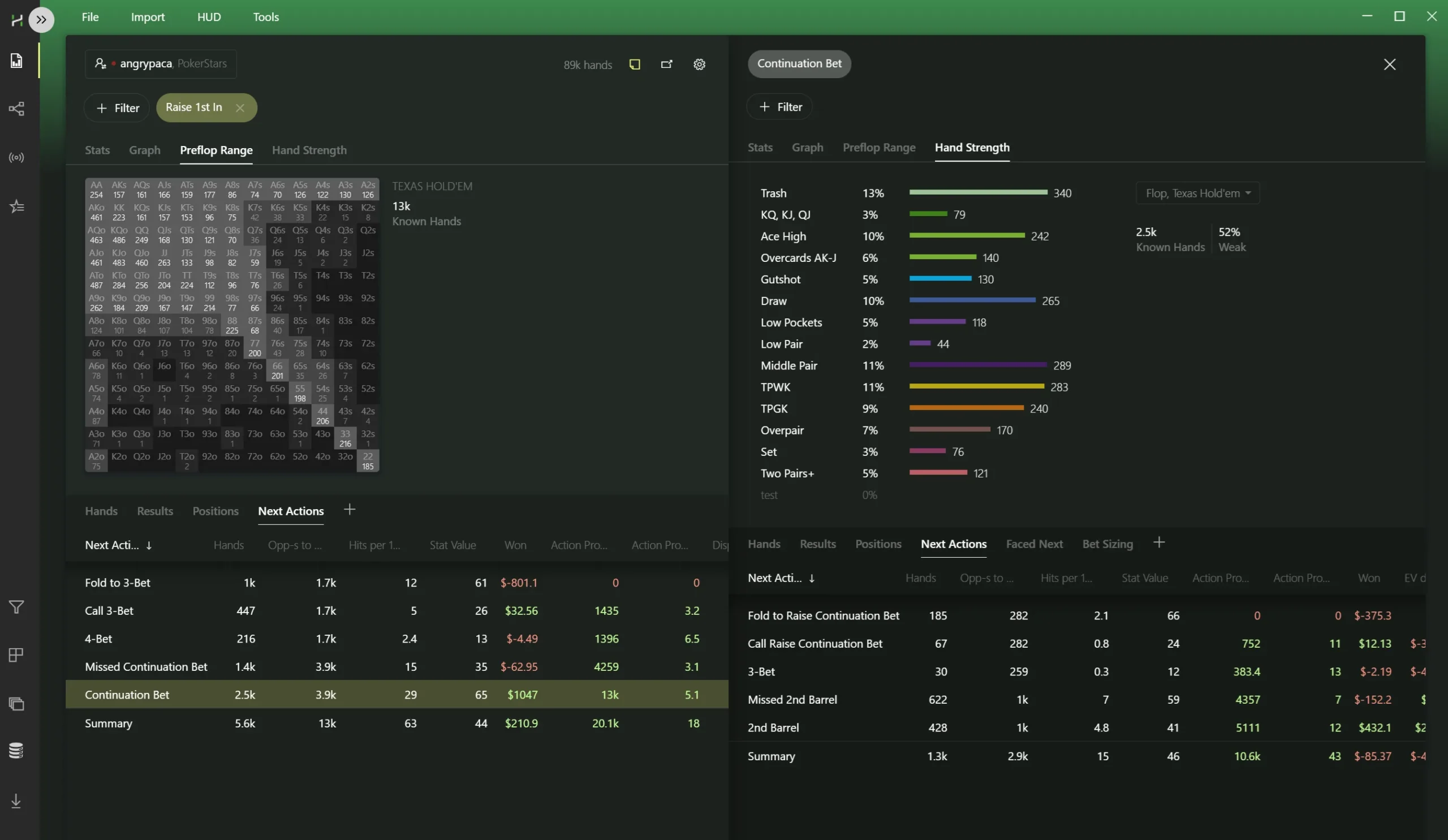
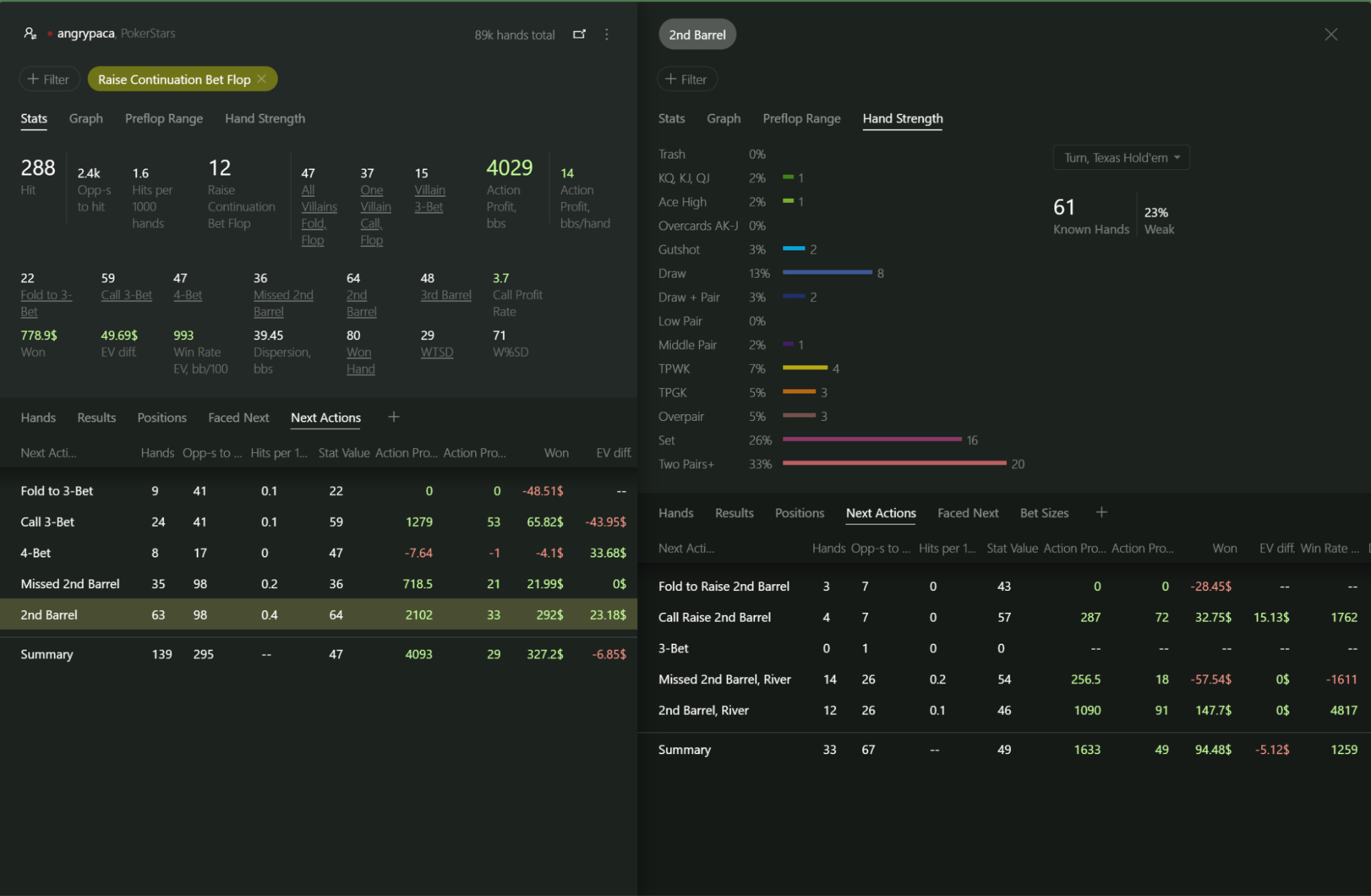
Automatic Smart Reports. Our software automatically shows you the relevant stat for any filters you have applied. For example, imagine you’ve selected the Continuation Bet Flop filter. Hand2Note 4 will show how an opponent reacts when his continuation bet is raised. Or how often he continues to barrel on the flop and turn when his continuation bet is called, etc.
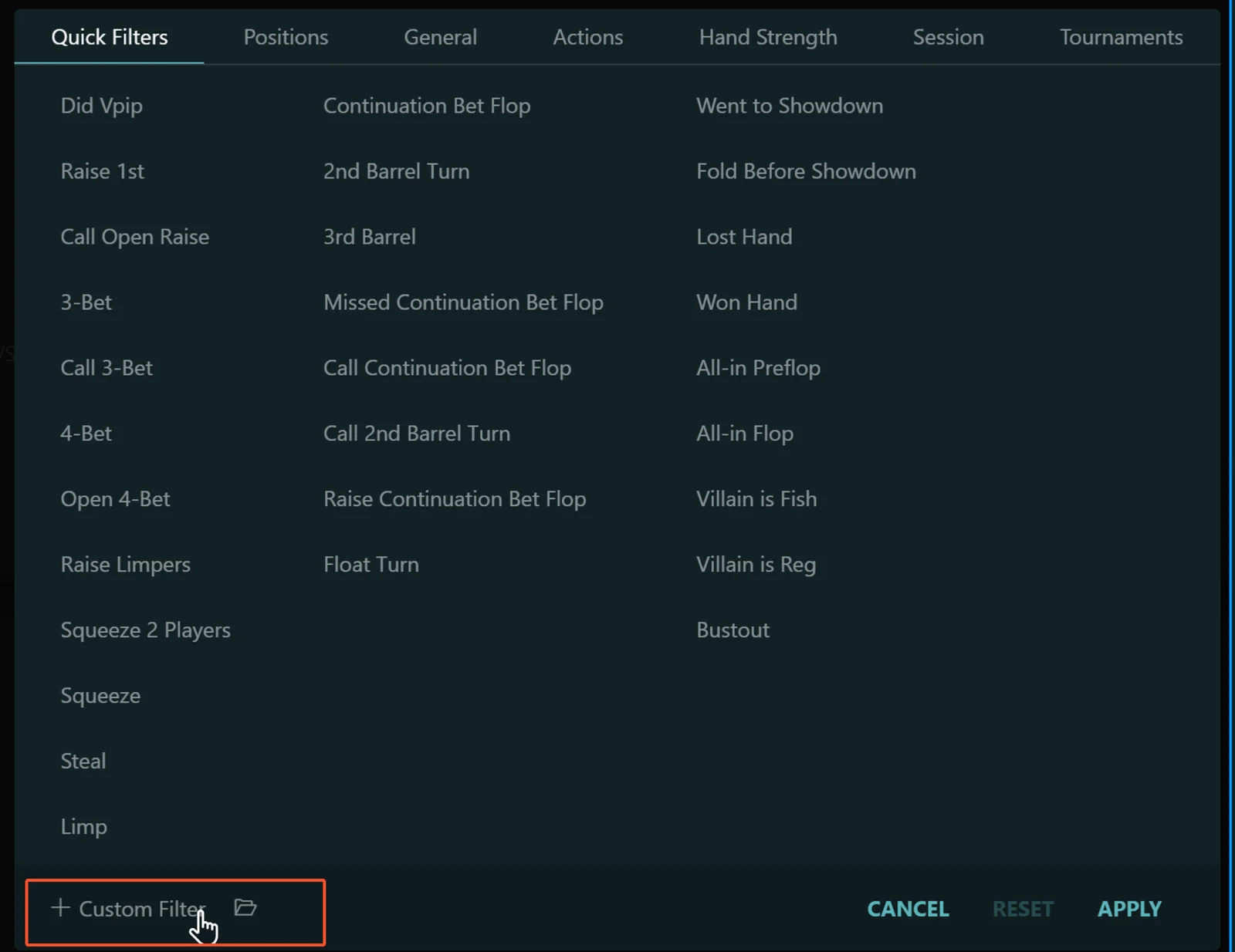
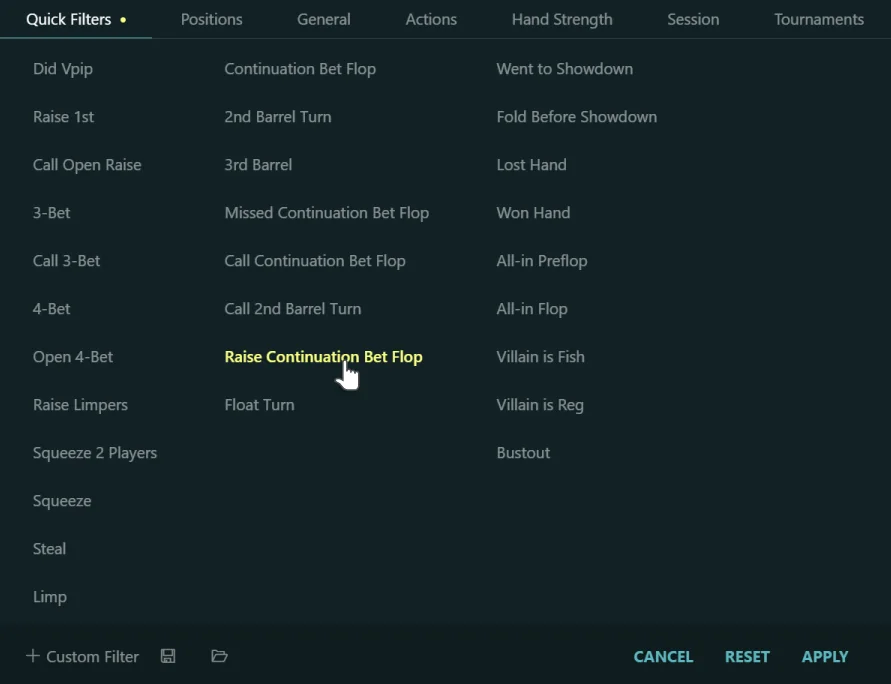
Custom Filter in Reports. But if you don’t like our automatic smart reports, we’ve allowed you the freedom to create your own custom filters. Custom filters will also generate tailored reports specific to the scenarios you want to study.
There are also other small but notable features:
- Support for more poker rooms such as GGPoker
- Recording bomb pot hand histories
- Support for 6-Card Omaha
- Translated into Chinese, Ukrainian, Russian, Spanish, Portuguese and many more languages
- Hand2Note 4 is compliant with PokerStars’ terms and conditions.
Interactive Reports
If you want to see how often your opponent checks when his continuation bet on the flop is called, click on the stat Missed 2nd barrel. Hand2Note will immediately produce a report around the stat you’re analysing. This is one of many interactive elements. Clicking on stats will also give you chart ranges.
Replayer
We have also redesigned the Hand2Note hand replayer. You can also set the replayer to appear in smartphone mode.
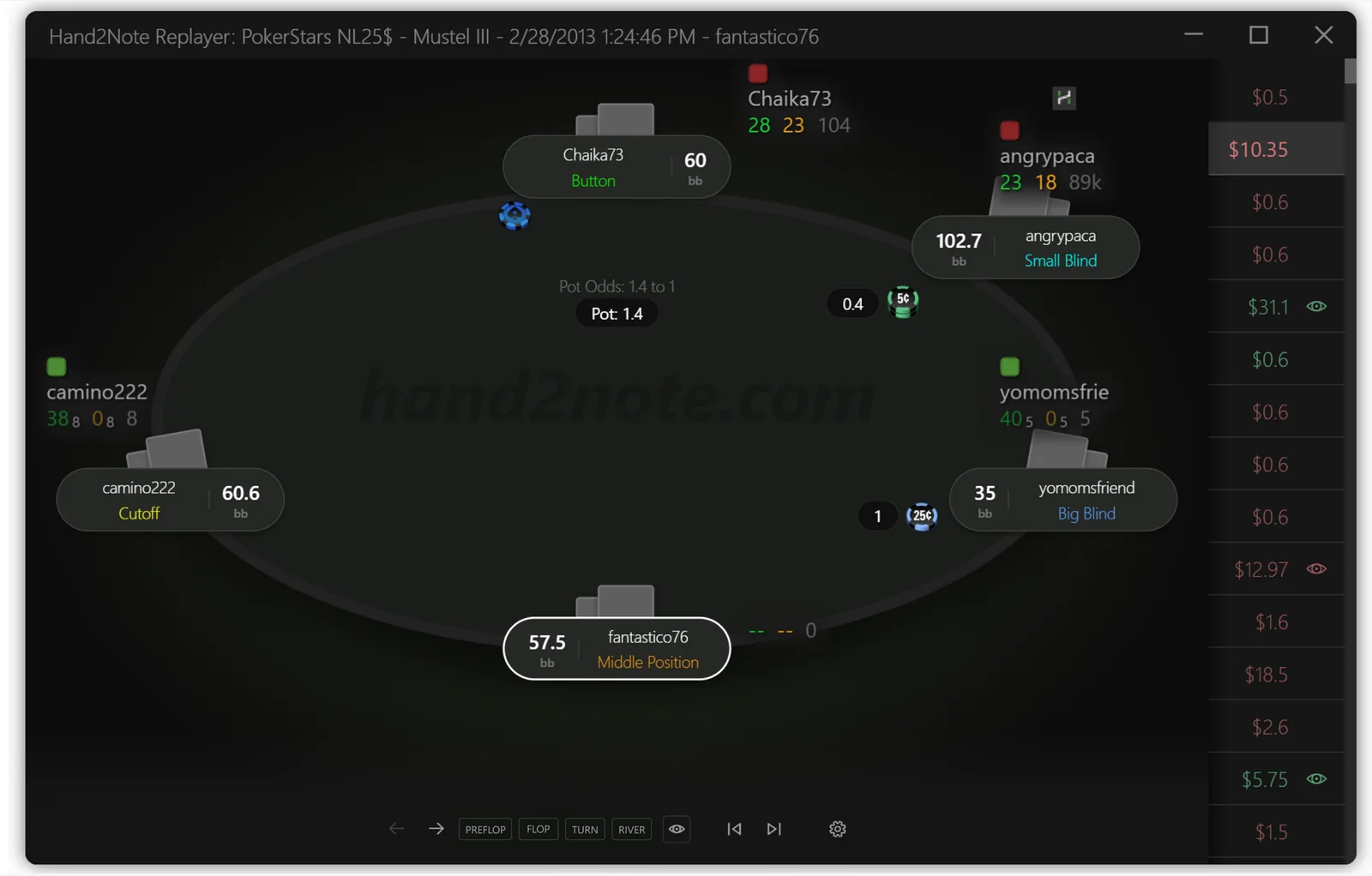
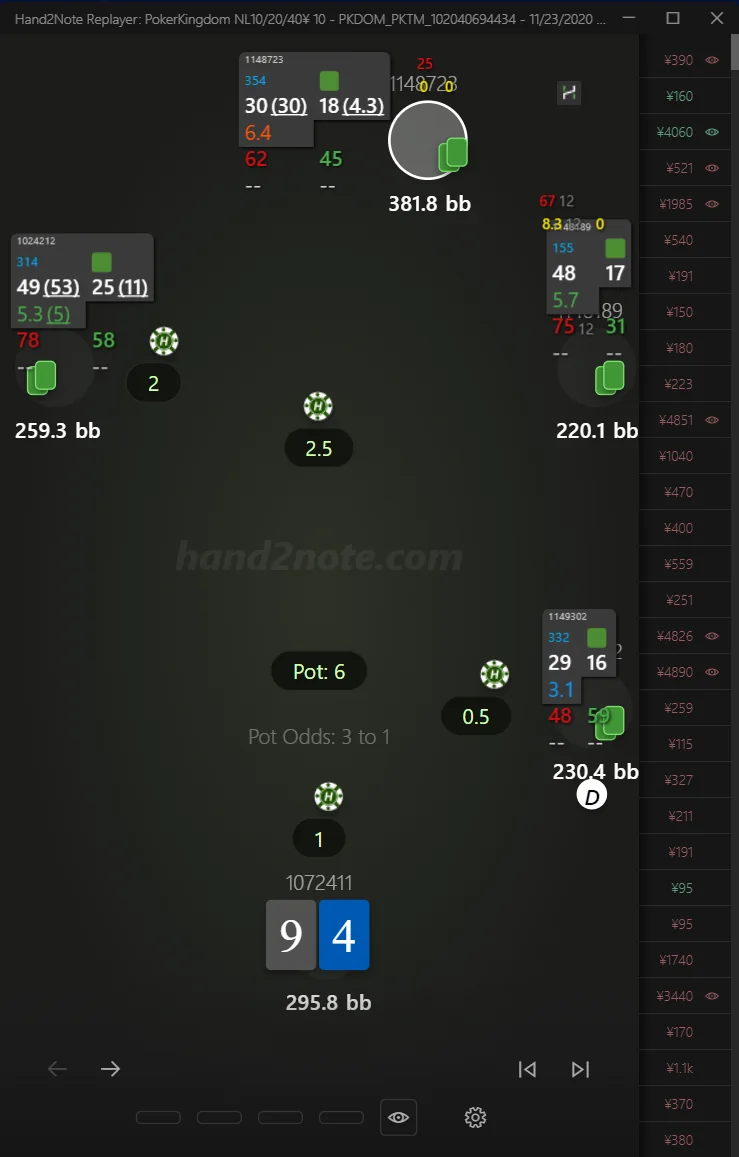
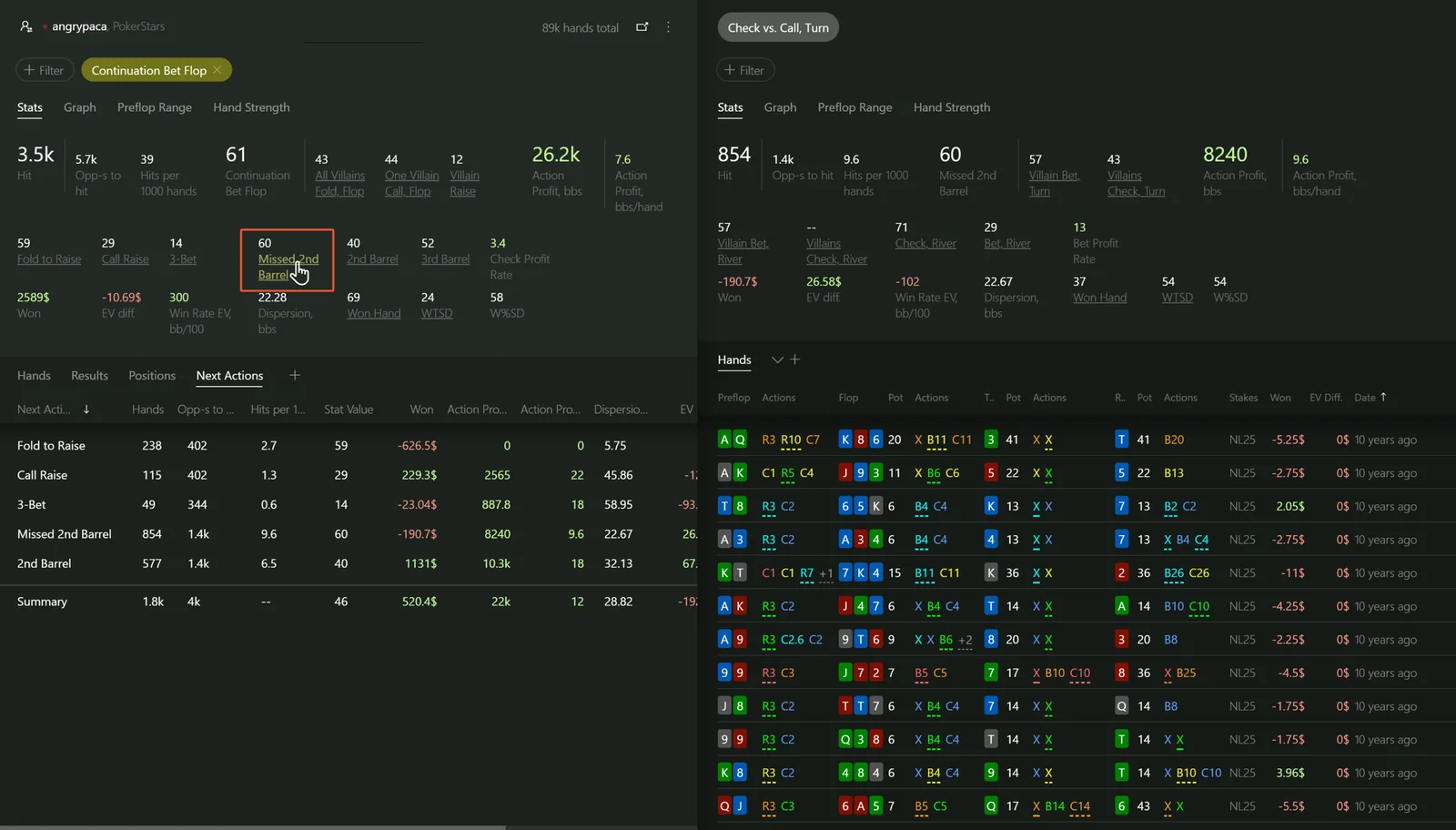
Source: Hand2Note — What’s New in Hand2Note 4.
Explore Hand2Note features
Six tools Hand2Note highlights on its homepage. Each card opens the matching guide further down this page.
Explore Our Unique Features
Besides HUD and reports we’ve created dozens of features to improve your strategy.
Smart Reports
The most advanced reporting system on the market
More Details
HUD Editor
Create custom HUDs and popups with thousands of stats.
More Details
Analyze Player Pools
Split player pool into categories and research their tendencies.
More Details
Eliminate Leaks
Find out actions with negative EV to get rid of leaks in your strategy.
More Details
Hand into Note
Drag & drop hands into the notes on a player for future reference.
More Details
Dynamic HUD
The HUD shows stats depending on players’ current positions and actions.
More DetailsTaking You To The Edge With Powerful Reports
Analyse and uncover leaks with our advanced reporting system.
Designed for easy exploration.
Analyse a range of poker spots. Compare stats side by side. Effortless note taking and visuals.
Hand2Note on mobile poker apps
PokerBROS, PPPoker, X-Poker, Suprema and about 20 other Android apps, with the HUD shown over the emulator window.
Mobile poker apps
Play on your favourite poker site
Hand2Note supports all popular poker sites including desktop and mobile ones.
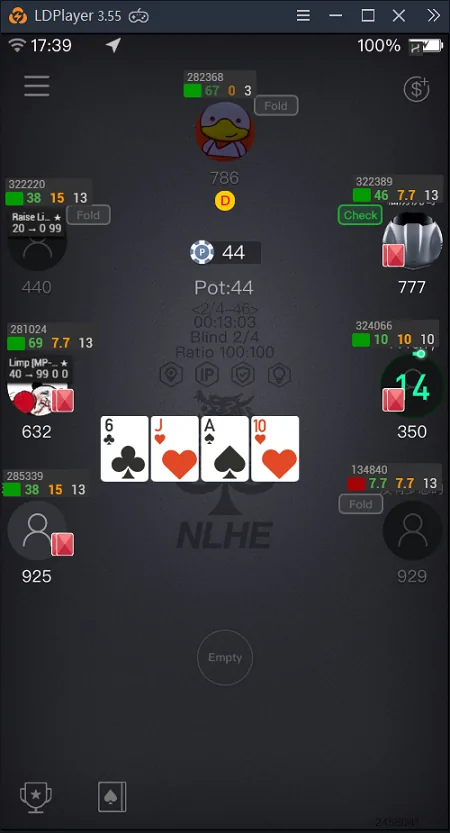
On mobile poker apps, such as PokerBros or Red Dragon, you just run Hand2Note and you’re ready to go. The HUD shows up automatically without any prior adjustments.
Android apps are supported through emulators on Windows. However, some platforms — like PPPoker — also offer a desktop client.
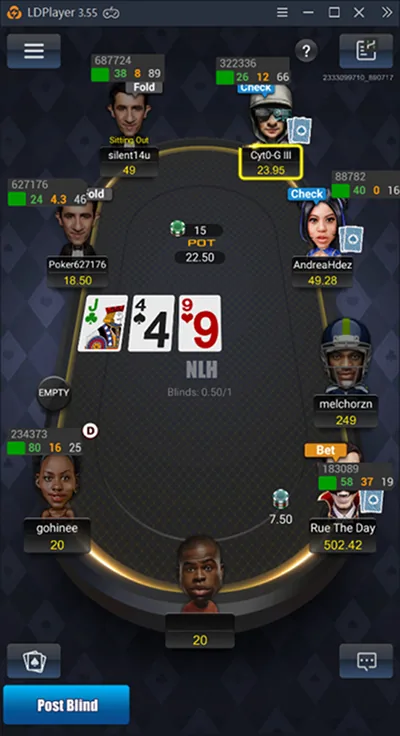
Note. Hand2Note supports HUD on mobile apps only when you run the app on an Android Emulator, such as LdPlayer (recommended) or Nox.














How to use an emulator
An Android emulator is a Windows desktop application that simulates a smartphone on your PC.
How does the Hand2Note HUD work with Android apps? Hand2Note runs on the host operating system (Windows), connects to the emulator, and displays the HUD directly over the emulator window.
How to Set Up the Emulator HUD
Download LDPlayer. Make sure to choose the correct version based on the table below. For example, apps like Pokerrrr2 only work with LDPlayer 9.
Install the poker app inside the emulator.
Launch Hand2Note. After the first launch, you may need to restart the emulator(s) for the HUD to appear.
Do I need a converter for playing in Asian apps?
No, additional software or subscriptions are not required. Hand2Note works directly with supported rooms, so converters are not needed — including for apps running via Android emulators.
Android apps supported by Hand2Note
- supported
- not supported
- HighlightedHotPokerDeals guide
| Poker app | Emulator HUD | Desktop app HUD (Windows) | NLH | PLO | PLO5 | PLO6 | Double Board | 6+ (Short Deck) | Zoom (Fast Poker) | Spin & Go | Tournaments | Emulator |
|---|---|---|---|---|---|---|---|---|---|---|---|---|
| PokerBros | Supported | Not supported | Supported | Supported | Supported | Supported | Supported | Supported | Not supported | Supported | Supported | LDPlayer 4/5/9 |
| PPPoker | Supported | Supported | Supported | Supported | Supported | Supported | Supported | Supported | Not supported | Supported | Supported | LDPlayer 9.1.50+ |
| XPoker | Supported | Supported | Supported | Supported | Supported | Supported | Supported | Supported | Not supported | Supported | Supported | LDPlayer 4/5 |
| Pokerrrr 2 | Supported | Not supported | Supported | Supported | Supported | Supported | Not supported | Supported | Not supported | Supported | Supported | LDPlayer 9 |
| Dpzx | Supported | Not supported | Supported | Supported | Supported | Supported | Not supported | Supported | Not supported | Supported | Supported | LDPlayer 4/5/9 |
| Suprema Poker | Supported | Supported | Supported | Supported | Supported | Supported | Supported | Supported | Not supported | Supported | Supported | LDPlayer 4/5/9 |
| KKPoker | Supported | Supported | Supported | Supported | Supported | Supported | Not supported | Supported | Not supported | Supported | Supported | LDPlayer 9.1.50+ |
| RedDragon | Not supported | Supported | Supported | Supported | Supported | Supported | Not supported | Supported | Not supported | Supported | Supported | Desktop client |
| HHPoker | Supported | Not supported | Supported | Supported | Supported | Supported | Not supported | Supported | Not supported | Supported | Supported | LDPlayer 9 |
| PokerKing Asia | Supported | Not supported | Supported | Supported | Supported | Supported | Not supported | Supported | Not supported | Supported | Supported | LDPlayer 4/5/9 |
| AAPoker | Supported | Not supported | Supported | Supported | Supported | Supported | Not supported | Supported | Not supported | Supported | Supported | LDPlayer 9.1.50+ |
| HighStakes | Supported | Not supported | Supported | Supported | Supported | Supported | Not supported | Supported | Not supported | Supported | Supported | LDPlayer 4/5/9 |
| PokerWorld | Supported | Not supported | Supported | Supported | Supported | Supported | Not supported | Supported | Not supported | Supported | Supported | LDPlayer 4/5/9 |
| PokerHub | Supported | Not supported | Supported | Supported | Supported | Supported | Not supported | Supported | Not supported | Supported | Supported | LDPlayer 4/5/9 |
| JackPoker | Supported | Not supported | Supported | Supported | Supported | Supported | Not supported | Supported | Not supported | Supported | Supported | LDPlayer 4/5/9 |
| PokerMan | Supported | Not supported | Supported | Supported | Supported | Supported | Not supported | Supported | Not supported | Supported | Supported | LDPlayer 5/9 |
| DDPoker | Supported | Not supported | Supported | Supported | Supported | Supported | Not supported | Supported | Not supported | Supported | Supported | LDPlayer 4/5/9 |
| MrPoker | Supported | Not supported | Supported | Supported | Supported | Supported | Not supported | Supported | Not supported | Supported | Supported | LDPlayer 4/5/9 |
| PandaPoker | Supported | Not supported | Supported | Supported | Supported | Supported | Not supported | Supported | Not supported | Supported | Supported | LDPlayer 4/5/9 |
| Poker2U | Supported | Not supported | Supported | Supported | Supported | Supported | Not supported | Supported | Not supported | Supported | Supported | LDPlayer 4/5/9 |
| PokerNex | Supported | Not supported | Supported | Supported | Supported | Supported | Not supported | Supported | Not supported | Supported | Supported | LDPlayer 9 |
| WePoker | Supported | Not supported | Supported | Supported | Supported | Supported | Not supported | Supported | Not supported | Supported | Supported | LDPlayer 9 |
* NLH – No Limit Hold’em. ** PLO5, PLO6 – Pot Limit Omaha with five and six hole cards, respectively. Table: Hand2Note “Supported Sites and Apps”, checked 22 October 2026. Highlighted apps link to HotPokerDeals club guides.
For HotPokerDeals readers. Highlighted rows are the apps we cover: PokerBROS, PPPoker, X-Poker, Suprema Poker, Pokerrrr 2 and PokerMan. ClubGG runs as a desktop client and has its own guide below. QQPK is not on Hand2Note’s list; EliteHUD converts QQPK hand histories for trackers, including Hand2Note. Each app and club sets its own rules for third-party software, so read them before you play with a HUD.
My HUD isn’t showing up in the emulator. How can I fix it?
If the HUD still doesn’t work, try the following:
- Make sure you’re not running any other converters at the same time as Hand2Note.
- Ensure you’re using a supported Android emulator and playing a supported game type. Refer to the table above for details.
- Temporarily disable antivirus software, as it might interfere with Hand2Note.
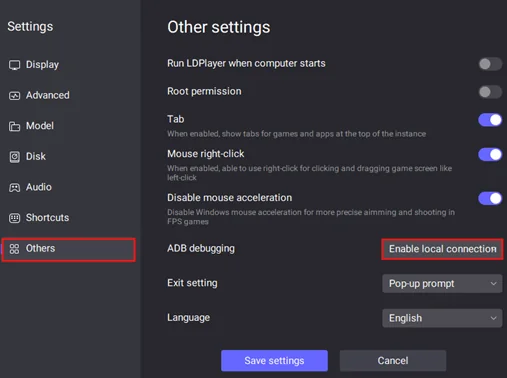
- If you’re using LDPlayer 4.xx, go to the emulator settings and set ADB debugging to “Open local connection”.
Launch in the following order:
- Restart your computer.
- Launch the required number of emulators and open the poker app in each.
- Start Hand2Note.
- Wait for 1 minute.
- Restart the emulators one by one.
- Wait until the HUD appears.
Source: Hand2Note — Supported Sites and Apps, Getting Started.
ClubGG HUD with Hand2Note
The official Hand2Note setup guide for ClubGG: formats, PokerCraft hand histories, Hero aliases, Club Rates and troubleshooting.
Want to use a full-featured HUD on ClubGG?
Want to use a full-featured HUD on ClubGG, track your results, and analyze your hands without extra converters or complicated setup? With Hand2Note, you can.
Forget about extra converters and complicated setup. Simply install Hand2Note, open ClubGG, and start playing — Hand2Note will automatically collect your hands and display the HUD.
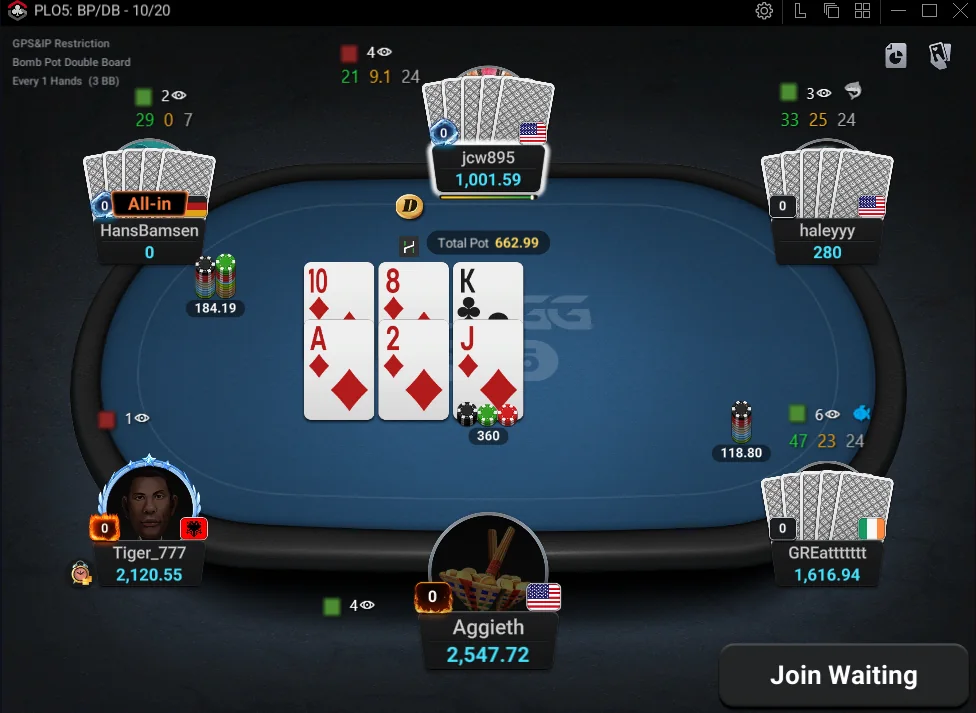
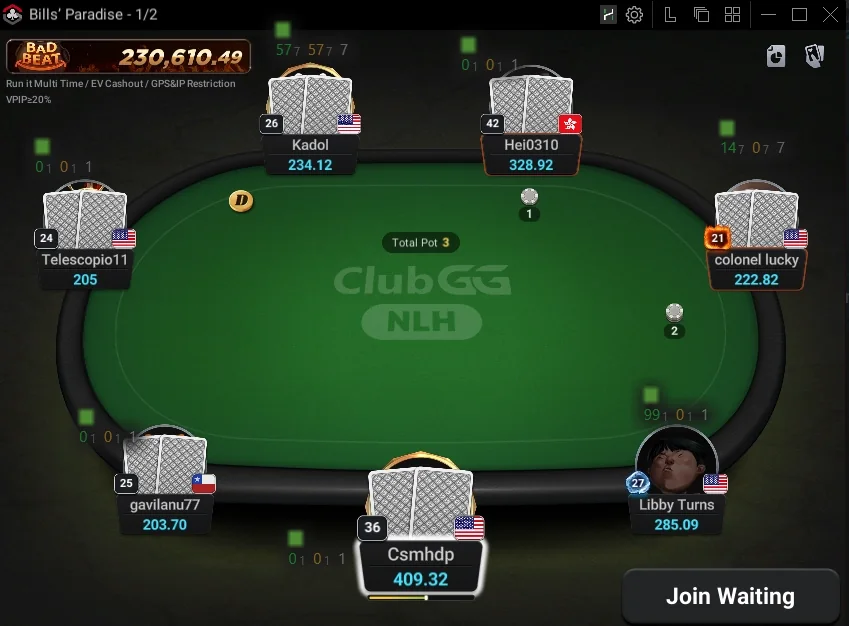
Hand2Note covers all major ClubGG games, including Hold’em, Omaha (PLO4, PLO5, PLO6), Short Deck, Double Board, and Bomb Pots. It also supports tournaments and tables with mandatory or optional straddles.
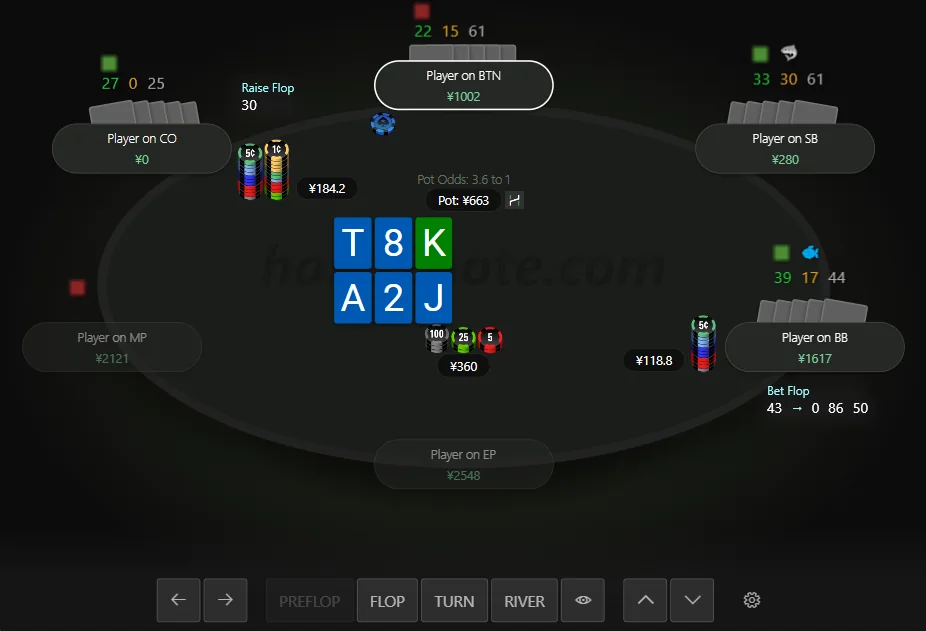
Use All Hand2Note Features on ClubGG
During your session, use:
- Dynamic, Positional, and Auto HUDs;
- detailed stat popups;
- player notes and badges;
- visual diagrams and other in-game features.
After your session, review your hands and results in Reports. Use Interactive Statistics to analyze your opponents and identify patterns in their play.
Flexible custom filters also let you analyze specific ClubGG formats, such as Bomb Pots and Double Board games, separately.
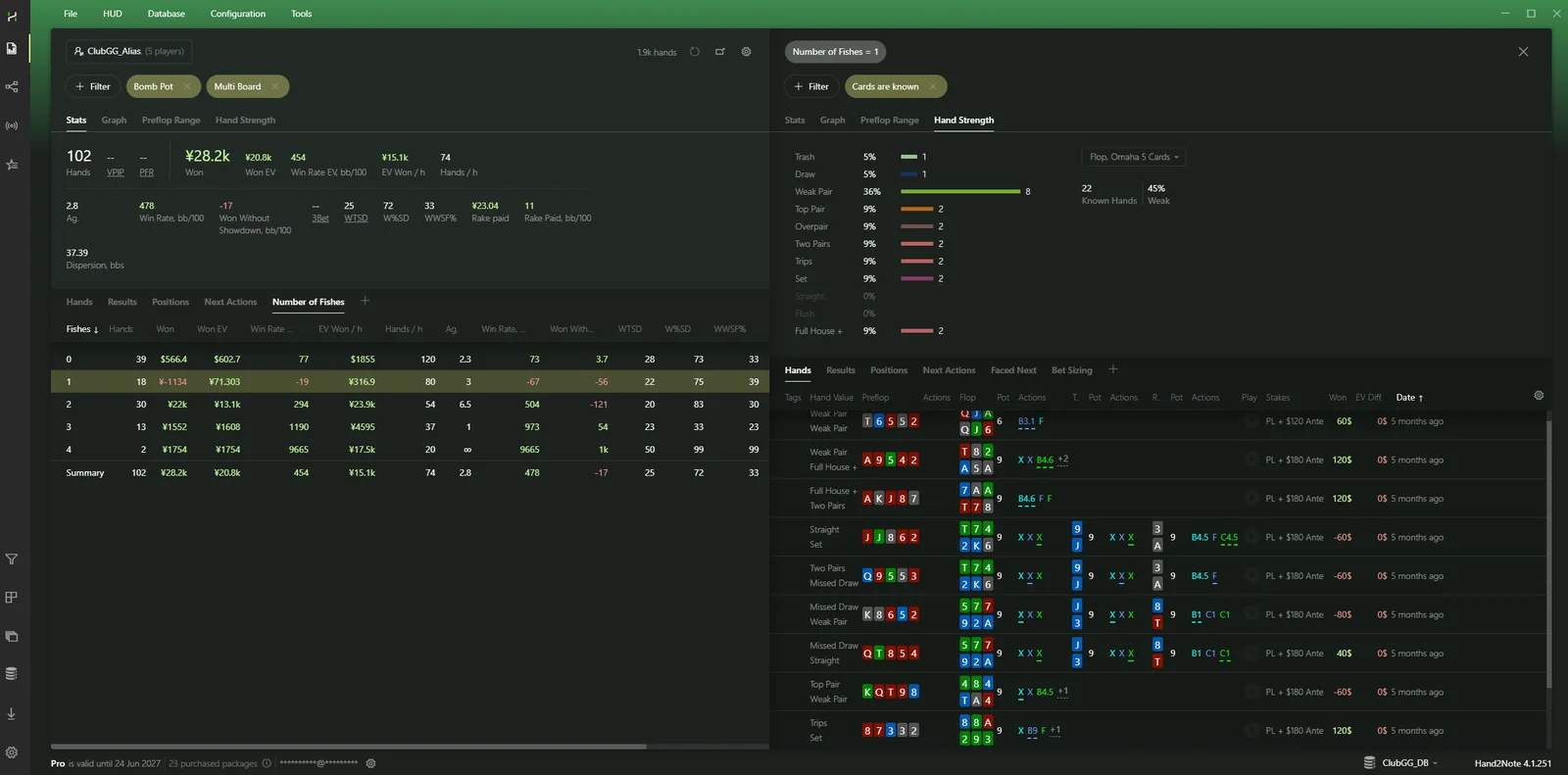
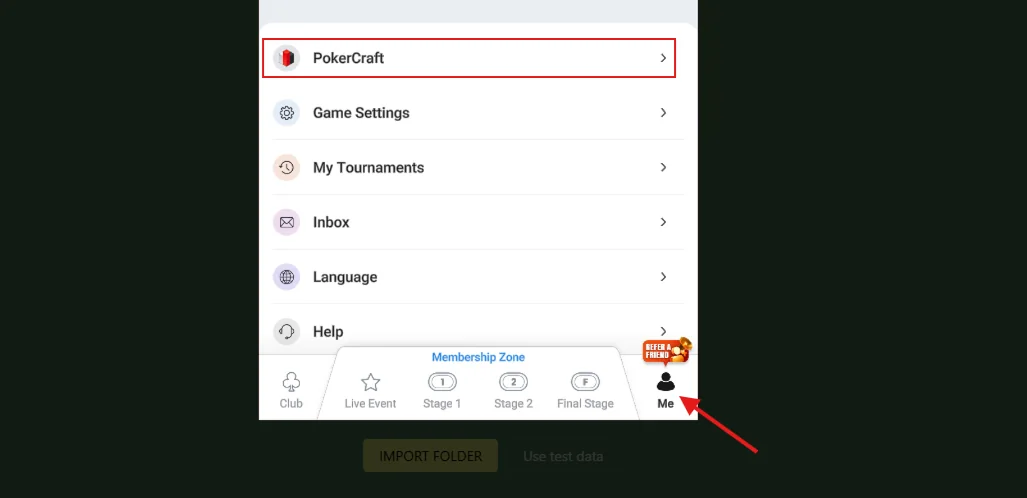
Works with PokerCraft Hand Histories
Hand histories downloaded from ClubGG PokerCraft can be imported into Hand2Note for analysis.
Note: Downloading hand histories via PokerCraft requires an active ClubGG Platinum subscription.
How to Set Up Hand2Note for ClubGG
Install Hand2Note.
Download and install the latest version of Hand2Note.
Sign In to Hand2Note.
Open Hand2Note and follow the login prompt. If you don’t have an account, create one.
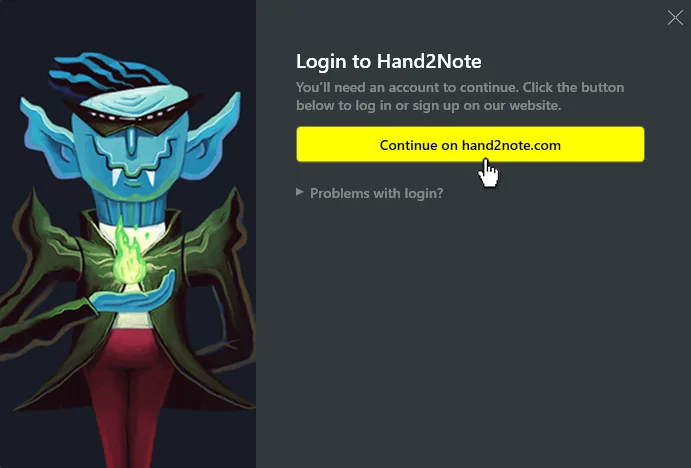
Signing in to Hand2Note. Your 14-day free trial starts automatically when you first open Hand2Note.
Launch ClubGG.
Run ClubGG as administrator: right-click the ClubGG icon and select Run as administrator. Hand2Note will automatically collect your hands and show the HUD at the table.
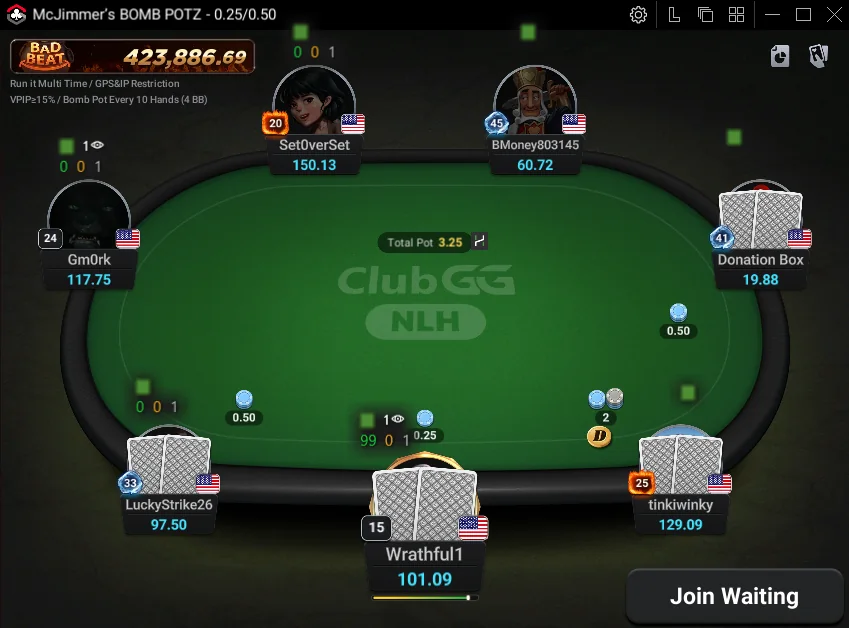
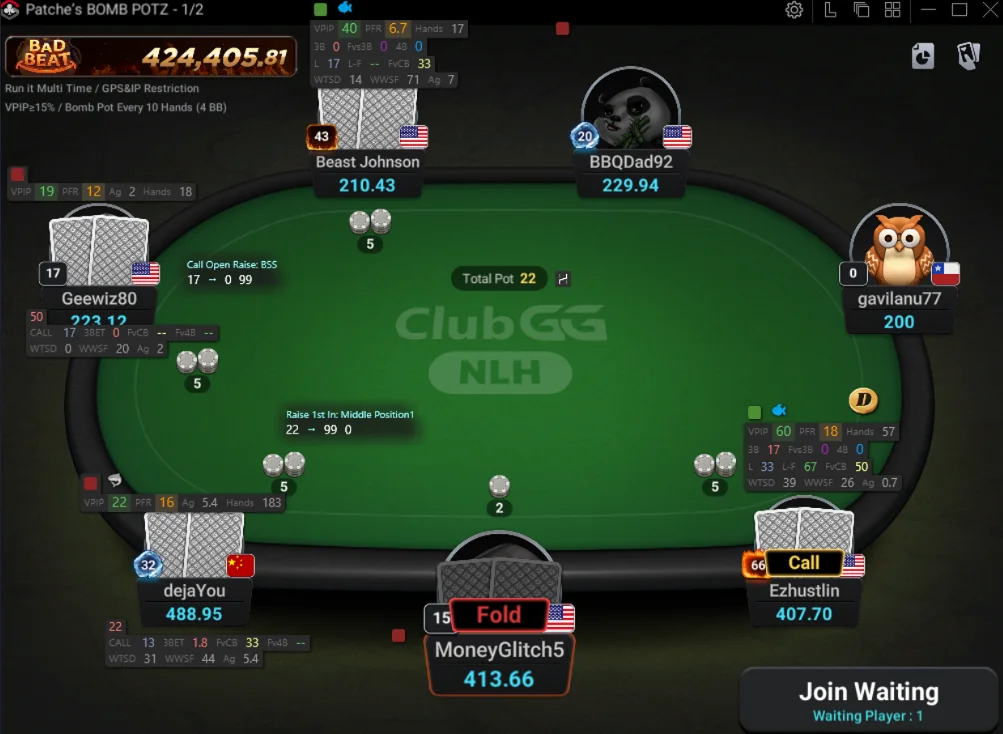
Hand2Note HUD on a ClubGG table. By default, the HUD shows three basic stats:
- VPIP — how often a player voluntarily puts money into the pot;
- PFR — how often a player raises preflop;
- Hands — the number of hands collected for that player.
The HUD also includes a Showdown Indicator, which shows the latest hands revealed at showdown.
Want more stats or a different layout? You can switch to another HUD or create your own. Learn more in How to Change Your HUD.
Create an Alias for Your Hero Accounts.
If you play on multiple ClubGG accounts, combine them into a single alias under Configuration → Hero Nicknames.
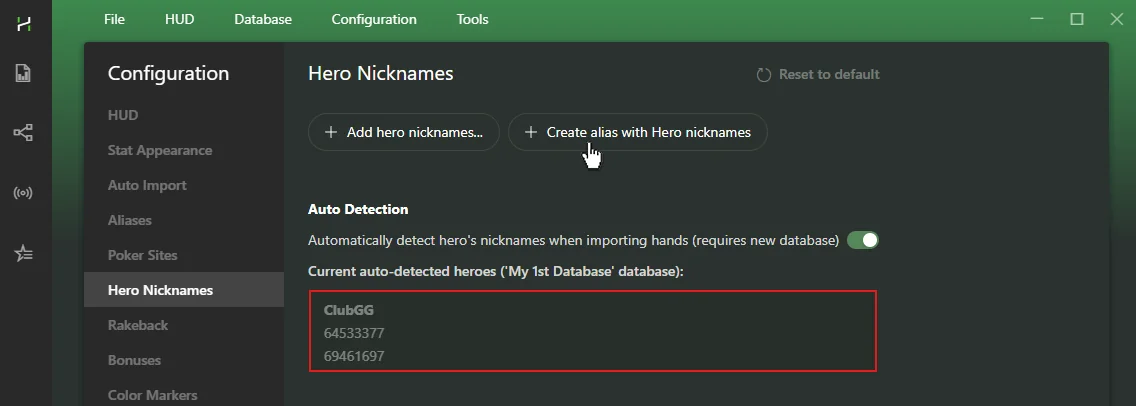
Adding Hero Nicknames to create an alias. Then select the alias in Reports and Sessions to see your combined stats and results across all accounts.

Selecting an alias in Reports.
Looking for a ClubGG club? Our ClubGG guide covers the app, its clubs and unions, and the macOS version. Hand2Note’s ClubGG HUD runs on the Windows desktop client.
ClubGG: frequently asked questions
What Are Club Rates and How Do They Work?
Different ClubGG clubs can use different chip values. Club Rates let you convert those chips into real-money values, so your results are easier to compare on graphs.
For example:
- Club A: 100 chips = $100
- Club B: 1,000 chips = $100
With Club Rates configured, both results will appear as $100 on your graph.
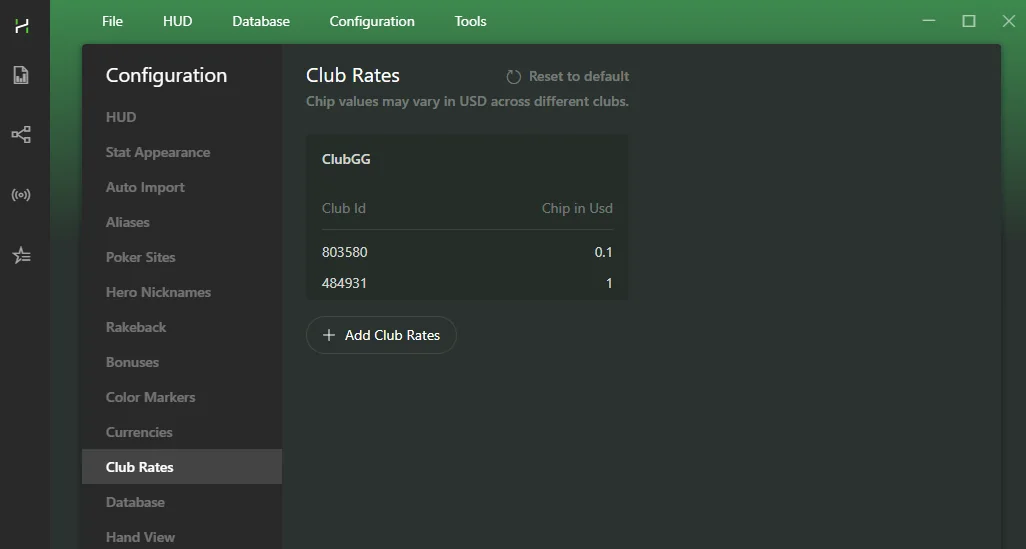
Note: Club Rates only change how results appear on graphs. They don’t affect the values shown in Reports or Sessions. Subscription stake limits also use the original stakes, not the converted Club Rates values.
Can I Change the Currency for ClubGG?
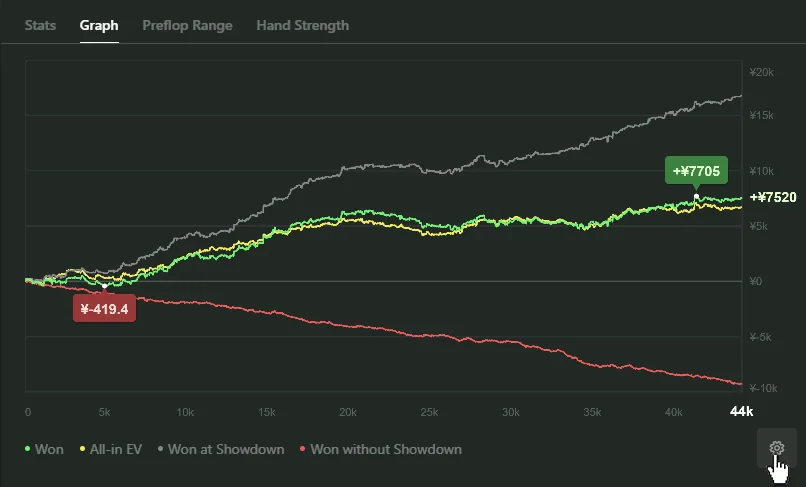
Hand2Note stores all ClubGG hands in Chinese yuan (CNY). This currency can’t be changed, but you can switch your graphs to display results in another currency.
Can I Run Multiple ClubGG Clients with Hand2Note?
Hand2Note doesn’t have a built-in option for running multiple ClubGG clients. However, there are free third-party solutions that work with Hand2Note. Contact Support for the latest information.
Troubleshooting: HUD Is Not Showing
If the HUD doesn’t appear on your ClubGG tables, try the following:
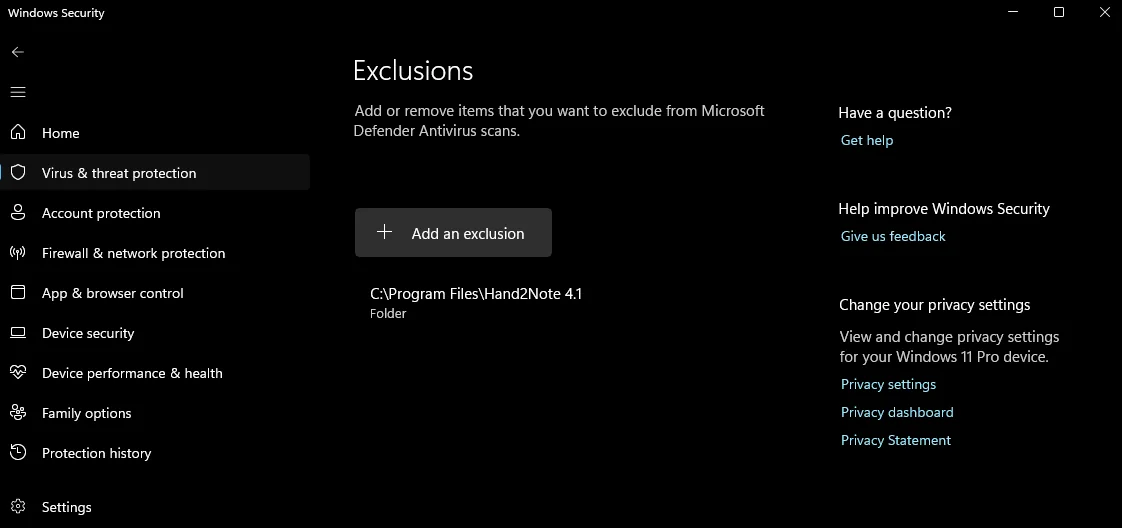
Add the entire Hand2Note folder to your antivirus exclusions, or temporarily disable your antivirus.
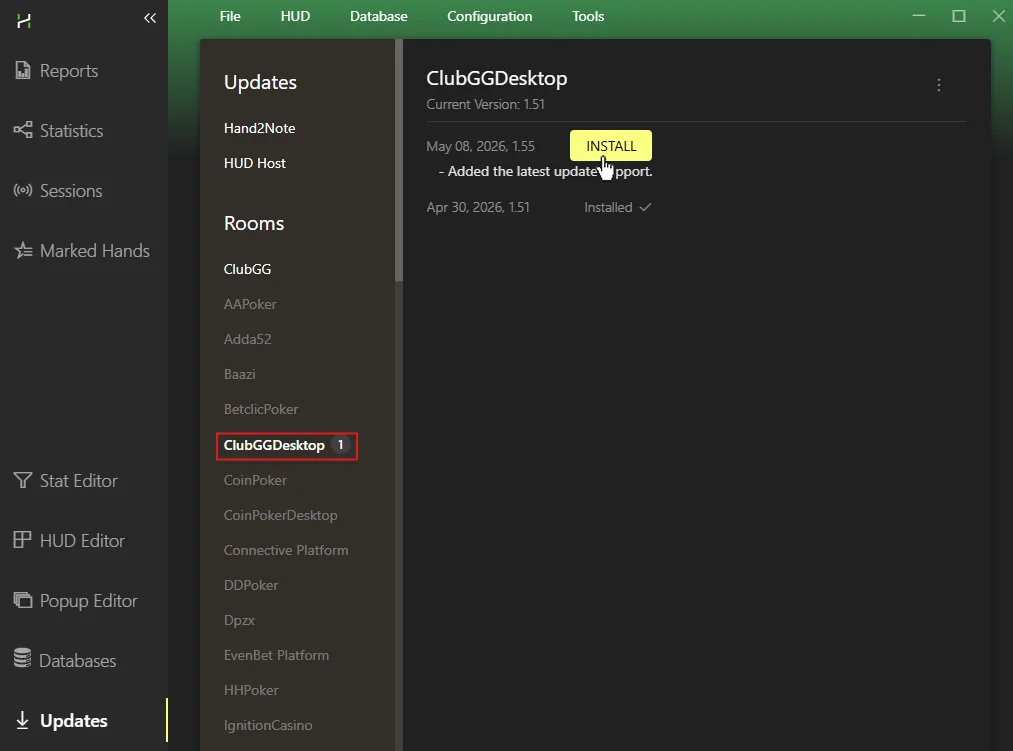
Open Hand2Note and go to Updates. Make sure you have the latest versions of: Hand2Note, HUD Host, ClubGGDesktop.
If the HUD still doesn’t appear, contact Support.
Source: Hand2Note — ClubGG HUD.
Poker HUD in Hand2Note
Static, Positional, Dynamic and Auto HUD, showdown indicator, color markers and ready-made HUDs, in Hand2Note’s own words.
What is HUD?
Poker pros see Hand2Note as the most powerful and user-friendly HUD software on the market.
With HUD, or Heads-Up Display, you make smarter decisions based on your opponents’ past behavior, such as how often they fold, raise, or how aggressive they are.
A HUD, or Heads-Up Display, in online poker is a visual interface that sits on top of your real-time online poker tables. The HUD shows statistics on each player based on their past hands.
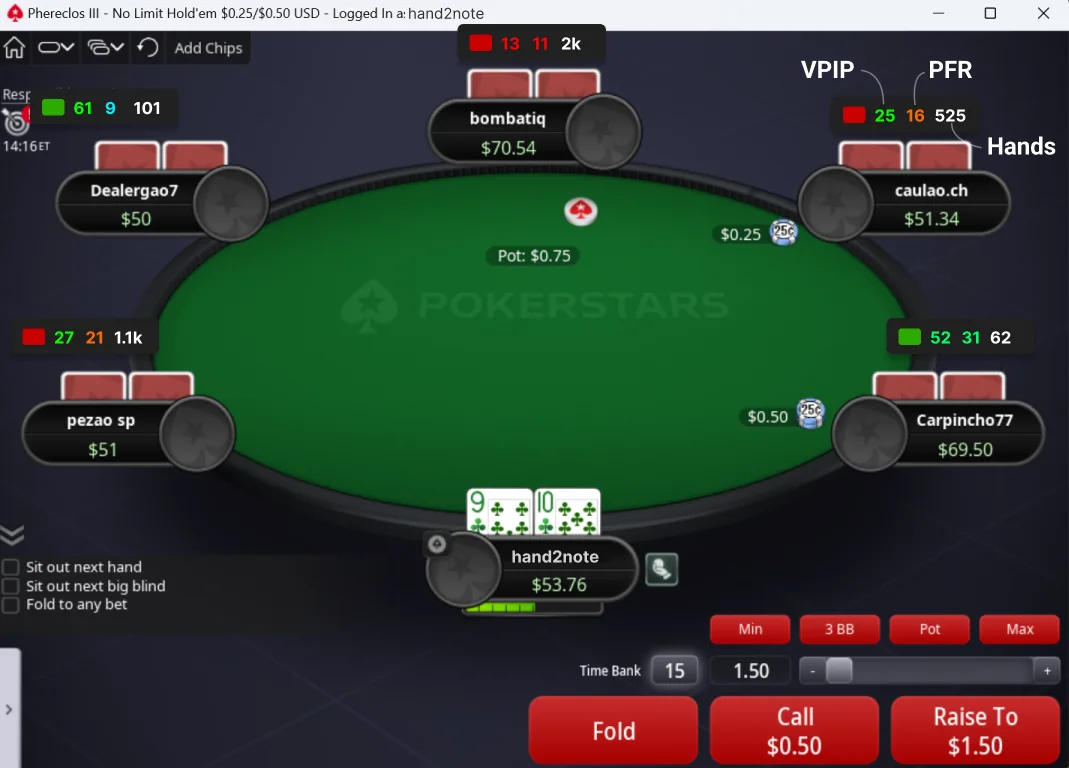
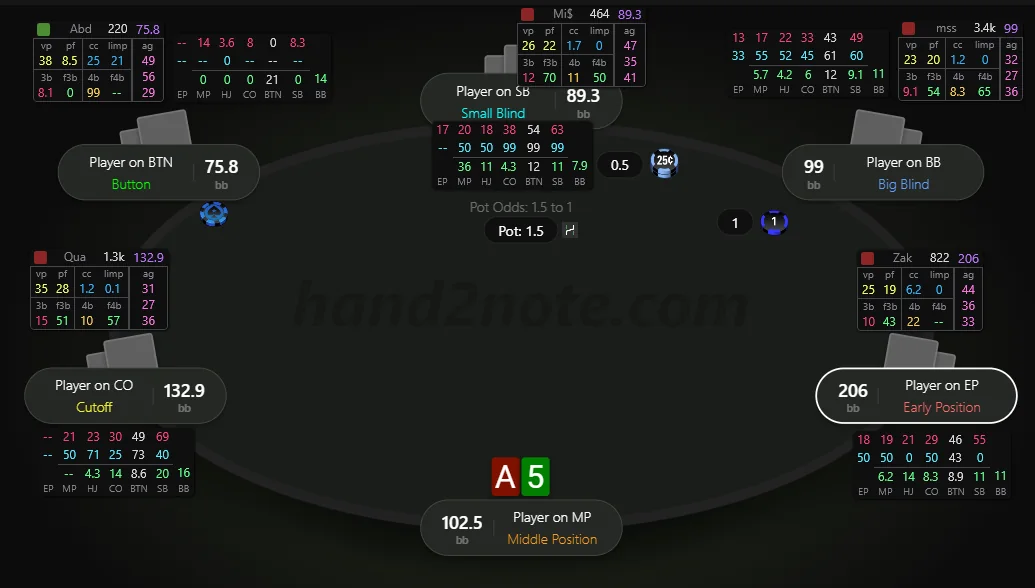
In the screenshot, the HUD displays three basic stats for each player at the table such as Voluntarily Put $ in Pot (VPIP), Preflop Raise (PFR), and the number of hands they’ve played.
VPIP higher than 40% usually indicates a weak player.
Why do you need a HUD?
Poker is a game of incomplete information. The more information you have on your opponent, the larger your advantage becomes. HUDs, or Heads-Up Displays, serve this very purpose, giving you more information in the form of data. Think of them as your secret weapon at the poker table!
For example, a typical “rock” waits only for very strong preflop hands: his VPIP (Voluntarily Put $ in Pot) is just 13%. You should avoid entering the pot with him unless you have a strong preflop hand.
The other player is quite the opposite. His PFR (Preflop Raise) equals to 31%. This means that he not just plays many hands preflop but plays them aggressively. Expect a lot of bluffs from him on the postflop.
Don’t miss valuable information by playing online poker without a hud.
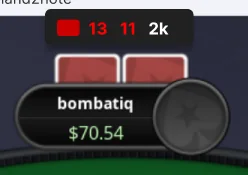
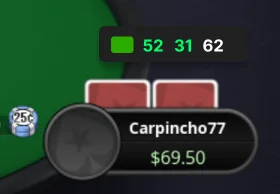
Note. We made getting started with HUD as easy as possible. You don’t need to deal with complex HUDs and stats. Basic stats like VPIP and PFR are often enough to get an edge at the table.
HUD in Hand2Note changes in real-time
There are three types of HUD in Hand2Note. With positional and dynamic HUDs, you can include hundreds of stats in the HUD while keeping it uncluttered and easy to scan.
Static HUD is a standard hud. It shows the same stats for all players at the table. If you’ve used other poker software, you’re probably familiar with this kind of HUD.
Positional HUD, in contrast to the Static HUD, displays different stats for each player at the table based on their positions, stack sizes, or player type.
While Positional HUD displays stats according to positions known at the start of a hand, Dynamic HUD adapts based on action in the hand. In other words, Hand2Note changes the HUD in real time during the hand.
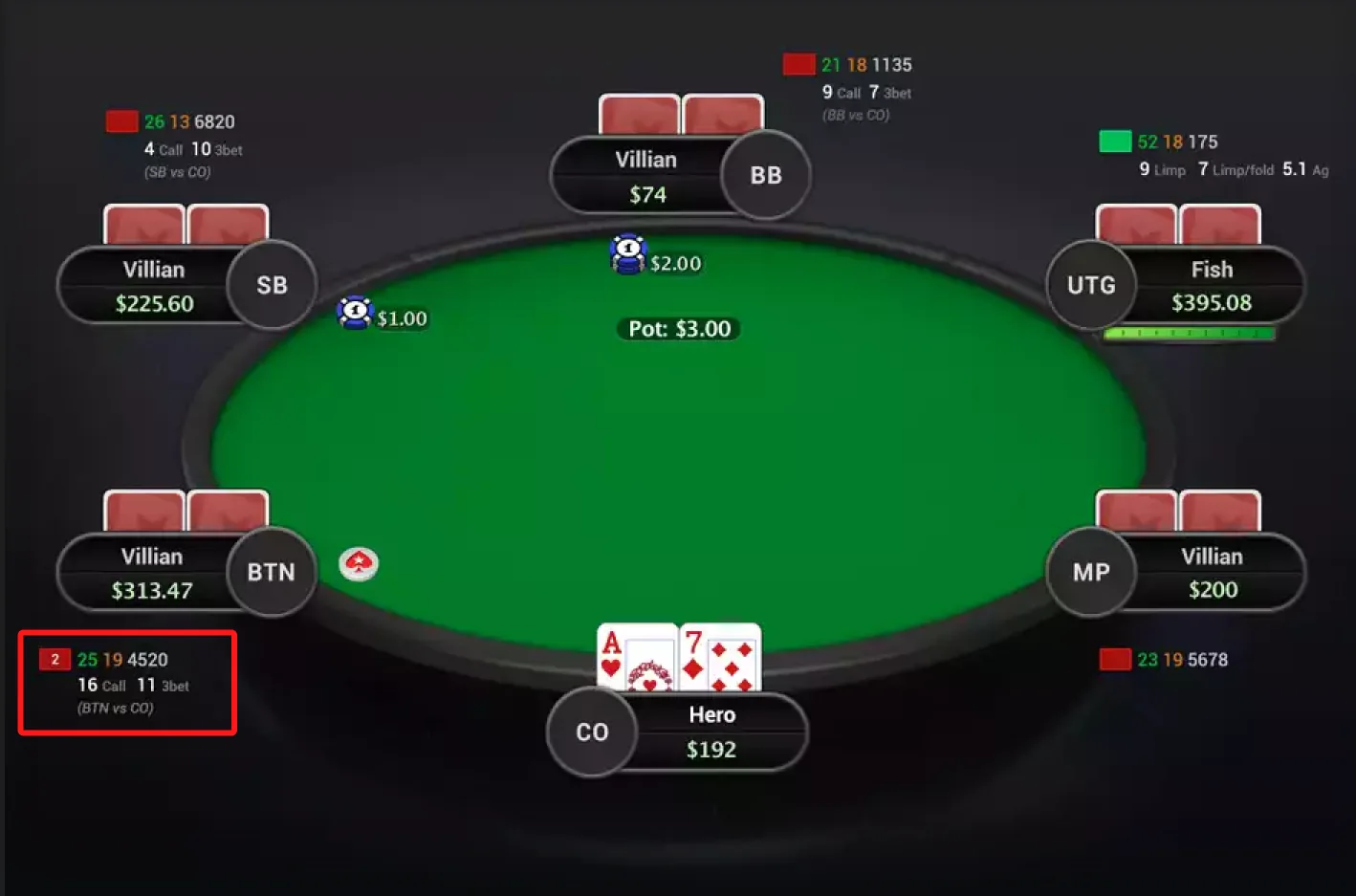
Hero is in the cutoff position (CO). For the player in the button position (BTN), the HUD shows how he usually 3-bets from the button against the cutoff. What’s really cool is that the HUD stats for the players on the small and big blinds are different, showing how often they 3-bet from their specific positions.
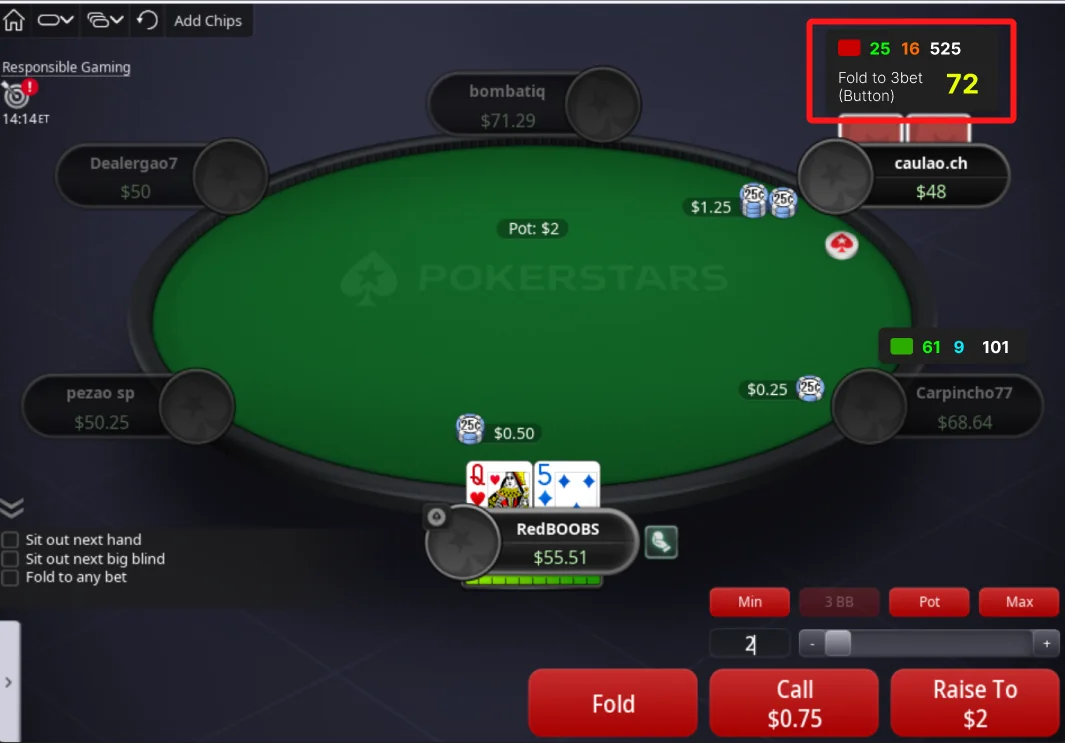
If the opponent raises from the button position, the HUD instantly shows how often he folds to a 3-bet in that situation. Folding to a 3-bet in 72% of cases is an exploitable weakness. This insight tells immediately that you should 3-bet with a wide range.
Unfortunately, both positional and dynamic HUDs are not allowed on PokerStars, IPoker, and Winamax. However, you still can use it on other poker sites or mobile apps.
Don’t miss any insightful showdown
In poker, if you understand one’s logic, you can exploit them. Showdowns give the most insight into a player’s strategy and logic because you see their cards.
However, in online poker, especially when multitabling, it can be challenging to keep track of every showdown. That’s where Hand2Note comes to the rescue. Hand2Note tracks the showdowns you haven’t reviewed yet and shows a notification in the HUD, so you never miss an opportunity to get valuable reads on your opponents.
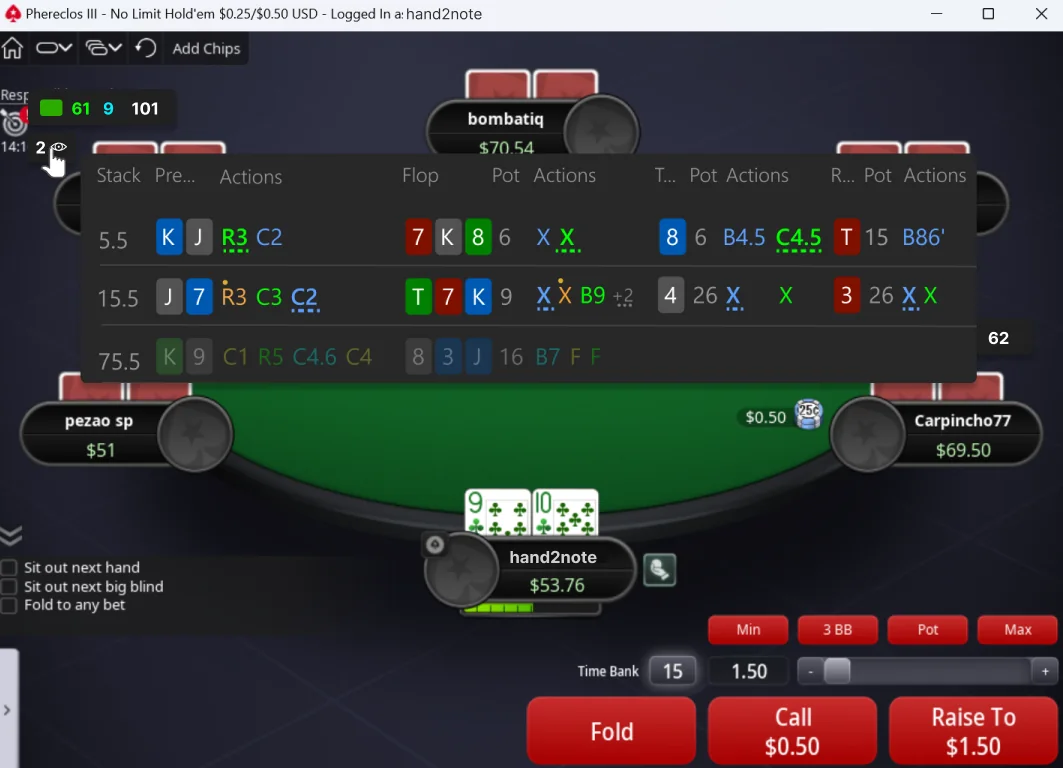
The Showdowns Indicator is especially useful for assessing the strategy of players who have just joined the table and whom you don’t know much about. Don’t lose your reads!
Color Markers
Color Marker helps you identify the type of the player. By default, red color means a regular player, and green color means a recreational player.
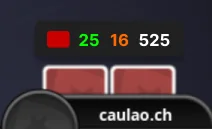
On PokerStars, you must assign the color markers to players manually because auto-coloring is not available on PokerStars.
Tip. You can edit the list of available color markers in Configuration → Color Markers.
Many poker pros use color marking to build an exploitative strategy. How? They manually set color markers for every player they meet at the tables. Then, they aggregate stats for all players with a specific color marker and study their strategy in Multi-Player Reports.
Auto HUD
Auto HUD complements the main HUD by automatically displaying the most relevant stats for the current situation.
The software detects table action in real time and shows matching statistics from your setup whenever enough hands are available.
Enable or disable Auto HUD in: Configuration → HUD.
Dynamic, positional, and automatic HUDs are not allowed on some poker rooms, including PokerStars, iPoker, and Winamax. To follow room rules, Hand2Note automatically disables these HUD types during play when required. Check all room restrictions in HUD restrictions.
Ready-Made HUDs
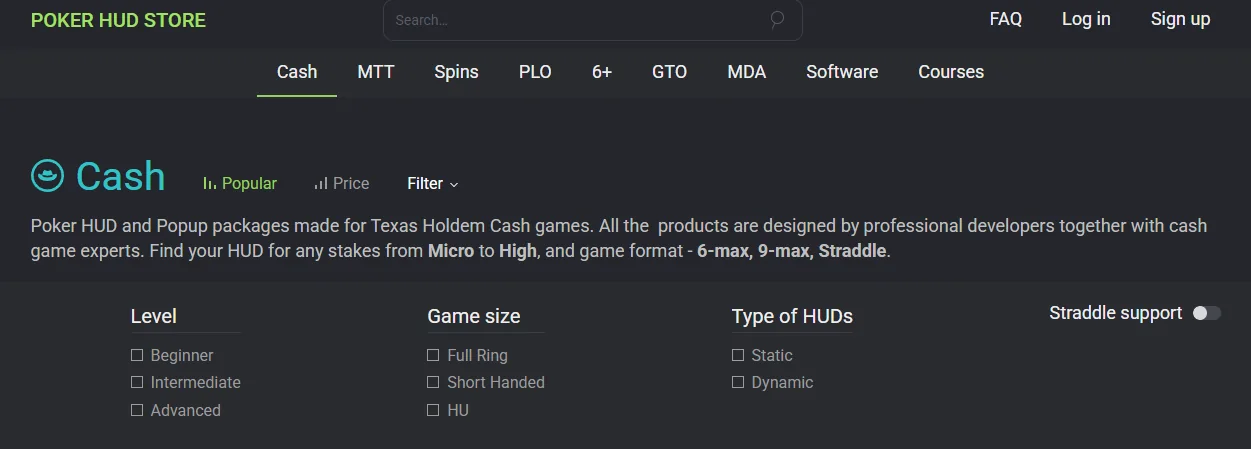
Not sure which stats matter most during play? Or simply do not want to spend time building a custom HUD? Ready-made solutions from Poker HUD Store are a great place to start.
The official store includes HUDs and stat packages created by professional players, coaches, and poker schools. Layouts are available for almost every format — from beginner-friendly HUDs to advanced setups for MTT, Spin&Go, Cash, and PLO.
Are poker HUDs legal / allowed / considered cheating?
There is nothing illegal about HUDs. Some poker sites, like GG Network, don’t allow HUDs (but still allow getting hand histories), and Hand2Note complies. If you see a HUD in Hand2Note on your poker sites, then it’s allowed.
Note that on PokerStars, the HUD is limited, and positional and dynamic HUD aren’t enabled on PokerStars.
Where does Hand2Note get information about previous playing history?
Poker software like Hand2Note gathers data for the HUD (Heads-Up Display) from the hand histories generated by online poker platforms. These hand histories are text files that contain detailed information about every hand played, including the actions taken by each player.
Most online poker sites allow players to save these hand histories to their local computers. Hand2Note then imports these files, processes the data, and uses it to populate the HUD with statistics.
For GGNetwork, reach out to their customer support to get your hand histories.
How can I customize HUD?
You can customize the HUD in our user-friendly but powerful HUD Editor. See Default HUDs and HUD Editor below.
Can I Use Different HUDs on Different Poker Rooms?
Yes. Create separate Game Types for different poker rooms in: Configuration → Game Types. After that, rebuild statistics. Switch between HUDs directly through the H icon during play. For example: use Static HUD for PokerStars; and Pro Positional HUD for 888. Hand2Note remembers your selected HUD and automatically uses it for that room in future sessions.
Source: Hand2Note — Poker HUD in Hand2Note, Why Hand2Note HUD?.
Popups, notes and session control
What a Hand2Note HUD gives you during play: popups, notes on stats, showdown tracking, colored borders, badges, tabs and session results.
A powerful HUD doesn’t have to mean dozens of panels
Many professional players consider Hand2Note one of the most powerful poker HUDs and trackers available today. But a powerful HUD doesn’t have to mean dozens of panels and hundreds of stats on the table.
Hand2Note works equally well with advanced professional HUDs packed with information and simple compact layouts that give you access to additional stats, popups, notes, and other tools when you need them.
Popups and Advanced Statistics
A Hand2Note HUD is not limited to stats displayed directly on the table. Additional information becomes available instantly through the popup system.
Stat Popups
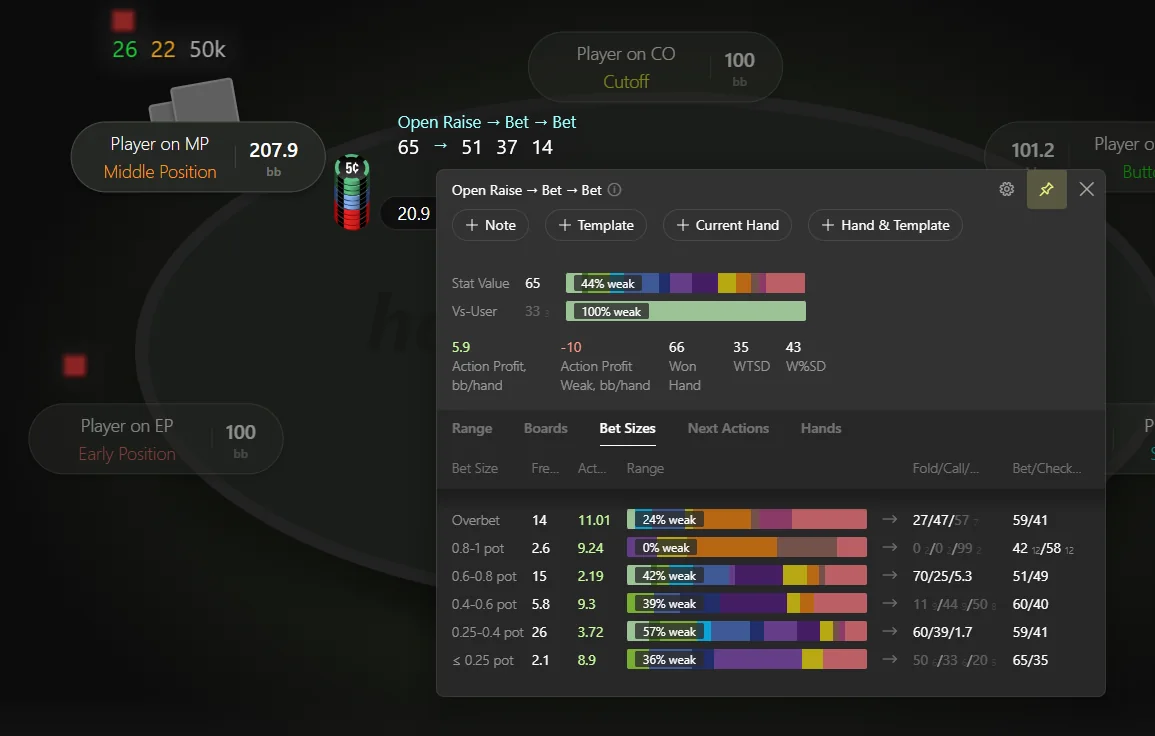
Hover over any stat to open a popup with visual charts, hand ranges, bet sizing breakdowns, next actions, and other advanced statistics.
Bet sizing groups, board textures, and hand strength display inside popups can all be customized separately in Hand2Note configurations.
Assigned Popups
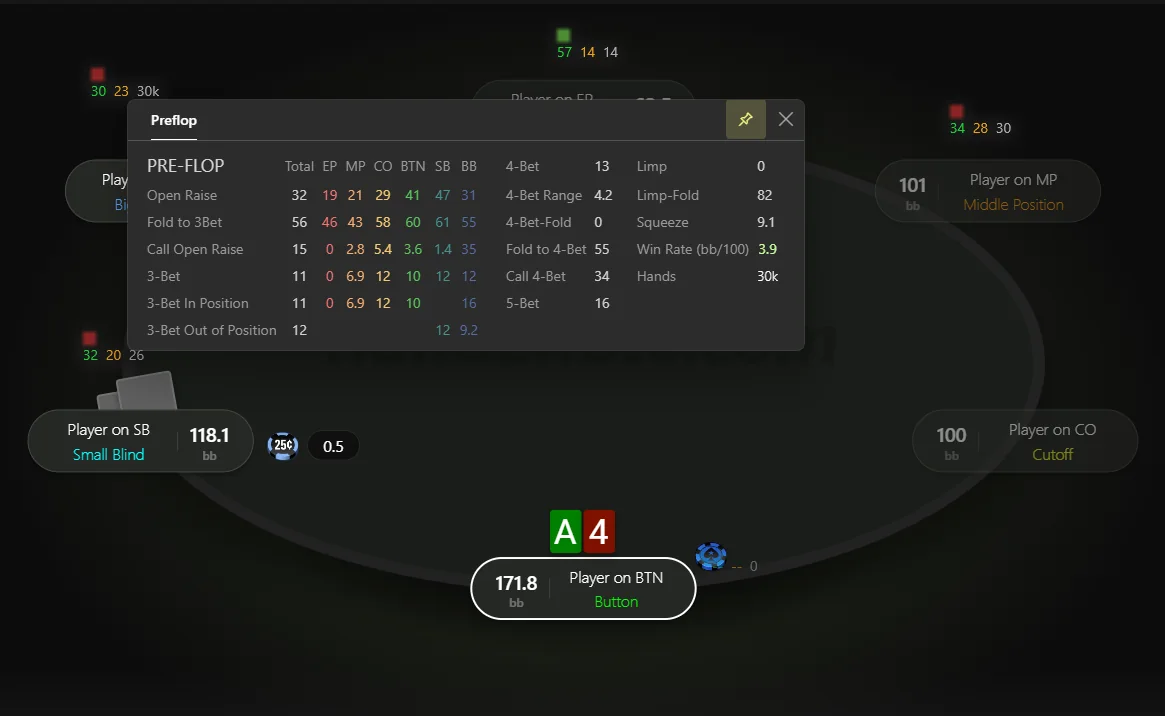
Replace the default stat popup with a completely custom one. Hovering over a stat can then display completely different information.
Assign a popup through HUD Editor: open HUD Editor, click the required stat cell, and in the Properties panel select + Assigned popup and choose a popup from the list.
Main Player Popup
Click any HUD panel to open the main player popup with all key opponent information in one place. The popup gives quick access to detailed stats, notes, player graphs, and other advanced information.
Any custom popup can be used as the main popup. Hand2Note automatically adds a graph tab, notes, and a settings panel.
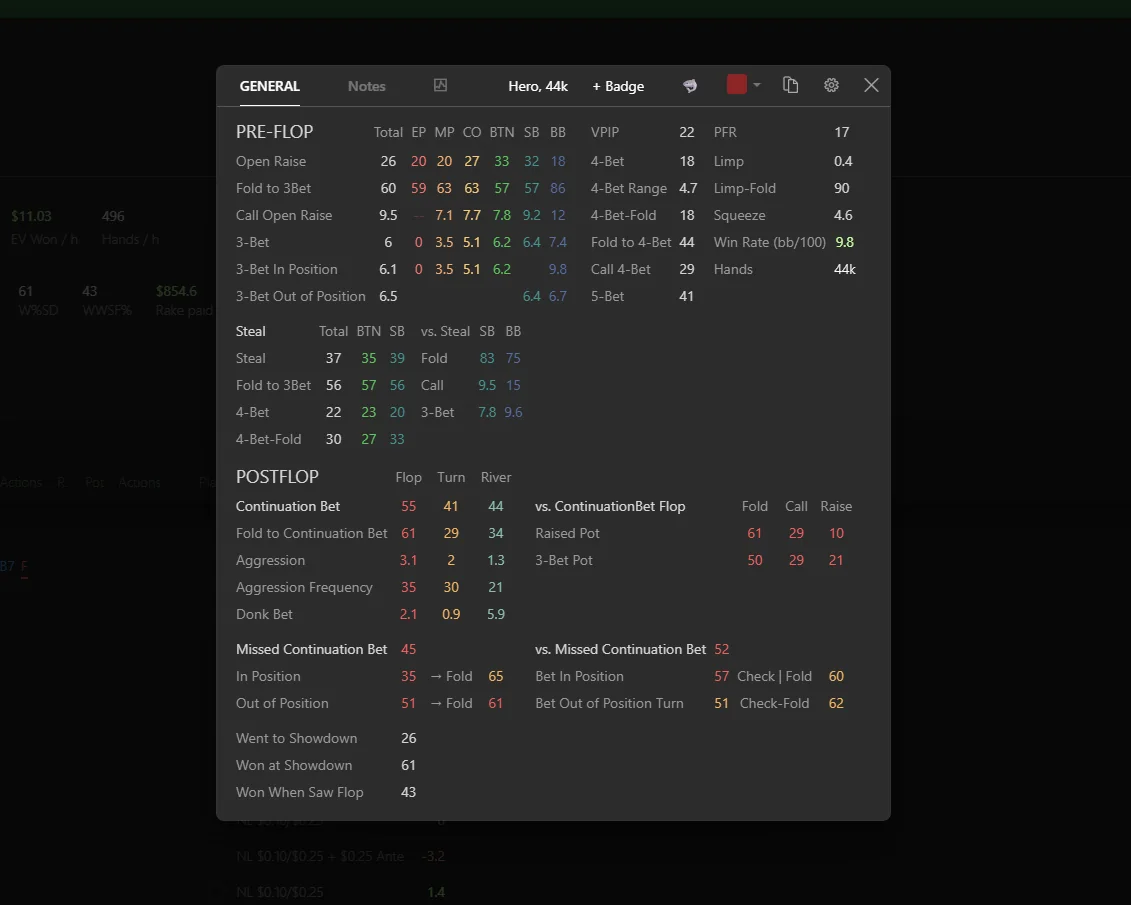
Tip: Hand2Note automatically generates different popup types for preflop and postflop stats.
Notes and Visual Markers
Statistics alone are not always enough during play. Personal observations often help players adapt faster and find exploitative adjustments more easily.
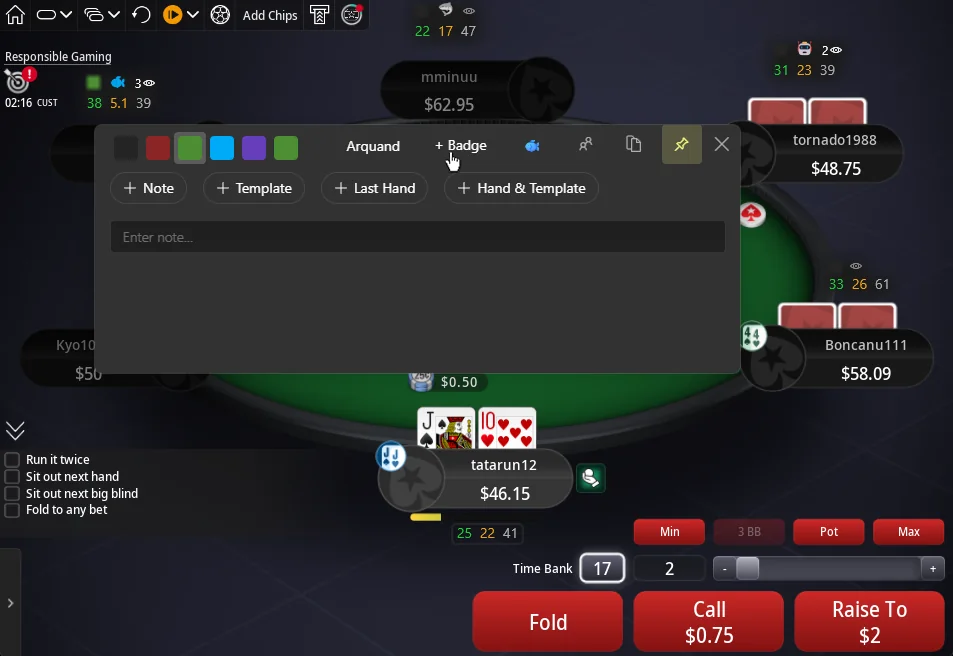
Player Notes
Hover over the notes icon to open the notes popup. Inside the popup, add notes manually, use templates, attach hands, and replay hands from the beginning to review the entire action.
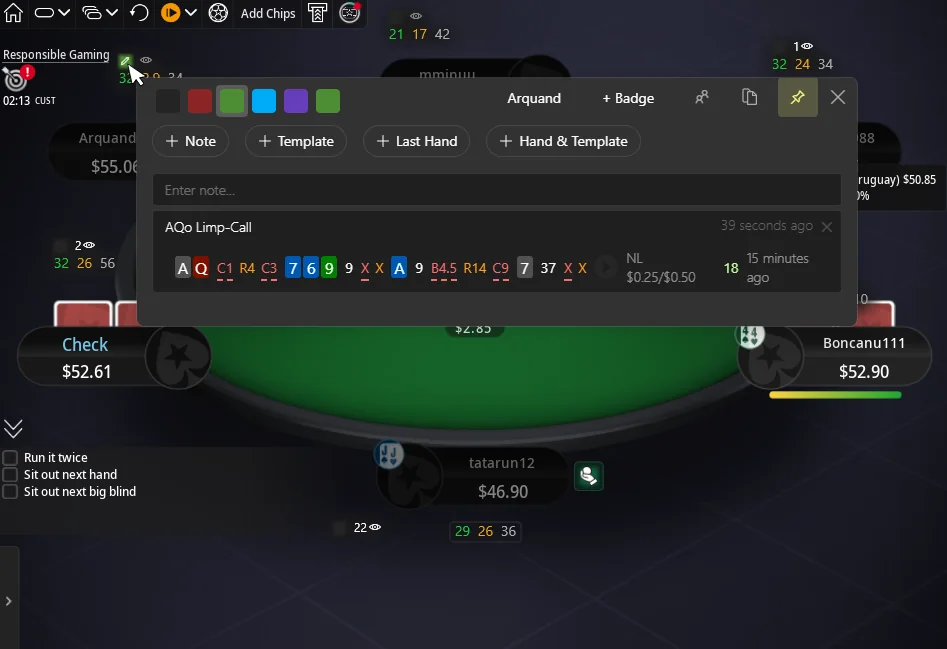
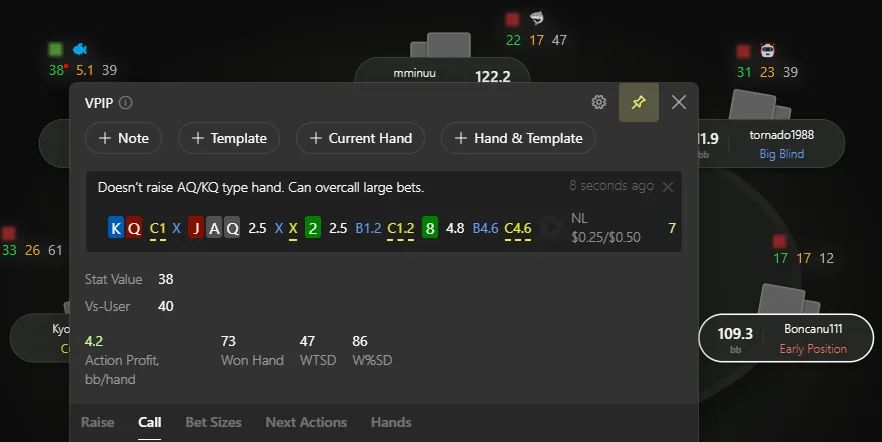
Notes on stats
Notes can also be attached directly to individual stats, keeping important reads and observations exactly where they matter most.
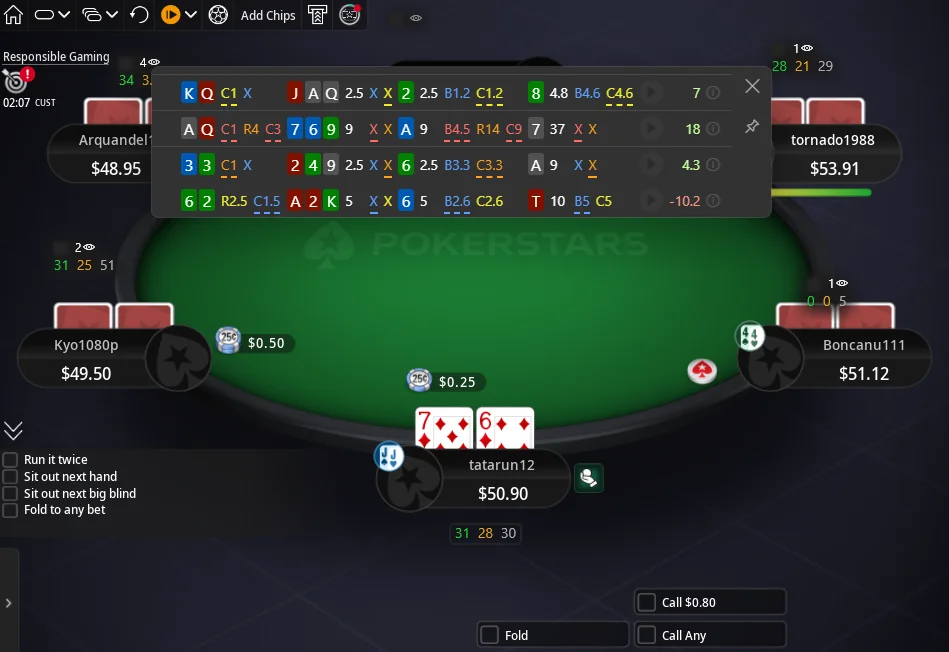
Last Showdown Indicator
When multi-tabling, important showdowns and table dynamics are easy to miss. To help with this, Hand2Note tracks recent showdowns and displays the latest revealed opponent hands through a dedicated eye indicator. Hovering over the indicator opens a list of recent hands for quick review or note-taking.
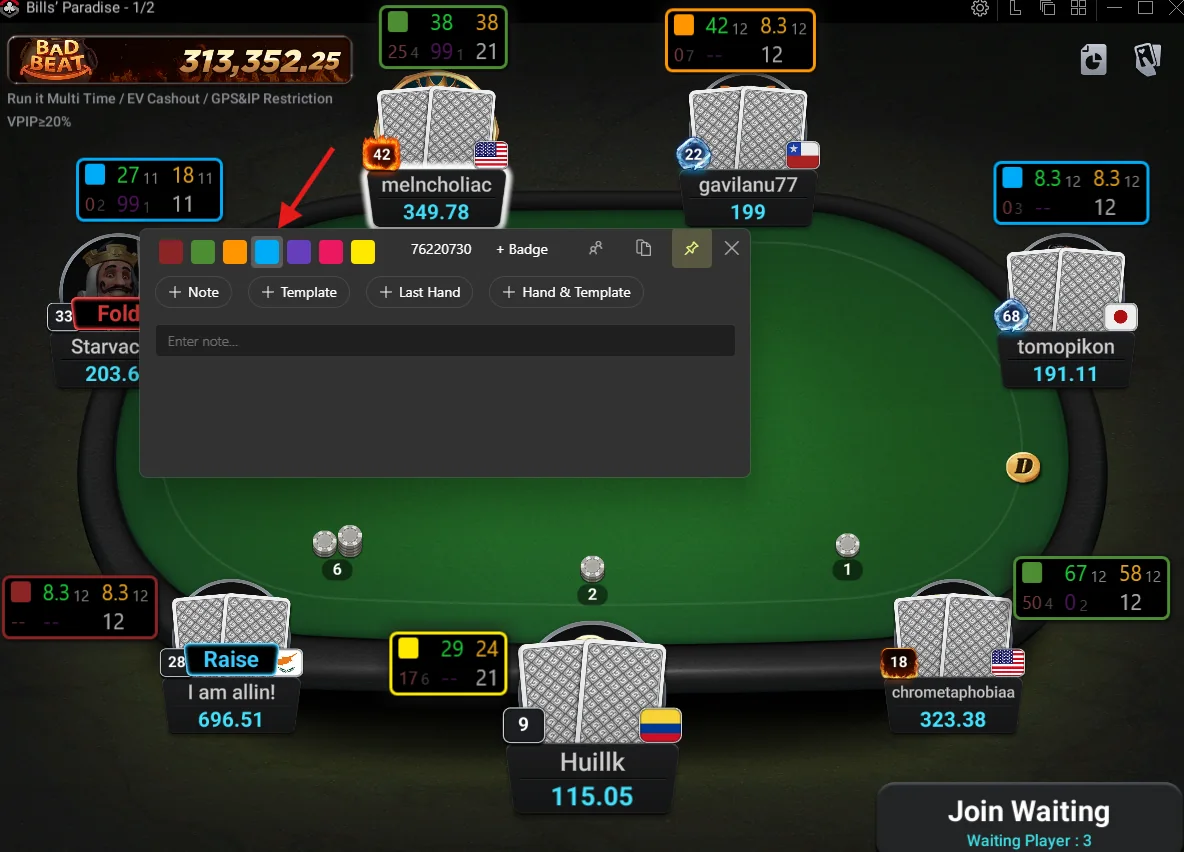
Colored HUD Border
Colored HUD borders make important opponents easier to spot instantly. The border color automatically follows player color labels and helps quickly identify profitable tables and recreational players.
The feature is especially useful on poker sites and Asian apps where standard color labels may be difficult to see or partially hidden behind the HUD itself.
Player Badges
Player badges provide another quick way to mark opponents during play. Multiple badges can be assigned to the same player to highlight tendencies, strategy patterns, or important reads.
Use built-in badges or add your own custom images through Stat Editor.
Tip: for custom images, 58×39 pixels works best.
Enable colored HUD borders in: Configuration → HUD → “Display player’s color marker as a HUD border”.
HUD Display During Play
HUD elements do not always need to stay visible. Grouping, hiding, and simplifying HUD panels helps keep the table clean and comfortable even with large amounts of statistics.
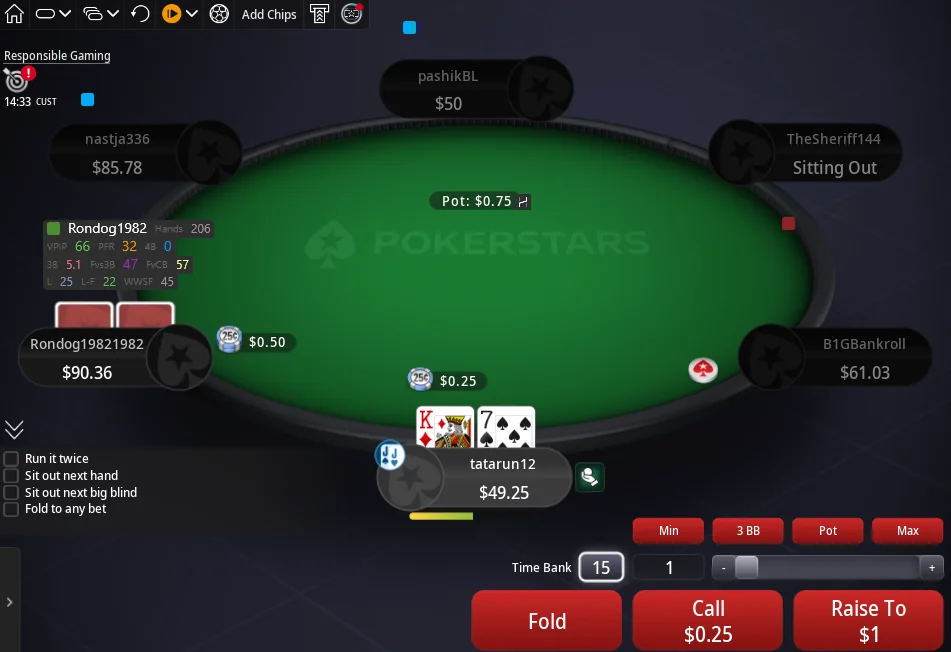
Hide HUD After Fold
During a hand, HUD panels for inactive players can hide automatically. This removes unnecessary information from the table and helps focus only on players still involved in the hand.
- when a player folds;
- when Hero folds — hide all HUD panels until the hand ends;
- when observing tables without Hero at the table.
Show HUD Only on Hover
This mode works well for players who rarely look at statistics during play. The HUD only appears when the cursor moves over it.
Streamers also often prefer this mode because viewers can follow table action more clearly without too many numbers on the screen. Configure mouse-out opacity through HUD Editor: select the required panel and set transparency from 0 to 1.
HUD with Tabs
Split stats into tabs to avoid overloading the table with rarely used information. With tabs, additional stats only appear when needed.
Add the Inner Tabs element inside HUD Editor and drag the required panels or stat tables into the tabs. Tabs can be added, renamed, and repositioned.
Session Control
Reviewing sessions and saving important hands remains an important part of poker improvement for many professional players.
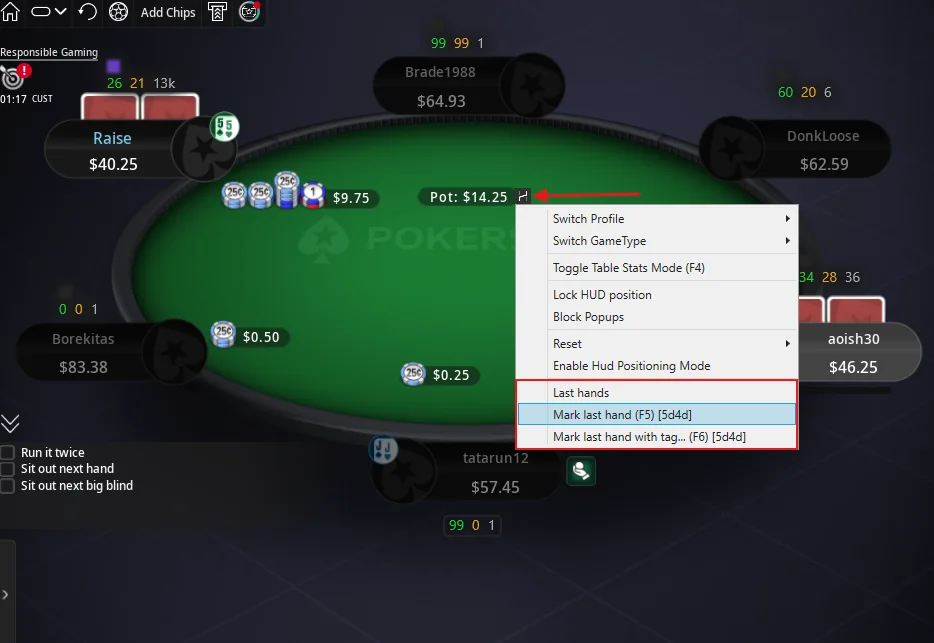
Marking Hands During Play
During a session, hands can be marked in several ways:
- through the H icon at the table;
- with hotkeys F5 and F6 (change hotkeys in: Configuration → HUD)
- or through the Last Hands list.
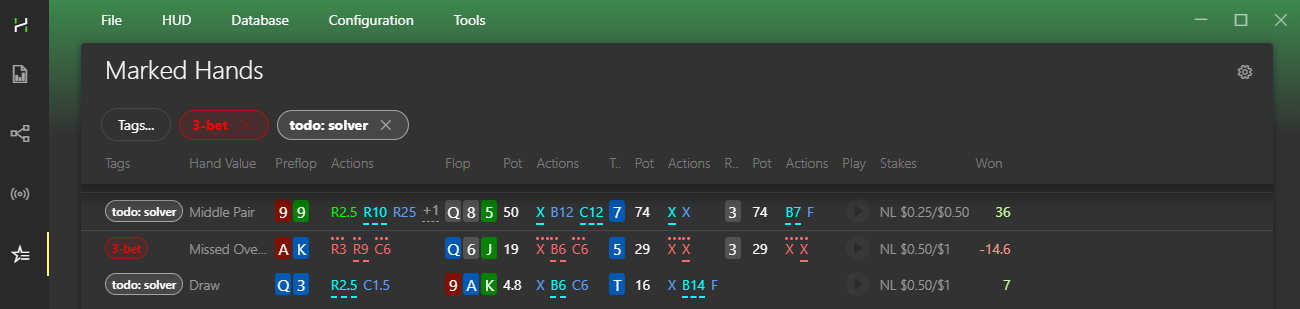
All marked hands appear in the Marked Hands section for quick review, sorting, and tag filtering. Hands can also be exported for coaching or review in third-party software.
Tip: create custom hand tags in: Configuration → Marked Hands Tag.
Sessions and Results
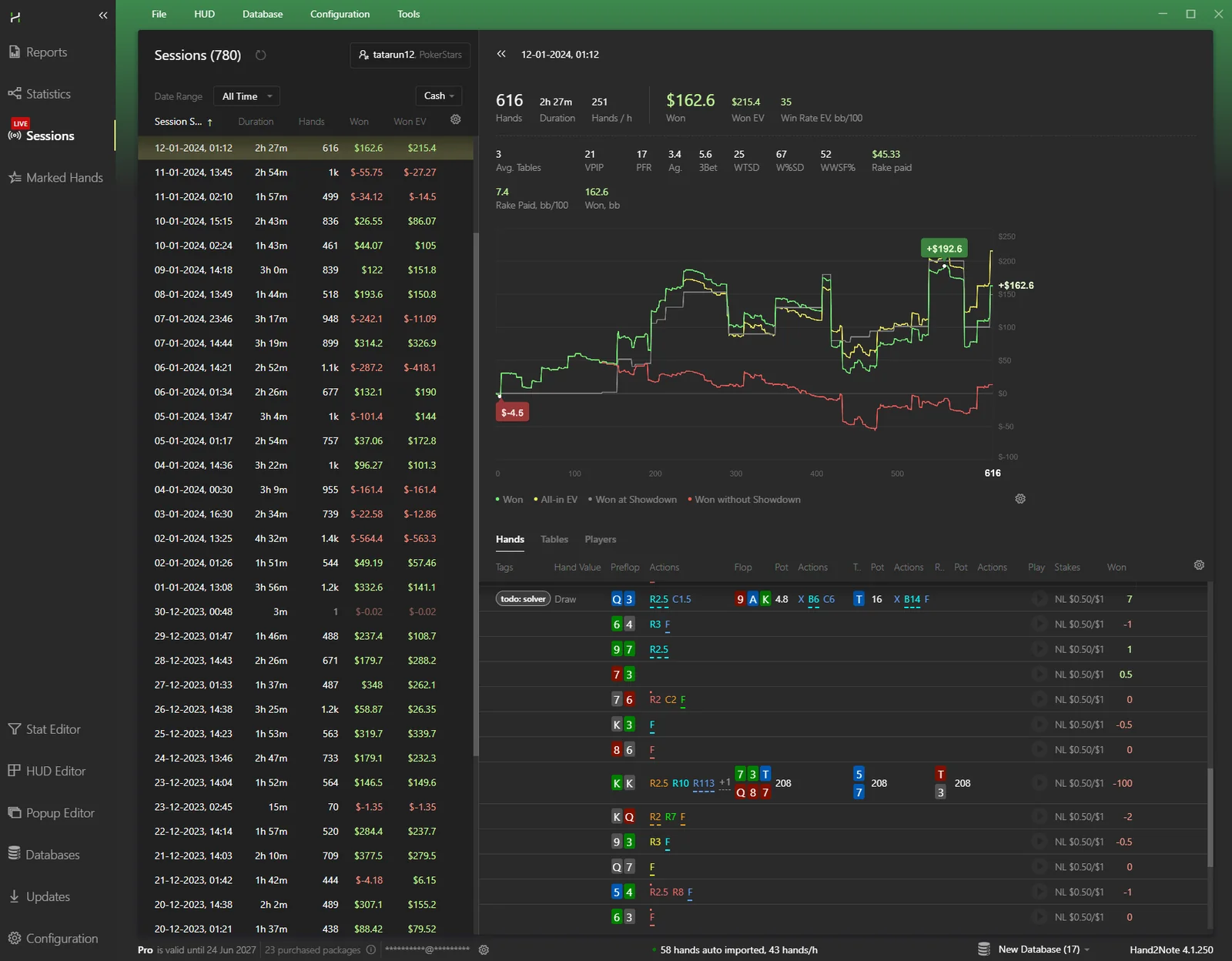
Hand2Note automatically tracks current session results, including graphs, hand count, duration, and overall statistics. Review played hands, mark important spots, and export hands directly from the Sessions section.
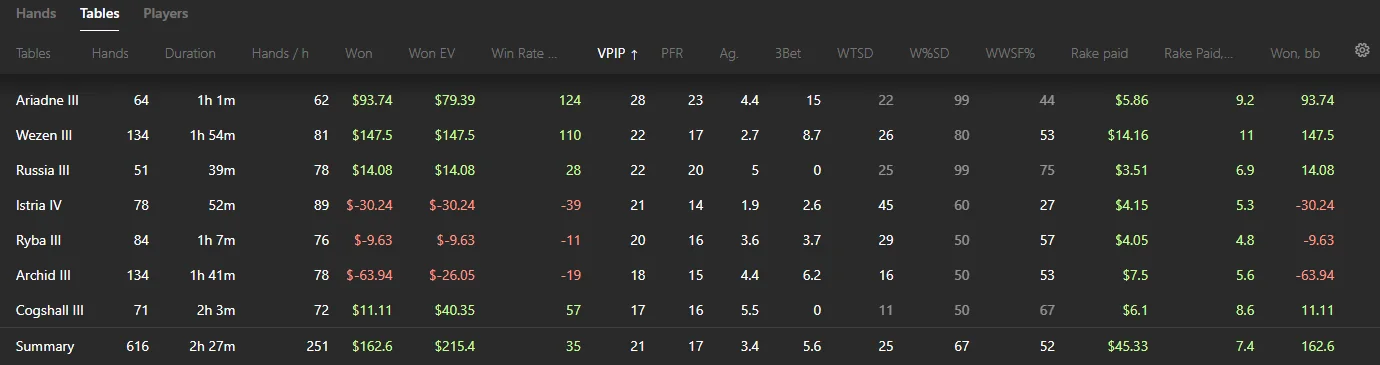
Besides personal results, the section also helps track table statistics, sort tables by VPIP, view opponent statistics, and find players encountered most often.
Source: Hand2Note — Why Hand2Note HUD?.
Default HUDs, HUD Editor and HUD Store
The three HUDs you get after installation, how to switch them at the table in three clicks, and how to build or buy your own.
Which HUDs are available after installation
The default HUDs are just a starting point. Hand2Note gives you more than one way to find the HUD that fits your game.
After you install Hand2Note, you get three standard HUDs: Default, Hand2Note Pro Static and Hand2Note Pro Positional. Hand2Note uses the “Default” profile as the HUD at the table for all games. These standard HUDs include different numbers of stats.
The “Default” HUD has three key stats: VPIP, PFR, and hand count.
Tip: If you are just starting to play with a HUD, start with the “Default” HUD. VPIP and PFR help you understand your opponent’s playing style.
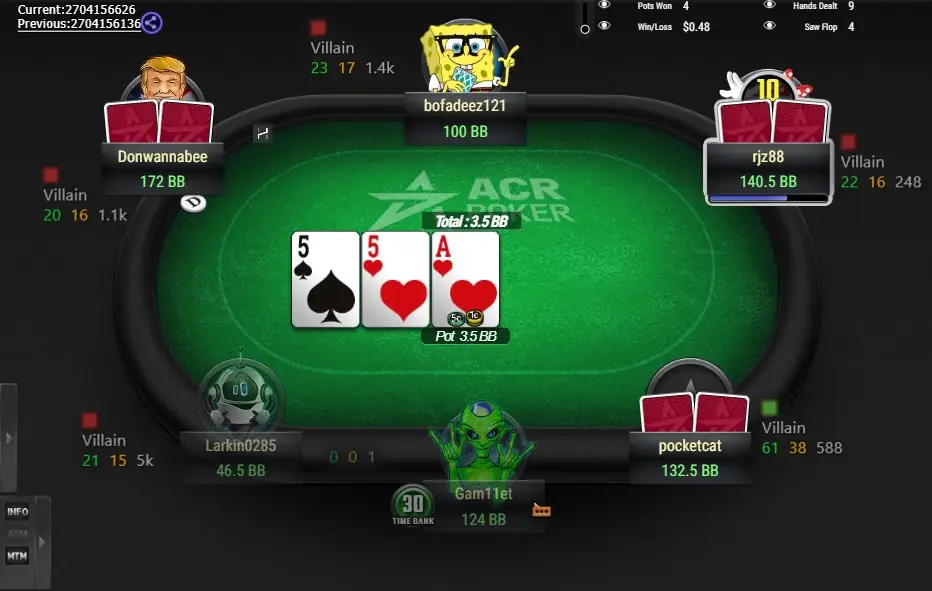
The “Hand2Note Pro Static” HUD has more stats than “Default”, but it still stays fairly simple. It already includes key stats such as 3Bet and Fvs3Bet, which are essential in a HUD.
Tip: If you need more stats at the table, try “Hand2Note Pro Static”.
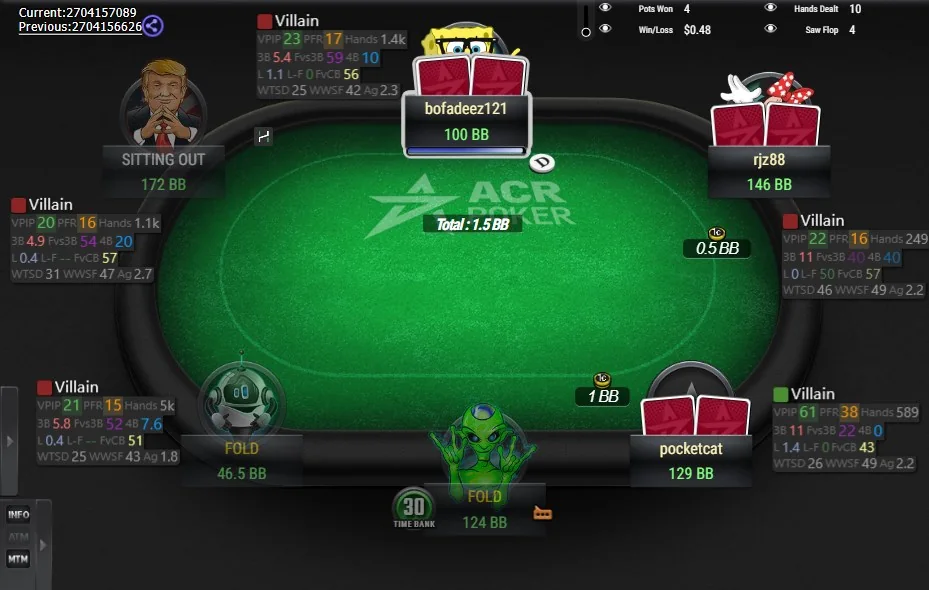
The “Hand2Note Pro Positional” HUD is a dynamic HUD and changes its stat set based on the game situation:
- The number of hands you have on the player;
- Whether the opponent acts before or after you;
- The opponent’s position relative to you;
- Whether the player is a regular or not.
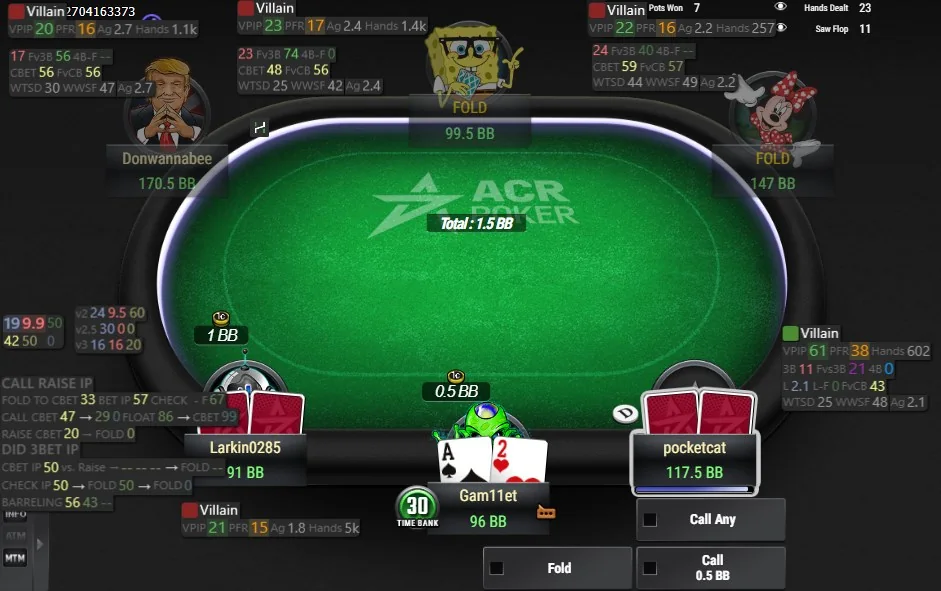
Note: PokerStars, iPoker, and Winamax do not allow dynamic HUDs during play. If you use “Hand2Note Pro Positional” in these poker sites, some stats and panels will not appear at the table.
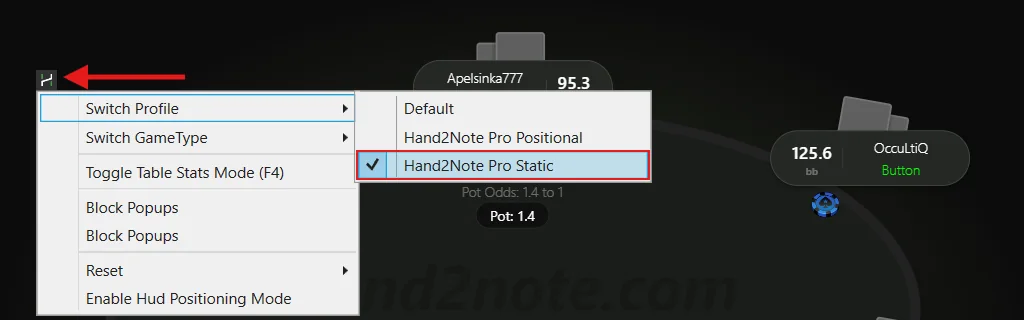
Switch the HUD at the table
Check which HUD appears at the tables and switch it during play, if needed, in just three clicks.
Find the Hand2Note logo at the table and left-click it.
A menu will appear below the logo. Click “Switch Profile”.
Select a HUD you want from the list. The check mark next to the profile name shows the currently selected HUD.
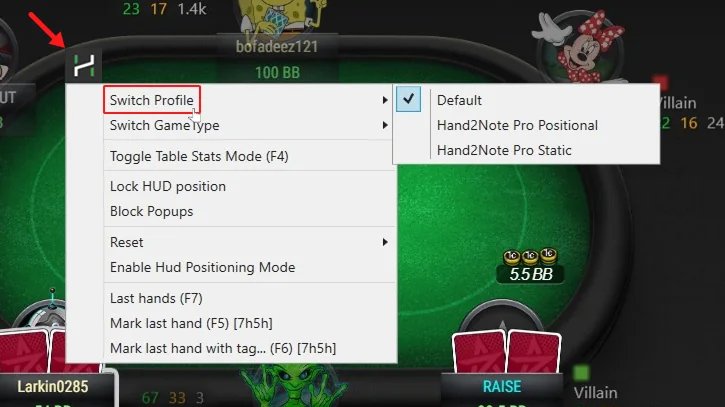
Creating a custom HUD
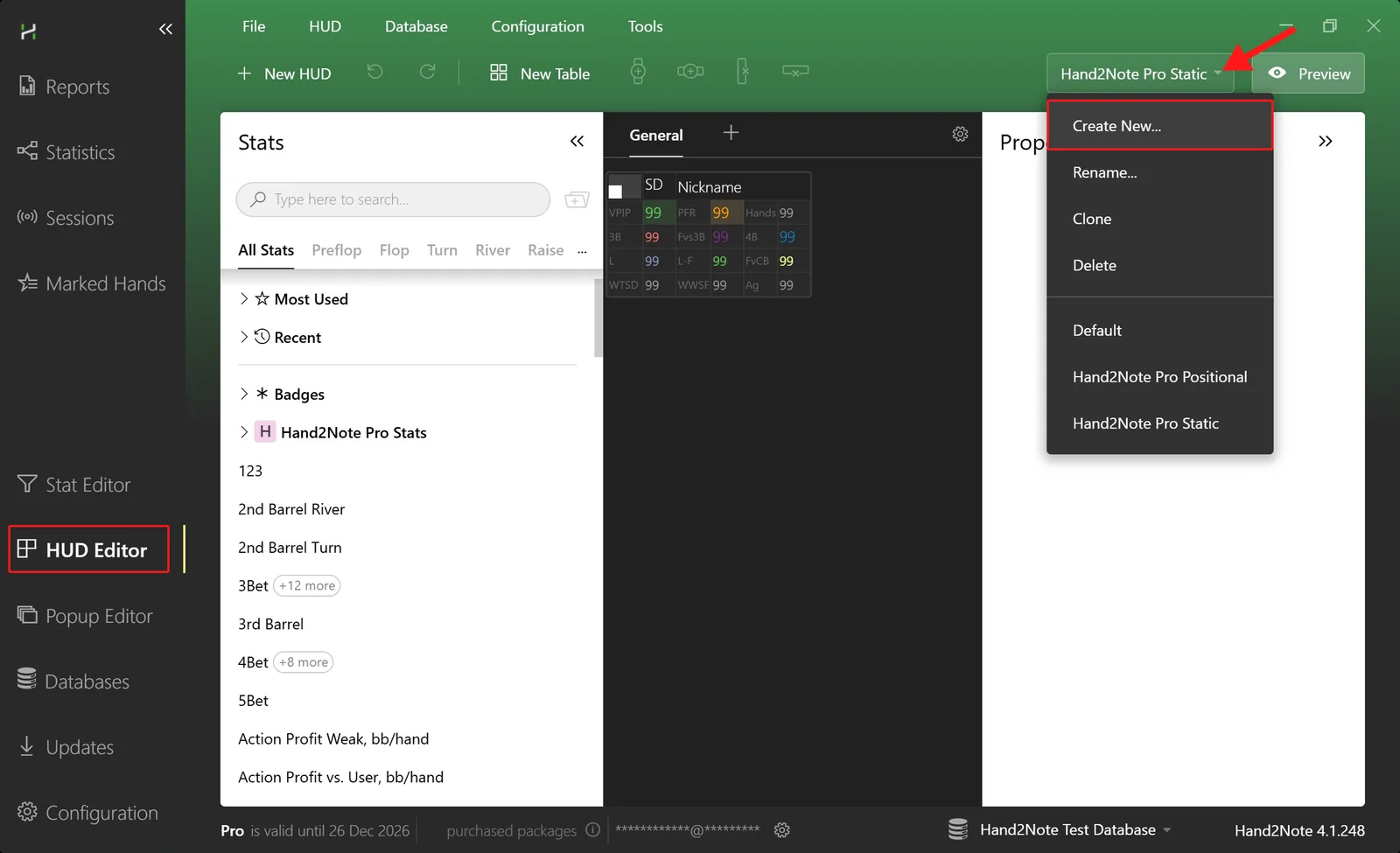
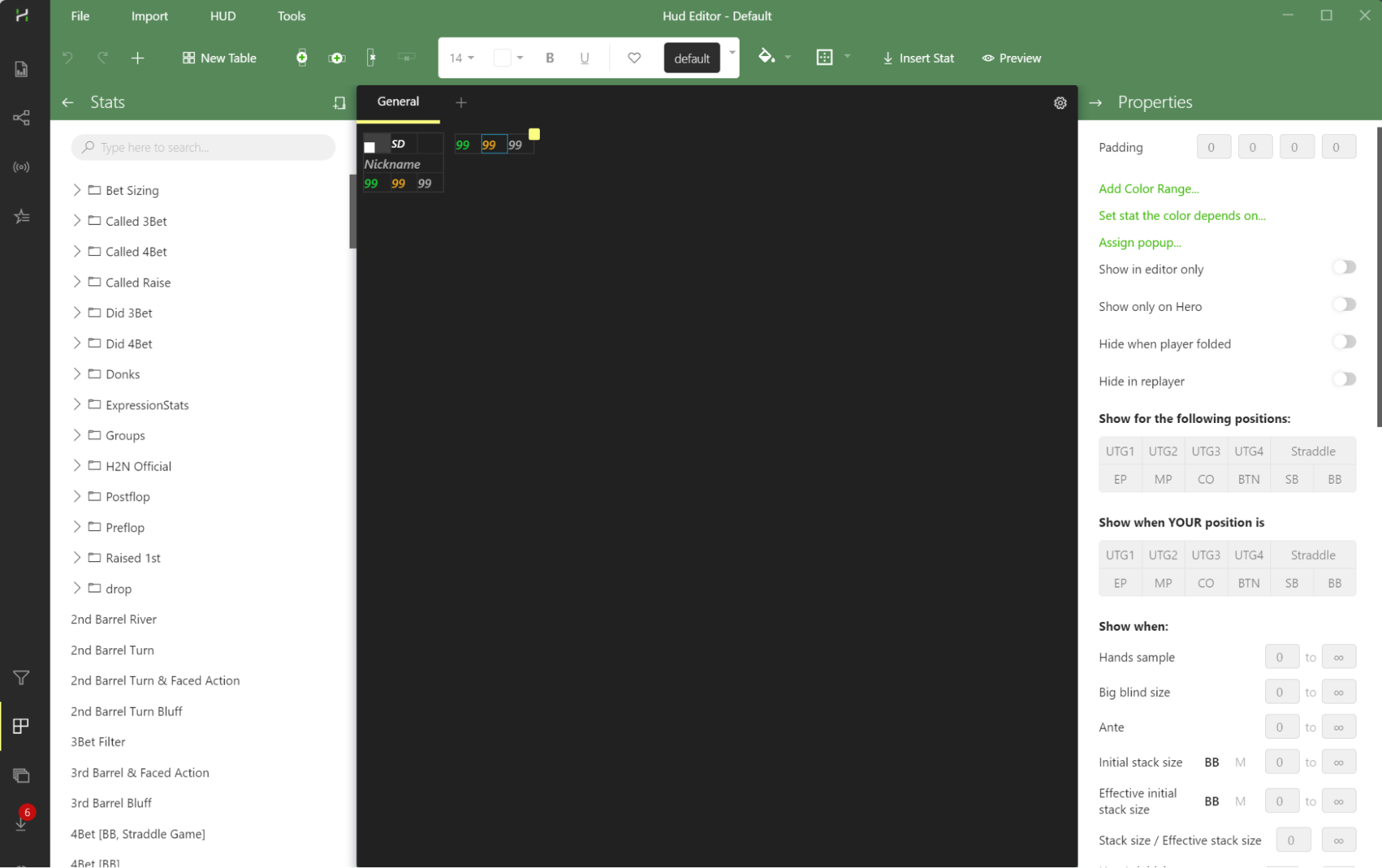
Hand2Note gives you flexible HUD settings. Use the “HUD Editor” tab to create and edit HUDs. HUD Editor gives you options to:
- Add any number of stats to a HUD;
- Create custom color templates;
- Change the stat layout in a few clicks;
- Add several stat panels;
- Control when stats appear at the table;
- Set a stat’s color based on its value;
- Make the HUD transparent so it distracts you less during play.
Buy a ready-made HUD
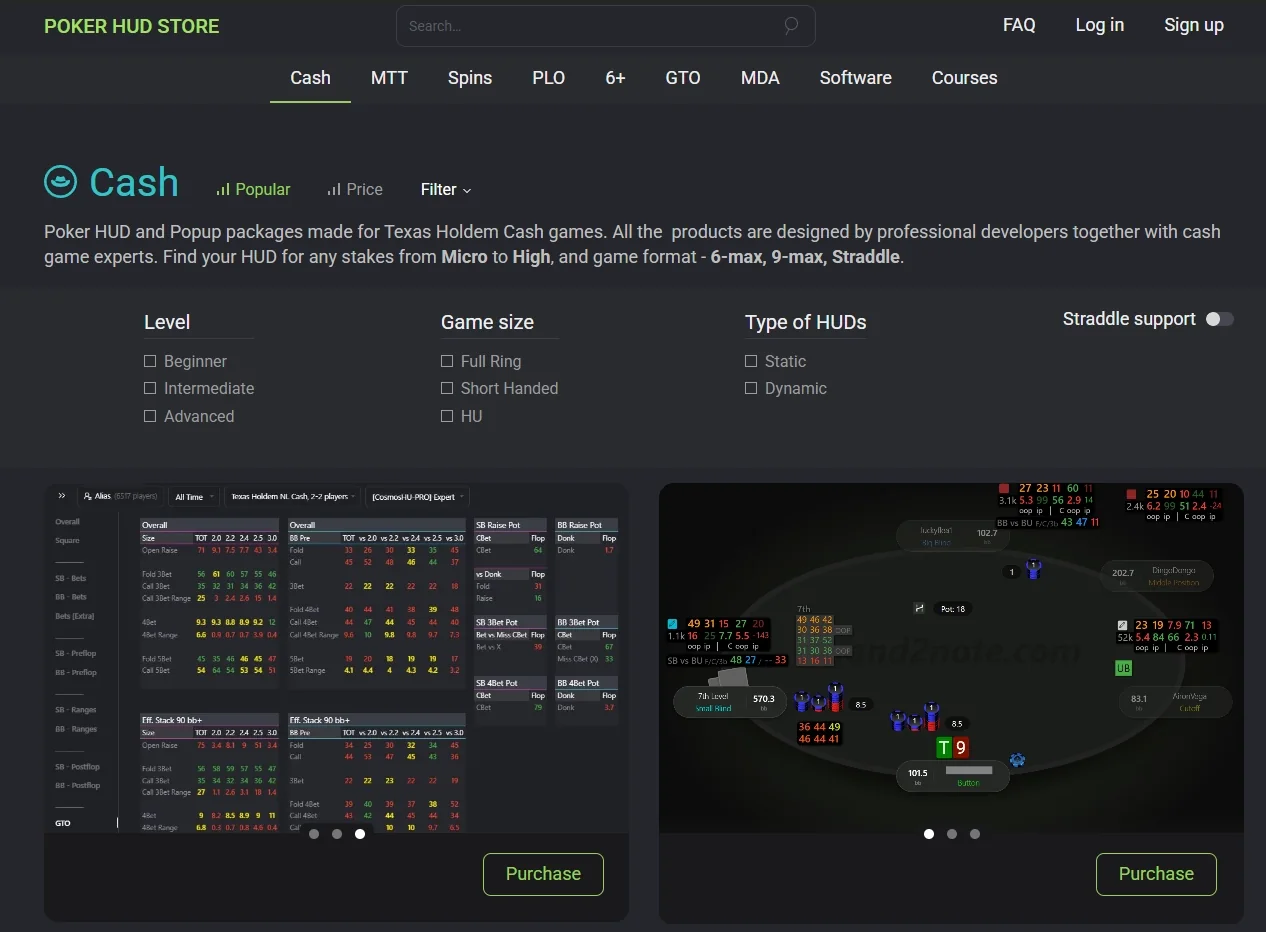
Hand2Note gives you powerful HUD tools, so there is no reason to stop at the default HUDs.
- Do the standard HUDs not fit your needs?
- Do you not have time to create a custom HUD?
- Are you not sure which stats to add to a HUD?
If yes, try a ready-made HUD from our official HUD Store, created by professionals.
Note: HUD Store offers a full refund within 7 days after purchase. You do not need to give a reason.
How to switch the HUD before you start playing?
Open the “Replayer” window to switch the HUD before you start playing. Hand2Note will then save your choice, and this HUD will appear at the tables during play.
A quick way to open “Replayer”: open the “Reports” tab, right-click a row with a compact hand view and click “Open in Replayer”.
Do I have to rebuild statistics after I switch the HUD?
No. You do not need to rebuild statistics after you switch the HUD. Hand2Note tracks this automatically, so you do not need to guess when a rebuild is required. When a rebuild is really needed, Hand2Note shows a banner.
Do I have to switch the HUD every time?
No. You only need to switch a HUD once. Hand2Note will save your choice automatically. You do not need to switch the HUD at the table again each new game.
Can I play with different HUDs at the table on different poker sites?
Yes! To do this, change the categories in the “Game Types” section and switch the HUD for each poker site. For example: “Hand2Note Pro Static” HUD for PokerStars; “Hand2Note Pro Positional” HUD for ClubGG.
I switched the HUD at the table, but now nothing appears
This may happen because the HUD has dynamic filters that show some stats or panels only at certain points during play. The standard “Hand2Note Pro Positional” HUD has such filters too. PokerStars, iPoker, and Winamax do not allow dynamic HUDs during play.
Why does the program ask me to buy a HUD if I already have a subscription?
If the message “The package is not purchased” appears at the table, check which email you used to buy the HUD. A Hand2Note subscription and a ready-made HUD license are separate. The HUD license only works with the same email as your Hand2Note account.
A ready-made HUD does not work without an active Hand2Note subscription.
Source: Hand2Note — Switch HUD in Hand2Note.
Hand2Note Reports and Smart Reports
Track winnings, filter any spot, let Smart Reports pick the stats that matter, build custom filters and move between spots in a few clicks.
Off the tables: analyze and improve your strategy
While Heads-Up Displays, or HUDs, are mostly used during actual poker games, reports come into play for analyzing and improving your strategy off the tables.
Track your winnings
How much money have you won or lost this month? Did you play poorly, or were you just hit with a streak of bad luck? What’s your actual win rate? And should you be playing fewer or more tables at once? Find the answers to all these questions in Hand2Note reports.
- Open the Reports tab.
- Make sure your Username is selected. Use aliases if you play under multiple usernames on the same poker site.
- To display the winnings graph, click on the ‘Graph’ tab.
The graph displays four lines:
- Amount Won, the green line, shows your total winnings.
- All-in EV (Expected Value), the yellow line, shows you All-In EV winnings.
- Won without Showdown, the red line, shows how much money you won in hands where you didn’t get to showdown.
- Won at Showdown, the gray line, shows how much money you won in hands where you went to showdown.
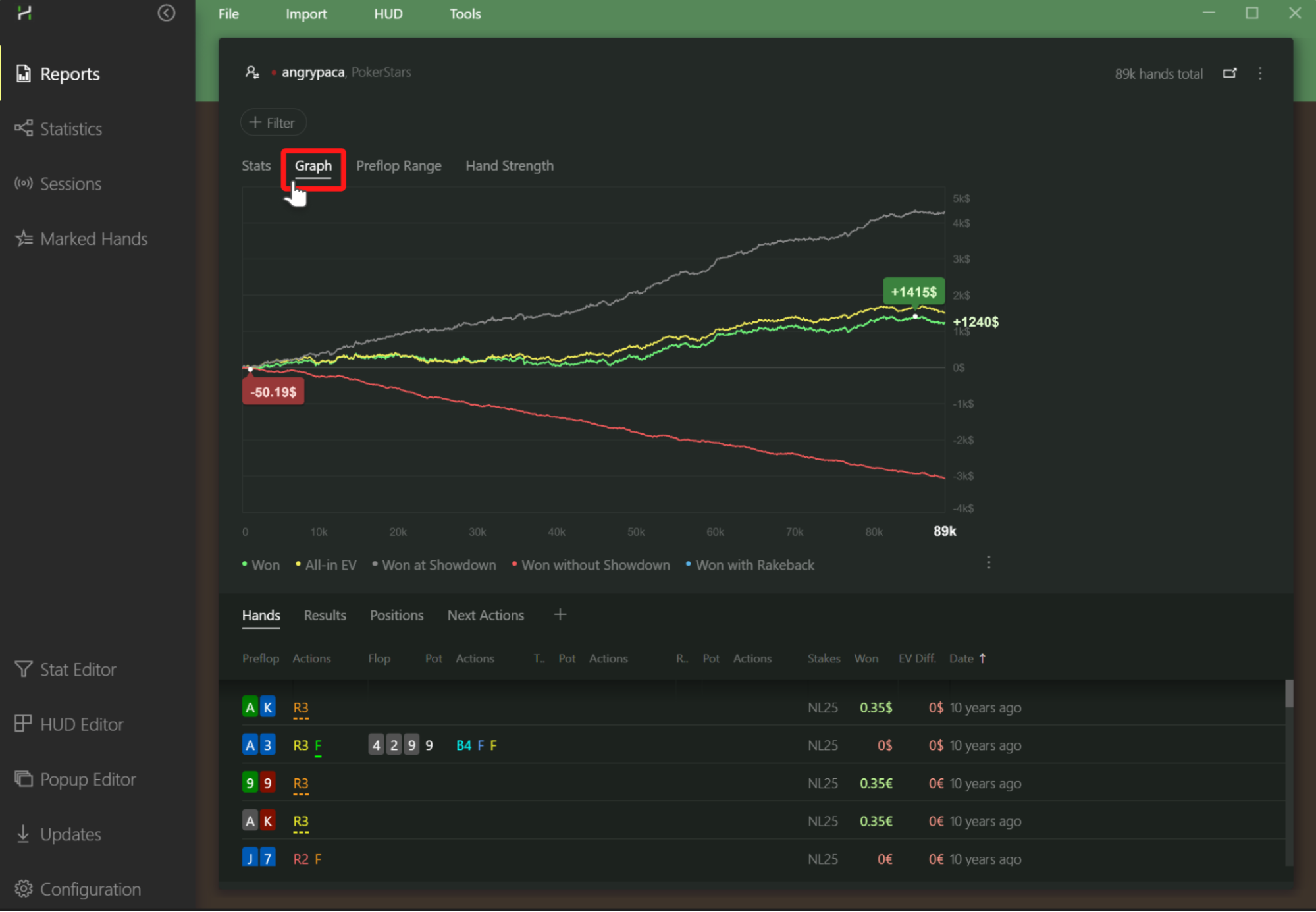
Tip. You can get immediate insights into a player’s style by just looking at their ‘Won without Showdown’ line, also known as the red line. If this line is going up, they’re likely bluffing too much. On the flip side, if it’s going down, they’re probably playing more passively.
In reports, you examine your winnings based on a variety of factors, including time period, session length, tournament type, stakes, time of day, and even the number of tables you’re playing at once.
Filter poker hands to examine and improve your strategy
Say, for instance, you feel uncertain about your strategy with 3-bet hands. First, filter out the hands where you’ve made a 3-bet. Second, review them one by one in the hand replayer.
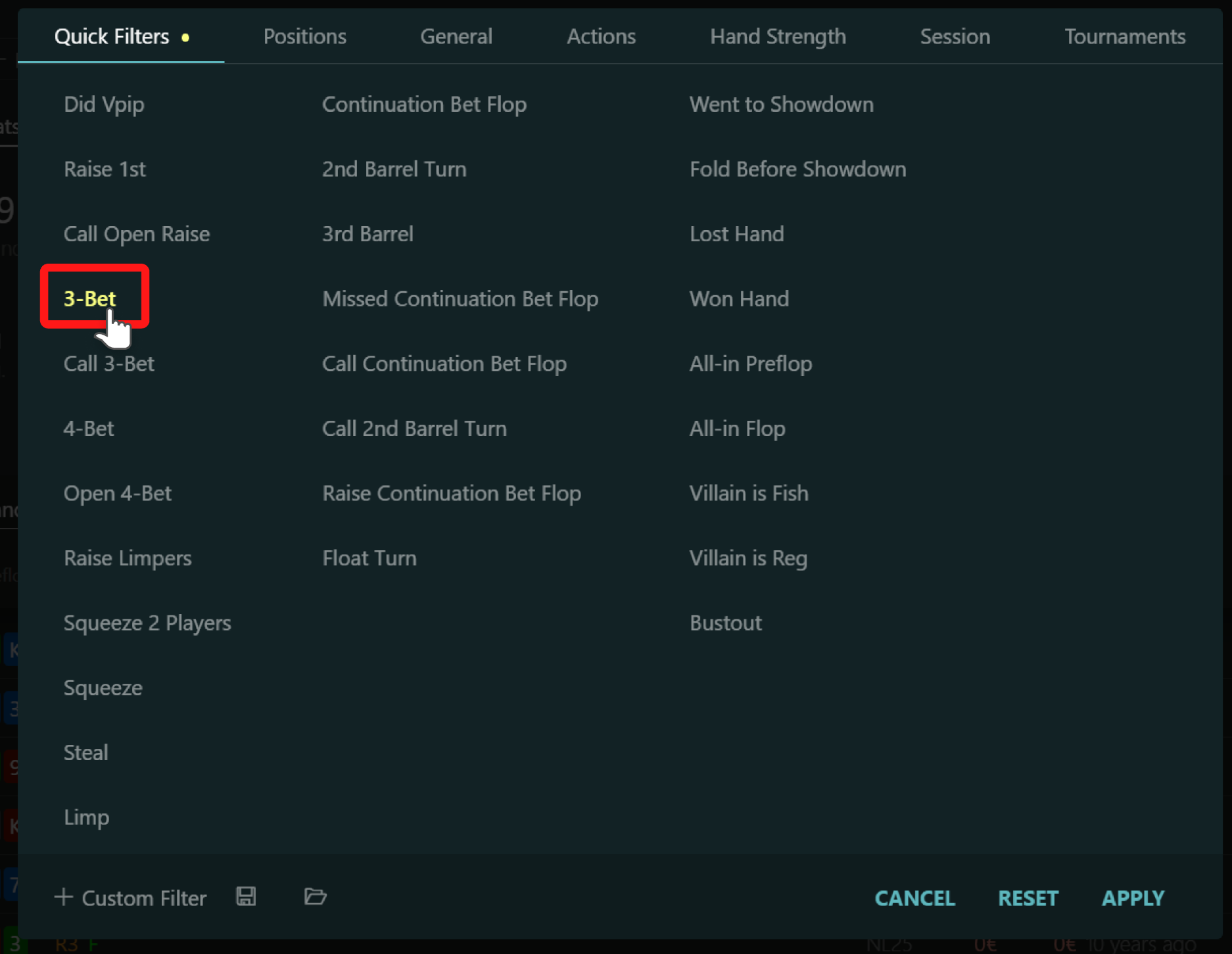
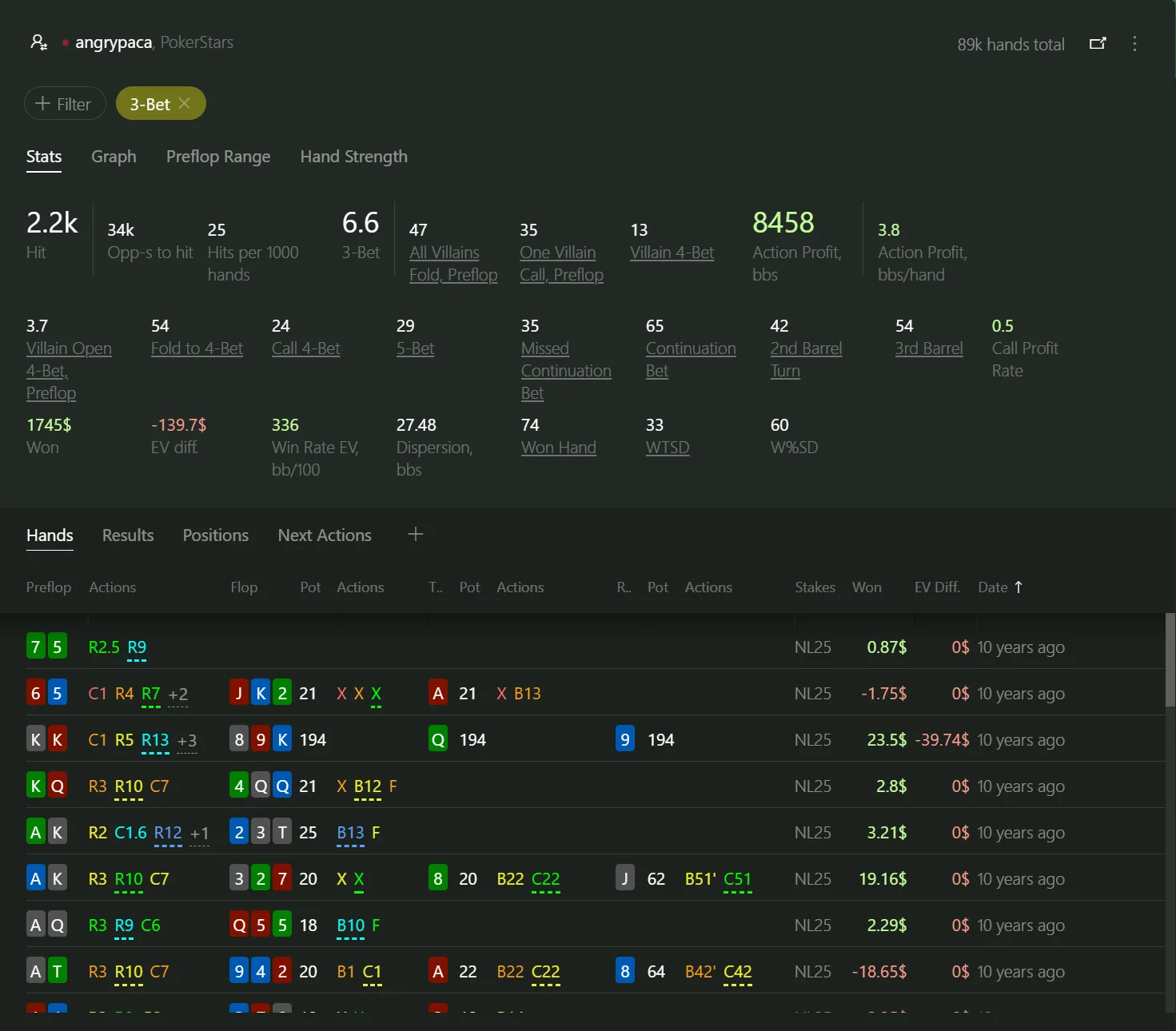
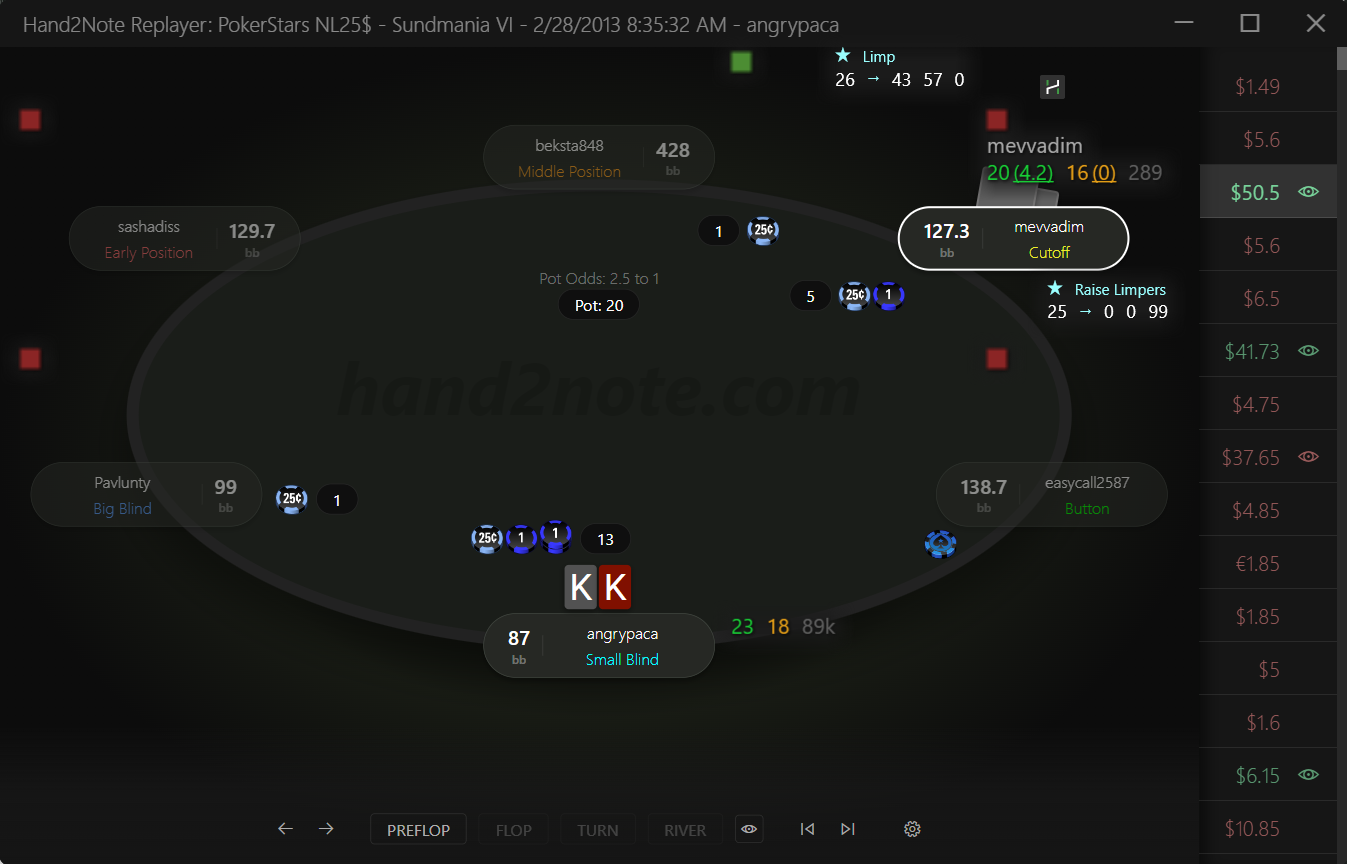
Hand2Note boasts the most flexible hand filtering system on the market. Many poker pros find the Custom Filter feature as the standout element in the latest Hand2Note release.
FAQ. How can I save a hand filter? To save a hand filter, click the ‘Save’ icon at the bottom of the report filter dialog. Then, choose the destination file.
Why do we call reports in Hand2Note smart?
Smart reports in Hand2Note are yet another tool to sharpen your exploitative strategy. By recognizing the stats you’re most interested in, smart reports streamline your analysis and decision-making.
Basically, the reports are “smart” because Hand2Note figures out the stats you care about. When you select a filter, you’re telling Hand2Note which spot you’re looking for. Then, Hand2Note picks the stats that match that situation and shows them to you.
Obviously, when you select the ‘Raise Continuation Bet’ filter, you are likely not interested in stats like VPIP, PFR, Total Hands Played, or your hourly win rate. Instead, you would be interested in stats that are more closely related to raising a continuation bet, such as Fold to 3-bet, Check Turn, and so on.
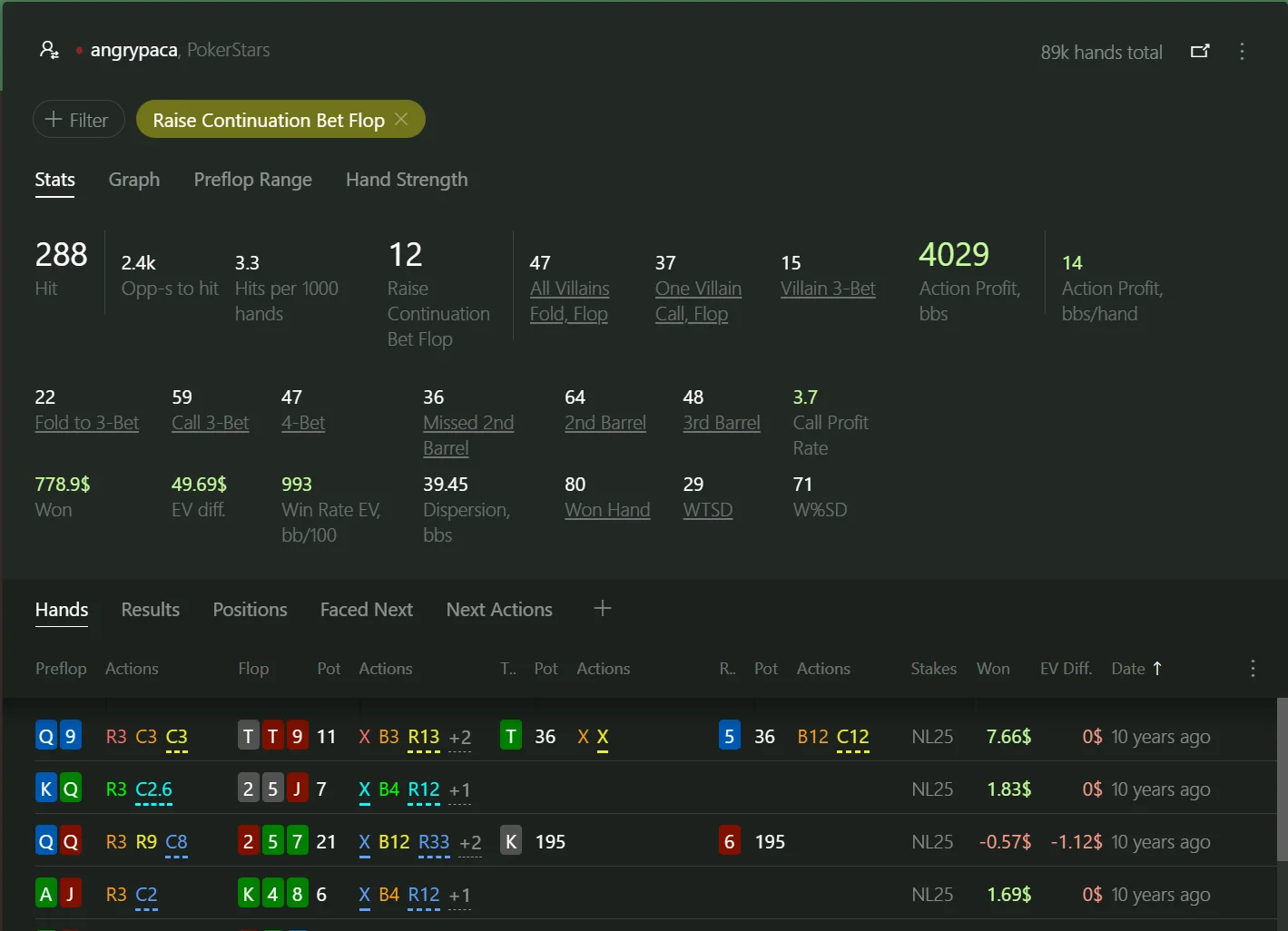
Hit · Opp-s to hit · Hits per 1000 hands
Hit shows how many hands hit the filter. Opp-s to hit stands for opportunities to hit. Hits per 1000 hands shows how often you find yourself in this situation.
Action Profit · Call Profit Rate
The EV, or Expected Value, shows how profitable the action was. The Call Profit Rate shows how many big blinds you win when you call a continuation bet instead of raising it.
Won · EV diff. · Dispersion
EV diff. stands for Expected Value Difference. Dispersion, bbs: the higher dispersion the bigger are swings: you could win big, but you could also lose big.
Go even farther
With Faced Next and Next Actions report you can easily navigate between related spots.
Do smart reports work with a custom filter?
Yes, smart reports do work with a custom filter. Hand2Note selects a set of related stats based on the filter definition, and this is not limited to just a predefined set of filters.
Source: Hand2Note — Smart Reports, Reports.
Custom Filter in Reports
The most flexible filtering system
Many poker pros find the Custom Filter feature as the standout element in the latest Hand2Note release. With this feature, Hand2Note has got the most flexible filtering system among all poker reporting software.
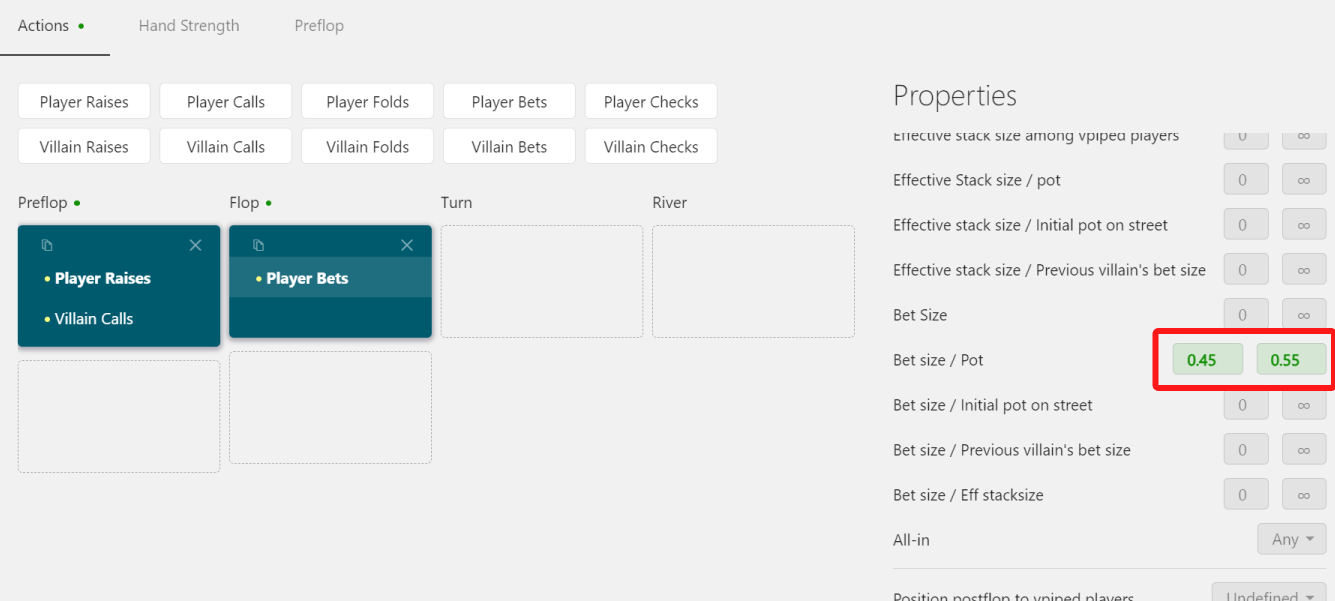
Usually, you select filters from a set of predefined filters or options. But what if you need something much more detailed and precise? In this case, the Custom Filter comes in handy. For example, the manual filters the following hands:
- I made a continuation bet in a raised pot
- I was heads-up on flop
- My bet sizing was half a pot
- I did it against a regular player
Select the Player Bets action and set Bet size / Pot in range from 0.45 to 0.55. This selects only the hands where the player bet an amount equal to half of the pot.
There are a few key points about Hand2Note here. First, Hand2Note works fast. Even with millions of hands in the database, it applies a custom filter in seconds. Second, Hand2Note computes a bunch of additional stats based on the filtered hands. This includes stats like how often everyone folded to your bet, how often you folded to a raise, and dozens of other stats.
FAQ. Why do we need to include only bets against regular players? Because people might play very differently against weak amateur players compared to regular players like you. In real-life scenarios, we want to figure out how others play against people with similar experience and skills to ours.
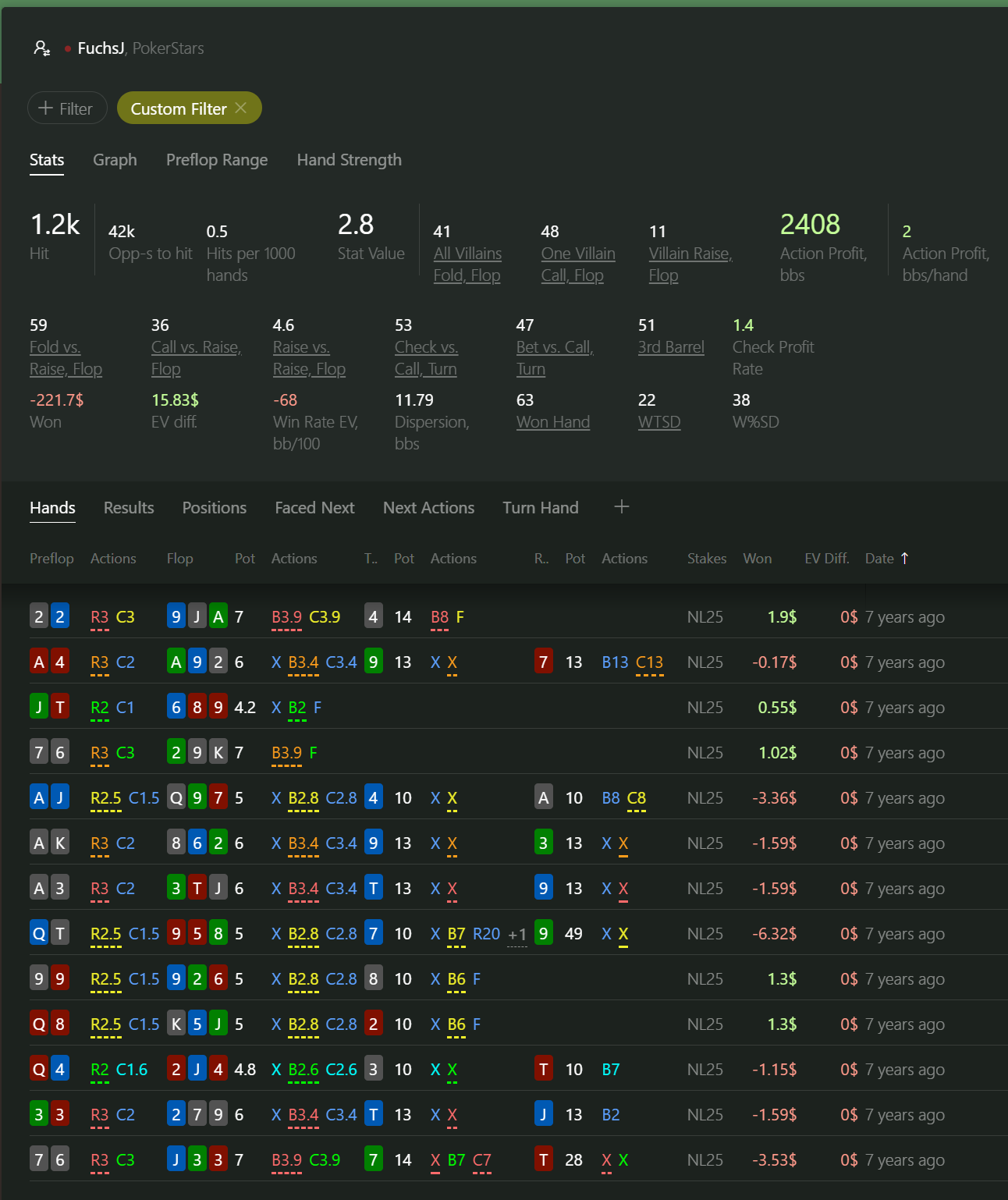
Source: Hand2Note — Custom Filter in Reports.
Navigate between ‘spots’ with ease
We built Hand2Note to be user-friendly. We aim for you to spend less time fiddling with filters and more time diving into stats and strategy. That’s where our interactive filtering system really shines.
- Interact with a stat. Click on a stat to filter the hand that hits this stat.
- Interact with a preflop range. Click on a Preflop Heat Map to filter specific preflop hands.
- Interact with a postflop range. Click on the Postflop Histogram to filter out all postflop hand values except the selected ones.
- Go to the next faced action. The Faced Next report splits hands based on the action you have faced in them.
- Go to the next action. The Next Actions report splits hands based on the action we took.
By chaining the actions one after another using the Faced Next and Next Actions reports, you reveal the true power of these features.
Compare reports side-by-side
Display, for example, your Open Raise ranges from two different positions side-by-side: select the Raise 1st filter and MP (Middle Position) filter, open the Preflop Range tab, click the Pin button in the report menu, and switch the filter on the first panel to BTN.
Tip! Use the side-by-side comparison when you are comparing the stats of two different players or player groups.
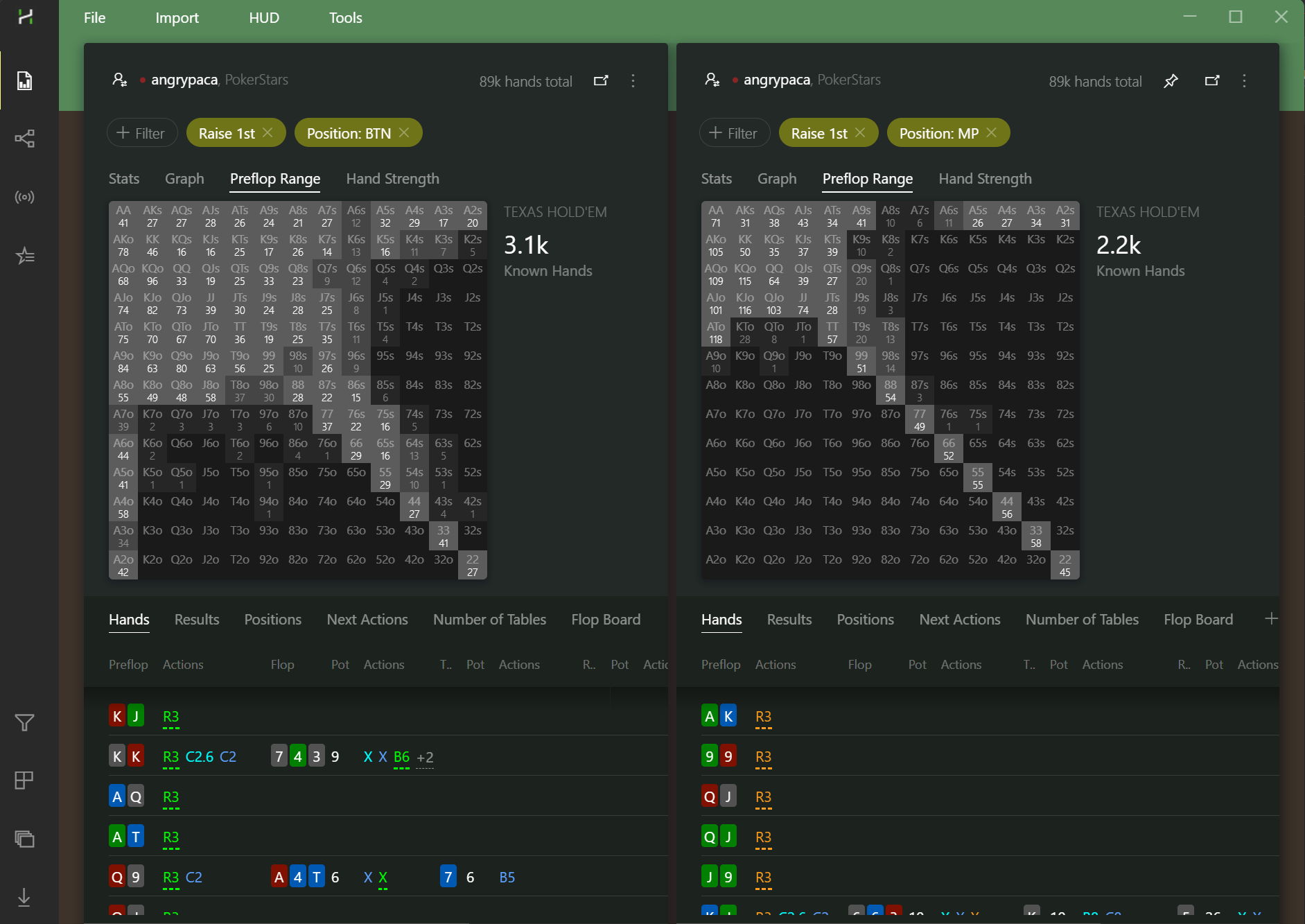
Source: Hand2Note — Reports Navigation, Reports.
Action Profit: find actions with negative EV
Action Profit shows the profit of each decision regardless of the hand’s outcome, so you can see which bets, calls and checks actually make money.
What is Action Profit in Hand2Note?
Imagine you play at the tables and someone tells you the exact profit of your every action, regardless of the hand’s outcome. Hand2Note’s Action Profit feature brings you closer to that dream goal.
Action Profit is the amount of profit that a player earns from a specific action like calling, raising, betting, etc.
For example, the pot is 10, you bet 5 and everyone folds. The profit of your bet is 10. Another example, the pot is 10, you bet 5, another player raises, and you fold. In this case, your bet profit is negative, equaling -5.
Since folding doesn’t generate profit, the action profit of a fold is always zero.
How does Action Profit boost your win rate?
Action profit is like your poker cheat sheet; it shows you where you can tweak your game to take advantage of others.
The main idea is that playing an optimal strategy, also known as a GTO (Game Theory Optimal) strategy, isn’t always the most profitable way. Instead, you should aim to exploit your opponents by playing an unbalanced but exploitative strategy. It works as long as your opponents don’t react appropriately to those unbalanced exploits in your game.
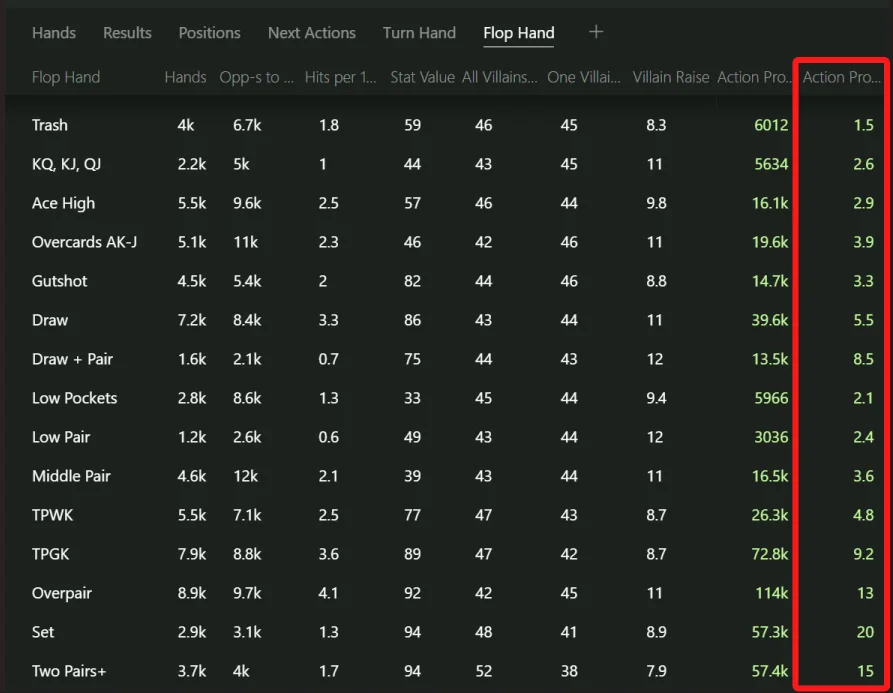
Compare profits between alternative actions
Is there a way to make even more? What if checking could be even more profitable? Pin the Continuation Bet report, change the filter in the first report to Missed Continuation Bet, and compare the reports side by side. The last column shows action profits for each category of hand value on the flop.
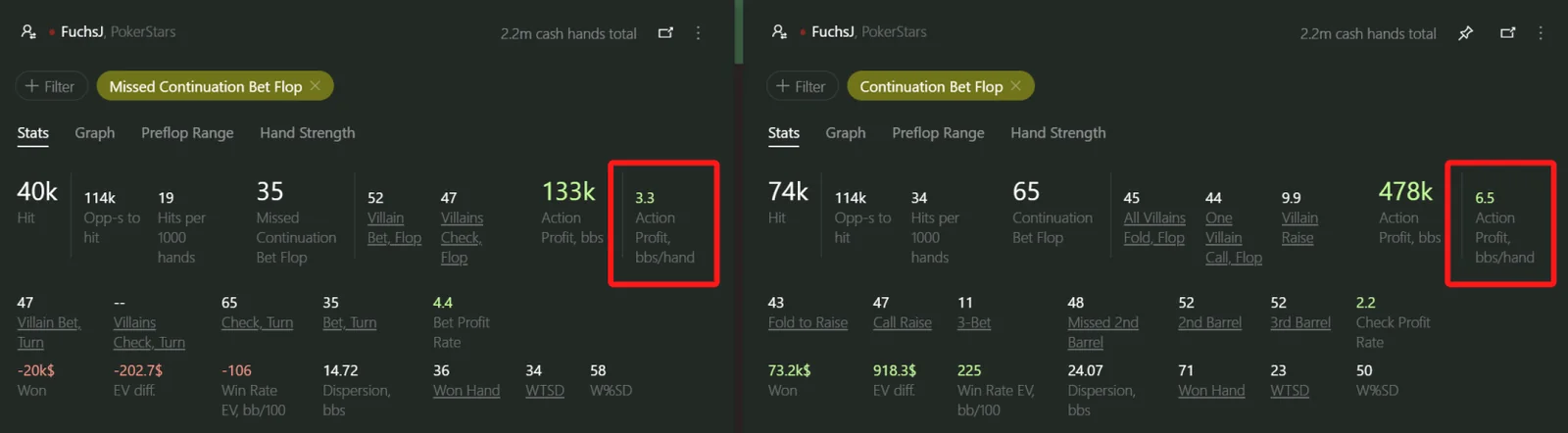
The action profit from a check is 3.3 big blinds, which is only half as much as the profit from bets, which stands at 6.5 big blinds. Prefer betting over checking more often.
Comparing profits from betting and checking for every ‘bluff’ category, ranging from trash to draw: betting with a draw or an ace high is more profitable than checking.
Most surprisingly, checking with a value hand turned out to be more profitable than betting! Every check with an overpair gives 16 blinds, while betting with an overpair gives just 13 blinds.
How is it that slowplaying works better?
Because slowplaying is an exploit that works at these stakes. Playing GTO, you can’t slowplay strong hands and bluff with weak hands too frequently. However, the reality is that opponents at these stakes don’t care whether you follow the GTO strategy or not.
By bluffing more with weak hands and slowplaying stronger hands, you can take advantage of opponents’ lack of experience. They simply aren’t skilled enough to recognize an unbalanced but more exploitative strategy against them.
Fix leaks in your game that cost you money
Professional poker players dedicate hundreds of hours to analyzing poker hands. They identify and patch up ‘leaks’ in their game. ‘Action Profit’ is one such indicator. If the profit is negative, you should revise your strategy.
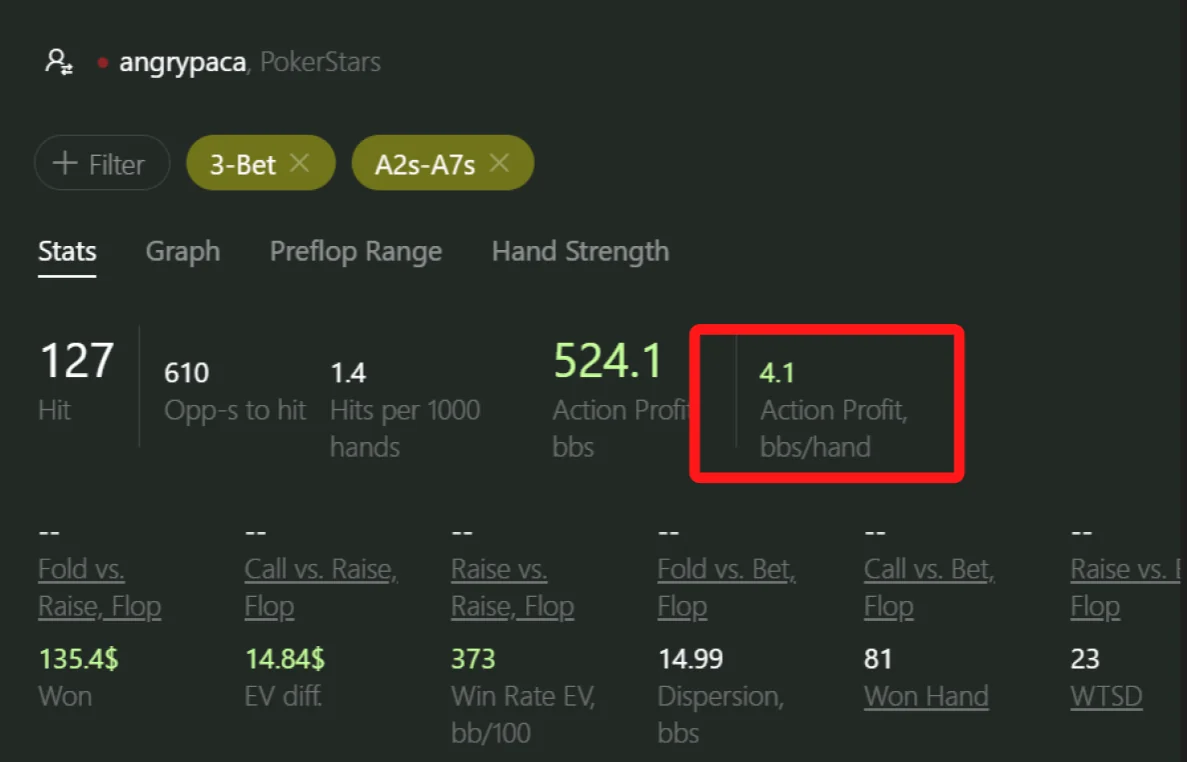
Source: Hand2Note — Action Profit, Reports.
Interactive Statistics and Multi-Player reports
Click any stat, range or histogram to dig deeper, then aggregate whole player groups to see how your pool really plays.
Interactive Statistics
Explore a broad range of spots all at once
While Reports are tailored for diving into specific situations and analyzing them in detail, the Statistics tab takes a different approach. It’s your go-to tool for exploring a broad range of spots all at once, even when you’re not exactly sure what you’re seeking.
In the Statistics tab, you enter the exploration mode. You scan through the data to uncover unbalanced or weak points in your opponents’ play. Ultimately, your goal remains the same: finding ways to exploit at the tables.
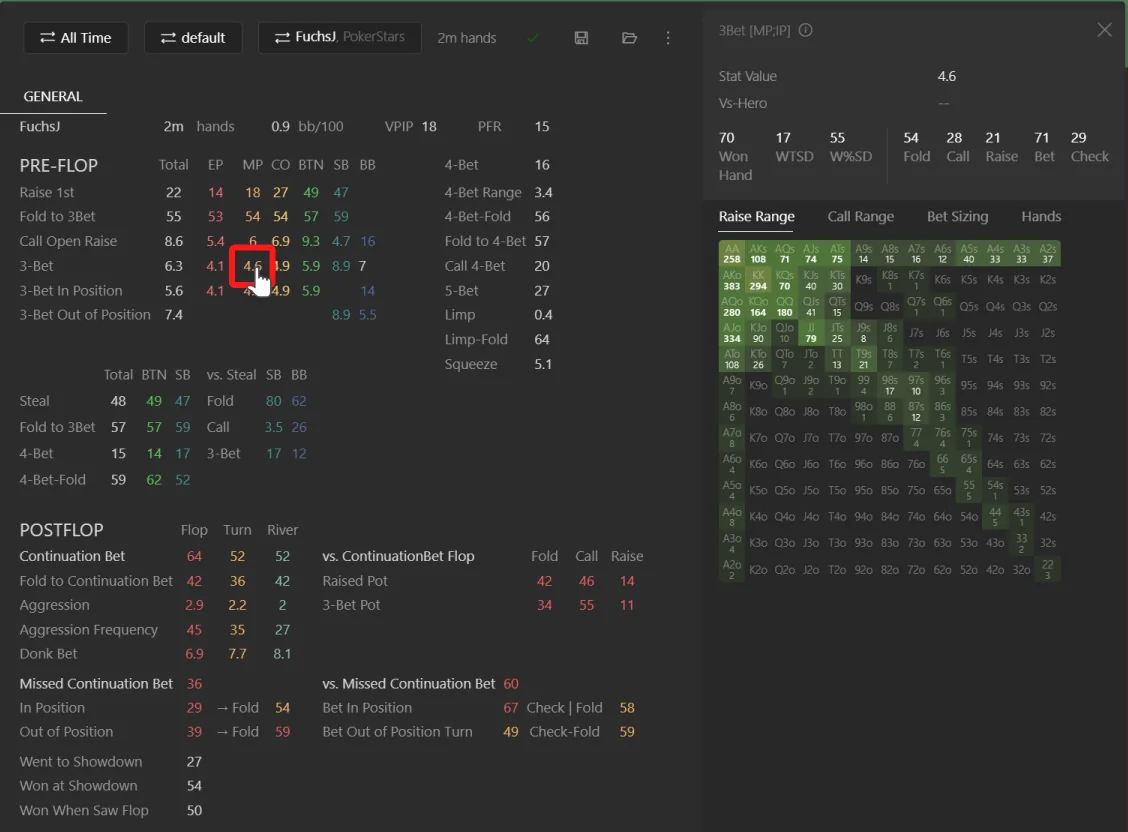
Click on the 3bet from MP stat, which stands for the middle position stat.
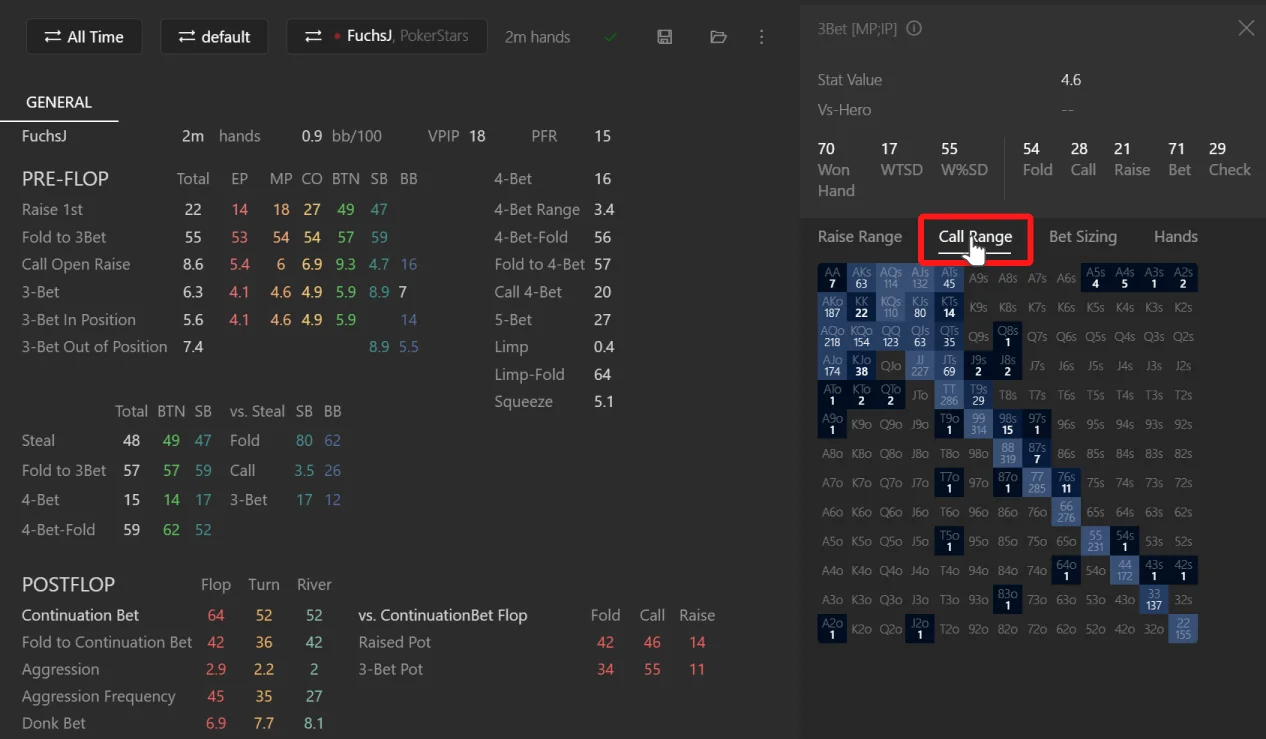
By clicking Call Range, you can immediately compare his 3-bet range with his ‘Call Open Raise’ range.
Tip. By comparing the raise and call ranges in the same spot, you gain insights into whether the player or player group balances their strategy. Click on the cell in the range to open list of corresponding hands, and double click on any item in the hand list to open the Hand Replayer.
Know how often your opponents bluff
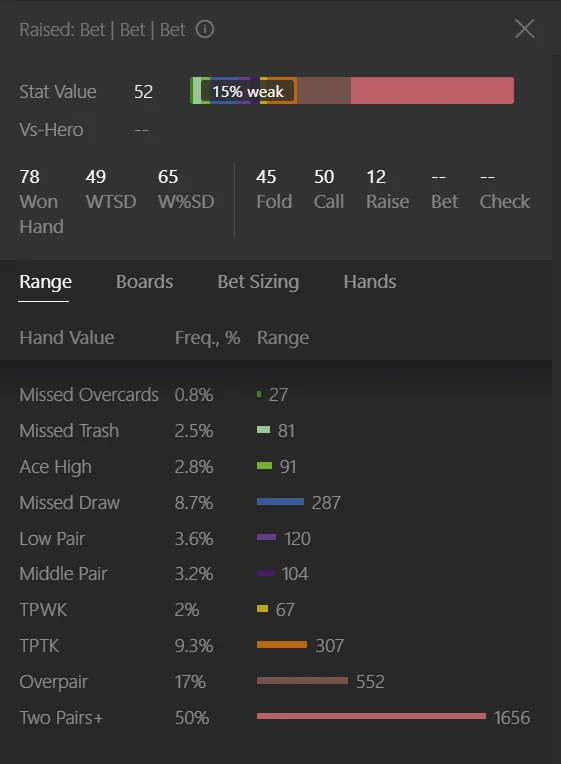
Study postflop ranges in different spots to find the percentage of weak hands in the ranges of your opponents. For bets and raises, weak hands usually mean bluffs or semi-bluffs.
A weak hand is typically something less than a middle pair. Postflop histograms display the percentage of these weak hands within the range. You can use this indicator to quickly identify potential exploitable situations when the proportion of weak hands is either excessively high or low.
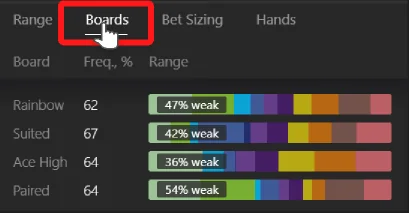
Examine actions by board
By default, you have just a few board categories in Hand2Note. However, you can add up to 256 board categories in Configuration → Board Categories.
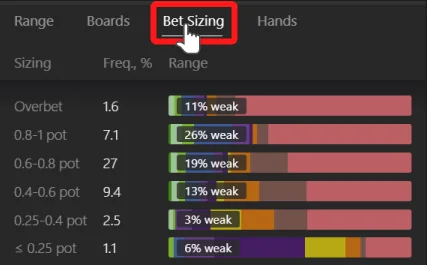
Split postflop ranges by bet sizing
In the example, we see that the player mostly overbets with strong hands. It’s an exploitable read!
Build an exploitative strategy with Multi-Player reports
In contrast to optimal strategy, also known as GTO strategy, exploitative strategy is much more profitable against less experienced or weaker players who frequently make mistakes.
Create reports for the entire player group rather than for a single player. We call it a Multi-Player report. Use this feature to discover the most exploitative strategy against your competition.
For example, to see how top winners play at your stakes, open the Player Dialog in the report, and in the Multiple Players tab set “EV Win Rate” to five or higher and “Hands” to 1000 or more. The resulting report shows stats of top winning regular players whose win rates are five big blinds per 100 hands or higher.
Note! Multi-Player reports can have millions of poker hands. No worries, Hand2Note handles all that data within seconds.
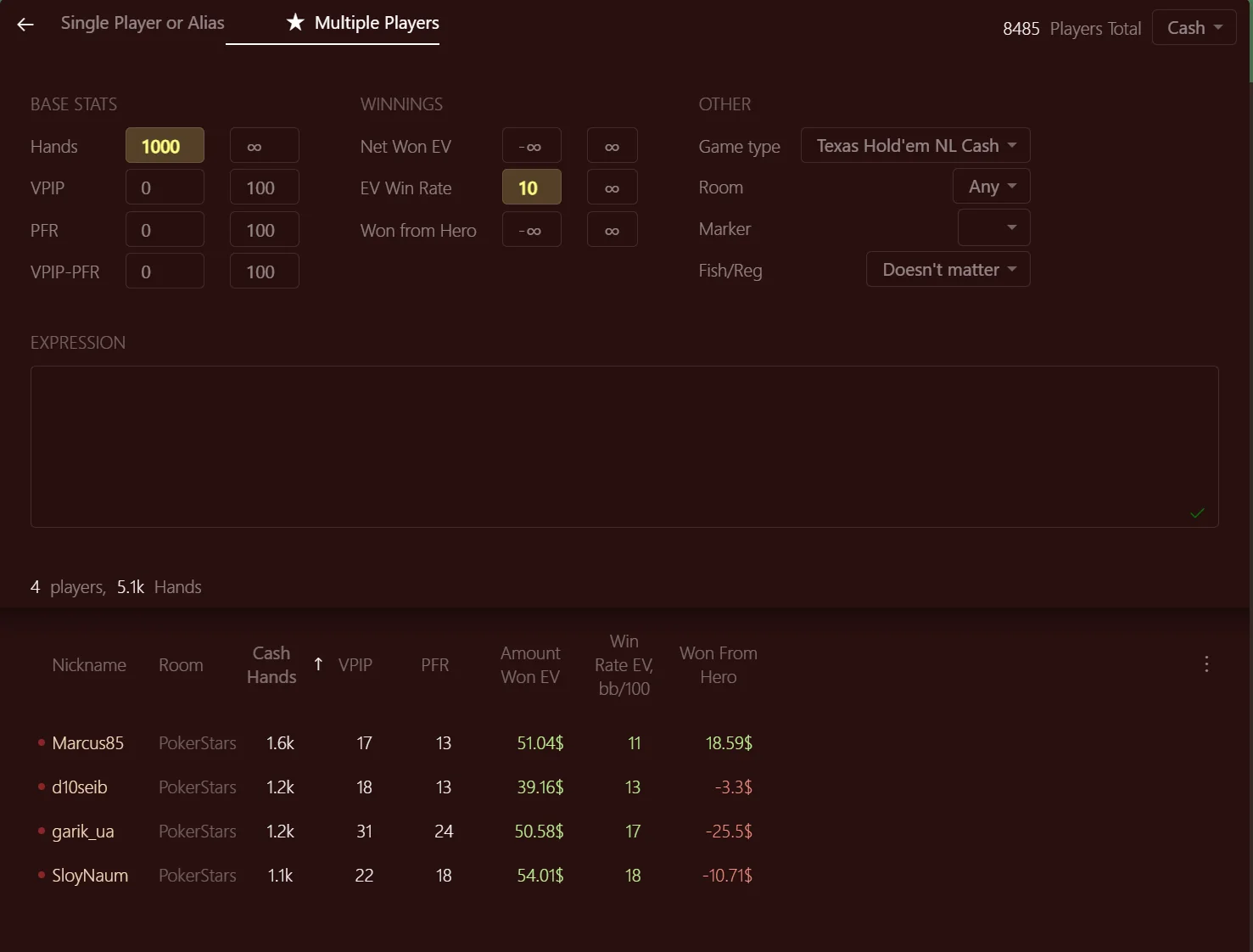
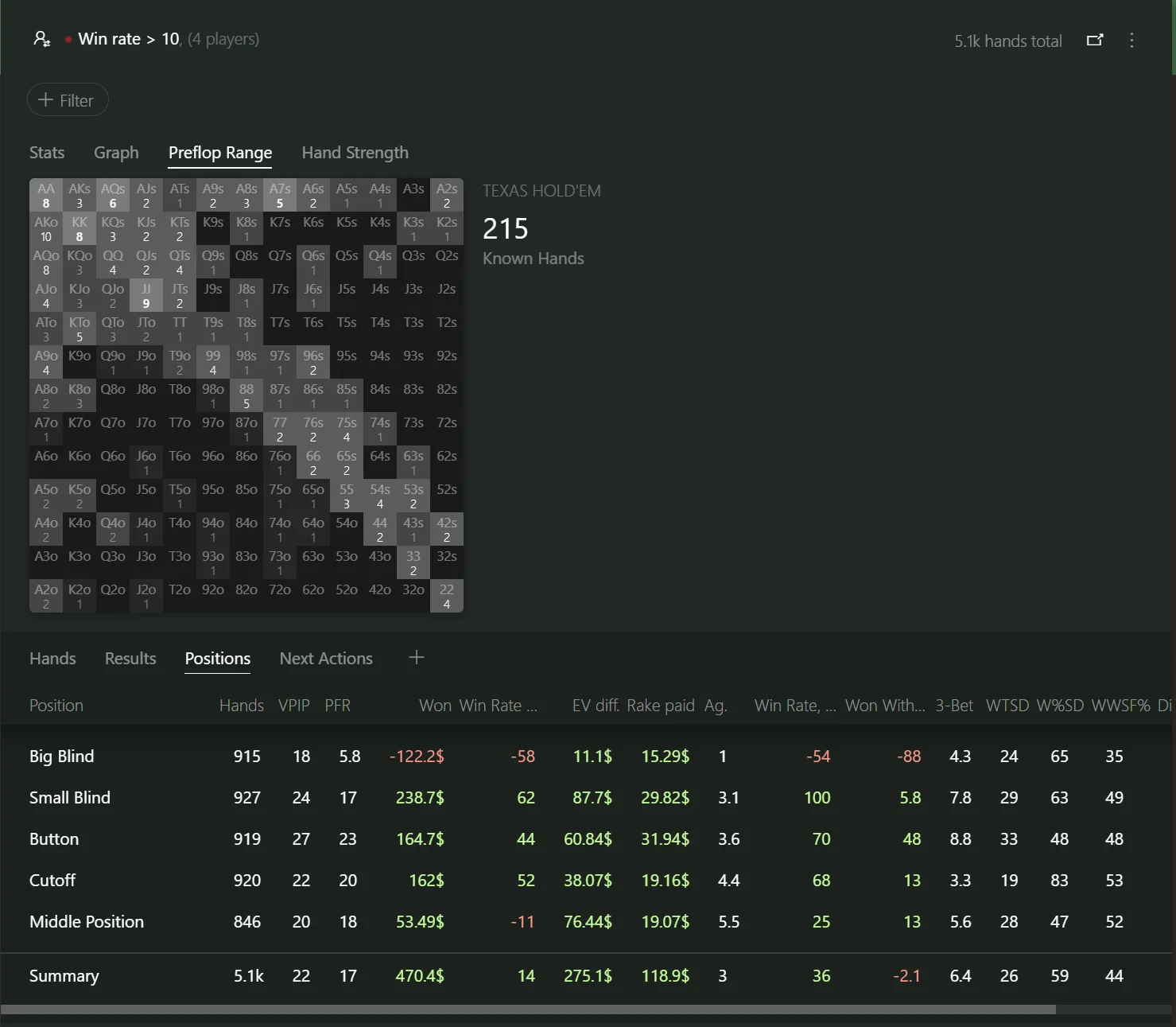
Many poker professionals regard it the most powerful feature of Hand2Note. By studying stats of player groups, they craft an exploitative strategy and boost their win rates.
Regular vs Regular Statistics
If needed, Hand2Note can exclude hands played between regulars and recreational players. This gives you cleaner, more accurate stats on how regulars play against each other.
Interactive Statistics
Explore population tendencies, focus on specific player groups, find exploits, and work with data in the dedicated Statistics section.
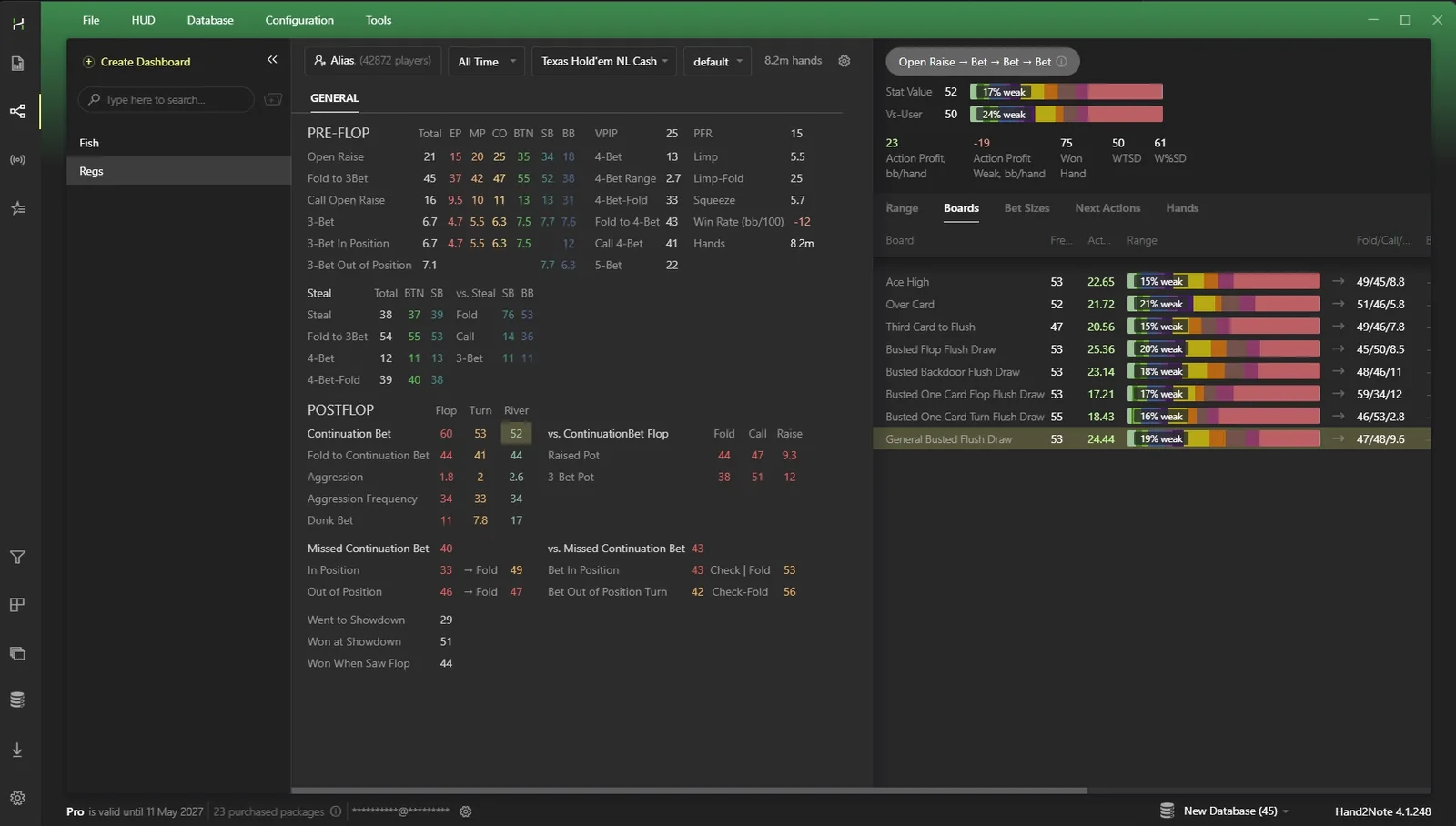
How do I select stats for a specific time period?
You can track statistics for specific periods, uncovering the shifts and trends in your or your opponents’ strategy.
How do I use different profiles for stats in the Statistics tab?
Switch profiles in the Profile Menu.
How do I Save & Load heavy multiplayer reports?
Click the Save icon to save the report. To load the report, click the Open Report next to the Save icon and select the report.
How do I switch between Cash and Tournament mode?
Switch between Tournament and Cash mode in the Players Dialog.
Source: Hand2Note — Interactive Statistics, Reports, Switching to Hand2Note.
Notes in Hand2Note
Hand into Note, predefined note templates, notes bound to stats, and the compact hand view used across the app.
Have you ever wondered why our product is called Hand2Note?
Notes and reads play a crucial part in building an exploitative strategy in poker. We designed Hand2Note for taking and managing notes efficiently. Helping you to build an exploitative strategy is a core value of Hand2Note.
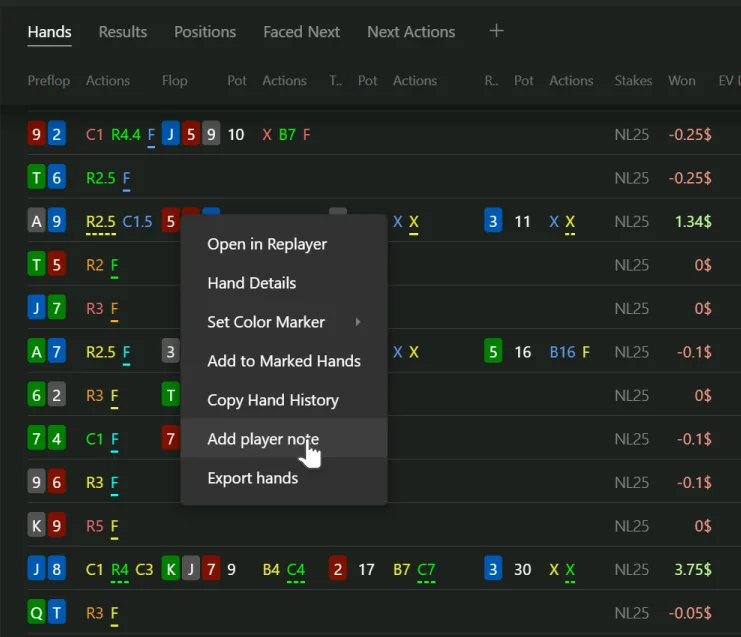
Inserting a hand into a note was one of the first features of Hand2Note in its early days. Right click on a hand view to open the context menu and select ‘Add to Note’. Hand2Note automatically preselects the target player for whom you are saving the note based on the actions in the hand.
Every good poker player has its own set of typical reads and notes. Create your own list of predefined notes in Hand2Note. For example, the note “Overbet Bluffs” means that the player tends to bluff when he overbets. This feature saves your time when you are playing multiple tables.
If you have many notes on a single player, say ten or more, things become messy. By assigning notes to a specific stat, you organize your notes based on the situations where you might need them. For example, if you have a read on how your opponent usually makes continuation bets, you assign a note to the Continuation Bet stat.
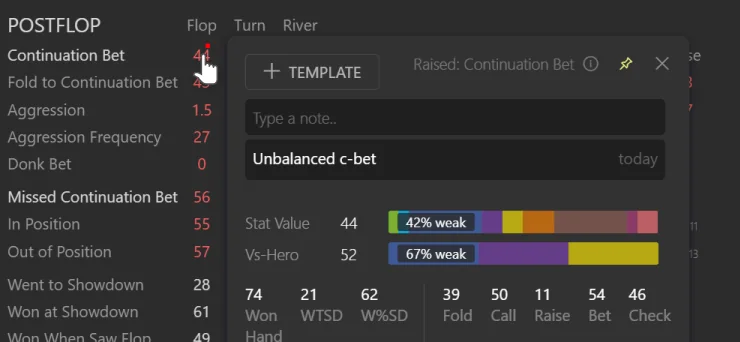
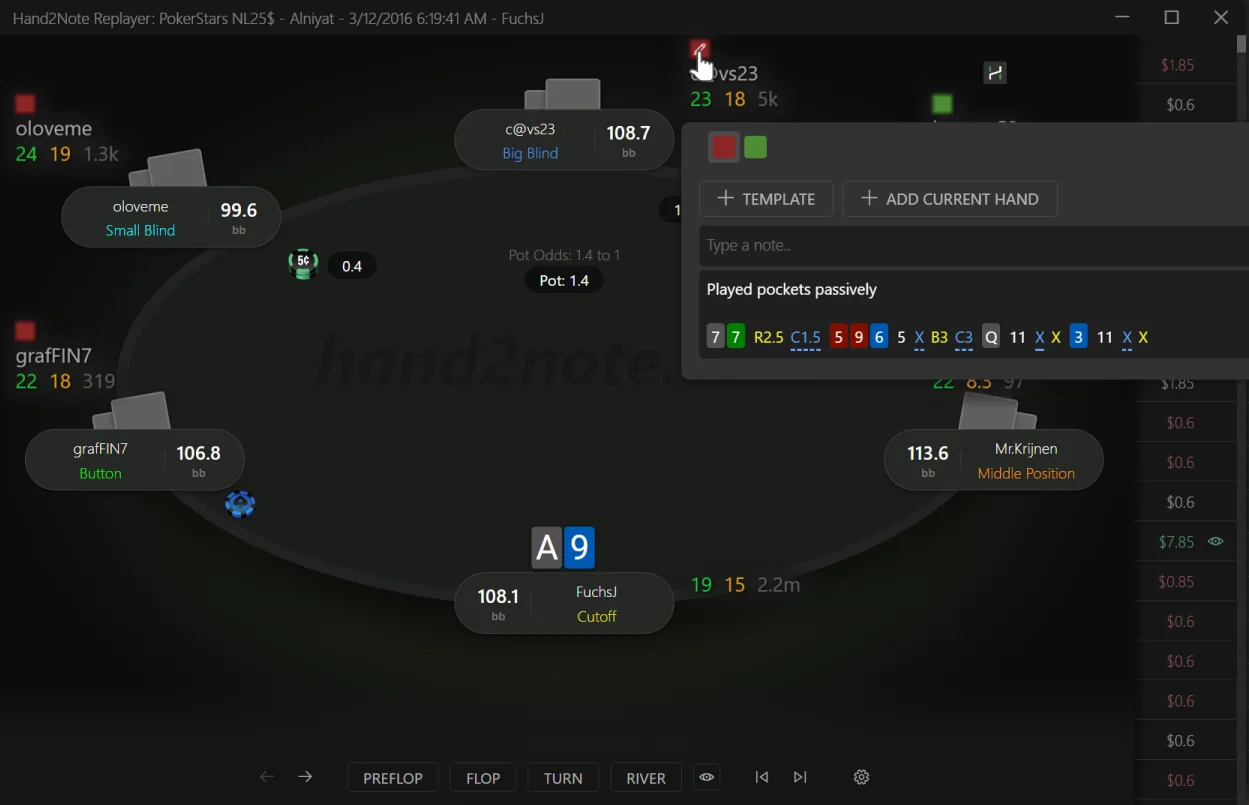
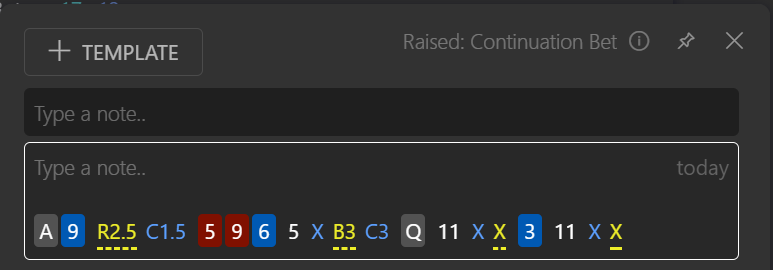
Add a hand into a note on a stat
- Right click on the hand and click Copy Hand History in the context menu.
- Open the stat popup and right click on the empty input. Then click Paste Hand History.
- The hand was added to the notes on the stat.
Your notes can be transferred as well
Importing notes is supported from Holdem Manager 3 and PokerTracker 4, so you keep everything you’ve written.
Compact Hand View
A short visual representation of a hand
In Hand2Note, we introduced a short visual representation of a hand. While taking little space on the screen, the compact hand view contains a lot of information about the actions in the hand.

Reading the example hand
| Symbol | What happened |
|---|---|
| K♦ J♠ | The king of diamonds and the jack of spades were dealt to Hero. |
| R3 | Hero raised 3 big blinds from the button position. Underlined actions are always Hero’s actions. |
| C2 | Player called 2 big blinds from the big blind position. |
| 7♥ K♠ 8♣ · 6 | The 7hKs8c flop was dealt and the pot size on the flop was 6 big blinds. |
| X · X | The player on the big blind checked. Hero checked. |
| 8♦ · 6 | The turn card was 8d and the pot was 6 big blinds. |
| B4.5 · B4.5 | The player on the big blind bet 4.5 big blinds. Hero called 4.5 big blinds. |
| T♥ · 15 | The river card was Th and the pot was 15 big blinds. |
| B86′ | The player on the big blind went all-in with 86 big blinds. The symbol “‘” means that the action was an all-in. |
| C86 | Hero called 86 big blinds. |
The ‘X’ symbol means a check. Position colors cover EP3, EP2, EP1, UTG, MP, CO, BTN, SB, BB and Straddle (STD).
Source: Hand2Note — Notes In Hand2Note, Compact Hand View.
Hand2Note vs Holdem Manager 3 vs PokerTracker 4
The full feature comparison published by Hand2Note: overall, HUD, reports, popups, notes, visualization, statistics and performance.
Hand2Note vs Holdem Manager 3 (HM3) and PokerTracker (PT4) comparison
Choosing the right poker tracking software can make or break your edge. For years, Poker Tracker and Hold’em Manager have been the go-to tools, offering nearly identical features. But poker has evolved—and so have the tools.
That’s where Hand2Note comes in, with innovative features, unmatched performance, and a fresh approach to player analysis.
H2N vs. HM3 vs. PT4: 8 groups, 50 features
- yes
- no
- partly / with add-on
| Feature | Hand2Note | Holdem Manager 3 + NoteCaddy | Poker Tracker 4 |
|---|---|---|---|
| OverallHand2Note has all the features required by a professional poker player. | |||
| HUD | yes | yes | yes |
| Popups | yes | yes | yes |
| Reports | yes | yes | yes |
| Hand replayer | yes | yes | yes |
| Omaha support | yes | yes | yes |
| Custom stats | yes | yes, in NoteCaddy | yes |
| Performance | high | medium | low |
| HUDHand2Note offers the most advanced HUD on the market. Even on sites with strict HUD restrictions, it delivers game-changing features. | |||
| Static HUD | yes | yes | yes |
| HUD from the very first hand at the table | yes | no | no |
| Last Showdown Indicator | yes | no | no |
| Auto-hides on fold | yes | no | no |
| Positional HUD | yes, except major sites | no | no |
| Dynamic HUD | yes, except major sites | no | no |
| Auto HUD | yes, except major sites | no | no |
| HUD tabs | yes | no | no |
| HUD hot keys | yes | no | no |
| ReportsHand2Note Smart Reports automatically adjust stats to your selected filters. They run fast even on massive databases. | |||
| Number of different reports | high | high | medium |
| Smart Reports | yes | no | no |
| Report Chaining | yes | no | no |
| Interactive Reports | yes | no | no |
| Multi-player reports | yes | yes, but limited | no |
| Action Profit | yes | yes, in NoteCaddy | no |
| Custom Filter | yes | no | no |
| PopupsHand2Note delivers extended popups with rich detail for every stat—fast, responsive, and fully customizable. | |||
| Popups with statistics | yes | yes | yes |
| Advanced elements in popups (ranges, hand lists, inner tabs, notes etc) | yes | no | no |
| Auto popup on every stat | yes | no | no |
| Winning graph in a player popup | yes | no | no |
| Compact Hand View | yes | no | no |
| Showdown hands right inside the stat popup | yes | yes, in NoteCaddy but limited | no |
| NotesHand2Note has the most advanced note-taking system: insert hands directly into notes, templates, and attach notes to individual stats. | |||
| Text notes | yes | yes | yes |
| Inserting hands into notes | yes | no | no |
| Note templates | yes | no | no |
| Notes on stats | yes | no | no |
| Autonotes | no | yes, in NoteCaddy | yes |
| Data visualizationWhile other tools offer preflop and postflop range visualizations, Hand2Note makes them instantly accessible in the HUD and popups. | |||
| Preflop range visualization for every stat | yes | yes, in NoteCaddy | no |
| Preflop range mixing visualization | yes | no | no |
| Postflop range visualization | yes | yes, in NoteCaddy | no |
| Custom hand strength group | yes | no | no |
| StatisticsIn Hand2Note, custom stats are first-class citizens—highly customizable, easy to use, and ready to go out of the box without any extra tools. | |||
| Stats vs-Hero | yes | yes | yes |
| Automatic extra statistics on each stat | yes | no | no |
| Bet sizing distribution on each stat | yes | no | no |
| Hero’s stats in opponent eyes | yes | yes, in NoteCaddy | no |
| Statistics customization flexibility | high | very high | medium |
| Statistics customization complexity | easy | difficult | very difficult |
| Excluding “reg-vs-fish” spots from a sample | yes | no | no |
| PerformanceHand2Note delivers significantly higher performance than competing products. | |||
| Import speed | very high | medium in HM2, low in NoteCaddy | low |
| Reports performance | very high | medium | low |
| Popup opening speed | high | medium | medium |
| Replayer opening speed | high | medium | medium |
Comparison published by Hand2Note in its manual (“H2N vs. HM3 vs. PT4”), checked 22 October 2026. Column order changed so Hand2Note comes first.
Conclusion
Hand2Note has all the features you’d expect from a poker HUD and reporting tool. But the magic is in the details—dozens of features you’ll quickly fall in love with.
And if you’re tired of slow imports and clunky UI delays, Hand2Note is the solution you’ve been waiting for.
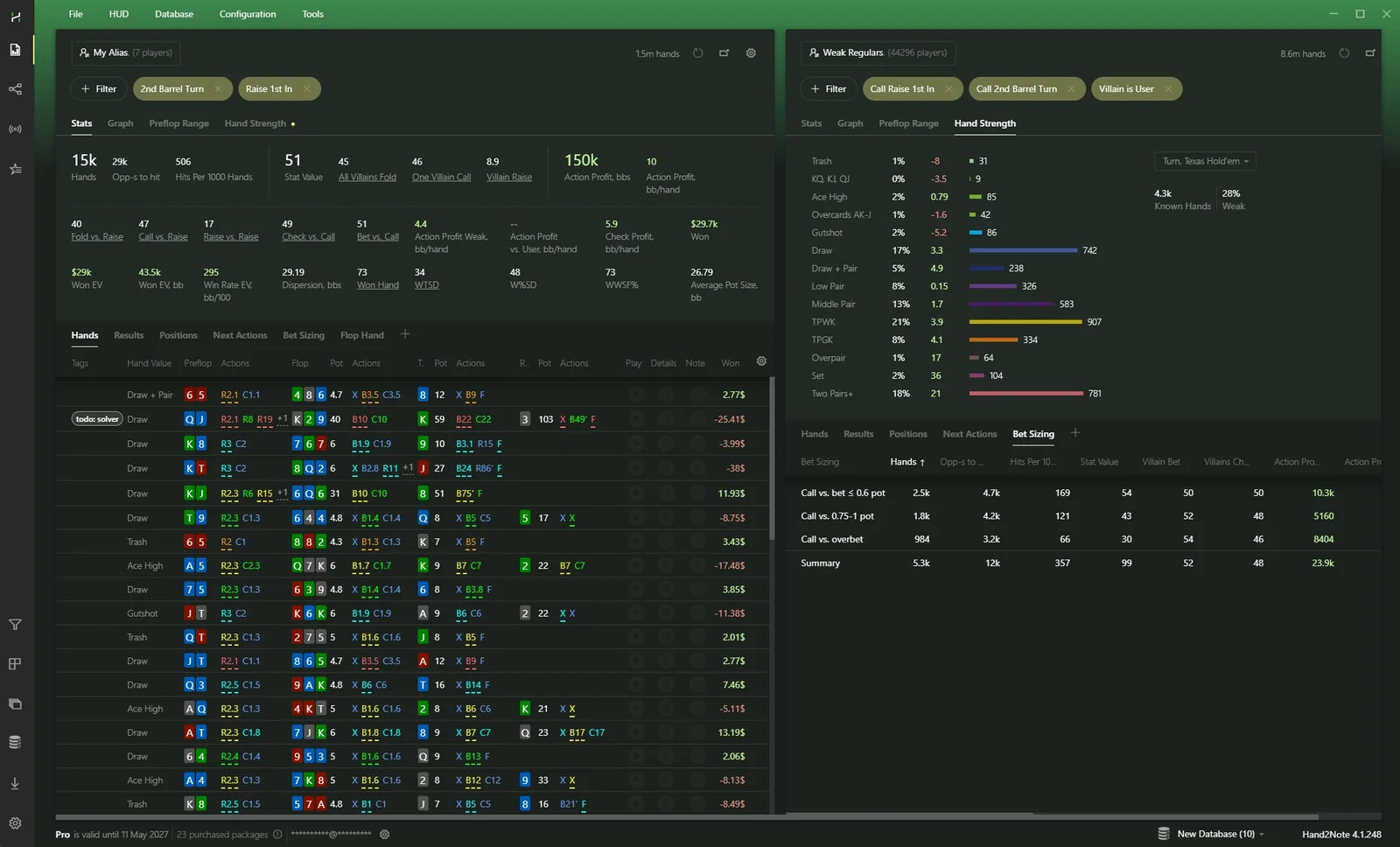
Source: Hand2Note — H2N vs. HM3 vs. PT4.
Supported poker sites and HUD rules
Which desktop rooms get a live HUD, which only support hand history import, and which HUD features are limited by room rules.
Play on your favourite poker site
Hand2Note supports over 50 sites and apps. This article provides the most up-to-date information on supported platforms, game types, HUD features, and restrictions. Use it as your go-to reference.
Desktop Poker Sites. Most poker sites offer a desktop client for Windows or macOS. Some sites, like GGPoker, don’t allow HUDs but still provide hand histories. You can import these hand histories into Hand2Note and analyze your game using our powerful tools.
Desktop poker sites supported by Hand2Note
- supported
- not supported
- HighlightedHotPokerDeals review
| Network / site | Windows HUD | MacOS HUD | NLH | PLO | PLO5 | PLO6 | Double Board | 6+ (Short Deck) | Zoom (Fast Poker) | Spin & Go | Tournaments | Native HH Support | Notes |
|---|---|---|---|---|---|---|---|---|---|---|---|---|---|
| PokerStars NetworkAll reservations are supported | Supported | Supported | Supported | Supported | Supported | Supported | Not supported | Supported | Supported | Supported | Supported | Supported | HUD works with restrictions |
| Sisal.it, Snai.itPokerStars Network | Supported | Not supported | Supported | Supported | Supported | Supported | Not supported | Supported | Supported | Supported | Supported | Supported | HUD works with restrictions |
| iPoker NetworkAll skins are supported | Supported | Not supported | Supported | Supported | Supported | Supported | Not supported | Supported | Not supported | Supported | Supported | Supported | HUD works with restrictions |
| PokerStars on FanDueliPoker Network | Supported | Not supported | Supported | Supported | Supported | Supported | Not supported | Supported | Not supported | Supported | Supported | Supported | HUD works with restrictions |
| Winamax | Supported | Supported | Supported | Supported | Supported | Supported | Not supported | Supported | Supported | Supported | Supported | Supported | HUD works with restrictions |
| PacificAll skins and reservations are supported | Supported | Supported | Supported | Supported | Supported | Supported | Not supported | Supported | Supported | Supported | Supported | Supported | No restrictions listed |
| WSOP.comPacific | Not supported | Not supported | Not supported | Not supported | Not supported | Not supported | Not supported | Not supported | Not supported | Not supported | Not supported | Not supported | HUD is not allowed |
| Winning Poker NetworkAll skins are supported | Supported | Supported | Supported | Supported | Supported | Supported | Not supported | Supported | Supported | Supported | Supported | Supported | No restrictions listed |
| CoinPoker | Not supported | Not supported | Supported | Supported | Supported | Supported | Supported | Supported | Not supported | Supported | Supported | Supported | HUD is not allowed |
| GG NetworkAll skins are supported | Not supported | Not supported | Supported | Supported | Supported | Supported | Not supported | Supported | Supported | Supported | Supported | Supported | HUD is not allowed |
| VangPoker | Not supported | Not supported | Supported | Supported | Supported | Supported | Not supported | Supported | Supported | Supported | Supported | Supported | HUD is not allowed |
| Phenom Poker | Not supported | Not supported | Supported | Supported | Supported | Supported | Not supported | Supported | Supported | Supported | Supported | Supported | HUD is not allowed |
| BetClic Poker | Not supported | Not supported | Supported | Supported | Supported | Supported | Not supported | Supported | Not supported | Supported | Supported | Supported | HUD is not allowed |
| PokerPlanets | Not supported | Not supported | Supported | Supported | Supported | Not supported | Not supported | Not supported | Not supported | Supported | Supported | Supported | HUD is not allowed |
| BetRivers | Not supported | Not supported | Supported | Supported | Supported | Not supported | Not supported | Supported | Not supported | Supported | Supported | Supported | HUD is not allowed |
| PartyPoker PlatformPartyPoker shared pool | Not supported | Not supported | Supported | Supported | Supported | Supported | Not supported | Supported | Not supported | Supported | Supported | Supported | HUD is not allowed |
| PartyPoker reservations (BetMGM, .es, .it)PartyPoker Platform | Supported | Not supported | Supported | Supported | Supported | Supported | Not supported | Supported | Not supported | Supported | Supported | Supported | No restrictions listed |
| Unibet(.fr) | Supported | Not supported | Supported | Supported | Not supported | Not supported | Not supported | Not supported | Not supported | Supported | Supported | Supported | No restrictions listed |
| ClubGG | Supported | Not supported | Supported | Supported | Supported | Supported | Supported | Supported | Not supported | Supported | Supported | Supported | No restrictions listed |
| ChicoTigergaming, BetOnline, SportsBetting | Supported | Not supported | Supported | Supported | Supported | Supported | Not supported | Supported | Not supported | Supported | Supported | Not supported | No restrictions listed |
| IgnitionIgnition, Bovada, Bodog | Supported | Not supported | Supported | Supported | Supported | Supported | Not supported | Supported | Not supported | Supported | Supported | Supported | No restrictions listed |
| BetConstruct NetworkVbet, GromBet, RPTBet, MafBet | Supported | Not supported | Supported | Supported | Supported | Supported | Not supported | Supported | Not supported | Supported | Supported | Not supported | No restrictions listed |
| Web3poker, CyberpokerBetConstruct Network | Supported | Not supported | Supported | Supported | Supported | Supported | Not supported | Supported | Not supported | Supported | Supported | Not supported | No restrictions listed |
| Peoples NetworkAll skins are supported | Supported | Not supported | Supported | Supported | Supported | Supported | Not supported | Supported | Not supported | Supported | Supported | Not supported | No restrictions listed |
| EvenBet PlatformHighStakes, SwCPoker | Supported | Not supported | Supported | Supported | Supported | Supported | Not supported | Supported | Not supported | Supported | Supported | Supported | No restrictions listed |
| PokerDOM.com | Not supported | Not supported | Not supported | Not supported | Not supported | Not supported | Not supported | Not supported | Not supported | Not supported | Not supported | Not supported | HUD is not allowed |
* NLH – No Limit Hold’em. ** PLO5, PLO6 – Pot Limit Omaha with five and six hole cards, respectively. *** Most major sites provide users with hand histories, which we call Native Hand Histories. Table: Hand2Note “Supported Sites and Apps”, checked 22 October 2026. Highlighted sites link to HotPokerDeals reviews.
For HotPokerDeals readers. Highlighted rows link to our reviews of GGPoker, CoinPoker, Phenom Poker, ACR Poker (WPN) and ClubGG. Where Hand2Note shows “HUD is not allowed”, you can still import hand histories and study them after the session. Room rules change, so check the current third-party software policy of your room before you play with any HUD.
Some sites require specific restrictions
Some sites require us to follow specific restrictions, such as disabling the Dynamic HUD. We comply with these rules to support fair play and ensure our users avoid bans. The rules affect the following features:
Dynamic and Positional Hud
The HUD cannot update in real time based on actions, player positions, stack sizes, or stats.
However, you can instantly switch the HUD for a player using hotkeys, or use tabbed HUDs like the ones included in this package.
Auto Color Markers and Badges
Automatically assigning a color marker or badge to a player based on their stats is not allowed.
However, you can still assign them manually to one or more players — even to thousands at once using multi-player filters.
Preflop and Postflop Histograms
Graphical representations of preflop and postflop ranges are not allowed.
However, the same range data is still available in HUD popups — just in text form.
Hand Value Stats
Stats based on specific hand value conditions (e.g., River Bet Bluff) are not allowed.
These stats are still available in popups and the HUD when using the hand replayer.
Stat Coloring
Stats can be color-coded, but only using up to three fixed color ranges.
What should I do to avoid accidentally breaking the rules?
Nothing! Hand2Note applies all restrictions automatically, so you don’t need to worry about it.
Note: These restrictions only apply to the live HUD and the popups you open by clicking on it during play. In the replayer, the HUD and all other popups work without any limitations.
HUDs are not allowed on GG. Is a tracker useless there?
Do you play on GG Poker Network and think a poker tracker is useless because HUDs are not allowed? Not quite.
Many players think so, but a HUD is only one part of Hand2Note. Most of its value comes after a session — reviewing hands, analyzing results, finding mistakes, and studying player tendencies.
Download Your Hand History
GG Poker Network does not save hand histories to your computer automatically. Instead, you need to download them from PokerCraft and import them into Hand2Note.
What is PokerCraft? PokerCraft is GG Poker’s built-in tool for viewing hand histories, tournament results, and other game data.
Open PokerCraft from the GG Poker client.
Select the game type you want to export, for example My Tournaments.
Click Download Game Histories and Download Game Summaries (if available). You can filter hands by date, buy-in, and other criteria before downloading them.
Extract the downloaded archives into a dedicated folder. For easier organization, store your files in separate folders by year and month.
Launch Hand2Note and click Database → Import from Folder. When the import is complete, open the Reports tab to view your hand history, tournament results, and statistics.
Tip: GG Poker stores hand histories for the last 3 months only. Download your files regularly to keep access to older hands. Up to 20,000 hands and up to 500 tournament results are available for download at a time.
Source: Hand2Note — GG Poker Network.
Supported sites: frequently asked questions
Is Hand2Note allowed on these sites?
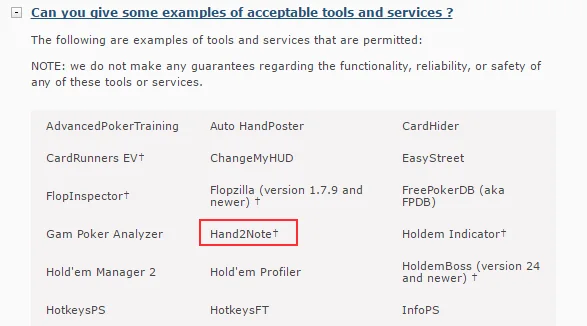
Yes, Hand2Note is officially allowed on all of the sites listed above. For example, it appears on the official list of permitted tools on PokerStars.
How can I request support for a new site or app?
Please contact our support team. If we receive enough requests, we’ll consider adding support for your site or app.
Why isn’t my HUD showing up?
Usually, the HUD appears once you’ve launched the poker client and then Hand2Note. If it doesn’t show up:
- Install the latest Hand2Note version. Check for updates in all three tabs: Hand2Note, HUD Host, and your poker site tab.
- Or just reinstall using the latest installer — it includes all updates. Before that, back up your settings via Configuration → Export Config.
- Ensure that your poker client’s language is set to English.
Why is my HUD visible but not updating?
- Make sure auto import folders are set up correctly in Hand2Note → Configuration. Only add folders for PokerStars, iPoker, Winamax, WPN, 888, PartyPoker, and EvenBet. Avoid adding other folders — they can break auto import.
- In your poker client settings, enable saving hand histories.
- Set the client language to English.
- Disable your antivirus or add the Hand2Note folder to exclusions.
- Update Hand2Note to the latest version. Download and reinstall it using the official installer.
- Reset Game Types and rebuild statistics (make sure poker clients are closed): close all poker clients; go to Configuration → Game Types and click Reset to Default; click on Database → Clean & Rebuild Statistics.
Which Android apps are supported?
Android apps are supported through emulators on Windows. However, some platforms — like PPPoker — also offer a desktop client. See the Android apps table above.
Does Hand2Note work with GGPoker?
GG Network does not allow HUDs, but Hand2Note supports all GG Poker Network game types for hand history import. Download your hands from PokerCraft and import them into Hand2Note.
Source: Hand2Note — Supported Sites and Apps.
Live Poker Database
Over a million hands from live poker streams with every hole card revealed, opened in the Hand2Note replayer, HUD and reports.
 Live Poker
 Database
At Hand2Note, we’ve gathered 1,053,323 hands from live streams on popular platforms like Hustler Casino Live and PokerStars Live — and put them all into a single easy-to-use Live Poker Database.
Take your live poker skills to the next level — with all players’ hole cards revealed.
We made a one-of-a-kind product that lets you see how the best live poker players in the world play. Practice guessing cards and reading tells. Study how top pros play at the highest stakes using all the powerful Hand2Note tools.
All cards are revealed, and each hand includes a link to the video stream.

 1 month of Hand2Note Pro free with database purchase
 1 year of free updates available every day
 Hand2Note 4 is all you need to view the hands
 Free sample is available for download
We converted video streams to hand history
For over two years, we monitor poker streams on YouTube, carefully collecting hand data: cards, stacks, actions, nicknames, and positions. At least two people review each hand to guarantee its accuracy. Accuracy is 99.9%.
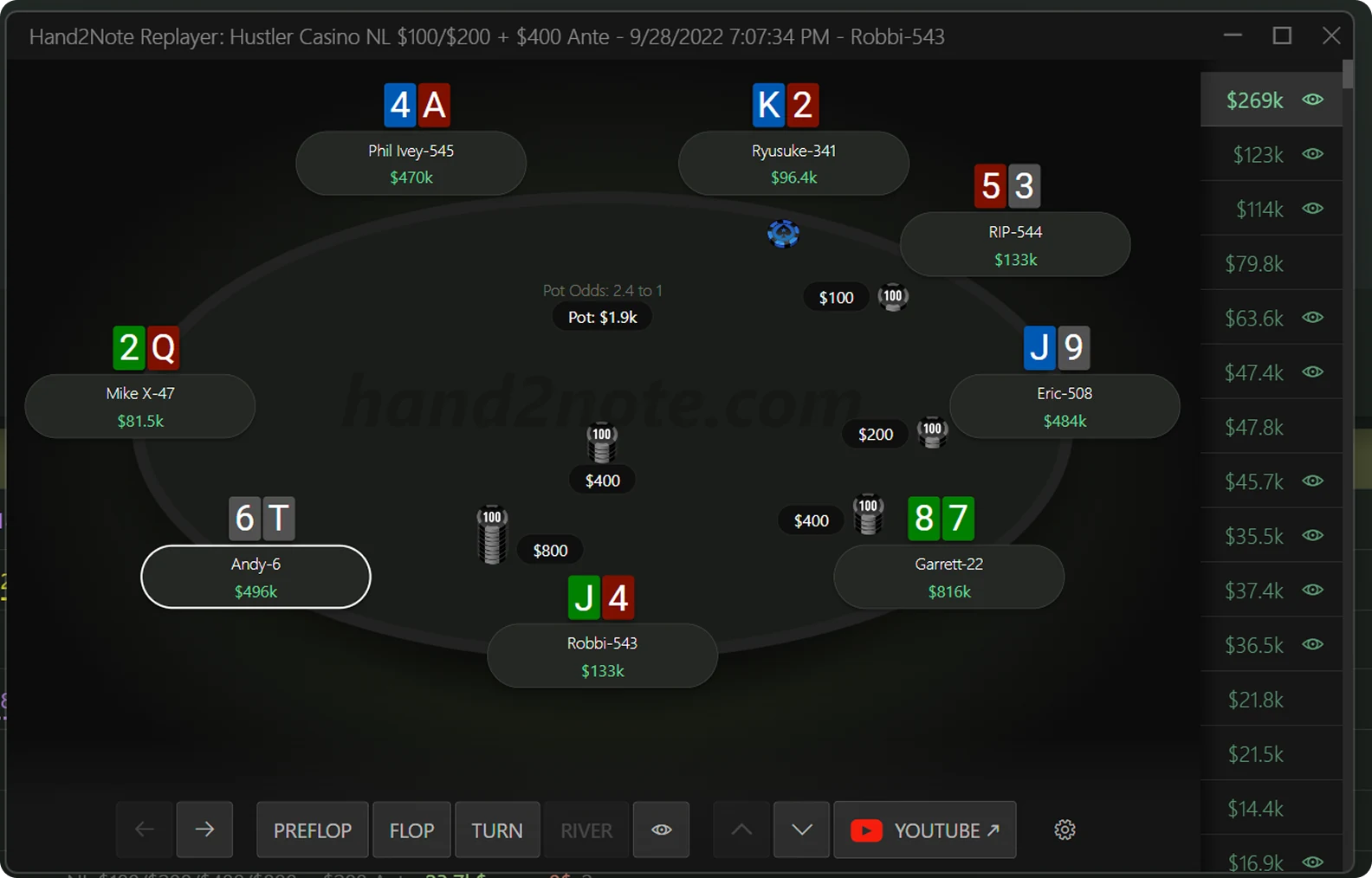
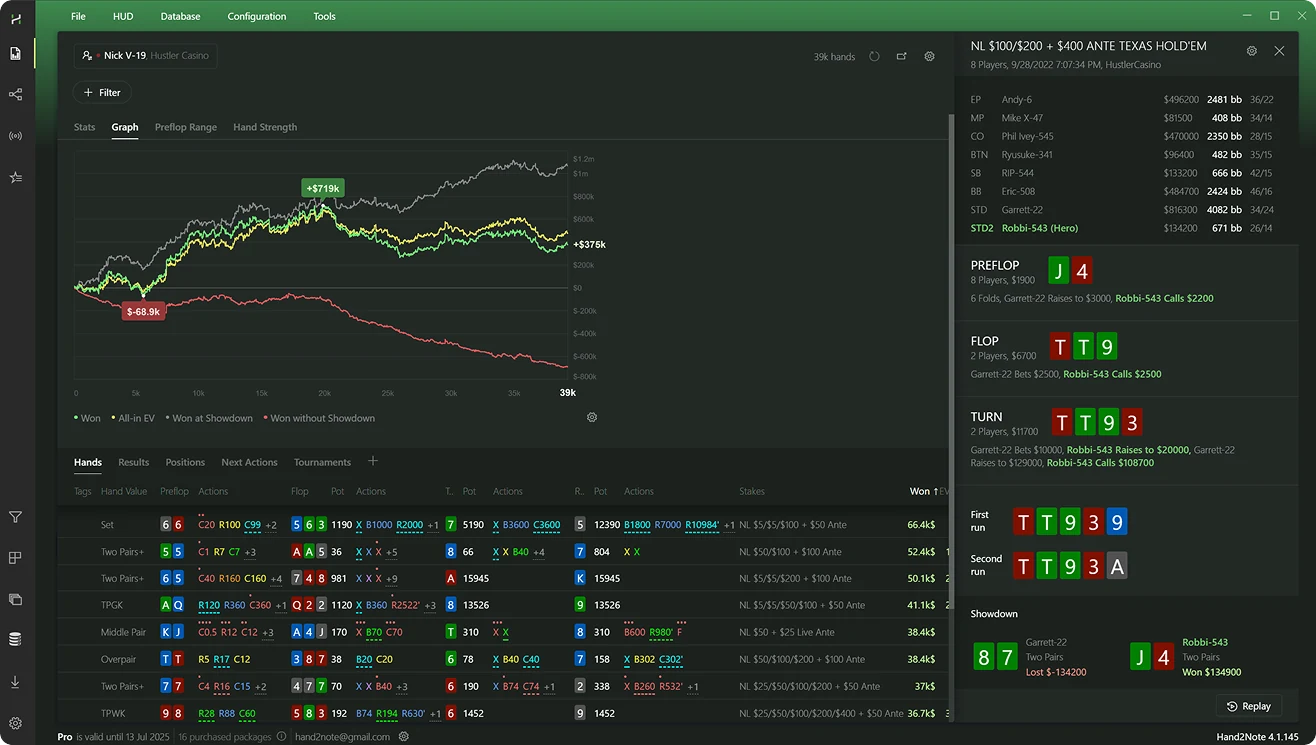
One example is the famous moment when Robbi Jade Lew hero called with J-high against a solid pro Garret ‘Gman’ Adelstein and won a $269k pot. Here’s the same hand in the Hand2Note replayer. You can easily move forward and backward between actions and hands. The replayer also includes a link to the exact moment in the original video.
These streams show every hole card — yes, even the preflop folds. Hand2Note captures it all in the replayer. Ever wanted to know what others fold? Now you can!
Note: We update the database daily, adding around 1,000 new hands each day.
Channels in the database
- Hustler Casino
- Poker At The Lodge
- Pokerstars Live
- Triton Poker
- PokerGO
- World Poker Tour
- GGPoker Live
- Kings Resort
- Bally Live Poker
- Texas Card House
- TCH LiVE Poker
- Hard Rock Poker
- Champions Poker Live
- Poker Night In America
- PartyPokerTV
- Hong Kong Poker Tour
- SunBet Poker Tour
- PBKC POKER STREAM
- Poker Xpress
Get ready for your next live poker session
Online poker players had access to the most powerful poker analytics tools, while live players did not. Until today.

Easy to Get Started
Just install Hand2Note and go to the Databases section. There you can choose the Live Poker database, buy it, or install the free sample.

Detailed Stats on Every Player
Not just bankrolls and winnings—get access to thousands of stats like VPIP, PFR, 3Bet, Continuation Bet, Aggression, and many more.

Free Sample is Available
Not sure if this database is for you? Try it risk-free—install the free sample (about 5% of all hands) and test all the features yourself.

Ethical & Legal
All hands are collected from public sources and official broadcasts, used strictly for educational and entertainment purposes.
Explore hands in a powerful desktop app
10 GB of data, deep insights on the world’s top live poker players, and powerful analysis tools
- Win Rate and Hands
- Preflop & Postflop Ranges
- Stats
- 1000+ stats
Who is this database for?
Do you play live poker regularly or just getting ready to sit at the table? This database is for you.
In poker, information is everything. The Live Poker Database reveals folding patterns you’ve never seen before.
You won’t find hands with revealed hole cards anywhere else — and that’s what makes this product valuable for any player, whether you play live or online.

Players preparing for a live poker session
Getting back to live poker after a break? Use this database to prepare. The most effective way: try to guess each player’s cards using the replayer.

Cash game players
Discover how pros and amateurs play — open raise and 3-bet ranges, overbets, check raises, and more.

Tournament players
Study how pros make decisions at final and pre-final tables. Be ready for the moments where the pressure and the stakes are highest.

Live stream participants
We have over 25,000 players in the database — chances are, you’re one of them. What do your actual stats say? Are you really good?
How to Use Live Poker Database
Let’s say you have a live poker tournament series or a cash game coming up next week. Maybe you’re a regular player, or maybe you’re coming back after a break — either way, you want to get ready.
Guess player hands in Hand2Note replayer
Pros are great at hand reading because they’ve seen thousands of showdowns over the years. With the Hand2Note Live Database, you can speed that up — guess, check, repeat.
First, open the Hand2Note replayer. Then, go through the hand, action by action. Try to guess each player’s cards as the hand plays out. Finally, reveal the cards to see how close your guess was.
Tip: In Hand2Note replayer, press and hold Alt to peek at the hidden cards.
Why is this better than watching a YouTube stream? Moving between actions in a hand is slow and clunky on YouTube, and the video shows all hole cards from the beginning of a hand, so you can’t test your reads. Reviewing hands in Hand2Note is fast, and since the cards stay hidden until you make your guess, you can actually train your hand-reading skills.
Train your tells reading skills
Live poker gives you way more information than online — like tells: timing, hesitation, overconfidence, eye movement, hand shaking, and more. Reading tells usually takes years of live experience. But not anymore. With Hand2Note, you can practice reading tells from home.
Hand2Note replayer includes a link to a YouTube video of every hand.
Tip: Use the left and right arrow keys (← →) on your keyboard to navigate the video in short intervals.
Study ranges — not just single hands
Hand2Note isn’t just a hand replayer. It’s the most powerful analytical tool designed to go far beyond basic review.
First, the HUD gives you a basic understanding of the actual player’s stats. Second, the HUD is dynamic. It brings the relevant stats up depending on the current spot. Third, go deeper — see the real ranges behind the action. Hover over a stat in the HUD to see the player’s full range.
Tip: Click the HUD to open an additional popup with even more stats.
Advanced: Explore Ranges in Multi-Player Reports
A small sample is a common problem when analyzing preflop and postflop ranges. Hand2Note solves it with Multi-Player Reports.
Go to the Statistics tab, open the Player dialog, switch to the Multiple Players tab, and apply a filter — for example, strong players with a VPIP around 33/20 and a win rate of over 10 big blinds per 100 hands.
In Hand2Note, you can explore ranges for any spot — 3-bet, 4-bet, limp-raise, fold to 3-bet, call 3-bet, second barrel, float — the list is endless. If it happens in poker, you can study it.
Source: Hand2Note — What is Live Poker Database?.
Getting started with Live Poker Database in Hand2Note for FREE
Download and Install Hand2Note.
Visit hand2note.com to download and install the software. Currently, Hand2Note is available on both Windows and Mac OS.
Launch Hand2Note and Log-in.
Open Hand2Note and log in. If you don’t have an account, you’ll need to register on hand2note.com first.
Install the FREE Sample.
Navigate to the Database tab in the side panel. Click the Details button. Click the Sample button to install the sample database. Once installed, double-click the database to activate it.
Review the Hands.
Go to the Reports tab. Double-click any hand to open it in the Hand2Note Replayer and start exploring.
If you like the sample, then Buy & Install the full database.
Purchase the database via the website using a bank card, Skrill, or cryptocurrency. After purchasing, reopen the app and confirm the database download.
Live Poker Database: FAQ
Does the price include updates?
Yes. When you buy the Hand2Note Live Poker Database, you get one year of free daily updates.
Where did you get the hands?
From various cash and tournaments live streams available on the internet such as Hustler Casino Live.
What happens after 1 year? Will I need to buy it again?
No, you’ll keep full access to the database without any extra payments. If you want to continue receiving updates after the first year, you can purchase an update plan at a discounted price.
Does using the database violate poker room rules?
No. You can’t use databases during play, but the Hand2Note databases are designed strictly for off-table analysis — which means they don’t break any rules. You’re free to use them fully, and it’s completely allowed.
Do I need to buy a Hand2Note subscription to use the Live Poker Database?
No. When you purchase the Live Poker Database, you get a 1-month free Hand2Note Pro subscription. After that, you can continue using the database with full features — no additional subscription required.
Can I use this database with Hand2Note 3 or other apps?
No, the Live Poker Database works only with Hand2Note 4. We built it specifically to take full advantage of H2N4’s advanced tools for analyzing large volumes of poker data and stats.
Is using this database legal?
Yes. We work with professional lawyers in North America to ensure compliance. Using this database is similar to collecting statistics from public sporting events.
* Player information, including nicknames, is merely part of performance statistics. This database product is not affiliated or connected with, or endorsed or sponsored by any of the identified players. ** All poker site names and brands are the property of their respective owners and are being used only for identification purposes.
Source: Hand2Note — Live Poker Database, Getting started with Live Poker Database for free.
Hand2Note plans and prices
Free Trial, Learner for microstakes and the unrestricted Pro plan, in Hand2Note’s own words.
Hand2Note pricing is simple
You can choose between either our full-featured Pro plan or the Learner plan for beginners.
Free Trial
Access to all the main features of Hand2Note, but only for the 14-day trial period.
- All poker sites and mobile apps
- Max database size:5 million hands
- All features except:Custom filter in Reports
- Valid 14 days only

Hand2Note Learner
Microstakes plan for beginners
- All poker sites and mobile apps
- Max database size:200k hands
- All features except:Custom filter in Reports
- Max stakes:$0.25 big blind in cash games$20+$2 tournament buy-in

Hand2Note Pro
Access to all the main features of Hand2Note without restrictions.
- All poker sites and mobile apps
- All features
- No restrictions
- 24/7 online chat support in all plans.
- Regular updates
- We will refund your money within 7 days if you are not satisfied with the product.
Prices as listed by Hand2Note on hand2note.com/Purchase, checked 22 October 2026. The developer may change them; the Hand2Note website shows the current price.
Frequently asked questions about subscription
Can I upgrade my Hand2Note Learner subscription to Hand2Note Pro?
Yes, you can. If you purchase the Pro subscription while your Learner plan is still active, the remaining time will be automatically converted based on the price difference.
Why do you have database size limitation in Hand2Note Learner plan?
We designed the Hand2Note Learner plan for beginners. Players who use large databases are considered professionals, and we expect them to use the Pro plan.
Is the trial version fully functional?
The trial version includes most features, but a few are excluded, such as custom filters in reports. The maximum database size in the trial version is also limited to 5 million hands.
Can I buy lifetime subscription?
At this moment we don’t sell lifetime subscriptions.
Do you offer an enterprise account for purchasing multiple subscriptions at once?
Yes, we do. Please contact our support team for assistance.
Is the Live Poker Database included in Pro?
The Pro subscription doesn’t include the database, but when you buy it, you get 1 month of Pro access for free. After that, you can keep using the full database in Hand2Note — no subscription required. See Live Poker Database.
Source: Hand2Note — Purchase.
Getting started with Hand2Note
Import hands or load the test database, then set up the auto-import folder so the HUD updates after every hand.
Your first steps with Hand2Note
We’ve worked hard to make your first steps with Hand2Note smooth and straightforward. Usually, all you have to do is start the program and you’re good to go.
Getting started with reports and stats
To start exploring stats and reports, all you need to do is import your hand histories.
Don’t have any hand history files? No worries, you can still get a feel for Hand2Note and its features by using our sample test database. Click on Use Test Data to use a sample database in Hand2Note.
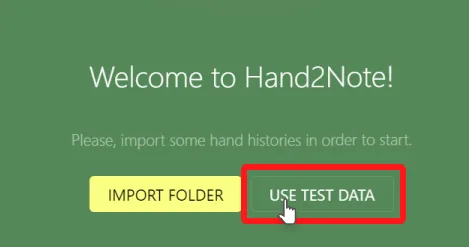
Tip. For GGNetwork, reach out to their customer support to get your hand histories.
To import existing hand histories into Hand2Note, you have a few options:
- Import from a folder on your computer.
- Import from specific files.
- Import from an existing database, such as Hand2Note, Poker Tracker 4, Hold’em Manager 2, Hold’em Manager 3, Drive Hud 2, or even a custom Postgres SQL server.
Press the Import Folder to import hand histories from a directory.
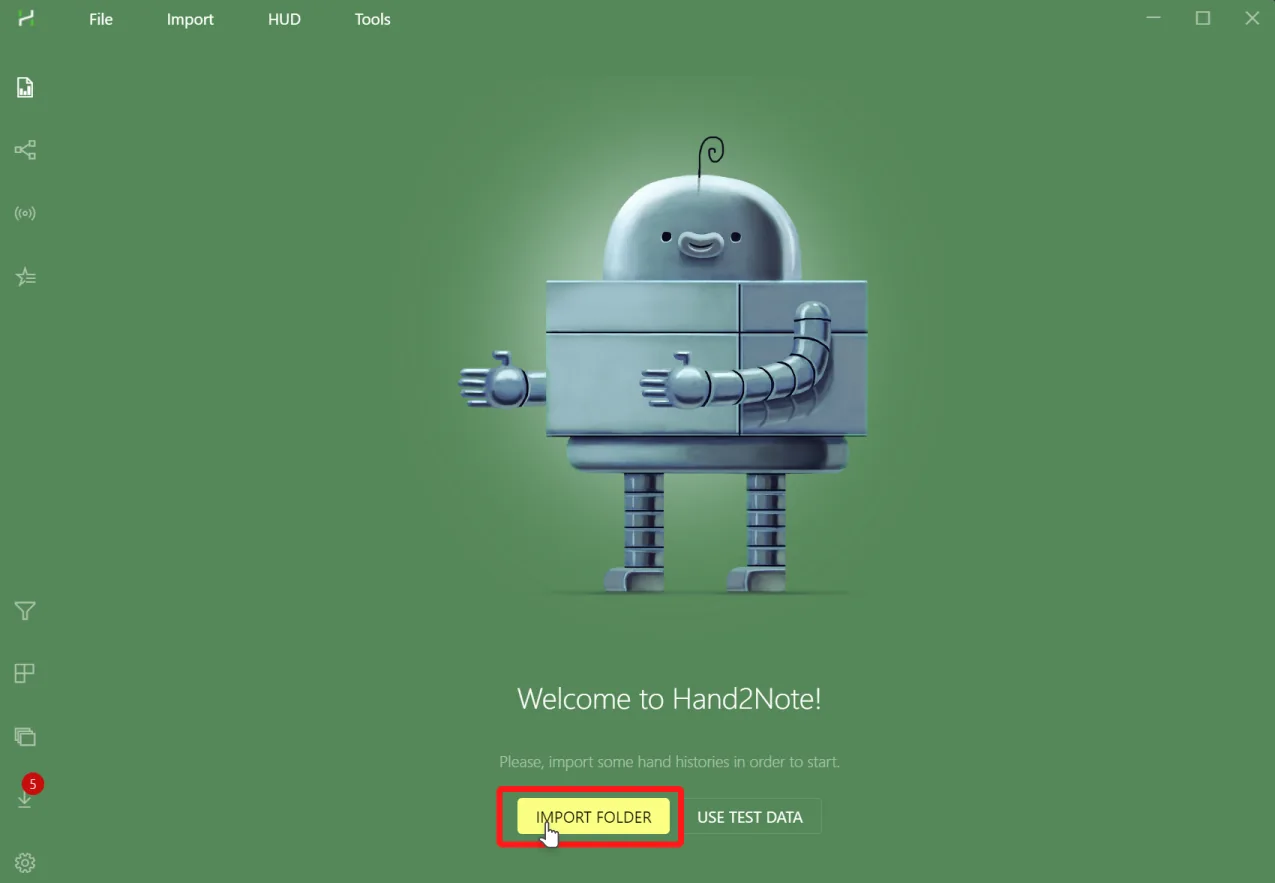
For other import options, such as importing from a database, navigate to the Import menu:
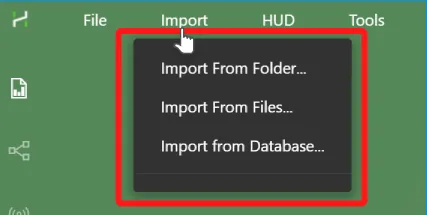
Now you’re all set. Next, discover the various uses and advantages of Hand2Note in the Reports and Statistics guides.
Getting started with HUD
On mobile poker apps, such as PokerBros or Red Dragon, you just run Hand2Note and you’re ready to go. The HUD shows up automatically without any prior adjustments.
Note. Hand2Note supports HUD on mobile apps only when you run the app on an Android Emulator, such as LdPlayer (recommended) or Nox.
Make sure your poker client is set to English.
Android app poker HUD Save hand histories.
In your poker application, look for an option like “Save Hand Histories”, and select a folder where the poker client will store these files.
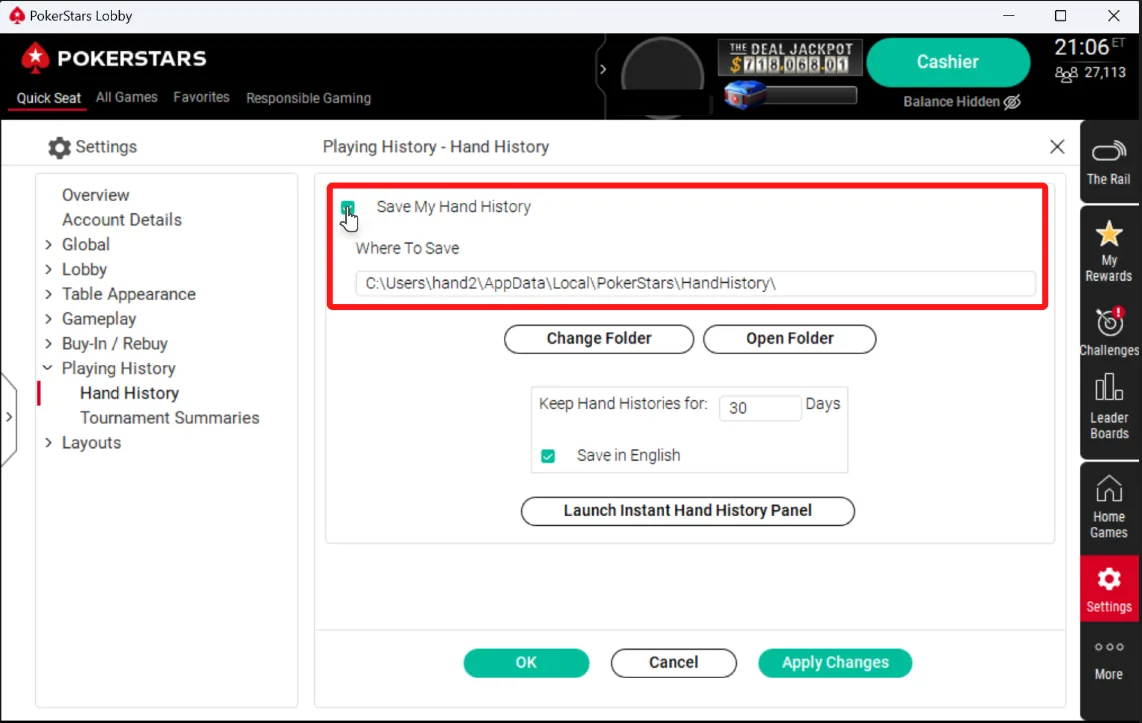
PokerStars hand history options Open the Configuration tab in Hand2Note.
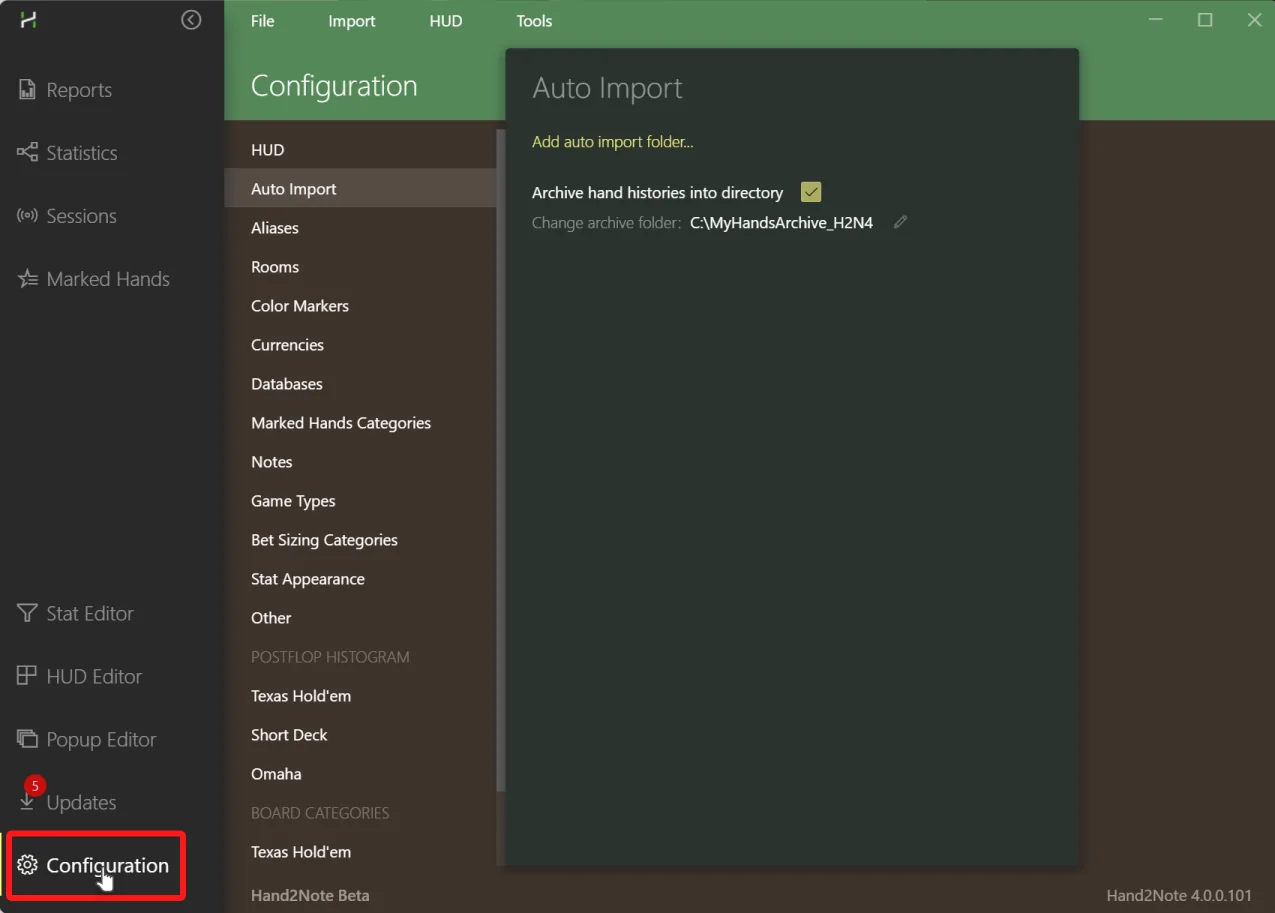
Hand2Note configuration tab Click Add-auto import folder…
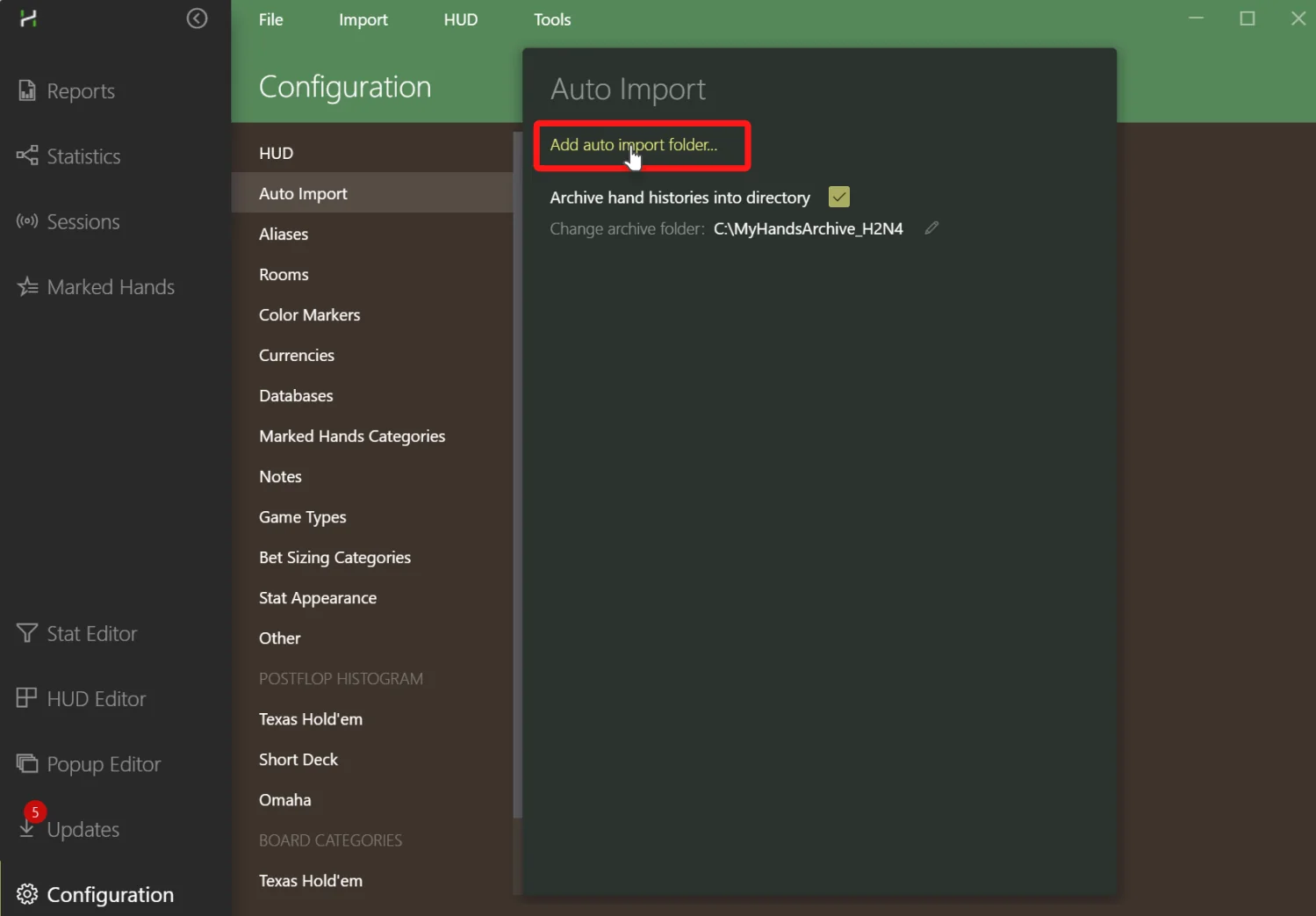
Hand2Note auto import folder config dialog Choose the same folder.
In the system dialog that pops up, choose the same folder you’ve selected in the poker client. This is what we refer to as the auto-import folder. The final configuration should look like this.
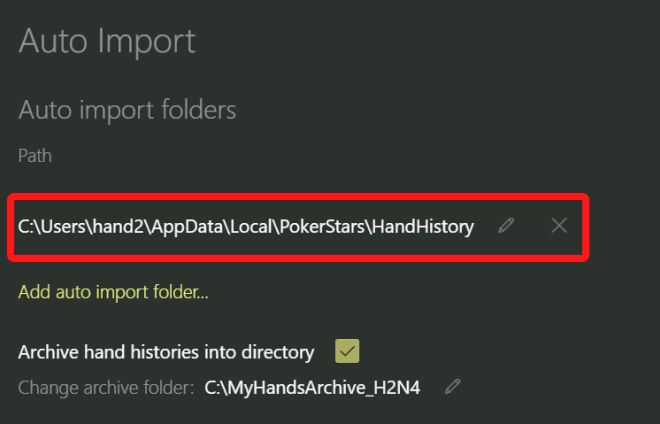
Hand2Note auto import folder config You’re all done!
The HUD should update after the current hand is completed.
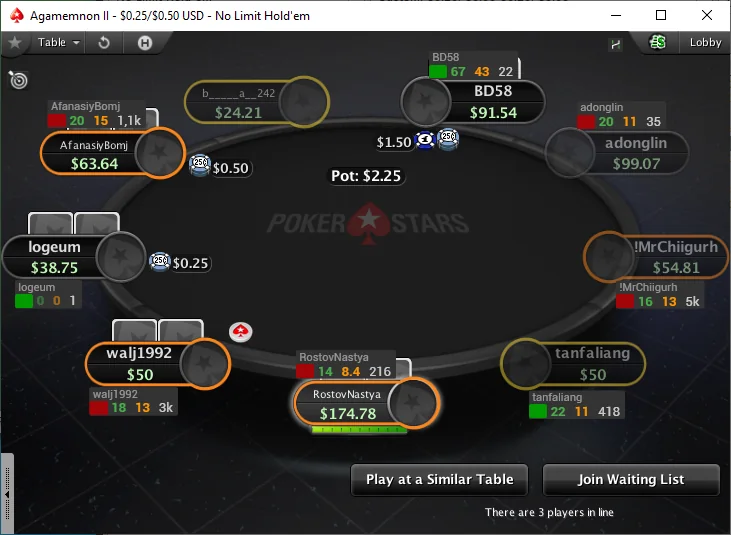
Hand2Note PokerStars HUD
Archive Folder
You can select the Archive Folder in the ‘Auto Import’ config. Hand2Note will take files from your poker app’s hand history folder and move them to the Archive Folder. This way, all your hand histories are stored in one location.
Don’t confuse the Archive Folder with auto-import folders!
Site-specific setup guides
Some poker apps may require additional, specific steps for the HUD to function correctly. For more in-depth guidance, refer to the setup guide tailored to your particular poker site:
- PokerStars
- Winamax
- IPoker
- WPN (Winning Poker Network)
- 888Poker
- ClubGG
Source: Hand2Note — Getting Started.
Switching from Hold’em Manager, PokerTracker or DriveHUD
What moves over (hands and notes), what doesn’t (HUD layouts), and the exact menus to use.
Moving to Hand2Note is much easier than most people expect
If you’re thinking about switching to another poker tracker but worried about losing your hand history, notes, or messing up your current workflow — that’s totally normal. It’s one of the most common concerns players have.
- You keep all your important data and move to a more powerful, modern tool — you’re not starting from scratch.
- The Hand2Note interface is clean and intuitive, so getting used to it usually takes very little time.
- A 14-day free trial is available, so you can explore everything before committing.
Hand History Database
You can import hands from Holdem Manager 2, Holdem Manager 3, PokerTracker 4, DriveHUD 2, and previous versions of Hand2Note right after installation. Hand2Note imports data directly from the third-party tracker’s database — there’s no need to export your hands manually beforehand.

Player Notes
Your notes can be transferred as well. Importing notes is supported from Holdem Manager 3 and PokerTracker 4, so you keep everything you’ve written.
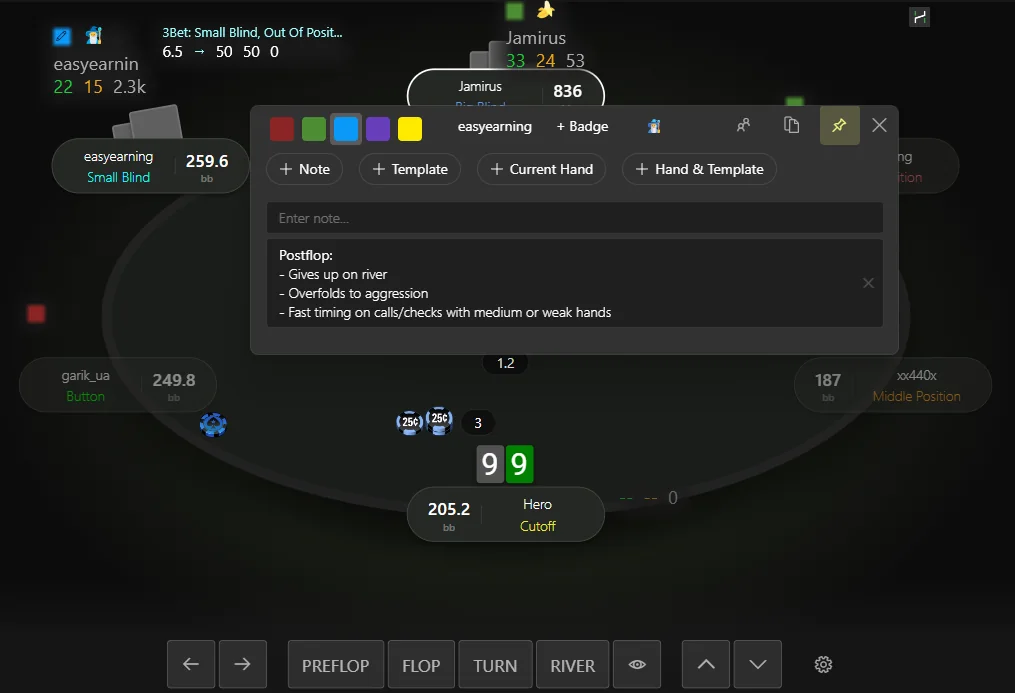
Why Players Switch to Hand2Note
When switching to Hand2Note, you’re not just moving your data or changing your HUD — you gain new tools to improve your game and analyze opponents more effectively. You move to a modern solution used by players at the highest levels.
Support for Most Poker Rooms
Hand2Note works directly with most popular poker rooms — no converters or third-party tools required. It supports modern game formats, including NL Hold’em, Short Deck, Pot Limit Omaha (PLO4, PLO5, PLO6), bomb pots, and double board games.
Fast and Flexible Reports
Flexible reports and filters help you analyze your game and compare it with your opponents. High performance keeps reports fast, so you can quickly find any situation, even with millions of hands.
Interactive Statistics
Hand2Note provides everything you need for deeper analysis and more confident decisions. Explore population tendencies, focus on specific player groups, find exploits, and work with data in the dedicated Statistics section.
Regular vs Regular Statistics
If needed, Hand2Note can exclude hands played between regulars and recreational players. This gives you cleaner, more accurate stats on how regulars play against each other.
Advanced Player Notes
In Hand2Note, notes become more useful: you can attach hands, use templates, and add notes to specific stats. This helps you organize information, quickly find what you need, and replay hands directly from your notes.
Working with Large Databases
You can create separate databases for different purposes and switch between them instantly — without long loading times. Hand2Note is optimized for large databases and maintains high performance even with tens or hundreds of millions of hands.

A Tool Used by Top Players
Hand2Note is used by high-level players, including Benjamin Rolle (better known as bencb, with over $10M in online tournament winnings) and Saulo Costa — a high-stakes cash player and coach.
HUD Store from Professional Players
Ready-made HUDs and popups created by professional players help you start playing faster without spending time on setup. The Poker HUD Store offers solutions for different formats, including Cash, MTT, Spins, PLO, and more.
For a more detailed comparison of Hand2Note and other trackers, see H2N vs. HM3 vs. PT4.
How to Switch to Hand2Note
Hand2Note Installation.
Download and install Hand2Note — the latest version is always available on the main page.
Tip: On first launch, a 14-day free trial is activated automatically.
Importing Hands.
To transfer your database, click: Database → Import From Database
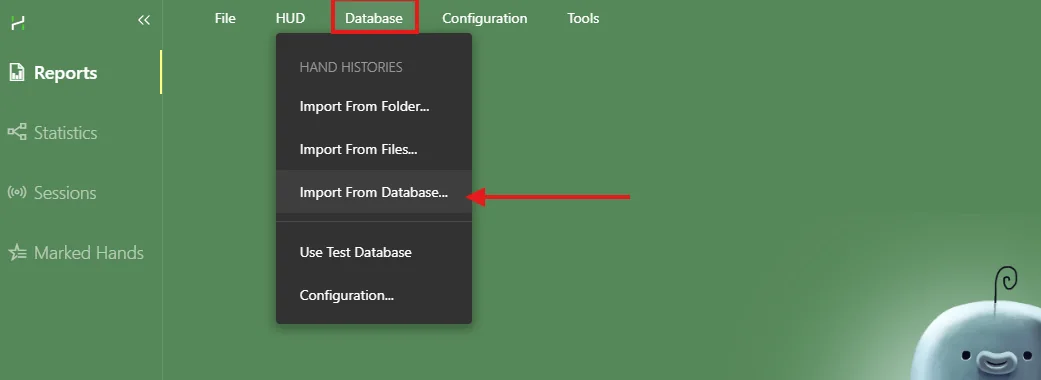
Selecting hand import from a third-party tracker database. Select the tracker you want to import data from:
- For Holdem Manager and DriveHUD, you may need to specify the database path manually.
- Poker Tracker 4 databases are usually detected automatically.
Wait for the import to complete.
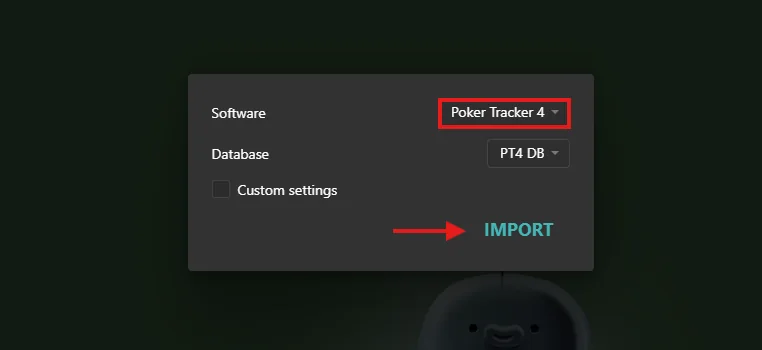
Selecting the database source and starting the import. Importing Notes (if needed).
If you’ve used player notes, click: Tools → Import Notes from…
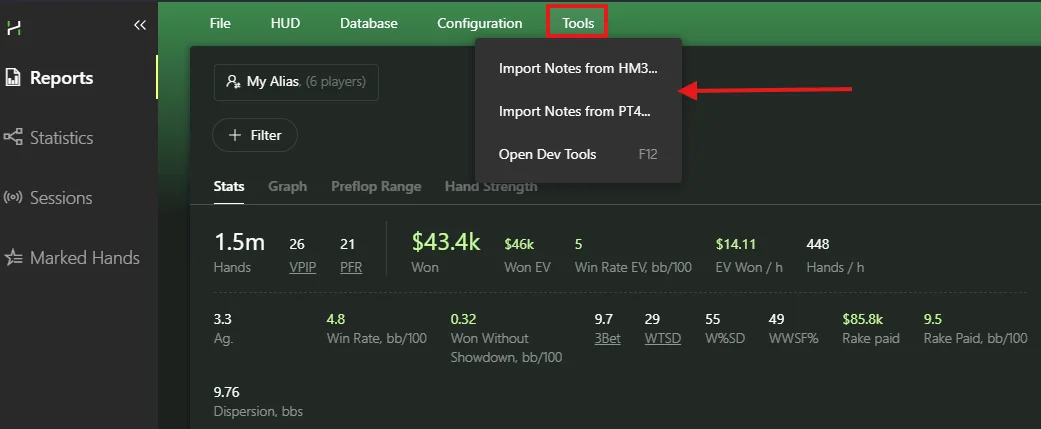
Note import options are available in the Tools menu. Import is supported from Holdem Manager 3 and PokerTracker 4 in the following formats:
.json,.PlayerNotes,.pt4notesDone.
Restart Hand2Note — your database and notes will be available.
Frequently Asked Questions
Can HUDs and popups be transferred from other trackers?
HUDs and popups cannot be transferred directly from other trackers, as each program uses a different architecture. In practice, this usually isn’t an issue:
- After installation, you’ll have access to default HUDs and popups that you can start using right away. See How to switch the HUD.
- Hand2Note includes built-in editors that allow you to quickly recreate a HUD similar to the one you’re used to.
Tip: If you want to fully recreate your current HUD, you can order a custom setup in our official Poker HUD Store or choose a ready-made solution.
Do I need a converter for playing in Asian apps?
No, additional software or subscriptions are not required. Hand2Note works directly with supported rooms, so converters are not needed — including for apps running via Android emulators.
I only have hand history files — can I import them directly?
Yes, you can import hands directly via: Database → Import from Folder or Import from Files options.
Troubleshooting
Database not found
Most likely, your tracker is using non-default connection settings. Try enabling Custom settings and entering the database details manually. If you’re using Poker Tracker 4, you can find the required parameters in your database settings.
Not all hands are imported from the database
Hand2Note supports importing hands from most poker rooms, as long as the hand history is stored in its original format. If some hands are not imported, it’s possible that your previous tracker converted the hand histories during import and saved them in its own format.
Holdem Manager, PokerTracker, and DriveHUD 2 convert hand histories from the iPoker network. As a result, importing from their databases may be incomplete.
Solution: request hand histories in the original format from the poker room support and import them directly from files.
If you have any questions
If something isn’t working or you’re unsure about the setup, feel free to contact our support team. We’ll help you transfer your data to Hand2Note and configure everything properly.
Summary. Switching to Hand2Note doesn’t mean starting from scratch — it means upgrading your tool while keeping the data you already have. You keep your database and notes, and get a more powerful tool for analysis and improvement.
Source: Hand2Note — Switching to Hand2Note from Another Tracker.
About Hand2Note
The developer behind the HUD, its pro team, its history since 2010 and the TwoPlusTwo forum it owns.
Trusted by professional poker players
Hand2Note is trusted by many professional poker players and also widely used by poker coaches and in poker academies. Here are two well known professionals who use Hand2Note on a daily basis.
Benjamin Rolle (bencb)
Raise Your Edge academy owner with tens of millions in tournament winnings.

Hand2Note is my personal favourite software to track my hands, my opponents and my results.
Saulo Costa
NL1k-2k regular and also a well-known content producer and trainer of Run It Once Elite NLHE.

An ideal tool for working with huge databases of several million hands and analyzing field trends.
High Performance
Days of slow imports, huge databases and delays are long gone
How does it work: We’ve created our own database engine optimized for fast data processing and storing high volume of statistics.
 Reports are built in seconds
 Popups open in milliseconds
 Hand replayer opens immediately
15+ Years of Innovation in Poker Software
Hand2Note is the most powerful poker analytics tool, built by professional players who truly understand the game. We know the tools and features poker players need to gain an edge at the table.
Our mission is to provide people with modern, innovative, and top-quality software.




Team
Our team is made up of professional software engineers, product designers, and experienced poker players.
Key decisions about the software’s features are made by poker players who have been regularly playing high-stakes games for over 7 years.
Values
We value skilled people who work deeply on delivering value, pay attention to detail, and constantly improve themselves.
Bringing value to our customers is what matters most. All our efforts are focused on creating value for both Hand2Note users and the company.
History
- 2010The first version of Hand2Note has been released.
- 2012A dynamic HUD has been added, along with the ability to create custom stats.
- 2014Hand2Note 2 is released: a full-featured HUD and stats editor, plus pop-ups have been added.
- 2018Hand2Note 3 is released with a completely redesigned UI. All serious poker pros have switched to Hand2Note.
- 2025Hand2Note 4 is released. It is now a fully featured poker analytics software, far surpassing its competitors.
TwoPlusTwo (2+2)
In the summer of 2022, Hand2Note acquired the world’s most well-known poker forum — twoplustwo.com.
We’re transforming it into a modern platform with a professional poker player community. News, blogs, and trips to Las Vegas are all discussed on 2+2.
Feedback from Our Users

I got Hand2Note and it cured the severe blindness I have in my eyes THANK U HAND2NOTE
etb72 · RedditIt’s called MDA and a lot of CFP stables have already done this. Not necessarily AI but basically using farming hands and using Hand2Note to figure out how to exploit population tendencies based on how far off from equilibrium they are playing.
FollowingLoudly · RedditThanks so much for this, best hud ever
some-lexandr · RedditSource: Hand2Note — About Us.
Hand2Note 4 compared with DriveHUD 3, Asian Hand Converter and EliteHUD
Hand2Note's own comparison covers HM3 and PokerTracker. This one looks at the tools club-app players weigh it against.
| Tool | Price | Runs on | Best for | Check first |
|---|---|---|---|---|
| Hand2Note 4 | Learner $15.99, Pro $39 a month, paid yearly | Windows and Mac; emulator apps on Windows | Dynamic HUD, Action Profit, ClubGG HUD with no converter | Learner stops at a $0.25 big blind and 200k hands |
| DriveHUD 3 | Core $59.99, Ultimate $119.99 for the first year | Windows 10 or later, 8 GB RAM | GTO solver inside the tracker, leaks priced in bb/100, timing tells | Core covers $50 buy-ins and under; club apps need Ultimate+ |
| Asian Hand Converter | From $21.50 a month, 7-day trial | Windows PC and Android emulators | 13 Asian apps for DriveHUD, HM, PT and Hand2Note | With DriveHUD 3 use the built-in version, not the stand-alone one |
| EliteHUD | Plan A $29, Plan G $99 a month | Windows clients and supported emulators | Hand conversion for ClubGG, PokerBROS, PPPoker, Suprema, X-Poker and QQPK | Not a tracker; you still need HM3, PT4 or Hand2Note |
For ClubGG, Hand2Note is the shortest route: it reads PokerCraft hands and shows the HUD with no extra converter. On PokerBros, PPPoker and other emulator apps it also runs without converters, but only on Windows. DriveHUD 3 needs its Ultimate+ plan to cover the same apps, and it adds a solver and leak grading. The Asian Hand Converter and EliteHUD are converters, so they make sense if you already own a tracker you like.
Running apps on a PC: Android emulators for poker. Club guides: ClubGG, PokerBROS, PPPoker.
Support, community and FAQ
Where to get help with Hand2Note, plus short answers to the questions players ask most.
Hand2Note support is always here
Do you have any question? We are always ready to help.
 ManualDetailed manual about features and usages of Hand2Note.
 ForumAsk any question on the forum and our community will help you.
 24/7 SupportOur support team is available 24/7 through the live chat.
Hand2Note: common questions
Is Hand2Note free?
Hand2Note has a 14-day free trial that starts automatically when you first open the program. After that, you choose the Learner or Pro plan. See plans and prices.
Does Hand2Note work on Mac?
Yes. Hand2Note 4 is available for Windows and Mac (Apple Silicon and Intel). A macOS HUD is listed for PokerStars, Winamax, Pacific and Winning Poker Network; Android apps in an emulator need Windows. See the supported sites table.
Does Hand2Note work with PokerBros, PPPoker and other mobile clubs?
Yes, when you run the app in a supported Android emulator such as LDPlayer on Windows. Hand2Note shows the HUD over the emulator window without converters. See mobile poker apps.
Can I use Hand2Note on GGPoker?
GG Network does not allow HUDs. You can still download your hand histories from PokerCraft and import them into Hand2Note to review your results and opponents after the session.
Is Hand2Note allowed by poker rooms?
Hand2Note says it is officially allowed on all of the sites in its supported list and applies room-specific HUD restrictions automatically. For example, it appears on PokerStars’ list of permitted tools.
Can I import my Hold’em Manager or PokerTracker database?
Yes. Hand2Note imports from Holdem Manager 2 and 3, PokerTracker 4, DriveHUD 2 and earlier Hand2Note versions, plus notes from HM3 and PT4. See switching to Hand2Note.
What is the difference between Learner and Pro?
Learner is the microstakes plan for beginners: up to 200k hands, stakes up to $0.25 big blind in cash games or a $20+$2 tournament buy-in, and no custom filter in Reports. Pro has all features and no restrictions.
Where do I get help with setup?
Hand2Note has a detailed manual, a forum on 2+2 and a 24/7 live chat. See the support links above.
Is Hand2Note better than DriveHUD for club apps?
Hand2Note covers ClubGG and emulator apps in every plan, from $15.99 a month paid yearly for Learner. DriveHUD 3 covers club apps only on Ultimate+ at $199.99 a year, which also bundles the Asian Hand Converter, a GTO solver and leak analysis.
Step up your game with Hand2Note HUD right now
For Windows or Mac (Apple Silicon) · Mac (Intel)
- 1Download Hand2Note
- 2Launch your favorite poker room or app
- 3Start using stats in the HUD immediately
HotPokerDeals is an official Hand2Note partner and may earn a commission when you buy through links on this page. Product descriptions, instructions, screenshots, logos and characters belong to Hand2Note Software Ltd. and are used with permission. Prices and features were checked on 22 October 2026 and may change; the Hand2Note website is the final source.
Poker is for adults 18+ (or the legal age where you live). Always follow your poker room’s or club’s rules on third-party software. Play responsibly.