BetOnline Poker Review: Rakeback, Bonuses and Freerolls
BetOnline shares the Chico Poker Network with SportsBetting.ag and TigerGaming. Its lobby includes Hold’em, Omaha, Boost fast-fold cash games, Windfall Sit & Gos and multi-table tournaments. Cash rake and the weekly rakeback rate depend on the game and your VIP tier.
The software runs in supported browsers and on desktop and mobile. The screenshots in this review come from BetOnline’s product pages and help articles.
HotPokerDeals is a partner of BetOnline Poker.
BetOnline Poker Games, Software and Account Access
Client
Windows and macOS clients, iOS and Android access, and browser play
Cash games
Hold’em, Omaha, Boost fast-fold and selected bomb pot games
Tournaments
Sunday Majors, weekday MTTs, Sit & Gos, Windfall and satellites
Access
Location rules apply. The public welcome bonus is limited to North America
BetOnline Poker game finder
| Game | How it plays |
|---|---|
| No-Limit Hold’em | Two hole cards per player. Look for individual table listings or use Quick Seats to choose a game and stake. |
| Pot-Limit Omaha | Four hole cards in standard Omaha. BetOnline also lists five- and six-card Omaha, with exactly two hole cards used to make a hand. |
| Boost Poker | A fast-fold pool that moves you to a fresh hand when you fold. |
| Six Plus Hold’em | Short-deck Hold’em strips out ranks two through five. In BetOnline’s rules a flush beats a full house. |
| Bomb Pot Discard | A five-handed Hold’em variant. Everyone contributes before the flop, and players still in the hand discard one of their three hole cards after the flop betting round. |
| Windfall | A quick three-player Sit & Go. A wheel draws the prize pool before play begins. |
| Scheduled MTTs and satellites | The lobby lists Sunday Majors, weekday tournaments, bounty formats and qualifiers that can award entry to a target event. |
| Mystery Bounty | An eligible knockout earns a bounty whose value is revealed after the elimination. Check the event details for when bounties begin. |
BetOnline 100% First Deposit Bonus and POKER1000 Code
The published first-deposit offer gives eligible new North American customers a 100% match up to $1,000 with POKER1000. The minimum qualifying deposit is $10. The poker terms give you 60 days to earn the match.
The terms release $10 for each $20 of qualifying poker rake. A withdrawal before the match clears forfeits the unreleased portion. Check the separate conditions for new-player tickets: the offer describes daily requirements and a 24-hour expiry after a ticket is awarded.
| Term | Published condition |
|---|---|
| Bonus code | POKER1000 |
| Minimum deposit | $10 |
| Match | 100% up to $1,000 |
| Release | $10 for each $20 in qualifying poker rake |
| Clearance period | 60 days |
| New-player tickets | Separate daily requirements and 24-hour expiry after award |
BetOnline Poker Rakeback by VIP Tier
BetOnline’s September 2026 poker help article lists weekly rates from 10% at Bronze and Silver to 30% at Black. Qualifying cash-game rake and fees from Windfalls, Sit & Gos and multi-table tournaments count toward the poker reward. The rate follows your general BetOnline VIP tier. In the desktop poker client, My Missions shows your tracked rake and applicable rate. On mobile, open Contests from the poker menu.
Poker Loyalty & Rewards rates
BetOnline applies its published poker return to qualifying cash-game rake and tournament fees. The weekly cycle ends Thursday at 23:59 Eastern Time. If you leave a cash table or finish a tournament after the cutoff, the activity moves to the next cycle. Open Bonus History in the Cashier to check the automatic credit.
The welcome bonus runs on a separate schedule. Check whether the play cleared a deposit bonus, counted toward weekly rakeback or unlocked a ticket. Each appears under a different set of conditions.
| VIP tier | Poker rakeback |
|---|---|
| Bronze | 10% |
| Silver | 10% |
| Gold | 12.5% |
| Platinum | 15% |
| Diamond | 20% |
| Elite | 25% |
| Black | 30% |
Where to Check BetOnline Poker Rakeback
The Friday-to-Thursday cycle starts on the first Friday after poker registration. The room applies the VIP tier at the start of the cycle. For the week ending Thursday, leave the cash table or finish the tournament by 23:59 ET. The game counts toward the next week if it closes after that cutoff.
BetOnline calculates rewards in increments of $0.10 and requires at least $1 in qualifying rake for a payment. The Cashier’s transaction or bonus history shows the credited payment. An open cash session or unfinished tournament can account for a difference between your play and the current balance.
| Where | Open | What you can check |
|---|---|---|
| Desktop poker lobby | My Missions → Loyalty and Rewards → Missions | Tracked poker rake and weekly progress |
| Mobile poker menu | Contests → Loyalty and Rewards → Missions | Rake progress and the mission period |
| Poker Cashier | Transaction or Bonus History | A rakeback credit after the cycle ends |
Cash Games on Chico and Boost Fast-Fold
BetOnline identifies Chico as the network behind its player pool. The cash lobby has Hold’em, Omaha and Boost tabs, along with filters for game type and stake. In Group View, similar games share a row and you can request a seat without choosing a specific table. Where Table List View is available, you can see individual tables and compare seated player counts, average pots and wait times.
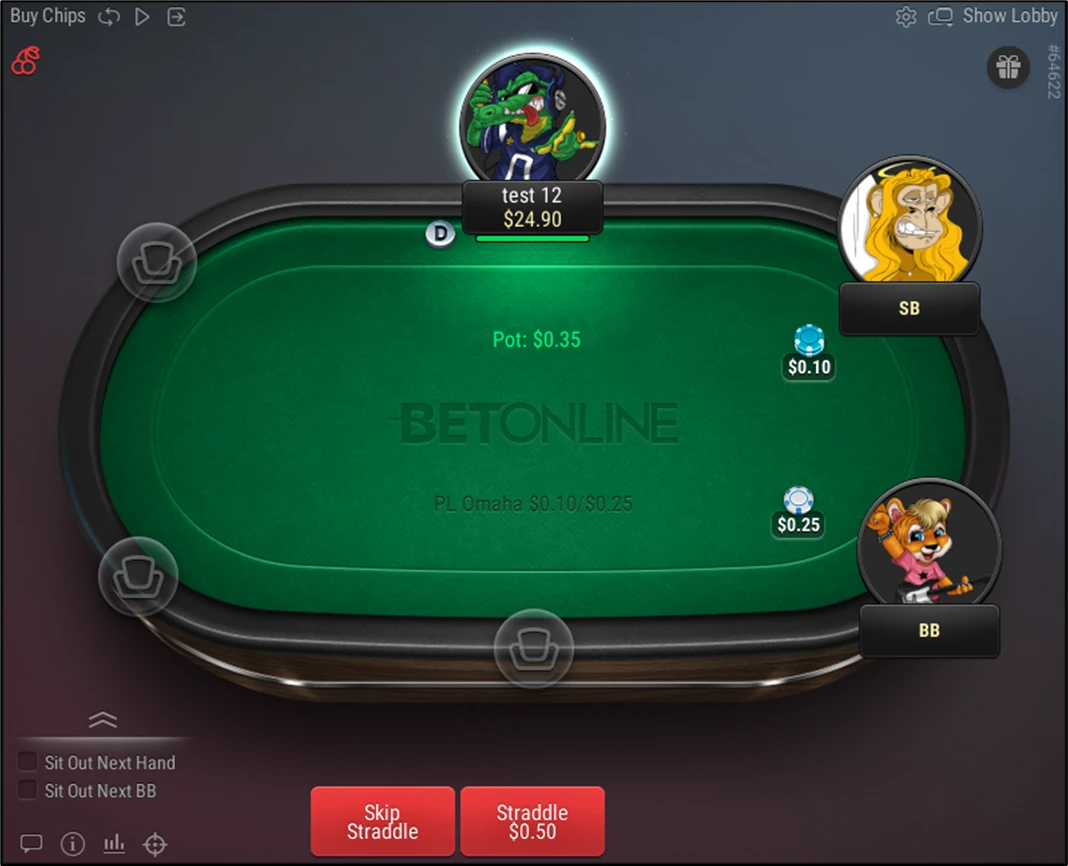
Boost sends you to another hand after you fold. In five-handed Bomb Pot Discard, everyone contributes at the start and the flop is dealt without a preflop betting round. Each player starts with three hole cards. After the flop betting round, anyone still in the hand discards one card before play continues to the turn. BetOnline also lists straddles at eligible cash tables.
Six Plus Hold’em uses a 36-card deck and changes how some made hands rank. A flush beats a full house under the rules BetOnline describes. In Omaha Hi/Lo, the pot can split between a high hand and a qualifying low. Look at the variant and betting format in the lobby before choosing a seat, especially when multiple Omaha games appear together.
BetOnline Poker Cash Game Rake and Caps
BetOnline publishes separate rates for Fast Fold, No-Limit regular and Pot-Limit regular cash tables. Start with the lobby’s game and stake. Then match the number of players to the table in the house rules. The charge is expressed in cents per unit of pot, and the cap is the most the room can take at that player count.
In the published $0.10/$0.25 schedules, the six-player cap is $2 at Fast Fold and Pot-Limit and $2.50 at regular No-Limit. The difference matters when comparing how much comes out of a large pot. On certain regular No-Limit stakes the pot increment also changes when seven or more players are dealt in. The final column lists the charge and cap for that case together.
| Stakes | Charge per pot increment | 2 players | 3 players | 4 players | 5 players | 6 players |
|---|---|---|---|---|---|---|
| $0.05/$0.10 | $0.01 per $0.20 | $0.50 | $1.00 | $1.00 | $1.50 | $1.50 |
| $0.10/$0.25 | $0.01 per $0.20 | $0.50 | $1.00 | $2.00 | $2.00 | $2.00 |
| $0.25/$0.50 | $0.01 per $0.20 | $1.00 | $1.50 | $2.50 | $3.00 | $3.00 |
| Stakes | Charge per pot increment | 2 players | 3 players | 4 players | 5 players | 6 players | 7+ charge and cap |
|---|---|---|---|---|---|---|---|
| $0.05/$0.10 | $0.01 per $0.20 | $0.50 | $1.00 | $1.00 | $1.50 | $1.50 | $0.01 per $0.16, cap $1.50 |
| $0.10/$0.25 | $0.01 per $0.20 | $1.00 | $1.50 | $2.00 | $2.50 | $2.50 | $0.01 per $0.16, cap $2.50 |
| $0.25/$0.50 | $0.01 per $0.20 | $1.00 | $1.50 | $2.50 | $3.00 | $3.00 | $0.01 per $0.18, cap $3.50 |
| $0.50/$1 | $0.01 per $0.20 | $1.00 | $1.50 | $2.50 | $3.50 | $3.50 | $0.01 per $0.18, cap $3.75 |
| $1/$2 | $0.01 per $0.20 | $2.50 | $3.50 | $3.50 | $4.50 | $4.50 | $0.01 per $0.18, cap $5.00 |
| $2/$5 | $0.01 per $0.18 | $2.50 | $4.00 | $5.00 | $7.00 | $7.00 | $0.01 per $0.18, cap $7.00 |
| $5/$10 | $0.01 per $0.18 | $3.00 | $4.00 | $6.00 | $8.00 | $8.00 | $0.01 per $0.18, cap $8.00 |
| Stakes | Charge per pot increment | 2 players | 3 players | 4 players | 5 players | 6 players |
|---|---|---|---|---|---|---|
| $0.05/$0.10 | $0.01 per $0.20 | $0.50 | $1.00 | $1.00 | $1.50 | $1.50 |
| $0.10/$0.25 | $0.01 per $0.20 | $0.50 | $1.00 | $2.00 | $2.00 | $2.00 |
| $0.25/$0.50 | $0.01 per $0.20 | $1.00 | $1.50 | $2.50 | $3.00 | $3.00 |
| $0.50/$1 | $0.01 per $0.20 | $1.00 | $1.50 | $2.50 | $3.50 | $3.50 |
| $1/$2 | $0.01 per $0.20 | $2.00 | $3.00 | $3.00 | $4.00 | $4.00 |
| $2/$5 | $0.01 per $0.18 | $2.50 | $4.00 | $5.00 | $7.00 | $7.00 |
| $5/$10 | $0.01 per $0.18 | $3.00 | $4.00 | $6.00 | $8.00 | $8.00 |
BetOnline Cash Lobby, Quick Seats and Table Selection
On desktop, start in the cash lobby and use the game tabs for Hold’em, Omaha or Boost. Switch between the real-money and play-money views before comparing stakes. Group View aggregates tables with the same game and stake. If you want to inspect a specific table, switch to Table List View when that option is offered.
Look at the player count, buy-in and average pot for a table. A table’s average pot describes recent play and may change after the lineup changes. A Boost entry selects a pool at one stake and sends you to a fresh hand once you fold. Use a regular table when you want to stay with the same lineup between hands.

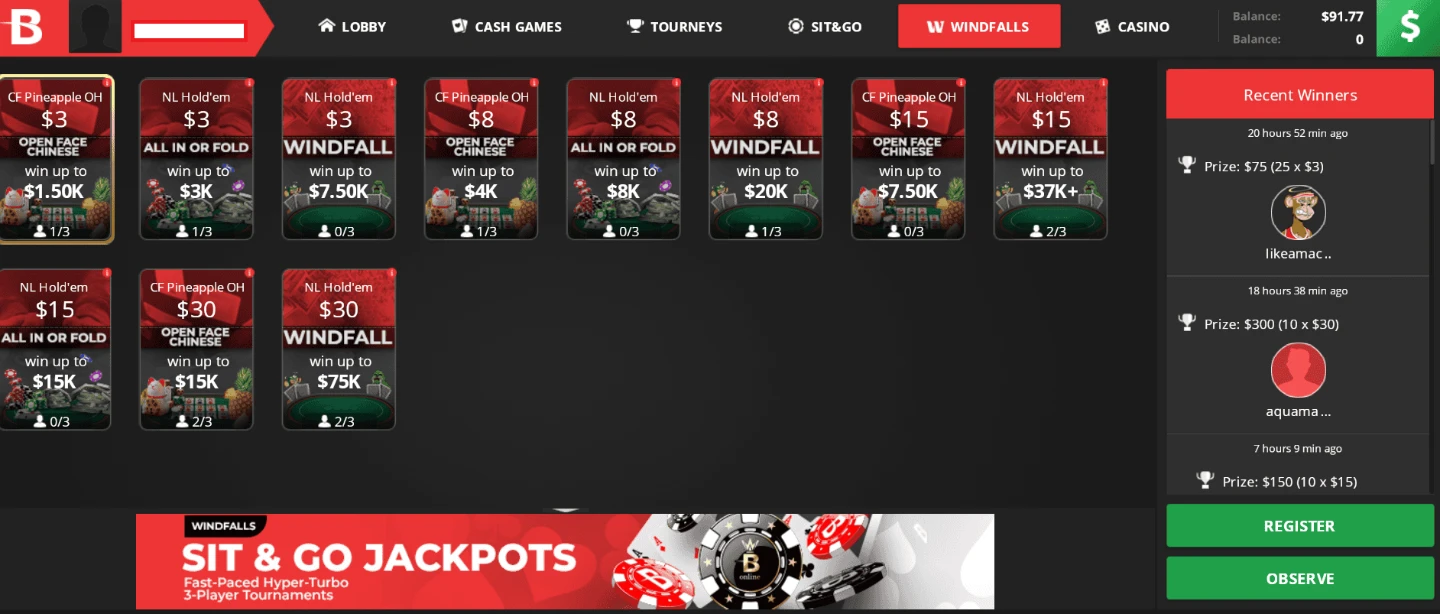
Windfall and the all-in version
A standard Windfall fills a three-player table and draws the prize pool before the first hand. Its lobby shows the available stakes and game details. BetOnline also documents an All in or Fold Windfall with a shorter action tree. Read the listing’s name, starting structure and payout notes before joining.
BetOnline Poker Tournaments and Freerolls
The schedule includes Sunday Majors and weekday multi-table tournaments. In progressive knockout events, part of an eliminated player’s bounty is added to the bounty on the player who knocked them out. Mystery Bounty events reveal the value of an eligible knockout after it happens. Check whether a tournament allows re-entry and when late registration closes. A standard Sit & Go starts once the required seats fill.
On desktop, sort the Tourneys list by start time, buy-in or status. Selecting an event opens the summary, and the full details show blind levels, registered players, active tables and prize information. The Main Events tab collects featured tournaments, and the Satellites tab shows routes to target events. On mobile, open a tournament and use the icons to switch between the summary, entry conditions, blind structure and player list.
For no-buy-in events, check the live tournament lobby and open the freeroll listing to see whether you qualify. The schedule and entry conditions depend on the event. The Windfalls tab is for the separate three-player tournament format, where a spin determines the prize pool before the first hand.

BetOnline Tournament Structures, Re-Entry and Satellite Tickets
Read the tournament detail panes before registering. The overview shows the buy-in, prize pool, starting time and current field. Continue to the structure to check blind length and starting stack. In a tournament with re-entry or rebuy, the rules show who can enter again and when the option closes.
The Main Events and Satellites views are useful when you have a particular destination in mind. A freeroll with an activity requirement differs from a time-limited step ticket, even when neither needs a separate entry purchase at registration. The welcome package’s tickets have their own time limit. Read the event’s entry and prize type instead of relying on its name.
| Event | Registration | Detail worth checking |
|---|---|---|
| Scheduled MTT | Opens ahead of its announced start time | Late registration, starting stack, fee and any re-entry. |
| Satellites | Register for a qualifier | The event the prize applies to and whether it awards a seat or ticket. |
| Freeroll | No cash buy-in on an eligible listing | Password, ticket, account requirement or play requirement. |
| Windfall | Starts once the required seats fill | Stake, prize draw and the structure that follows. |
| Steps | Entry uses an eligible ticket | Ticket expiry and next event in the chain. |
BetOnline Poker App and Browser Access
The poker download page lists Windows and macOS clients and routes for iOS and Android. Browser play is also available. BetOnline’s mobile help documents an iPhone or iPad browser route and a separate Android installer. Use the operator’s download page for the current route for your device.
The mobile experience has its own layout for cash games and tournaments. If you need to look up a result, the desktop settings let you filter hand history by date and by game type, including cash tables, Sit & Gos, Windfalls and other tournaments. The mobile app help describes a view of the last hand played.

Windows and macOS
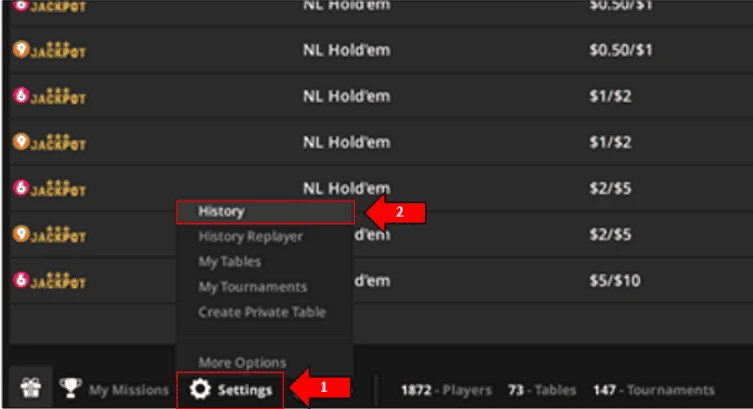
Use the platform link on the poker download page. Once the desktop client opens, the bottom menu contains My Missions, the Cashier and access to settings and history.

iPhone, iPad and Android
BetOnline documents mobile browser access for iPhone and iPad and an Android route. Use the operator’s current link for your device. In the poker menu, Contests opens your reward progress.
Open the poker room and find a table
On desktop, launch the BetOnline Poker client and sign in with your BetOnline account. In a supported browser, open the Poker area from your account. On a phone, the poker menu opens the lobby, contests and account tools. The available download route depends on the device.
For a cash game, select the game type and stake in the cash lobby. Open the table or use the Quick Seat control where available. For a tournament, open the event listing and read its buy-in, start time and late-registration rules before selecting Register.
For Windfall, open the corresponding game lobby and check the buy-in and displayed format. A standard Windfall and an all-in version start differently. Use your session history later to find the tournament and open a hand by its ID.
BetOnline Table Controls and Heads-Up Display
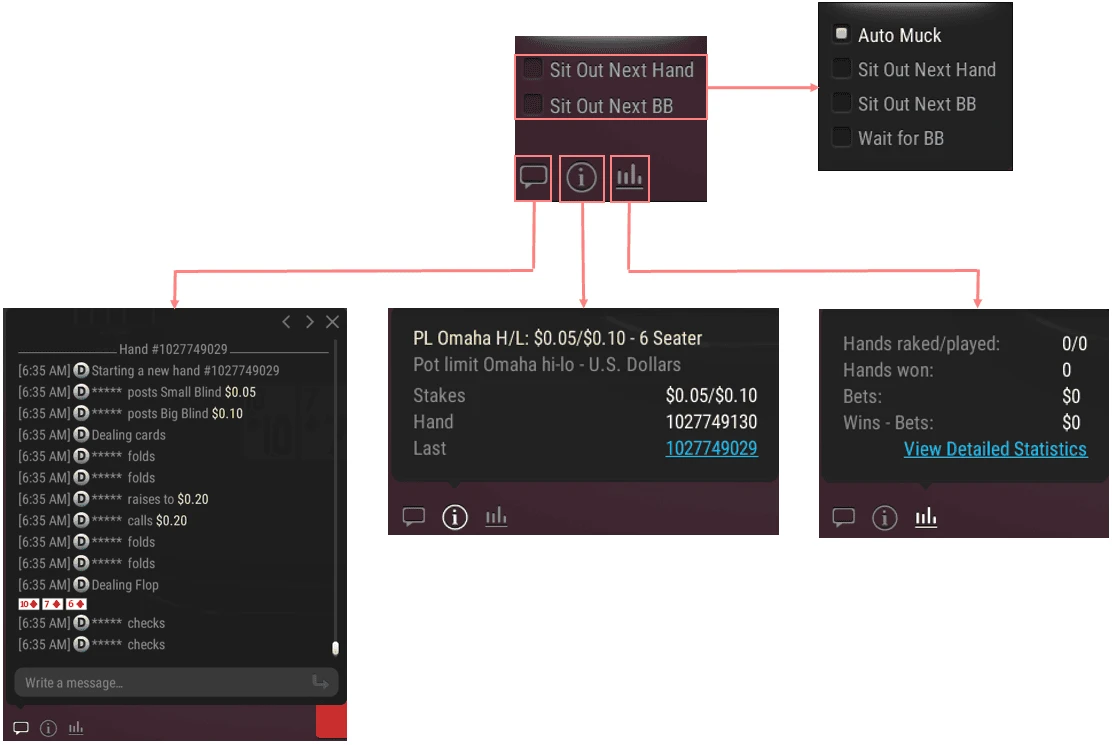
On Windows and Mac, the Move theme groups table information and actions into menus. Info shows the table name, stakes and hand ID. Session Options lets you sit in or out across several tables. The Layout menu can resize, tile or cascade open tables, and the bet slider lets you save different sizing presets for cash games and tournaments.
The built-in heads-up display (HUD) shows poker statistics on the table. The operator’s fair play rules separately prohibit tools that give players an unfair advantage, including bots, real-time solvers and seating scripts. For tournaments, the in-table status strip shows the current blind level, time to the next level, position and prize information. Its color changes when the event moves from late registration to play, the bubble and paid places.
On eligible cash tables, BetOnline offers a run-it-multiple-times option after players are all-in. When the option is used, the remaining community cards are dealt more than once and the pot is divided into portions for the separate runouts. Check the table rules to see when the option appears.
Table information and action history
Open Info to see the stakes and hand ID. Open the chat panel to review the action feed alongside the table. Player chat and action messages use the preferences in the table settings.
Action bar, chips and previous hands
Use the chip control to add chips at cash tables or to rebuy and add on when the event permits it. The replayer opens previously played hands. Session Options is the place to sit in or out across open tables without changing each one separately.
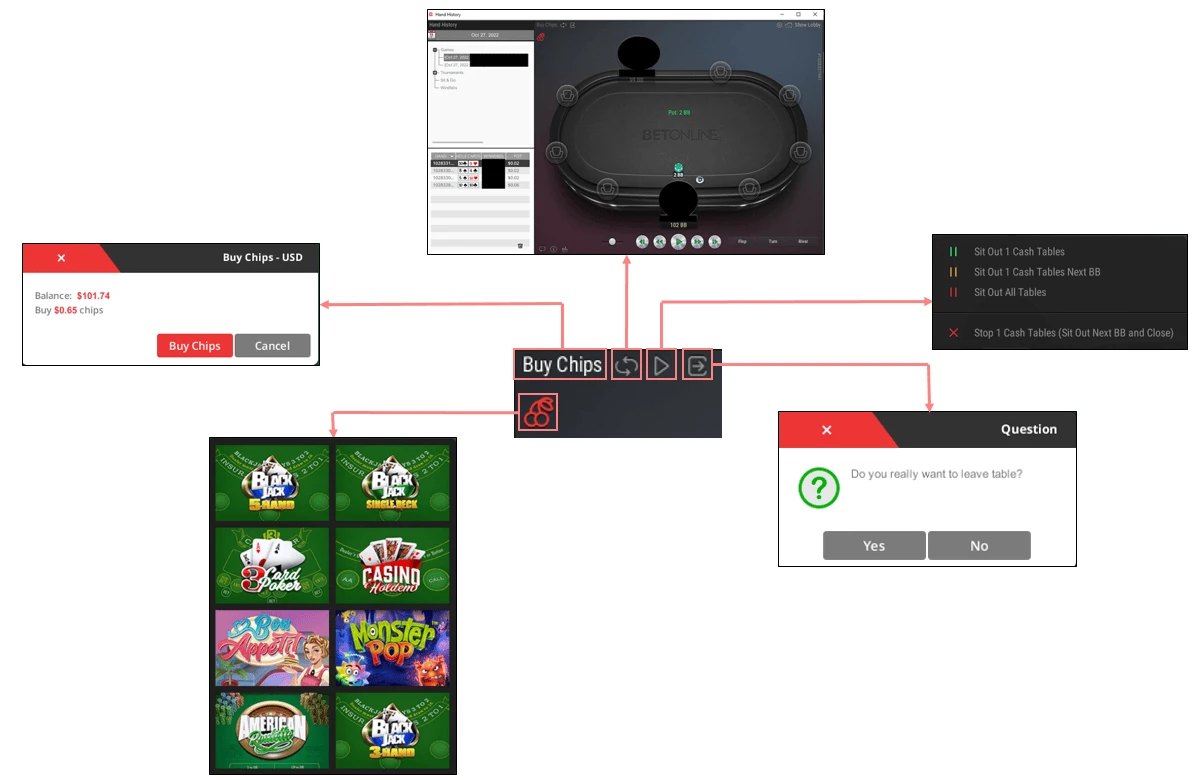
Table layout and bet sizes
Use Layout to tile or cascade tables, or resize them to fit your display. Open Options for the table settings. The cash and tournament bet presets can be configured separately. Check the entered amount before applying a preset at a table.

BetOnline Poker Settings, Hand History and Replayer
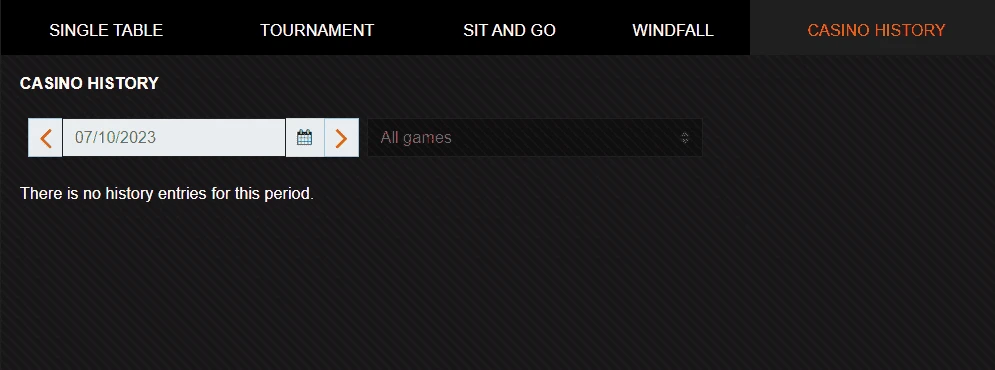
Open Settings on the desktop lobby taskbar and select History. Choose a date and a category to find the session, tournament or Windfall you played. The client groups the results by table or event. Expand one result and select the hand ID to see the record. For a problem reported to support, include that ID, the table name or event and the approximate time.
The History Replayer is useful for walking through a previous hand. From a live table, the Move theme puts the replay option in the action controls. On mobile, the help guide shows where to review the last hand. Check the platform before assuming the desktop history menus are present in the same place.
| Task | Control | What it shows |
|---|---|---|
| Find a cash session | Settings → History → cash category and date | Sessions and the hands associated with each table. |
| Find a tournament hand | Settings → History → tournament or Sit & Go category | Played events, table or hand identifiers and details. |
| Check active games | My Tables or My Tournaments | A way back to open tables and registered events. |
| Arrange open windows | Move theme → Layout | Resize, tile or cascade the desktop tables. |
| Check table identity | Move theme → Info | Table name, stakes and hand ID. |
BetOnline Poker HUDs, Hand2Note and Prohibited Software
The BetOnline poker rules identify Hand2Note, PokerTracker and Hold’em Manager as examples of trackers that can be used with statistics collected through your own play. A tracker’s compatibility with the room does not authorize outside databases. The room’s built-in HUD is part of the client. If you use third-party tools, verify the data source and which functions are enabled.
The policy allows basic game information, a simple starting-hand chart and interface aids that do not make decisions for you. It prohibits bots, real-time solvers, seating scripts, data mining and tools that act on game advice. If a feature is unclear, use the game-integrity contact published in the room’s rules.
| Tool | Use under house rules |
|---|---|
| Built-in HUD | Use the indicators available in the poker client. |
| Hand2Note, PokerTracker, Hold’em Manager | Use data from your own play. Third-party mined databases are prohibited. |
| Basic chart or display tool | Basic aid only. The player must choose and enter the action. |
| Solver, artificial intelligence or live advice | Keep decision assistance away from live play. |
| Bot or seating script | Prohibited. Do not automate actions or seating. |
Location Restrictions, Verification and Cashier Options
BetOnline’s public terms list restricted jurisdictions, including Australia, France, Panama and the United Kingdom. Check the list against your location and follow local requirements. The welcome offer’s North America restriction applies to that promotion.
BetOnline requires the name on a payment card to match the account. It can ask for photo ID or other verification documents. The published Cashier list includes cards and cryptocurrency, with separate limits for each method. The Cashier shows the options and current limits for your location and account.
BetOnline’s withdrawal requirements describe security checks the operator may carry out before releasing a payment. Account details should match your registration documents. Its account terms require accurate registration information and limit duplicate accounts.
BetOnline Support, Time-Outs and Self-Exclusion
BetOnline’s Help Center has poker troubleshooting and Player Services handles account restrictions through chat and support channels. You can request a fixed time-out of one week, one month, three months or six months. A time-out runs for the full period. BetOnline also offers permanent self-exclusion for the site through Player Services.
Player Services also handles requests to close the poker room on your account. The poker-only closure option can leave access to the sportsbook and casino open. For a problem at an individual table, the table’s Info panel gives you the hand ID, and tournament details identify the event. The poker rules distinguish individual connection problems from server-wide interruptions when explaining how tournament claims are handled.
BetOnline compared with Ignition Poker, Black Chip Poker and PokerKing
BetOnline, Ignition, Black Chip Poker and PokerKing all take crypto and pay a first-deposit match. The matches release at different speeds.
| Room | Welcome offer | Rakeback | Stands out for | Check first |
|---|---|---|---|---|
| BetOnline | 100% up to $1,000 with POKER1000, North America only | Weekly, 10% at Bronze to 30% at Black | Boost fast-fold, Windfall Sit & Gos, trackers with your own data | Closed in Australia, France, Panama, the UK and other listed places |
| Ignition Poker | 100% up to $1,000 by card, 150% up to $1,500 with crypto | 50% through the bonus, then Ignition Miles at 0.60% to 1.50% | Anonymous tables with no HUDs | Long-term rakeback after the bonus is small |
| Black Chip Poker | 100% up to $2,000, no code, from $25 | No flat rate, The Beast, Sit & Crush and Elite Benefits | Phil's Thrill and eight $50 freerolls a day | Race payouts are less predictable than a fixed rate |
| PokerKing | 100% up to $2,000, no code, from $25 | Royal Club, up to 65% | Linux and Apple silicon clients, 7 Day No Rathole tables | Bronze has no cash exchange and monthly targets reset |
BetOnline suits players who want a published weekly rakeback rate and the right to run Hand2Note or PokerTracker on their own hands. Ignition pays more during the bonus period but hides every player, so HUDs have nothing to read. Black Chip and PokerKing offer a bigger match of up to $2,000 with no code.
More on HPD: fast-fold poker, VPIP in context and real-time assistance rules.
Who BetOnline suits
North American players
POKER1000 is limited to new North American customers.
Tracker users
Hand2Note, PokerTracker and Hold'em Manager are allowed with data from your own play.
Fast-fold players
Boost cash games move you to a new hand as soon as you fold.
Look elsewhere if
you live in Australia, France, Panama, the UK or another restricted place.
BetOnline from sign-up to first withdrawal
01
Check your location
BetOnline lists restricted places, including Australia, France, Panama and the United Kingdom. POKER1000 is open to new North American customers only.
02
Deposit $10 or more with POKER1000
The match is 100% up to $1,000. The name on your payment card must match the account.
03
Release $10 per $20 of rake
You have 60 days. A withdrawal before the match clears forfeits the part that is not released yet.
04
Collect weekly rakeback
The cycle ends Thursday at 23:59 ET and the credit shows in the Cashier under Bonus History. A payment needs at least $1 of qualifying rake.
BetOnline Poker FAQ
What poker network does BetOnline use?
BetOnline identifies Chico Poker Network as its shared player pool. Use the BetOnline poker client or browser lobby to access the branded room.
How do I check my BetOnline poker rakeback?
Open My Missions in the poker lobby and select the Poker Loyalty & Rewards mission. It shows the rate tied to your VIP tier and your tracked poker activity.
Does BetOnline Poker have freerolls?
Yes. Look for current freerolls in the tournament lobby and check the event’s entry requirements before registering.
Can I play BetOnline Poker in a browser?
Yes. The poker room links to browser play and lists separate download options for compatible devices.
How is Boost different from Windfall?
Boost is a fast-fold cash game. Windfall is a three-player tournament with a random prize pool.
Where can I see a BetOnline tournament’s blind structure?
Open the event in Tourneys and choose Levels on desktop. In the mobile tournament details, select the blind-structure icon.
What is the BetOnline poker bonus code?
POKER1000. New North American customers get a 100% match up to $1,000 from a $10 deposit, released at $10 for each $20 of qualifying poker rake within 60 days.
Which countries cannot play BetOnline Poker?
BetOnline's terms list restricted jurisdictions, including Australia, France, Panama and the United Kingdom. Check the full list against your location before you register.