
DriveHUD review 2026: poker tracker, HUD and GTO solver
Poker tracking, rebuilt for modern play.
- Faster analysis
- Cleaner UI
- Deeper insight
DriveHUD 3 is a ground-up evolution of poker tracking, designed to help you find real edges faster, with less friction and more clarity. It imports your hand histories, tracks your results, shows real-time HUD stats on your tables, and gives you tools to study and improve your game: advanced reports, leak analysis, population analysis, GTO tools and AI-powered hand analysis.
On DriveHUD 2? Upgrade at the legacy price
HotPokerDeals is a DriveHUD partner. Product descriptions, instructions, screenshots and logos on this page are DriveHUD’s own, from drivehud.com and the DriveHUD 3 knowledge base. Prices and features checked on 22 October 2026.

Asian Hand Converter · HUD for Asian apps
A HUD on the Asian poker apps.
Track your hands and run a HUD on PokerBros, PPPoker, ClubGG and ten more apps, on your PC or in an Android emulator. Works with DriveHUD, Hold’em Manager, PokerTracker and Hand2Note. Also included with DriveHUD 3 Ultimate+.
Seven things DriveHUD 3 does that your old tracker doesn’t.
Most poker tools bury insight under complexity. DriveHUD 3 does the opposite: rebuilt from the database up, with every screen laid out around the questions players actually ask.
- 01HUD & live statsPopulation stats, hand charts and timing tells on the table.
- 02Mass Data AnalysisHow the pool plays every spot, by player type and seat.
- 03GTO solver & trainerSolve a spot from the hand you just played.
- 04Leaks, priced against GTOWhat each leak costs you, in bb/100.
- 05Filters & R&DAsk one exact question of your database.
- 06Visual or ClassicEvery report as a dashboard, or as columns.
- 07AI hand reviewA second opinion on any hand, with the AI you choose. Gemini is currently free.
01HUD & live stats
A HUD that reads at a glance, and a database behind it.
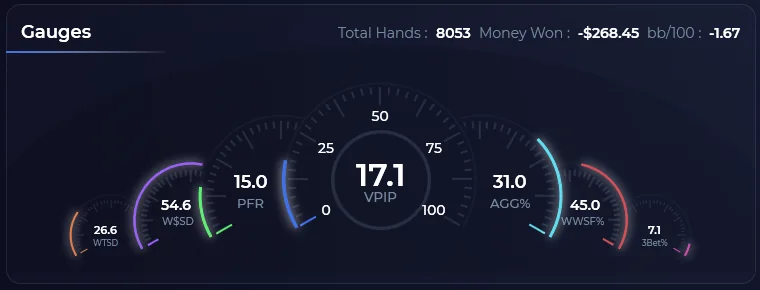
The gauges show where you stand before you scroll: VPIP, PFR, aggression and showdown numbers for whatever you have filtered. Below them, every report tab and every hand, a click away from the replayer.


- Population stats*See how far one player’s numbers sit from the pool on your site, right in the HUD.
- Hand charts*Your own charts, one click from the seat, where the room allows it.
- Timing tells*How long each decision took against that player’s own normal, as a chip beside the seat.
- True HUD resizingPanels and fonts scale with the table, in real time.

A refined interface
Fewer pop-up interruptions, and more of the screen you paid for spent on your data.
First-run setup
Theme, language and your poker rooms, set up in a couple of clicks.
* Only on poker rooms whose terms allow it. Timing tells work on BetOnline & Ignition, plus PokerBros, XPoker, SupremaPoker, PPPoker, CoinPoker, ClubGG, Pokerrrr2, WPT and PokerKing with the Asian Hand Converter.
02Mass Data Analysis
Mass Data Analysis that tells you who to attack.
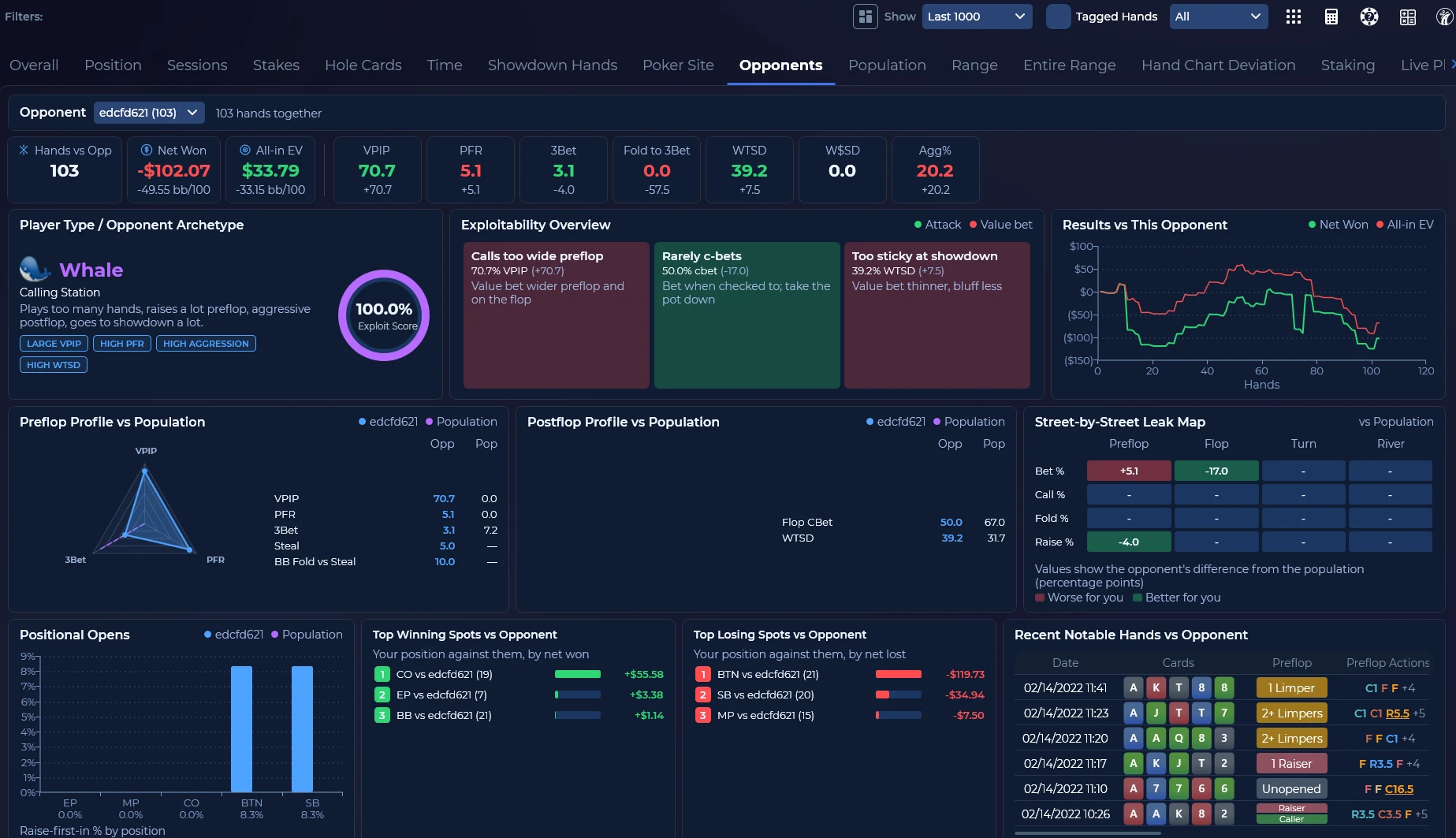
MDA reads the whole player pool. Every report shows how a spot is played, split by player type and by seat, measured against a GTO baseline, with the exploit written out in plain words underneath.
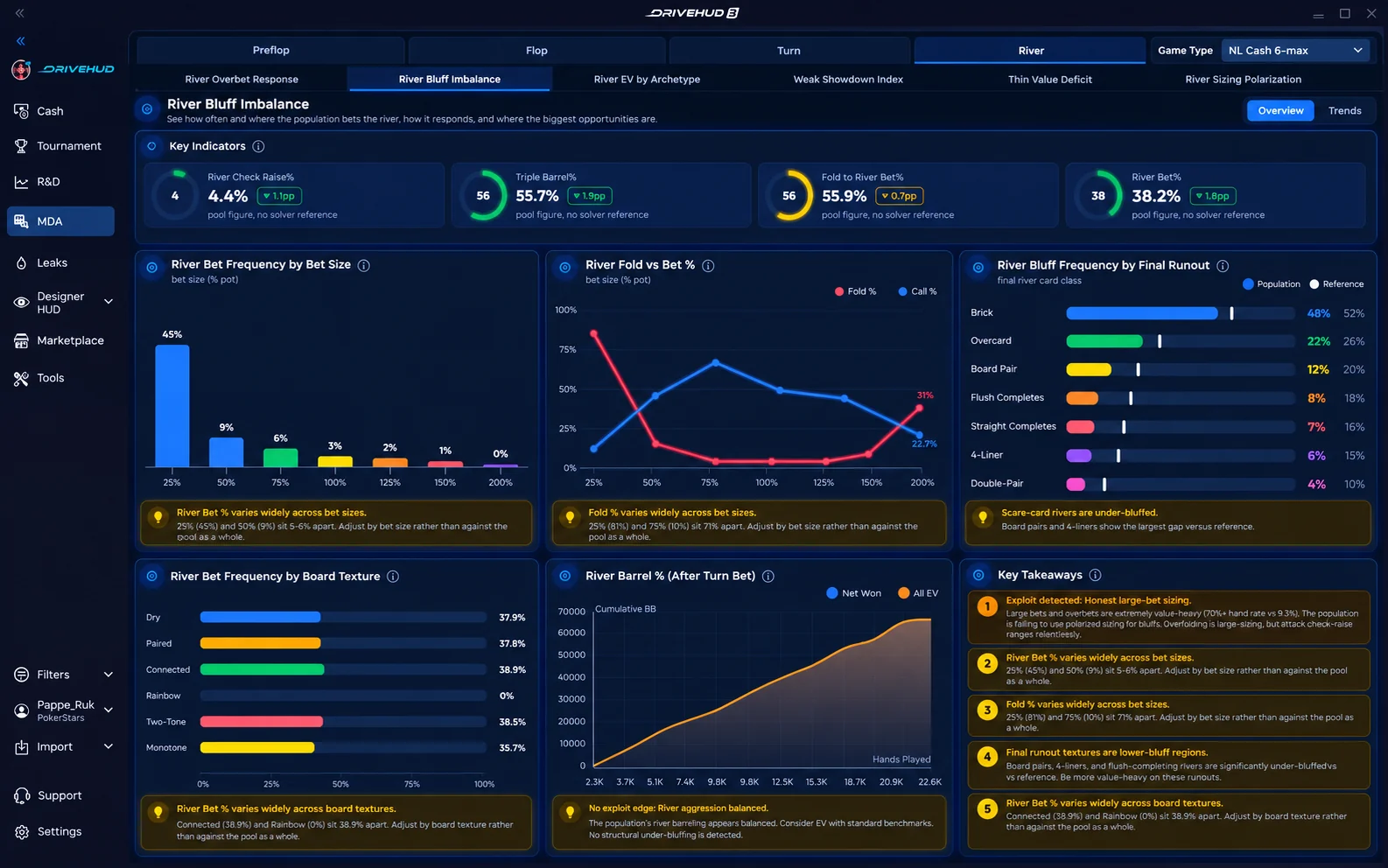
- Every game typeHold’em and Omaha, cash, MTT and Sit & Go, each with its own reports.
- Population onlyMDA studies the pool, so your own hands never skew what it shows you.
- Built for small samples tooThin cells are marked, so a 12-hand number never passes as a read.
- Steal from the right seatsFold-to-steal and 3-bet rates by position show which blinds give up too much.

03GTO solver & trainer
A solver inside the tracker.
Open any hand from a report straight into the GTO solver, see the whole range’s strategy, and lock a node to test an exploit. Hold’em and Omaha. The trainer then drills you on the spots that matter.
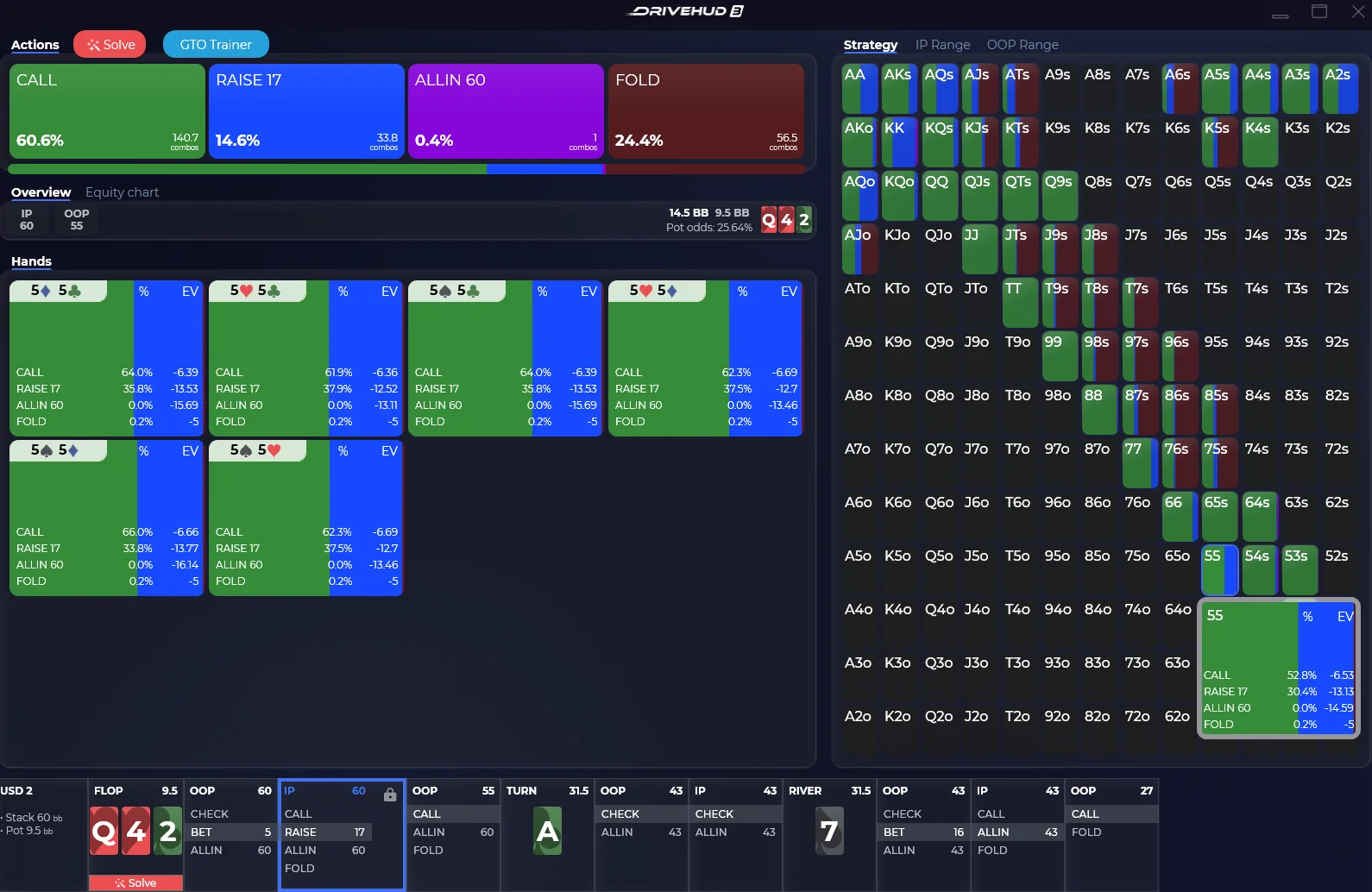
- ActionsCall, raise, all-in and fold, with frequency and combos for the whole range.
- HandsEvery combo’s mix and EV, suit by suit.
- Strategy gridThe range at a glance; hover any cell for its numbers.
- The lineFlop, turn and river in one strip. Lock a node and re-solve.
Every DriveHUD 3 licence includes DriveGTO. Open any hand from a report straight into the solver, then drill that spot in the GTO Trainer. GTO trainer: drill the spots that cost you most, with the solver as your coach.
04Leaks
Your leaks, priced against GTO.
Automated leak analysis grades your game, prices what the leaks cost in bb/100, and lines every stat up against a solver baseline, street by street and seat by seat.
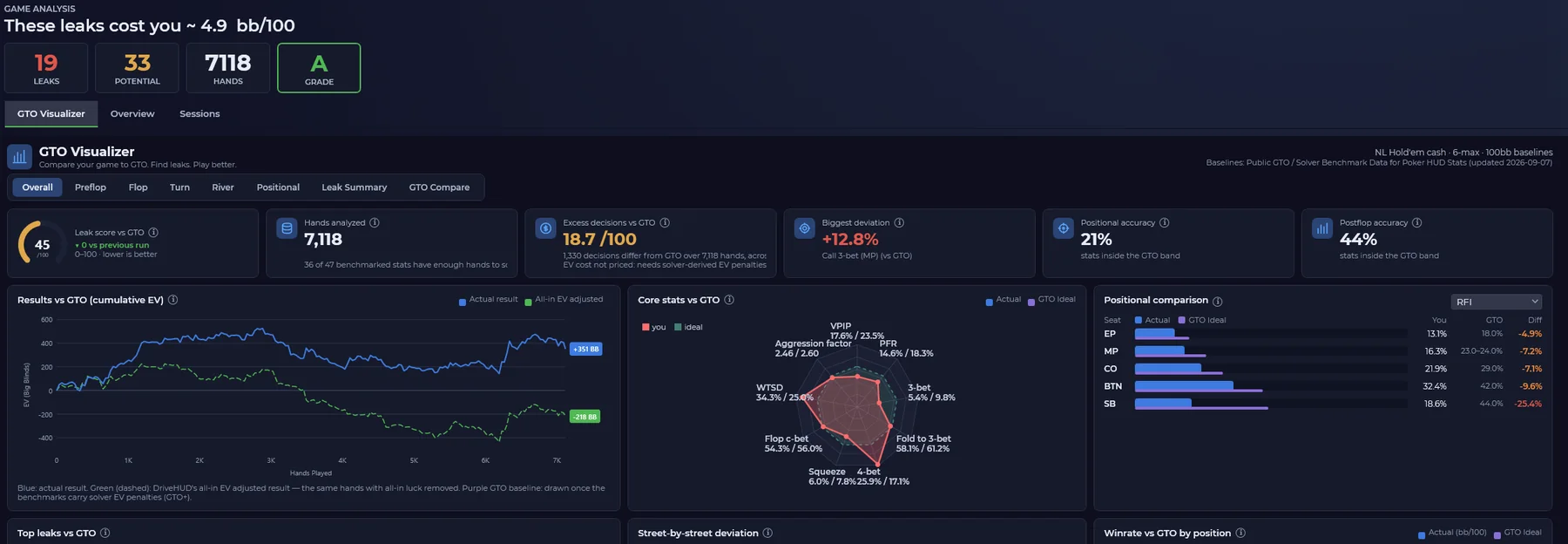
- Top leaks, rankedYou, GTO, the gap and a severity, for every stat with enough hands.
- Street by streetWhere the deviation starts: preflop sizing, flop c-bets, turn barrels.
- Results vs GTOYour cumulative result beside the all-in adjusted line.
- By positionWinrate per seat against the GTO expectation.
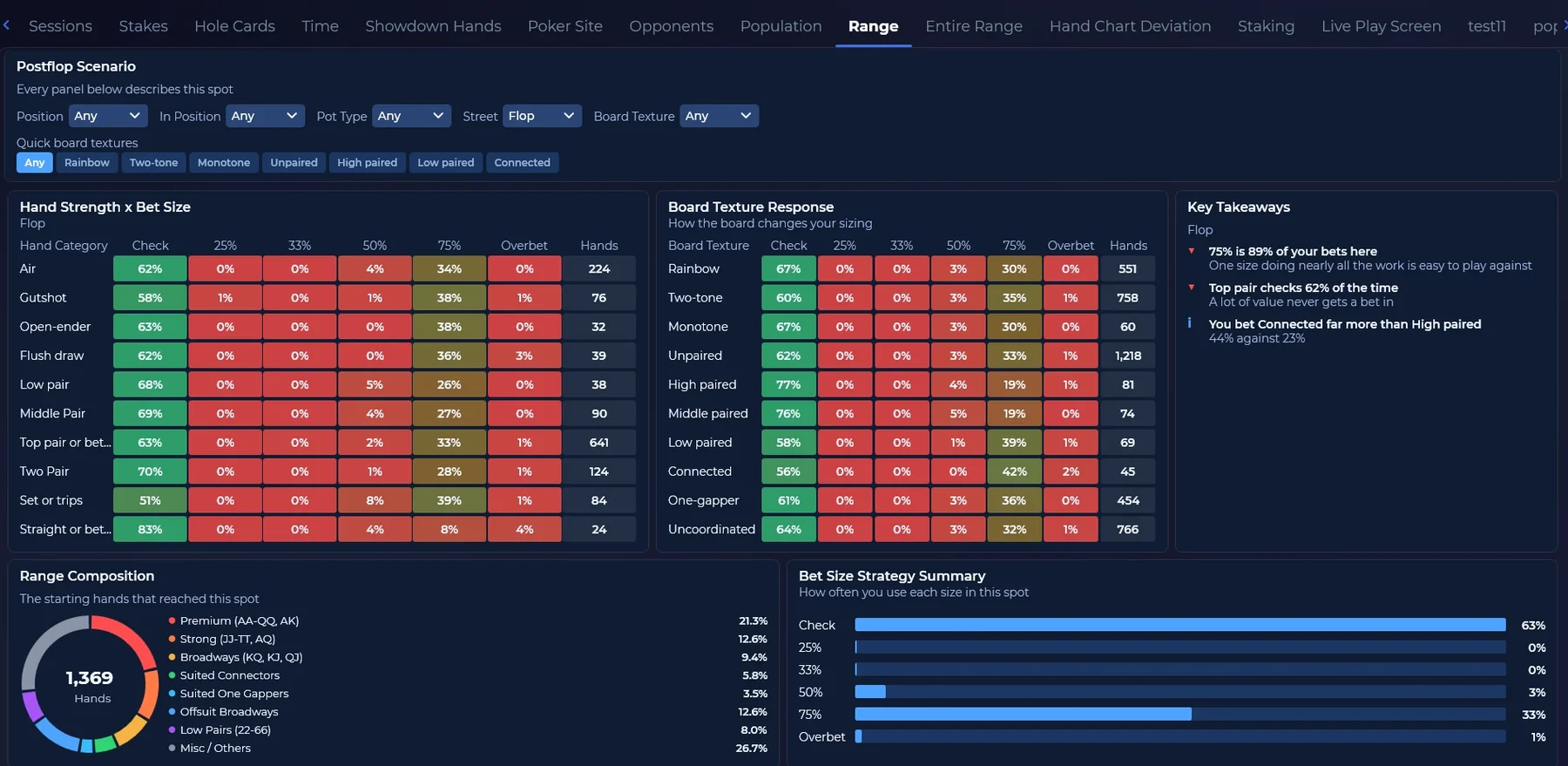
All-in EV
See your results with the all-in luck taken out, beside what you actually won.
Deeper bet sizing
Preflop and postflop sizing stats that expose predictable players.
Hand chart deviation
DriveHUD flags the hands you played away from your own hand charts, so you stay disciplined to your baseline.
05Filters & R&D
Ask one exact question of your database.
Filters are organised around the questions players ask, with presets for the common ones and a filter language for the rest. Slice by session length or time window, then build an R&D report on exactly that spot.
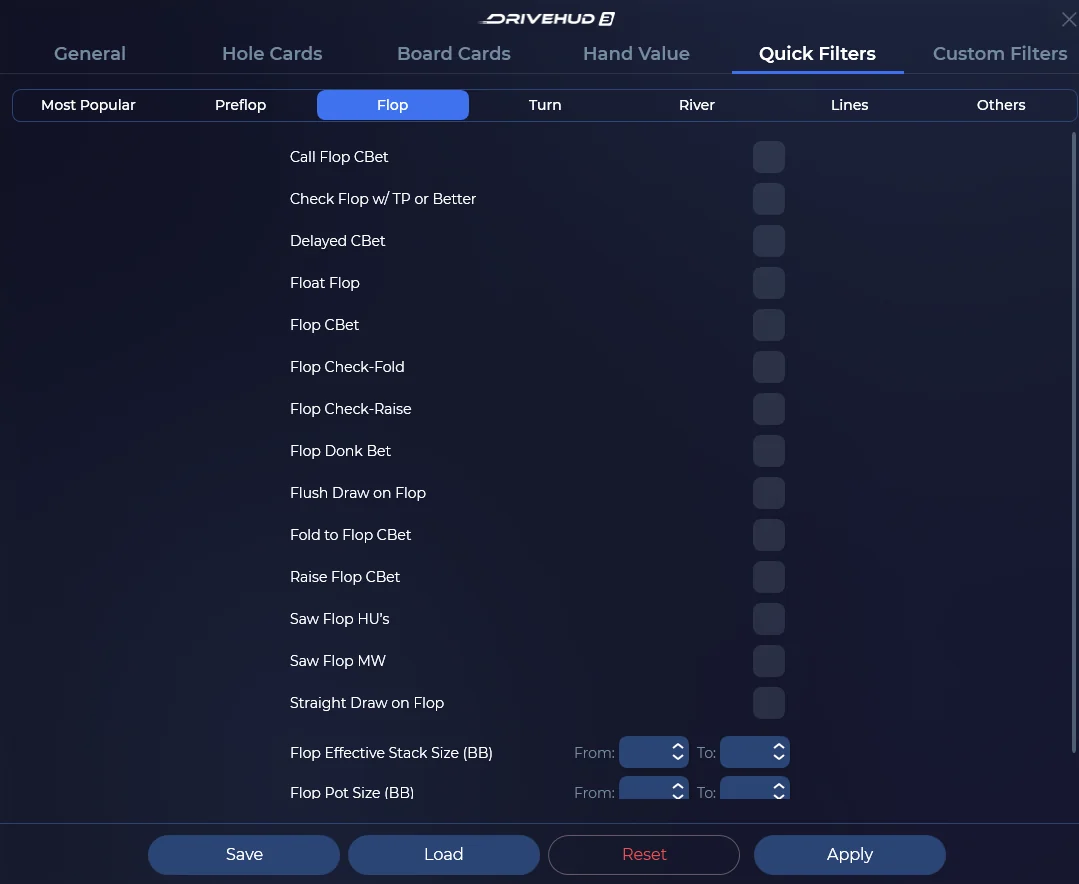
- Intent-driven presetsStart from the question, not from a logic tree.
- Bet-size rangesGroup 3-bet and c-bet sizings into your own buckets, preflop and post.
- Time-based filteringSession length, time of day, or a specific window of play.
- Filter languageWhen no preset fits, write the filter itself.


06Report views
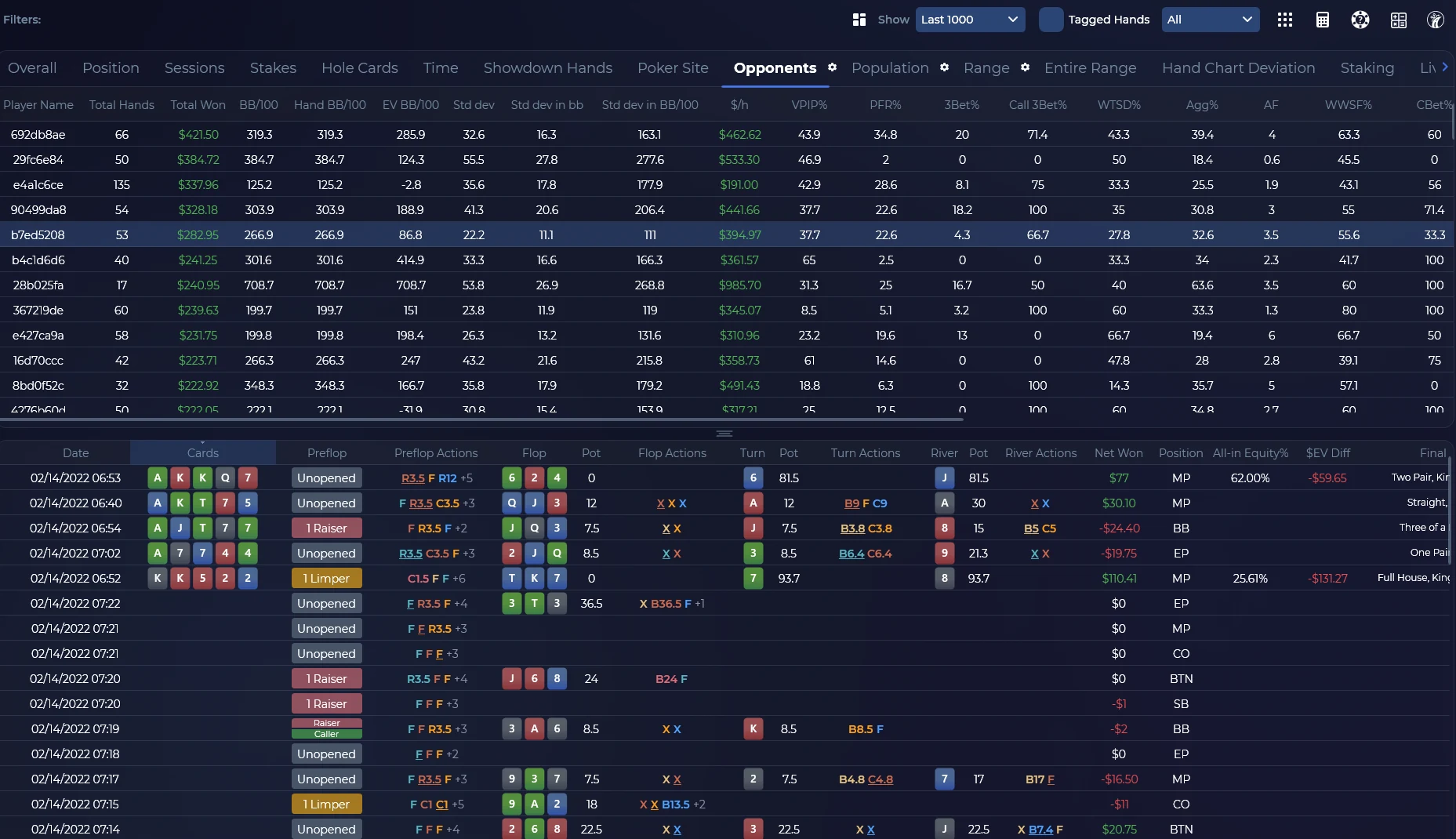
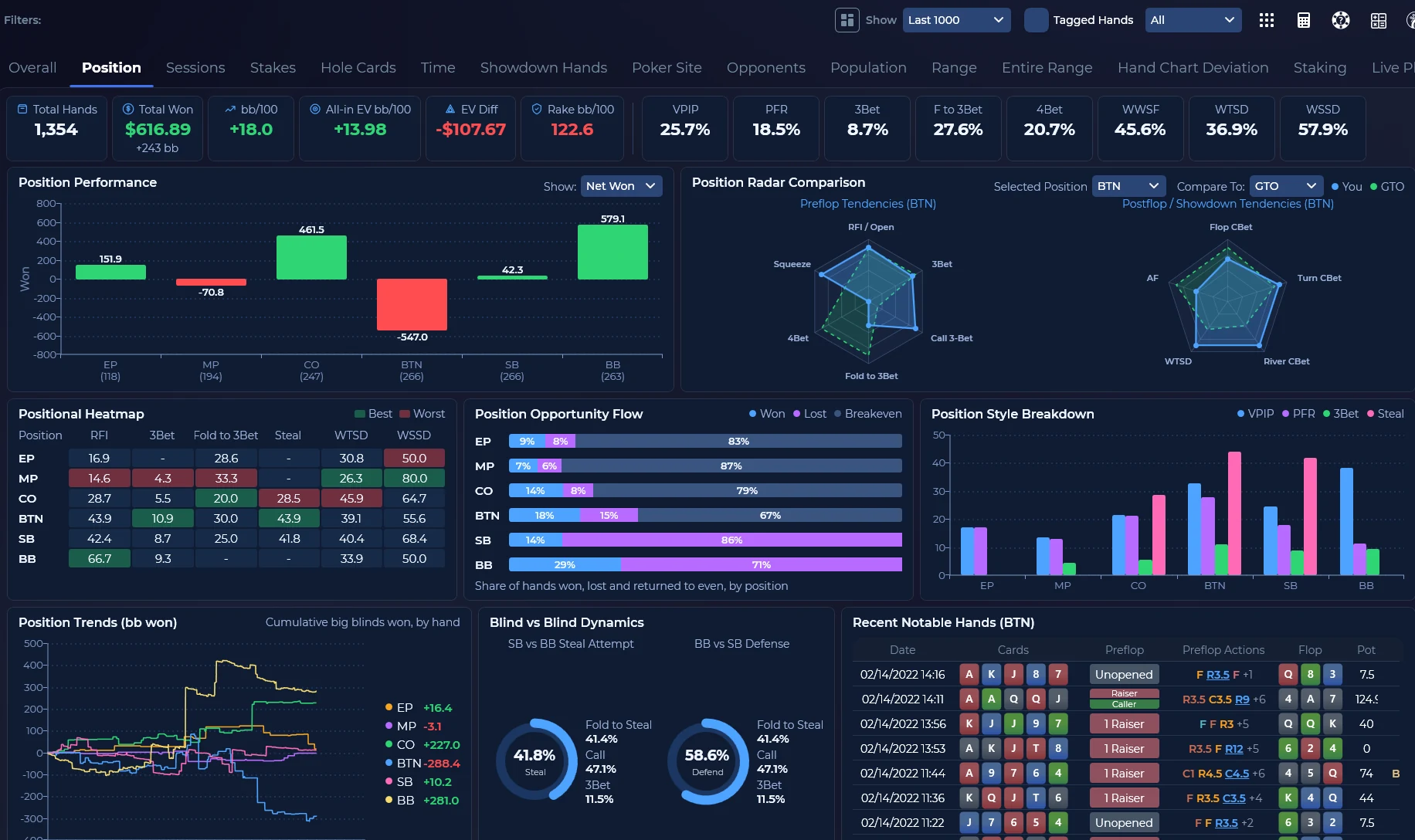
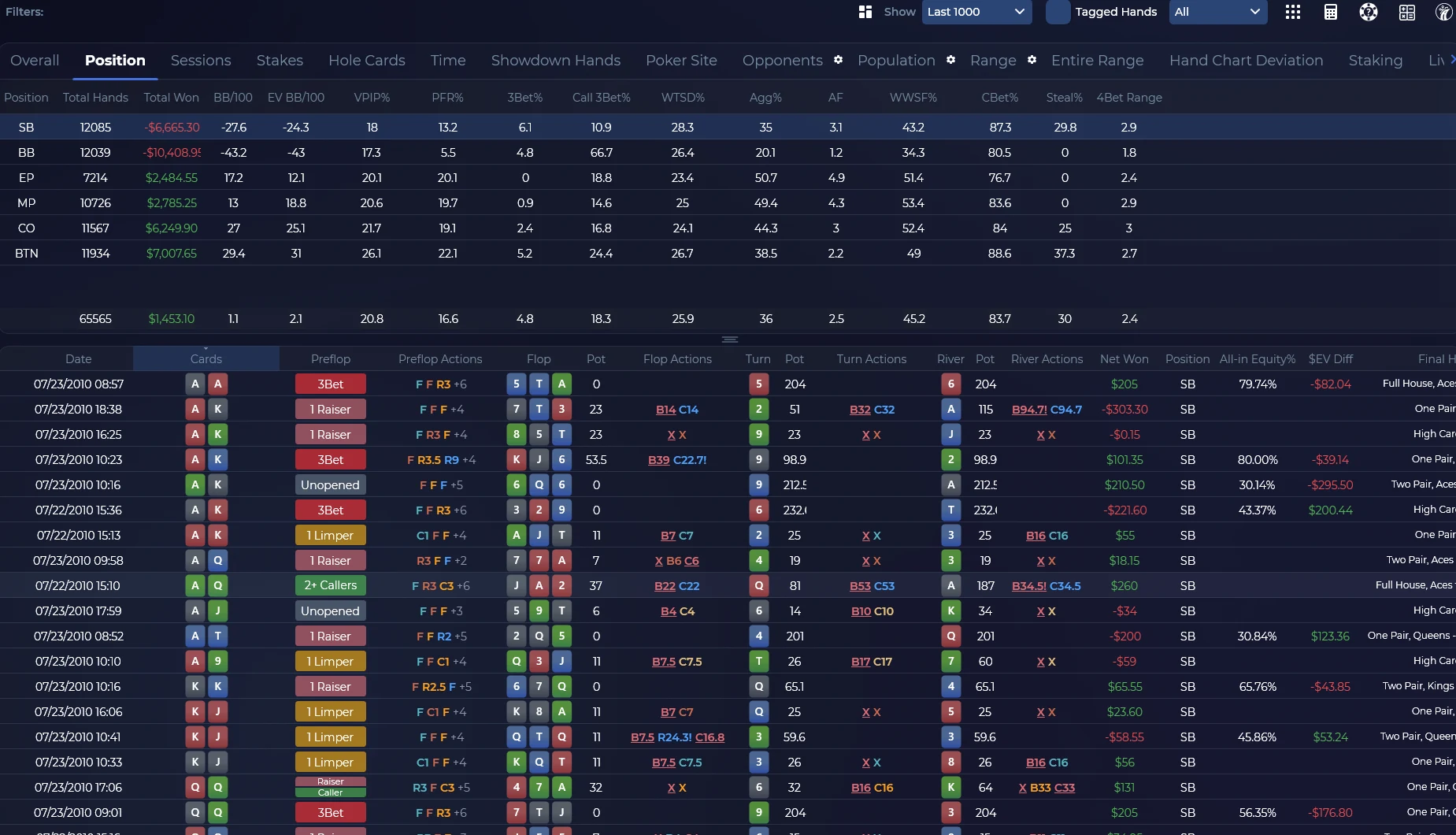
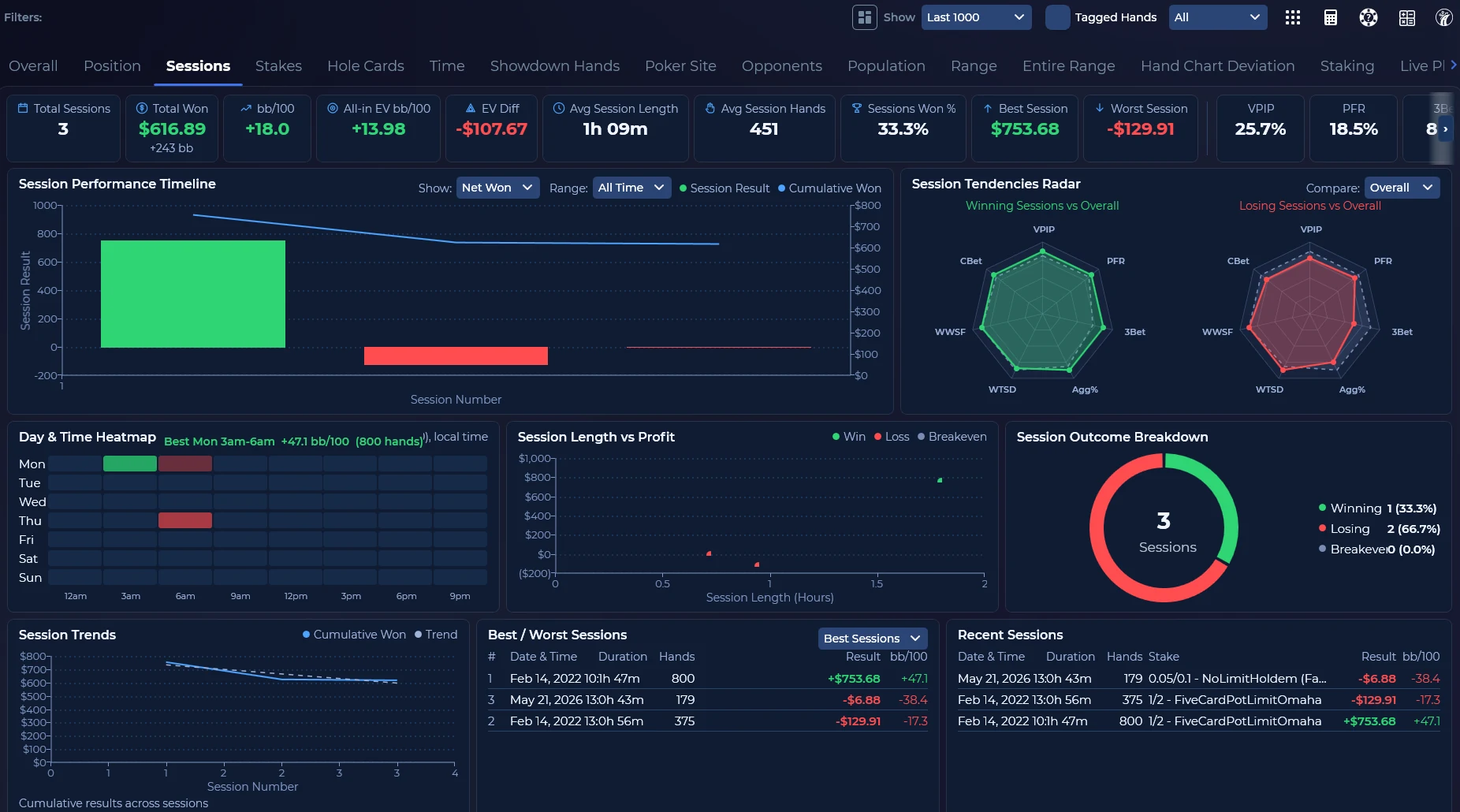
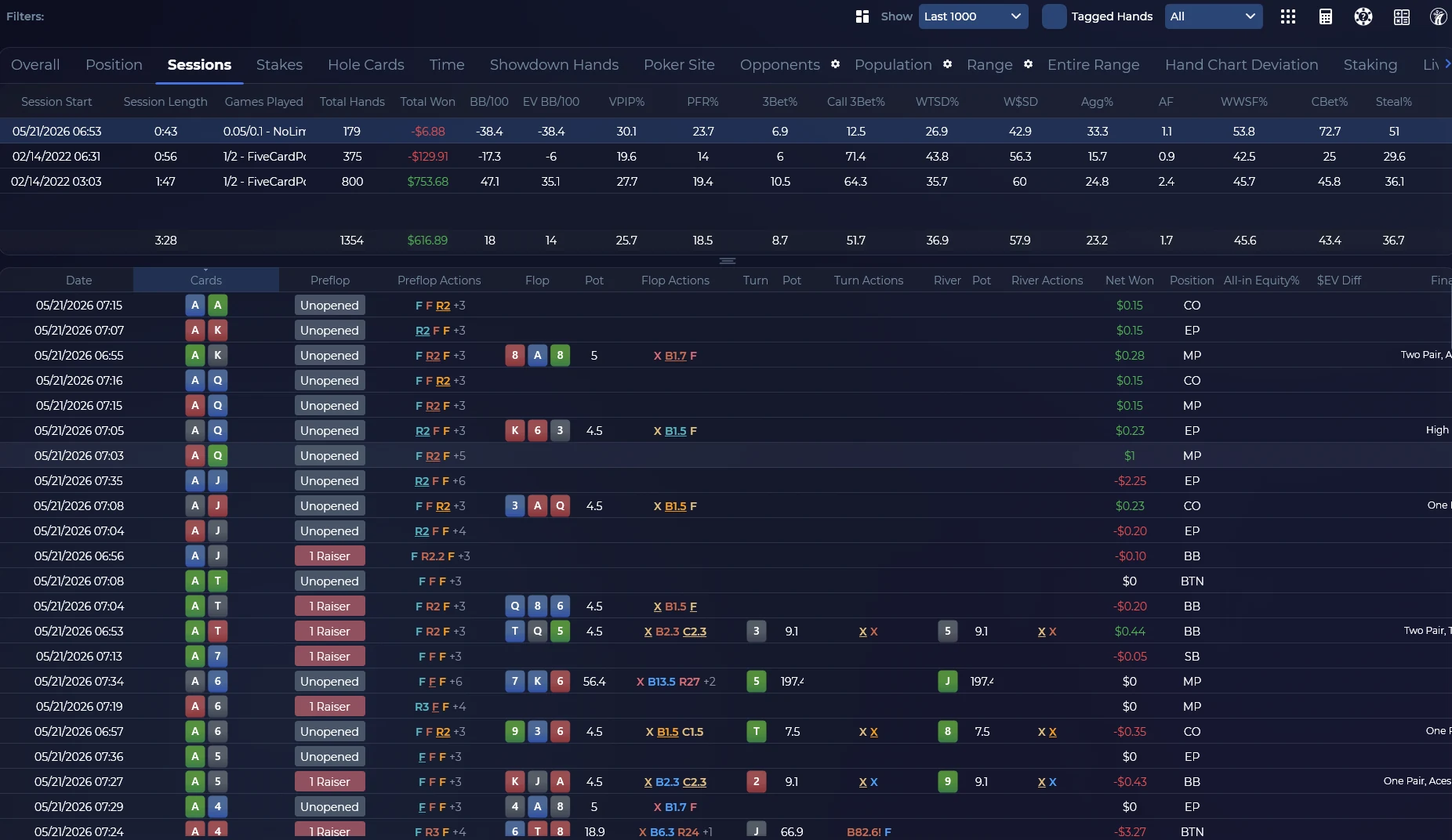
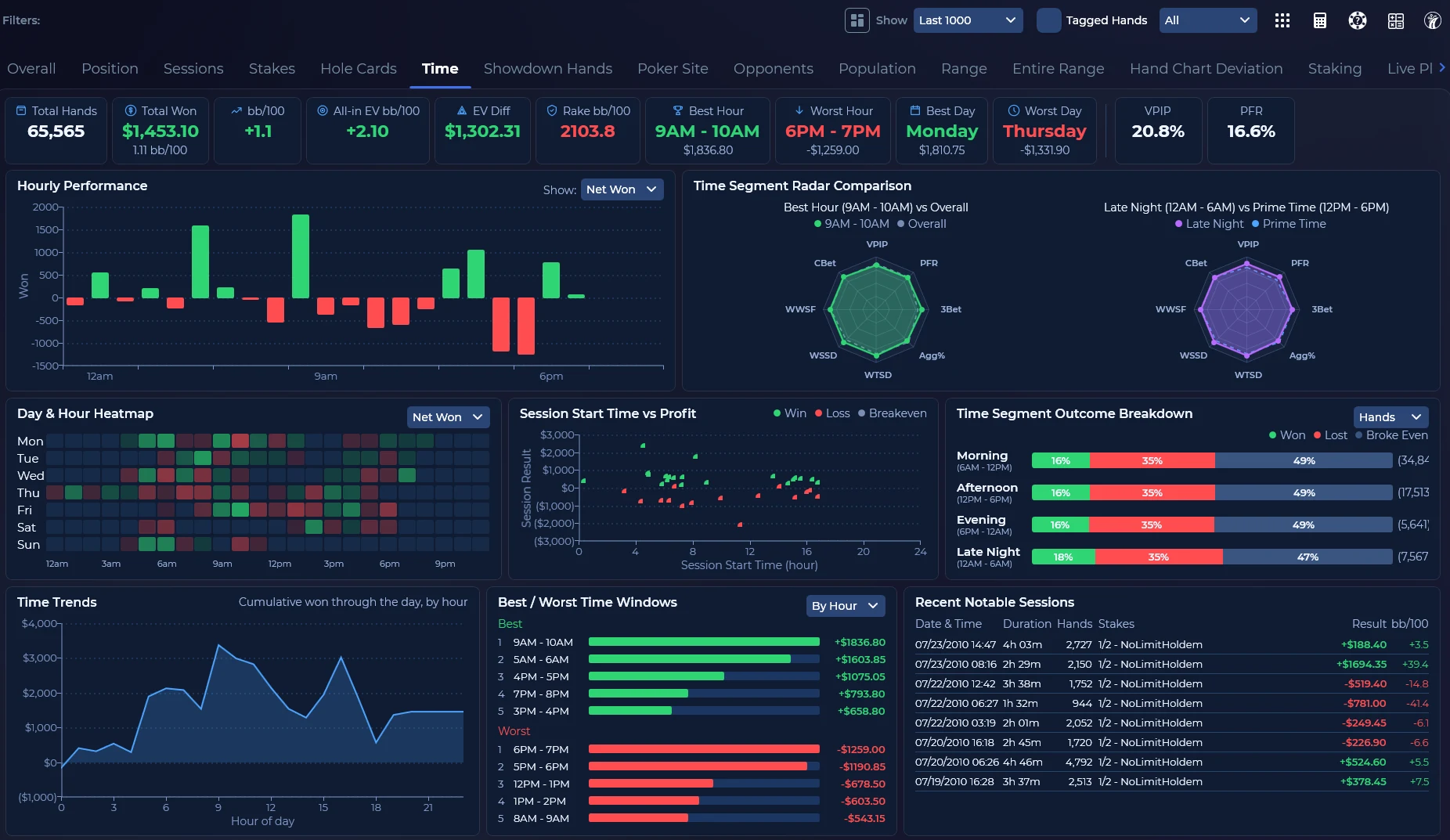
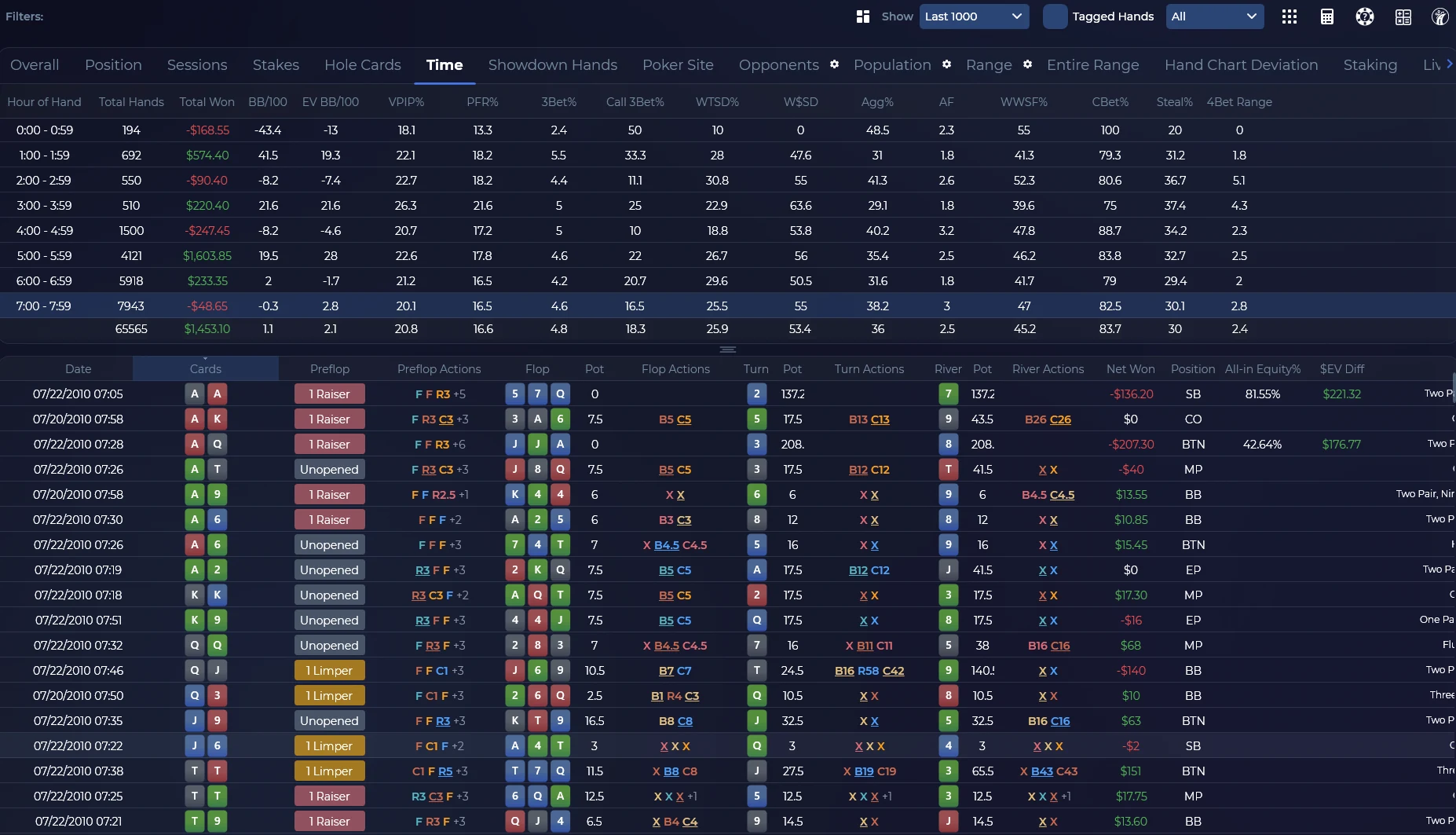
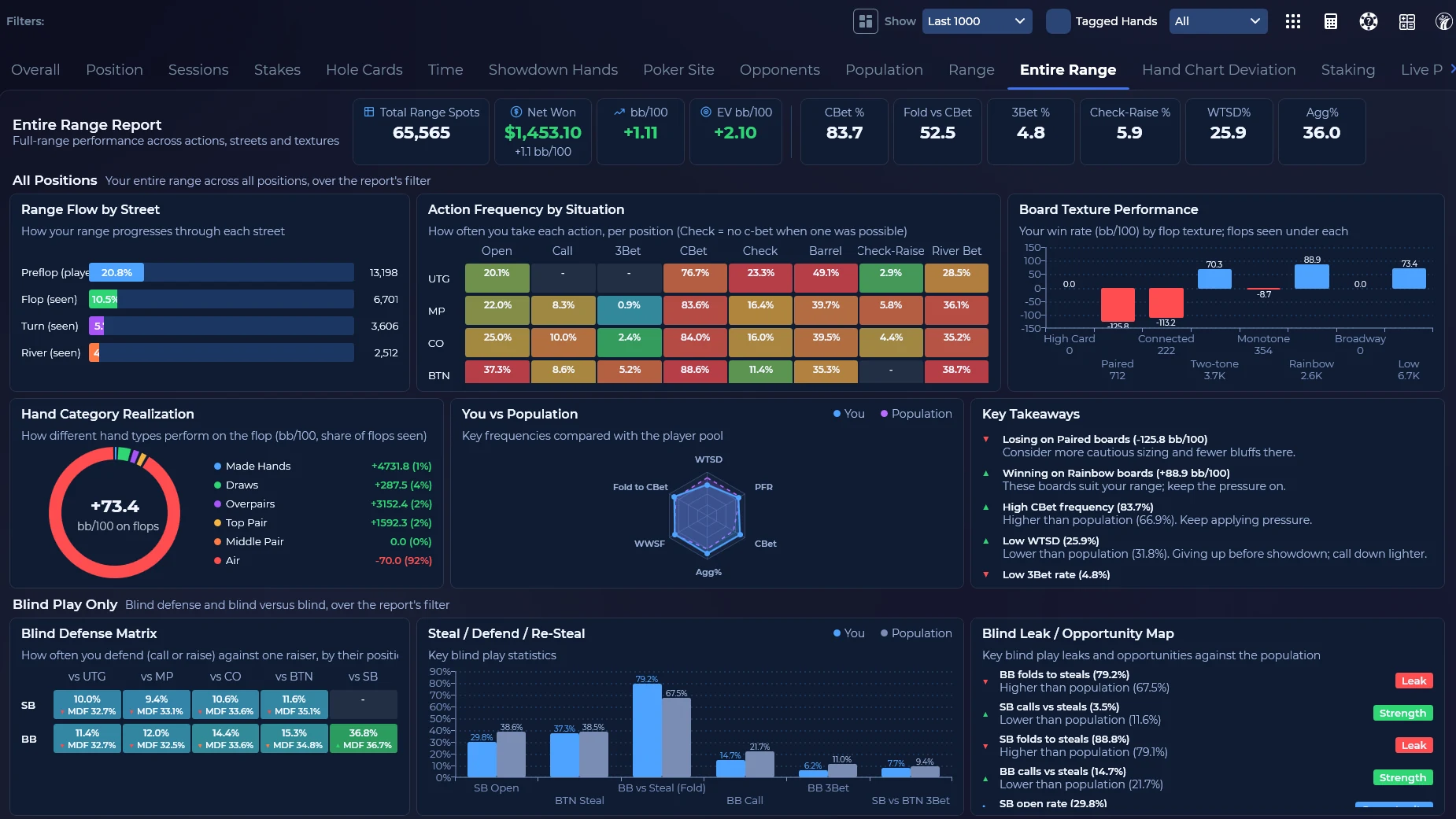
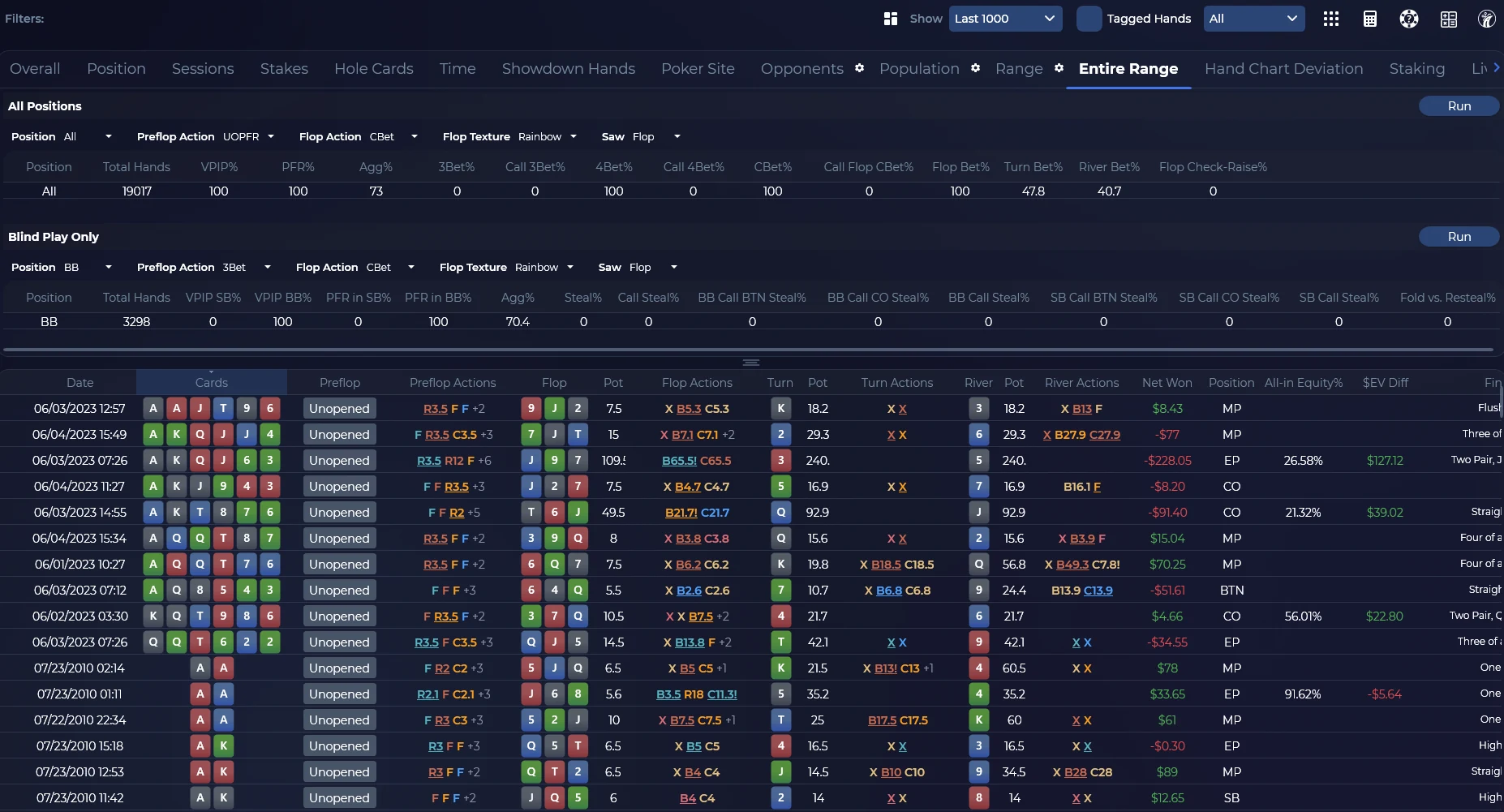
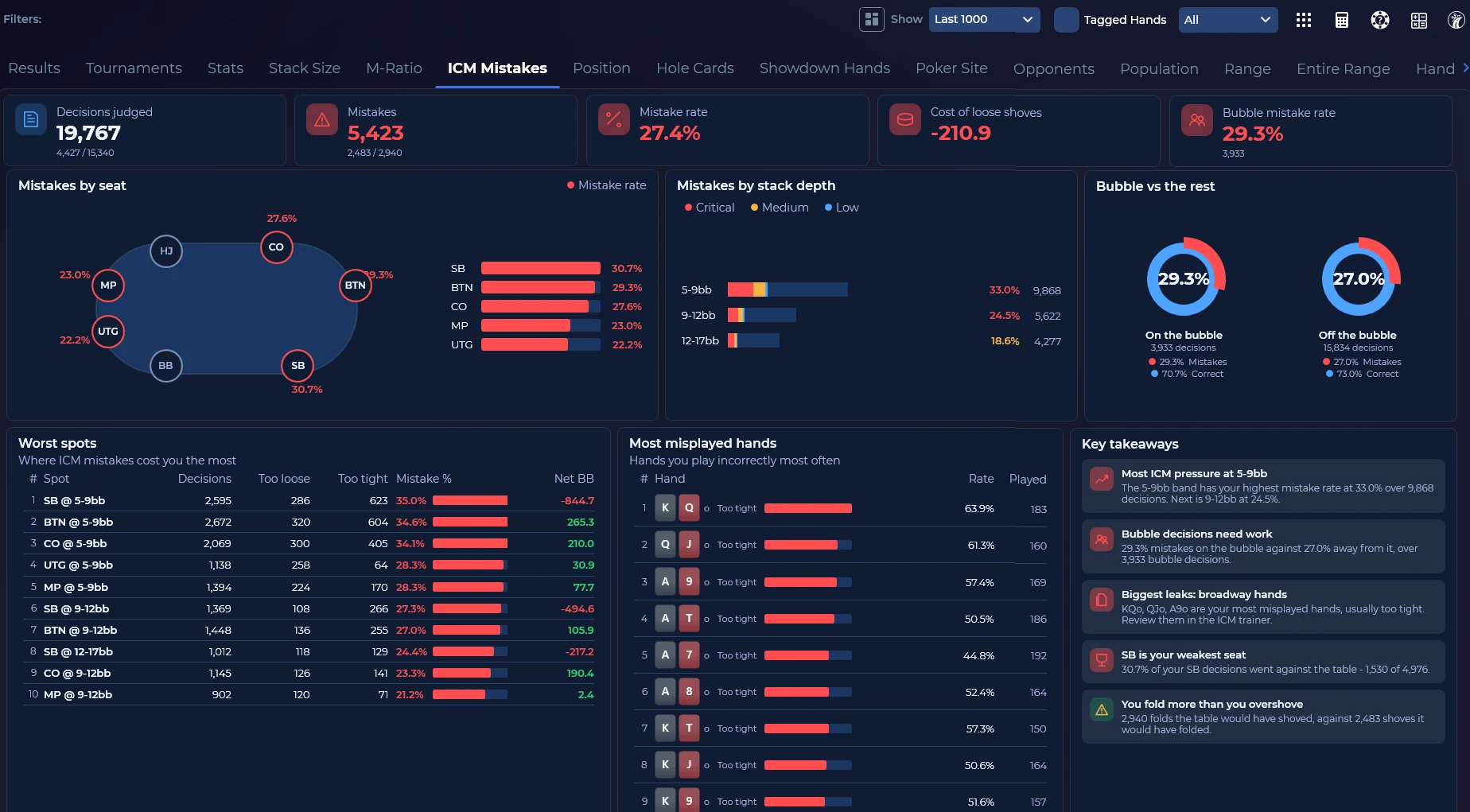
Every report, two ways: Visual or Classic.
Open a report tab as a visual dashboard of charts, radars and heat maps, or as the classic columns DriveHUD players have always used. Cash and tournament reports alike. Same filters, same hands, one click between them.

07AI hand review
A second opinion on any hand.
Built into DriveHUD 3, powered by the AI you choose. Pick any hand and get structured feedback and alternative lines, street by street, right inside DriveHUD.
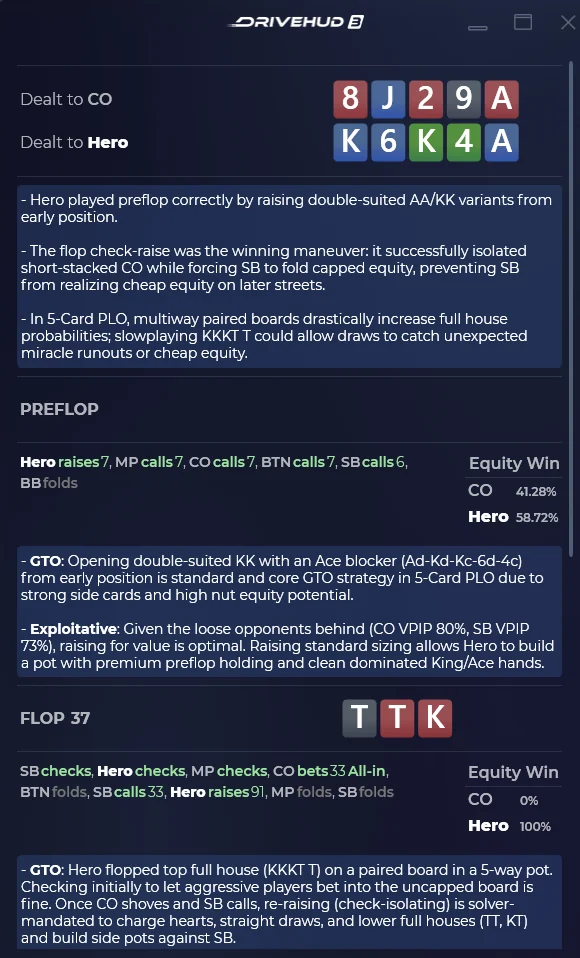
Bring your own AI: connect ChatGPT, Claude or Gemini with your own API key. Gemini is currently free with a Google account, so you can start without paying for AI at all.
It is not an answer engine. It’s a second set of eyes for the hands you’re unsure about, there when you want it and out of the way when you don’t.
How to set up Google Gemini in DriveHUD 3
- Create a Google Gemini API key. Open Google AI Studio and sign in with your Google account. Go to the API Keys section, click Create API Key if a key is not already available, then click Copy.
- Open the AI Analysis settings. Launch DriveHUD 3, click the Settings icon near the bottom of the left-side navigation bar, select the General tab and scroll down to the AI Analysis section.
- Select Google (Gemini). Open the Provider drop-down, select Google (Gemini), paste the key into the API Key field, leave Model blank for the default model, and click Apply or OK.
- Analyse a hand. Open a hand in DriveHUD 3 and launch the AI Analysis feature. You can switch between Google Gemini, OpenAI and Anthropic at any time from the Provider menu.
Treat your API key like a password. AI analysis should be used as an additional study tool rather than treated as a replacement for GTO solver output. Full guide: Setup Google Gemini w/ DriveHUD 3.
Tournaments
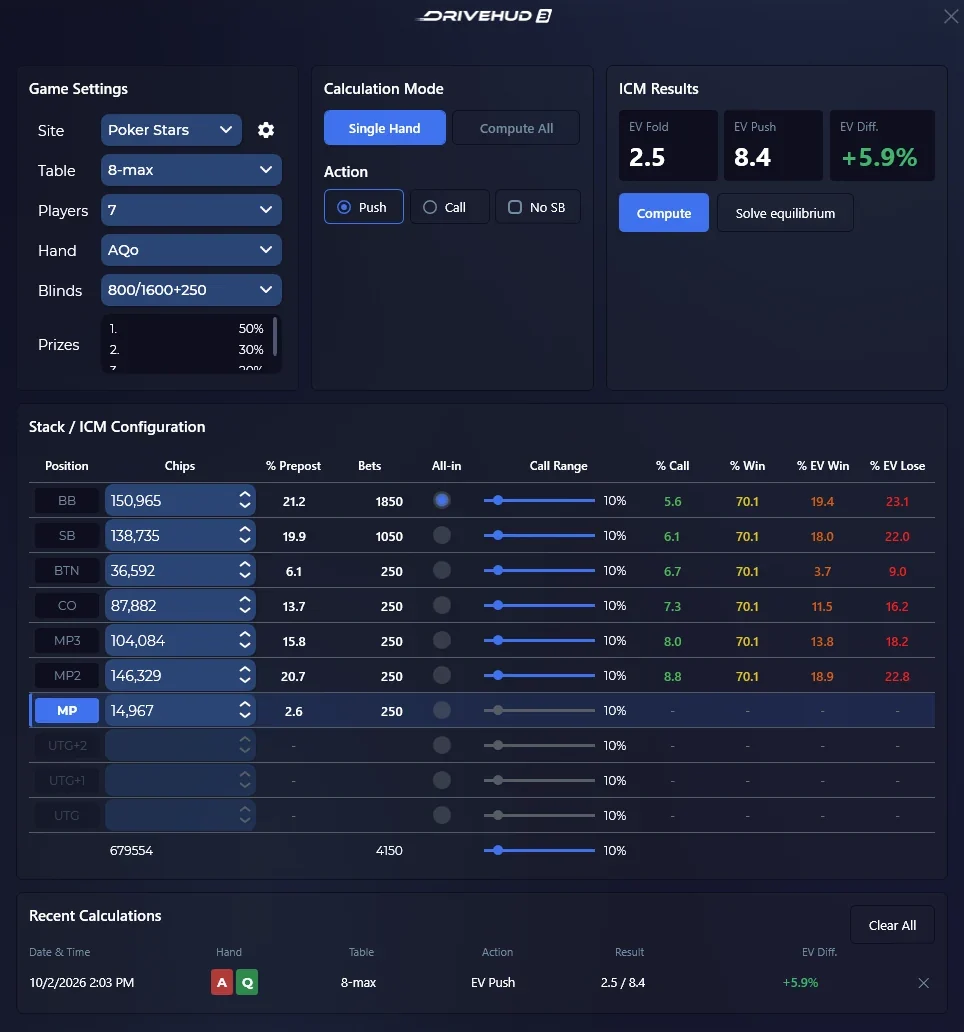
Stop bleeding chips to ICM.
Push/fold mistakes found for you, and the calculators to fix them.

Also in DriveHUD 3
The smaller things that add up.
The tools that made DriveHUD.
Everything DriveHUD 2 players rely on, carried over and rebuilt on the new engine.
- Population stats in the HUD*Run population reports and put them in any HUD. See what most opponents do on your site, and exactly how far one player sits from that norm.
- Quizzes you writeBuild quizzes for any spot, from preflop play and 3-bet pots to tough turn decisions, and let DriveHUD track your progress away from the tables.
- Custom stat creationIf the stat you need doesn’t exist, build it, or describe it in plain English. Save it once and use it in your HUD and every report.
- Hand chart deviationDriveHUD flags the hands you played away from your own hand charts, so you stay disciplined to your baseline.
- Hand charts in the HUD*Any chart you build can sit on the table for a quick reference during play.
- Filter building languageWrite filters for any scenario you can imagine, so no hand or tendency stays hidden in your database.
* Only on poker sites which allow these features.
How long an opponent took to act, measured against their own normal.
Every decision at the table is timed as DriveHUD captures it. Those times build a picture of how each player normally acts, and the HUD then shows each new decision as a small coloured chip: faster than usual, slower than usual, or nothing worth mentioning.
The comparison is always against that player’s own history, never a table average. A thoughtful player who takes six seconds over everything is not slow — they are normal, and the tell fires when they suddenly act in one second.
Reading a chip
Each chip is one decision. The top line is the action, the bottom line is how far that decision sat from the player’s own normal for that action.
- F−3.4s
- C−1.2s
- OR+0.3s
- CB+1.6s
- 3B+4.1s
- X—
A snap fold, a slightly quick call, a routine open, a mildly slow continuation bet, a long tank before a 3-bet, and a check with no baseline yet.
Colour
The chip colour is the size of the deviation, not the size of the bet. Red is faster than that player’s normal. Green is slower. The ramp reaches full colour at four seconds either side.
A chip also gains a bright outline when the deviation is large enough to count as a genuine tell rather than ordinary variation: a cool blue outline for fast, a warm orange one for slow. The current threshold is two seconds either side of the player’s median.
Action abbreviations
| Chip | Action | When it is used |
|---|---|---|
| F | Fold | Any fold. |
| X | Check | Any check. |
| C | Call | A call after someone has raised. |
| L | Limp | A call while nobody has raised yet. |
| B | Bet | A bet into an unbet pot. |
| CB | Continuation bet | A bet by the player who took the lead on the previous street. |
| OR | Open raise | The first raise of the street. |
| R | Raise | A raise that is none of the more specific kinds. |
| 3B | 3-bet | A raise with exactly one raise before it. |
| 4B | 4-bet | A raise with two raises before it. |
| 5B | 5-bet | A raise with three raises before it. |
| AI | All-in | The player put their last chips in. |
How to enable timing tells
- Open the HUD designer. In the left navigation, open Designer HUD. Pick the layout you use at the tables from the layout list. If you keep separate layouts for 6-max and full ring, or for different sites, repeat these steps for each one.

- Drag the Timing Tells tool onto the table. The stopwatch button in the toolbox is Timing Tells. Drag it onto the table canvas and drop it next to the stat box, where you want the chips to appear.
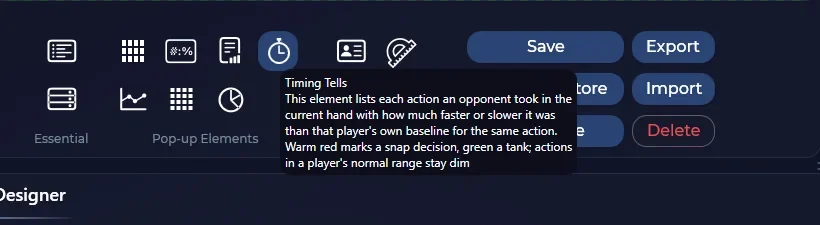

- Save the layout. Click Save. If the layout is already the one attached to your tables, you are done with the designer. If you were editing a copy, attach it to your tables the way you normally would.
- Check the Settings option. Open Settings → General and find Update Timing Tells on every action. It is on by default. With it on, the chips fill in during the hand as each player acts.

| Measured | Sites |
|---|---|
| Live, during the hand | PokerBros, XPoker, SupremaPoker, PPPoker and CoinPoker in every format. ClubGG, Pokerrrr2, BetOnline and Ignition in cash and tournaments. WPT in cash and tournaments, PokerKing in cash. |
| At import | Other supported live sites, and fast-fold pools. |
| Not measured | All-in-or-Fold tables and Ignition Zone, where there is no meaningful decision time. Also RedDragon, PokerTime and HiTea. |
Swipe the table sideways →
A baseline needs three recorded decisions of that kind before DriveHUD will compare anything against it. Timing is a read, not a rule. Source: Timing Tells Overview and How do I enable timing tells?
Where DriveHUD imports hands and shows its HUD.
No-limit and Limit Hold’em, and Omaha (PLO 4, 5 and 6-card), in cash games, multi-table tournaments and sit-and-gos.
Poker sites
iPoker skins
Asian poker apps · via Asian Hand Converter
Playing on PokerBros, PPPoker, ClubGG, X-Poker and the other Asian poker apps? Those work through the Asian Hand Converter, on the desktop app where one exists or in LDPlayer, BlueStacks or Nox on Windows. It is included with DriveHUD 3 Ultimate+, or sold on its own.
Asian Hand Converter guideThree plans. The full DriveHUD 3 in every one.
Every licence includes Hold’em and Omaha, the HUD, every report, the GTO solver and MDA. The difference is the stakes you play, and whether you need the Asian apps.
Core
For $50 buy-ins and under
$59.991st year
Renews at $19.99/yr · 10% off for auto-renewals
- Hold’em + Omaha included
- Built-in GTO Solver & Trainer
- Automated Leak Analysis
- MDA Reports & Population Analysis
Everything you need to beat small stakes.
Ultimate
For all stakes
$119.991st year
Renews at $39.99/yr · 10% off for auto-renewals
- Hold’em + Omaha included
- Built-in GTO Solver & Trainer
- Automated Leak Analysis
- MDA Reports & Population Analysis
Built for serious grinders who want a real edge.
Ultimate+
DH3 + AHC combo
$199.99per year
Renews at $199.99/yr · 10% off for auto-renewals
- Hold’em + Omaha included
- Built-in GTO Solver & Trainer
- Automated Leak Analysis
- MDA Reports & Population Analysis
- Asian Hand Converter (AHC) included
Access to Asian app sites: WPT Global, PokerBros, PPPoker (full list)
Maximum data, zero friction, no compromises.
Same software. Different stakes.
| Feature | Core | Ultimate | Ultimate+ |
|---|---|---|---|
| Stakes | Buy-ins of $50 and under | Every stake | Every stake |
| Hold’em and Omaha (PLO 4, 5 and 6-card) | ✓ | ✓ | ✓ |
| Cash, MTT and Sit & Go | ✓ | ✓ | ✓ |
| HUD, HUD Designer and every report | ✓ | ✓ | ✓ |
| GTO solver and trainer (DriveGTO) | ✓ | ✓ | ✓ |
| Automated leak analysis | ✓ | ✓ | ✓ |
| MDA reports and population analysis | ✓ | ✓ | ✓ |
| Timing tells, ICM tools, replayer | ✓ | ✓ | ✓ |
| Asian Hand Converter (PokerBros, PPPoker, ClubGG and more) | — | — | ✓ |
| First year | $59.99 | $119.99 | $199.99 |
| Renewal | $19.99/yr | $39.99/yr | $199.99/yr |
Swipe the table sideways →

Edge Suite · save $68.99
DriveHUD 3, X-Ray and Leak Buster 3.
The Ultimate version of all three, no stake limits, in one licence.
| DriveHUD 3 UltimateTracking, HUDs, reports, GTO tools and MDA at any stake. | $119.99 |
| X-Ray UltimateAutomatic player notes and profiles from the hands already in your database. | $39.00 |
| Leak Buster 3 UltimateLeak and opponent analysis, and drills for the spots that cost you most. | $79.00 |
Asian Hand ConverterHUD for the Asian apps. Desktop and Android emulators. $29/month or $129 for 6 months. Included with DriveHUD 3 Ultimate+.Read the guide → Player X-Ray UltimateAutomated player notes. Writes exploitable notes on every opponent. $39/year. Included in the Edge Suite.
 Leak Buster 3 UltimatePrices every leak in bb/100 and scores your game against solver baselines. $79. Included in the Edge Suite.
 DriveGTOPoker solver. Real-time solving on your own PC. Included with DriveHUD 3.
One DriveHUD licence activates on 2 computers and is good for one year from the first activation. Every update to DriveHUD 3 is free while your licence is active. DriveHUD accepts major credit cards, PayPal, crypto, Skrill, Neteller and Alipay. DriveHUD does not offer refunds on purchased serials, so use the 14-day trial before you buy. Prices from drivehud.com/pricing, checked 22 October 2026.
From download to a HUD on your table.
DriveHUD is a Windows desktop application. It needs Windows 10 or later and 8 GB of RAM; DriveHUD recommends 16 GB of RAM or more for the best performance. Your hand histories, database, HUDs and notes are all kept locally on your own computer.
- Download the 14-day trial. It is fully functional, with no trial limitations, so you can test every feature before you buy. Mac users can run it through Parallels or a similar Windows virtual machine, or with Boot Camp.
- Register your licence. On the DriveHUD 3 main window (bottom-left part), click on the Settings button. On the settings window, click on the Upgrade tab, then Enter License, and enter your email address and your serial. If all went well, you get a success message.


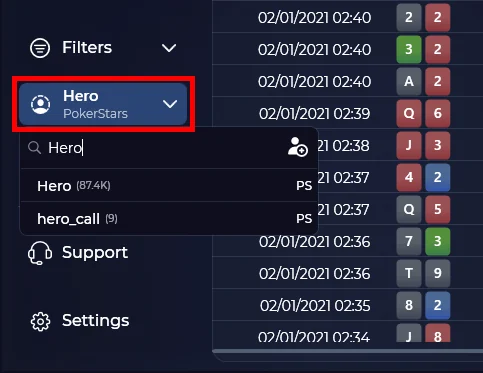
- Set your player ID. Enter your poker site player name into the drop-down list at the bottom left-hand side of DriveHUD 3. Once you do this, all of your player data will display. Cash game data is displayed in the dashboard, and tournament data in the Tournament tab.
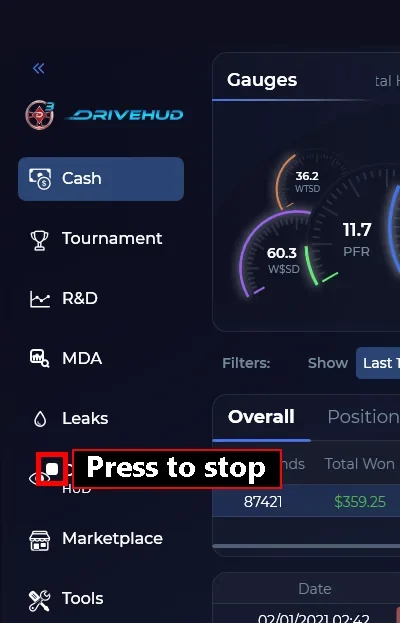
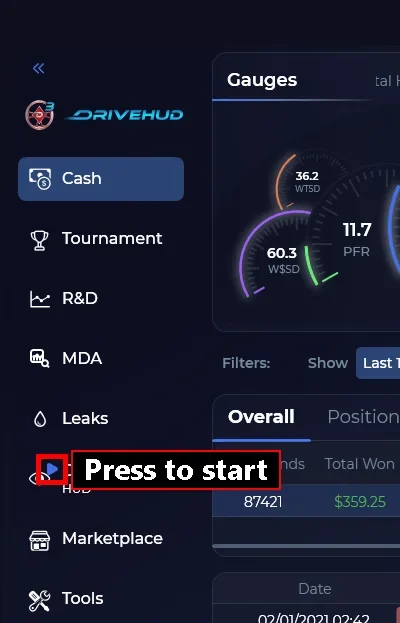
- Start the HUD. By default, DriveHUD 3 loads with the HUD started. From the Designer screen, a STOP button means the HUD is running; a PLAY button means it is stopped, so click PLAY to start it again. It takes one full complete hand before the HUD will appear on any poker table.
- Bring your old hands. DriveHUD 3 imports your DriveHUD 2 data, HUDs and settings during the first setup, or later from Settings → Database → Database Operations → Import from DriveHUD2. There are step-by-step guides for hands from Holdem Manager 2, Holdem Manager 3, PokerTracker 4 and Hand2Note.
- Back up your database. Open Settings, go to the Database tab, keep every backup option ticked (all data, settings and HUDs), and click Backup Now. The backup is a .zip file you can restore from later.
Open the user manual from inside DriveHUD with the support icon at the top right of any tab, or read the DriveHUD 3 online manual and the knowledge base. Support: drivehud.com/support and the forums.
DriveHUD apps
Four apps. One sharper game.
Find every leak, solve any spot, get notes on every opponent, and run a HUD on the Asian apps. Built by the team behind DriveHUD.
HUD for Asian apps
Asian Hand Converter
Track your hands and run a HUD on PokerBros, PPPoker, ClubGG and more, on desktop or in an Android emulator. Works with DriveHUD, Hold’em Manager, PokerTracker and Hand2Note. Tracks the tables you play and the ones you watch.

Database analysis
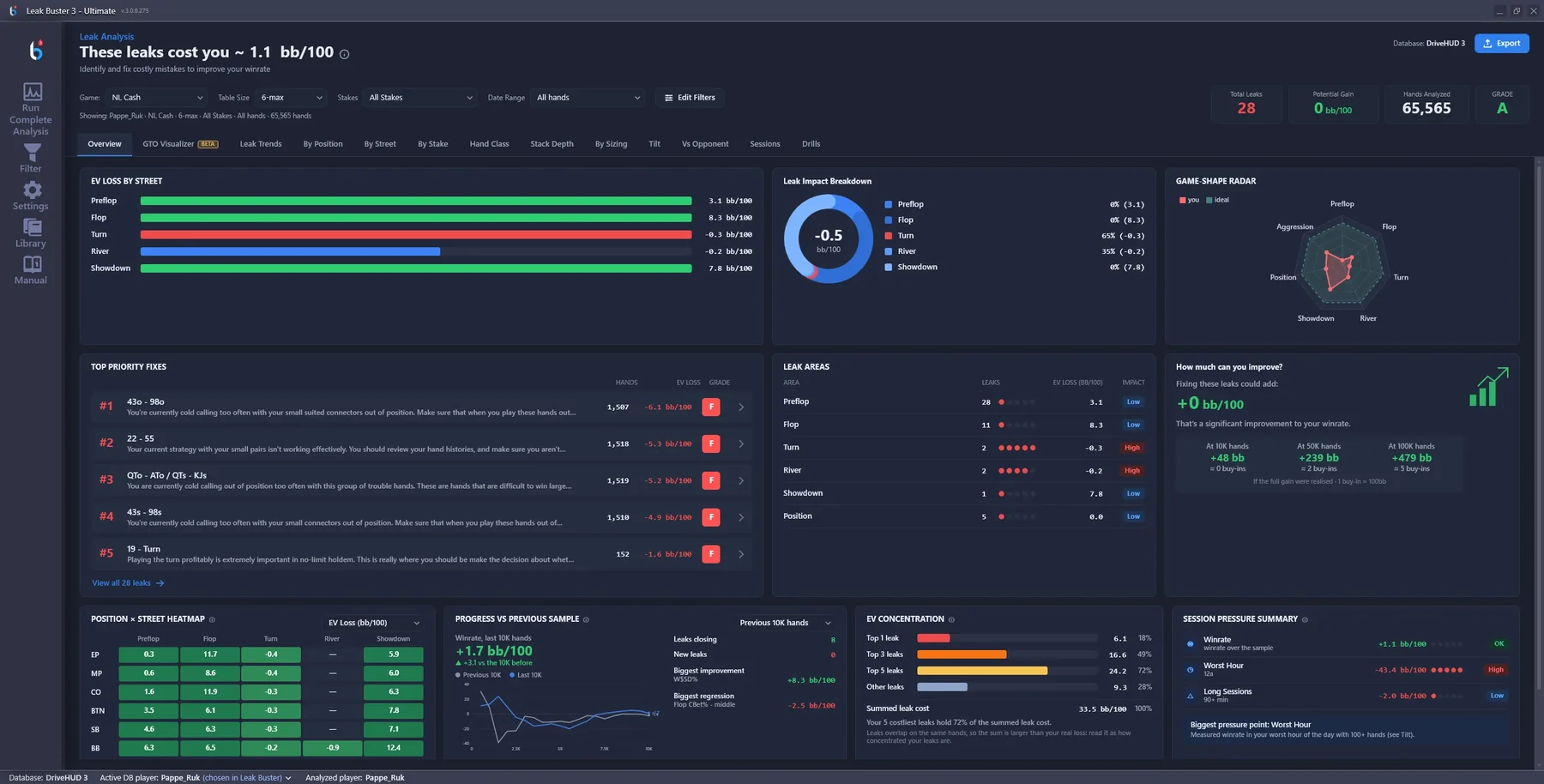
Leak Buster 3
Find out exactly where the money went. Point it at the database you already keep. Leak Buster prices every leak in bb/100, scores your game against solver baselines, and lines up drills for the worst of it, in the order that pays. Reads DriveHUD 1, 2 and 3, Hold’em Manager 2 and 3, PokerTracker 4 and Hand2Note 3.
Automated notes
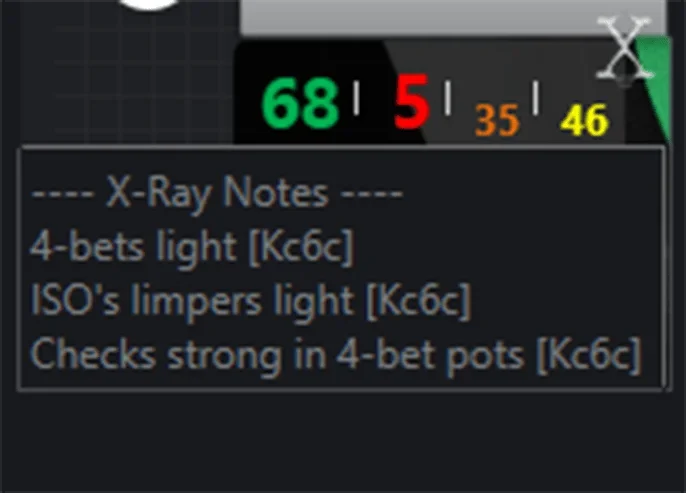
Player X-Ray
Notes on every opponent, written for you. While you grind, X-Ray reads your hands and writes exploitable notes on every player. Mouse over a seat to read them. Note profiles for micro, small, mid and high stakes, added in one click. Free 30-day trial.
Poker solver
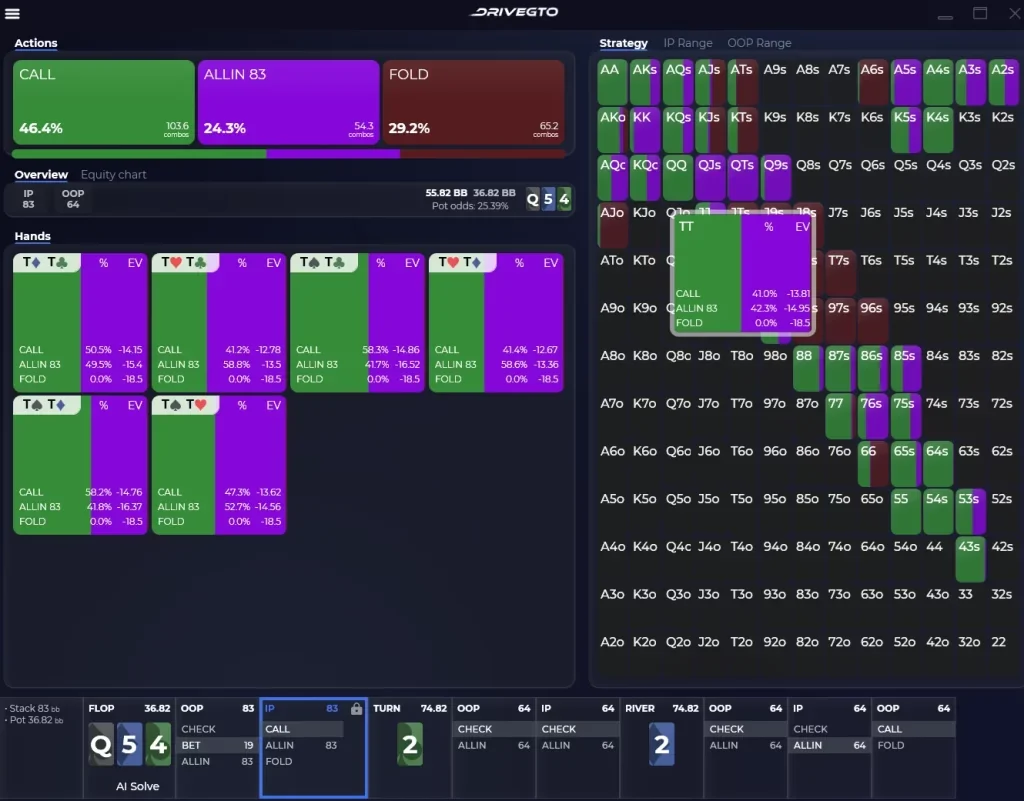
DriveGTO
Solve any spot on your own PC. A fast Hold’em solver built for practical review: real-time solving, range and EV visualizer, equity charting across streets. Runs locally, so your hands never leave your PC. Included with DriveHUD 3.
Trusted by winning players.
DriveHUD is used by professional players, coaches and serious grinders across the world.

“Having played online poker for nearly two decades, I had my custom-built setups of HUD’s and trackers that I was comfortable and used to. It took a lot for me to even consider a new HUD and tracking program, but after a twitch viewer of mine recommended I try DriveHUD, I was hooked. I’m glad I committed to making the switch. The DriveHUD team has been amazing, and the tools and features are everything a dedicated online grinder like myself needs.”Jon “Apestyles” Van FleetProfessional poker player · $20+ million in MTT cashes
“I love the simplicity of the HUD, and the ease of the filter creation. Love, love, love it!”
“DriveHUD strikes the perfect balance between the overwhelming complexity of standard HUD products and the one size fits all, boilerplate style of the simpler ones. I can finally see everything I need about my opponents in one clean window. Finally!”
“DriveHUD is easy to use online poker hud, and has all of the features you need to crush today’s online poker games.”
Testimonials as published on drivehud.com.
DriveHUD 3 compared with PokerTracker 4, Holdem Manager 3 and Hand2Note 4
DriveHUD 3 next to the three trackers it replaces most often. All four put stats on the table; the extras and the way you pay differ.
| Tool | Price | Runs on | Best for | Check first |
|---|---|---|---|---|
| DriveHUD 3 | Core $59.99, Ultimate $119.99 for the first year | Windows 10 or later, 8 GB RAM | GTO solver inside the tracker, leaks priced in bb/100, timing tells | Core covers $50 buy-ins and under; club apps need Ultimate+ |
| PokerTracker 4 | From $64.99 once, 14-day trial | Windows and Mac | LeakTracker, NoteTracker and ICM tools in one database | Small Stakes stops at $0.25/$0.50 and $22 buy-ins |
| Holdem Manager 3 | Free version, $65 Small Stakes, $100 All Stakes | Windows 10 and 11, 64-bit | Over 2,000 HUD stats, Graphical HUD, Situational Views | Club apps need a hand converter before the HUD works |
| Hand2Note 4 | Learner $15.99, Pro $39 a month, paid yearly | Windows and Mac; emulator apps on Windows | Dynamic HUD, Action Profit, ClubGG HUD with no converter | Learner stops at a $0.25 big blind and 200k hands |
DriveHUD 3 is the tracker for players who also want to study inside it: the GTO solver, MDA population reports and leaks priced in bb/100 come in every plan. The catch is that plans renew every year and it runs only on Windows. PokerTracker 4 and Holdem Manager 3 are one-off licences with leaner study tools. Hand2Note is the alternative if dynamic HUDs and club apps matter more than a built-in solver.
Club apps on DriveHUD need the Asian Hand Converter. For deeper solving, compare PioSOLVER and GTO Wizard.
DriveHUD 3: questions, answered.
Answers from the official DriveHUD FAQ.
What is DriveHUD 3?
DriveHUD 3 is poker tracking and analysis software. It imports your hand histories, tracks your results, shows real-time HUD stats on your tables, and gives you tools to study and improve your game: advanced reports, leak analysis, population analysis, GTO tools and AI-powered hand analysis.
Is there a free trial?
Yes. DriveHUD 3 comes with a free 14-day trial. It is fully functional, with no trial limitations, so you can test every feature before you buy.
Which plan do I need: Core, Ultimate or Ultimate+?
Every plan gets the full DriveHUD 3: Hold’em and Omaha, the HUD and HUD Designer, every report, the GTO solver and trainer, leak analysis and MDA. The difference is stakes and the Asian Hand Converter. Core covers buy-ins of $50 and under, Ultimate covers every stake, and Ultimate+ adds the Asian Hand Converter for PokerBros, ClubGG and the other poker apps.
Does DriveHUD run on a Mac?
DriveHUD is a Windows-only application. Mac users can run it through Parallels or a similar Windows virtual machine, or with Boot Camp.
Where is my hand data stored?
On your own computer. Your hand histories, database, HUDs and notes are all kept locally. The one exception is AI hand analysis: when you ask for an AI review, that hand is sent to the AI provider you chose, using your own API key.
Does it support Omaha?
Yes. Pot-limit Omaha with 4, 5 and 6 cards is in every licence, with its own reports.
Does it work with PokerBros, ClubGG, WPT Global and other poker apps?
Yes, through the Asian Hand Converter. It supports PokerBros, PPPoker, ClubGG, CoinPoker, Pokerrr2, Suprema Poker, X-Poker, PokerKing, Red Dragon, Bingo Poker, PokerTime and WPT Global, on the desktop app where one exists or in LDPlayer, BlueStacks or Nox on Windows. Setup steps are in our Asian Hand Converter guide.
Is AI hand review included?
Yes, it’s built into DriveHUD 3. You bring your own AI: connect ChatGPT, Claude or Gemini with your own API key. Gemini is currently free with a Google account, so AI hand review can cost you nothing.
Is DriveGTO included?
Yes. Every DriveHUD 3 licence includes DriveGTO. Open any hand from a report straight into the solver, then drill that spot in the GTO Trainer.
Can I move my DriveHUD 2 data over to DriveHUD 3?
Yes. DriveHUD 3 imports your DriveHUD 2 data, HUDs and settings, so you do not start over. Choose import during the first setup, or later open Settings, the Database tab, and under Database Operations click Import from DriveHUD2. DriveHUD 3 installs separately, so you do not need to uninstall DriveHUD 2 first.
How many computers can I activate one licence on?
One DriveHUD licence activates on 2 computers. If you need more, you can buy extra activations from the pricing page. To move to a new computer, reset your serial, then activate it on the new computer.
Is using a HUD allowed on my poker site?
Each site sets its own rules for HUDs and tracking software, and some limit what a HUD may show. Check your site’s terms before you play. On club apps, the club can add stricter rules too.
Ready to see your game more clearly?
DriveHUD 3 is built for players who want fewer assumptions and better answers. The cards are uncertain. Your analysis shouldn’t be.
18+. Play responsibly. Third-party poker software can be restricted by poker sites, apps and clubs; check their terms before you install it. HotPokerDeals is an information resource and a DriveHUD partner; we may earn a commission from purchases made through our links at no extra cost to you. Texts, screenshots and logos © DriveHUD / Ace Poker Solutions. More software: poker software hub.