GTO+ and Flopzilla review 2026: the $75 poker solver and $25 range tool
GTO+ and Flopzilla come from the same small Dutch developer and do two jobs that fit together. Flopzilla shows how a preflop range hits a board: how often it makes top pair, a flush draw or a gutshot, and what its equity is against other ranges. GTO+ takes those ranges and solves the spot, giving you the equilibrium strategy for every hand from flop to river.
Both are one-time purchases with all future updates included. GTO+ costs $75 and Flopzilla costs $25, which makes the pair one of the cheapest serious study setups in poker. They run on Windows and talk to each other directly, so ranges and boards move from one to the other with a click.
HotPokerDeals is a partner. Everything below comes from gtoplus.com and flopzilla.com, including their release notes, checked in November 2026.
On this page: quick facts, GTO+ solver, analysis tools, new trainer, release notes, Flopzilla, combo counter, prices and FAQ.
GTO+ and Flopzilla at a glance
The essentials from both official sites.
GTO+
$75 once
Flopzilla
$25 once, 2 PCs
GTO+ latest
v1.9.3 beta, Sep 2026
FlopzillaPro latest
v2.1.8 beta, Sep 2026
| Detail | GTO+ | Flopzilla |
|---|---|---|
| What it does | Heads-up postflop GTO solver for Hold’em | Range and equity calculator for Hold’em |
| Price | $75 main licence, $40 second computer, $50 upgrade from CREV | $25, licence covers two computers |
| Updates | One-time fee, all future updates included | Lifetime licence, all upgrades included |
| Included | A CREV licence (the earlier version of the software) | Both FlopzillaPro and Flopzilla v1 |
| System | Windows | Windows 7 or newer, 2 cores at 2 GHz, 1 GB RAM, 1 GB disk |
| Languages | Adds French, Japanese and Korean (v1.8.2, Oct 2025) | English plus Spanish, Russian, Chinese, French, Japanese, Korean |
| Refund | Within 14 days of purchase, no reason needed | See the Flopzilla refund policy page |
| Developer | StoxEV B.V., Purmerend, Netherlands | Same team; sites built by EIGHTY3 |
GTO+: what the solver does
Build a tree, fill in what you know, solve the rest.
GTO+ calculates Nash equilibrium strategies for heads-up postflop spots. You set the stacks, pot and ranges, build a decision tree with the bet sizes you want, and fix any plays you already know. The solver then works out the best play for everything else in the tree.
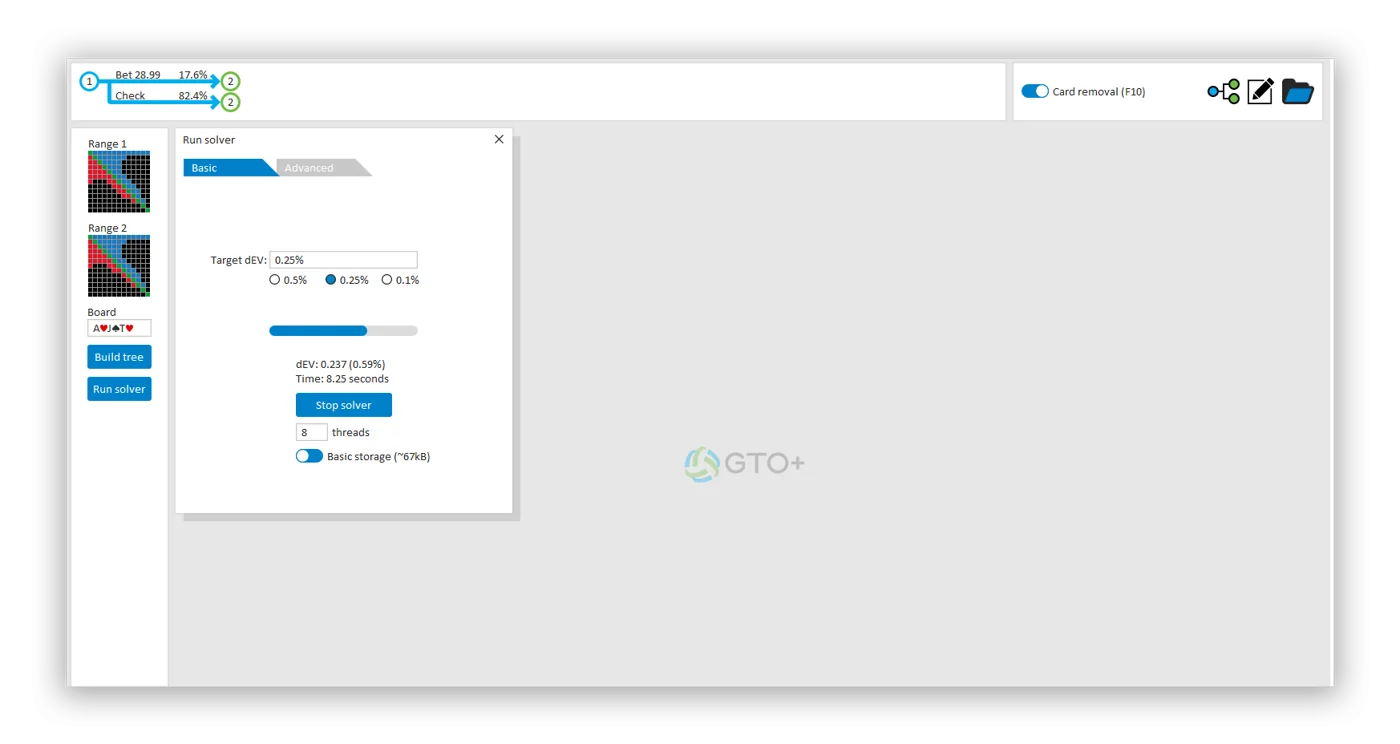
The developer’s main selling points are speed and tiny files. Memory use is low because compression happens on the fly, and a solved tree takes a few hundred KB instead of the several hundred MB other solvers often need, because GTO+ recalculates data when you ask for it. The solver converges all the way down to a Nash distance of 0%.
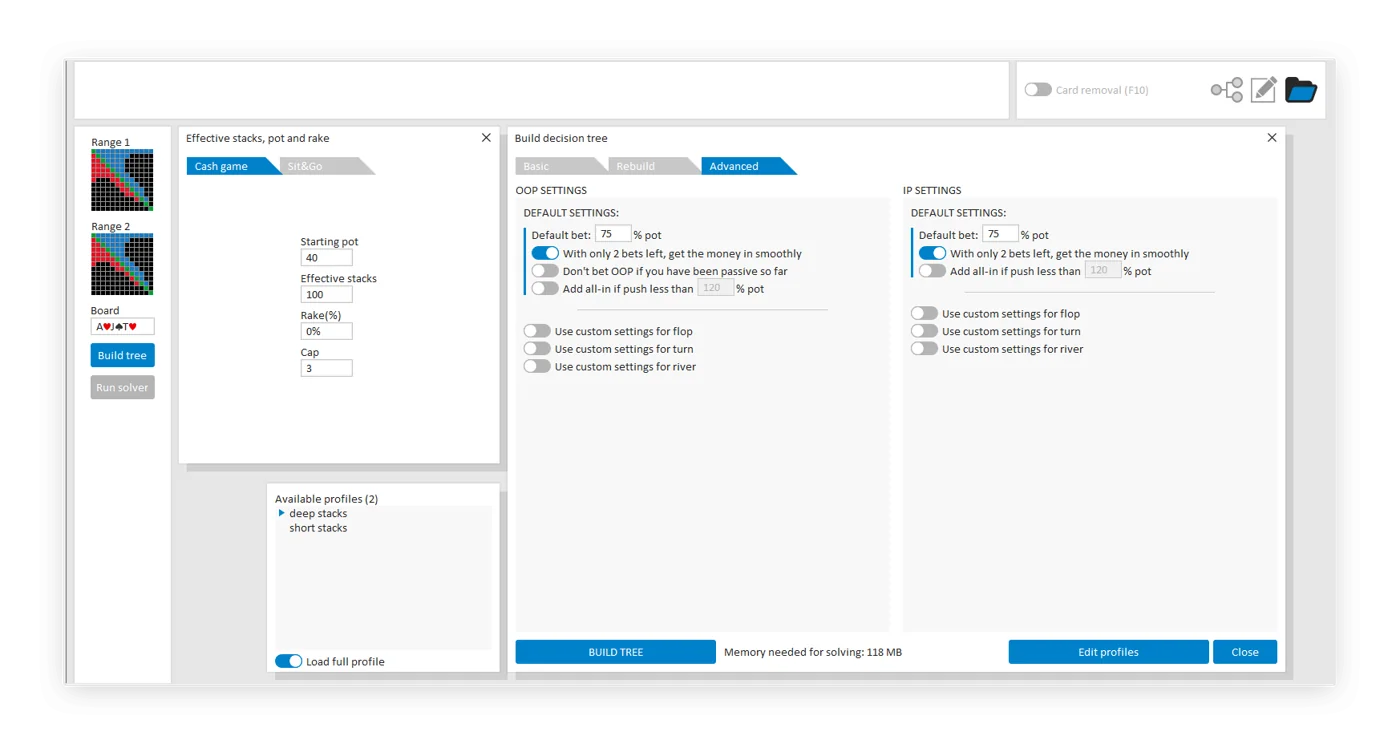
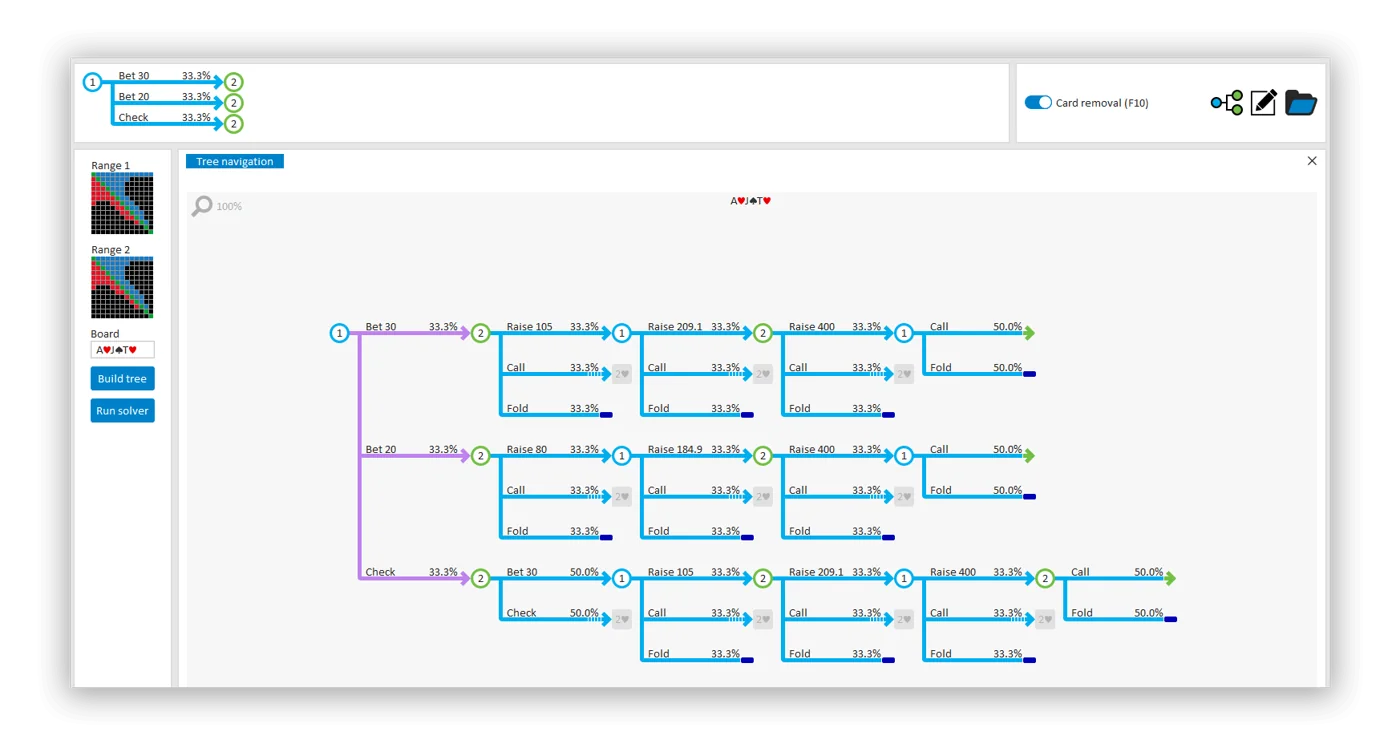
Tree builder
Multiple bet sizes, a friendly editor and advanced codes for bet spacing.
Database and scripting
Solve whole databases of trees and compare them.
Recalc lines
Edit turn or river runouts and re-solve only that part.
Card removal
Toggle blocker effects on or off with one button.
Graphing
Plot any property against any other at any node.
Self-contained
No other software needed to read the results.
Reading solutions inside GTO+
Analysis tools built in, no copy and paste.
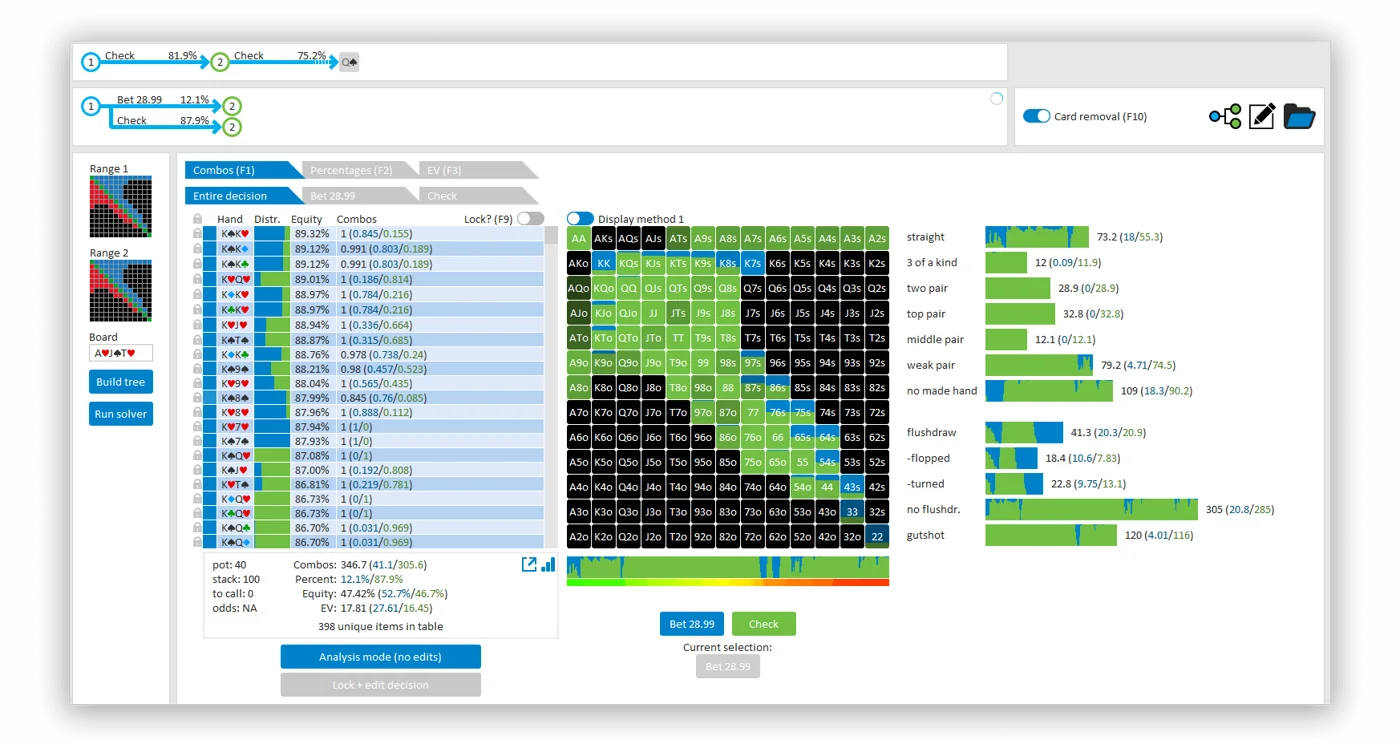
Where other solvers send you to external software to study a solution, GTO+ keeps the analysis inside. The strategy matrix, EV, equity and hand class breakdown sit next to the tree navigator, and since v1.8.6 you can switch the output between EV, EV as a percentage of the pot and equity realisation.
Version 1.8.7 added filters for several statistics at once: right-click a stat to fix it, then include or exclude hand groups to build exactly the range you want to study. Filters for equity buckets arrived at the same time, and the range-versus-range tool now shows the strategy of the player to act.
The new GTO+ trainer
Play against the solution, then review.
Version 1.9.2 (8 September 2026) introduced a brand-new trainer, opened from an icon at the top right. It plays hands against the solved strategy, shows hints for shortcuts on screen and can send a hand-versus-range spot straight to FlopzillaPro. The old trainer is still there if you hold CTRL while clicking the icon.
Two weeks later v1.9.3 added a long list of options: show hand histories on mouse-over, skip straight to the next hand, hide or show EV for your actions, fixed button positions so Fold and Call never move, a set number of AutoPlay hands, and tags on stored hands with the q, w, e and r keys. Hand history export in a PokerStars-style format, added in v1.9.0, lets you load solver hands into a tracker.
AutoPlay
Generate a set number of hands for both positions.
Tags
Mark hands with one key and review them later.
EV display
On or off, your choice.
Hand export
Single trees or whole databases.
GTO+ release notes: recent versions
From the GTO+ download page.
| Version | Main changes |
|---|---|
| v1.9.3 beta (22 Sep 2026) | Trainer customisation: EV display, button placement, AutoPlay count, tags, SHIFT plus arrow review |
| v1.9.2 (8 Sep 2026) | New trainer; hand-versus-range export to FlopzillaPro; G codes for bet size gaps; update notifications |
| v1.9.0 and v1.9.1 (Jun 2026) | Hand history export for single trees and databases |
| v1.8.9 (Feb 2026) | Raw output for aggregate, turn and river reports; edit active decision; soft shadows |
| v1.8.7 and v1.8.8 (Dec 2025) | Filters for several statistics at once and for equity buckets |
| v1.8.6 (Dec 2025) | EV, EV as % of pot or equity realisation output |
| v1.8.2 (Oct 2025) | French, Japanese and Korean |
| v1.7.9 (Aug 2025) | Compressed database trees need about three times less RAM; automatic backups; progress bars |
| v1.7.8.3 (Jul 2025) | New .gto2 save format, about three times smaller; multi-threaded saving |
The download page also links to alternative servers and to a 6+ (short deck) version of GTO+.
Flopzilla: how a range hits the board
Instant range and equity analysis.
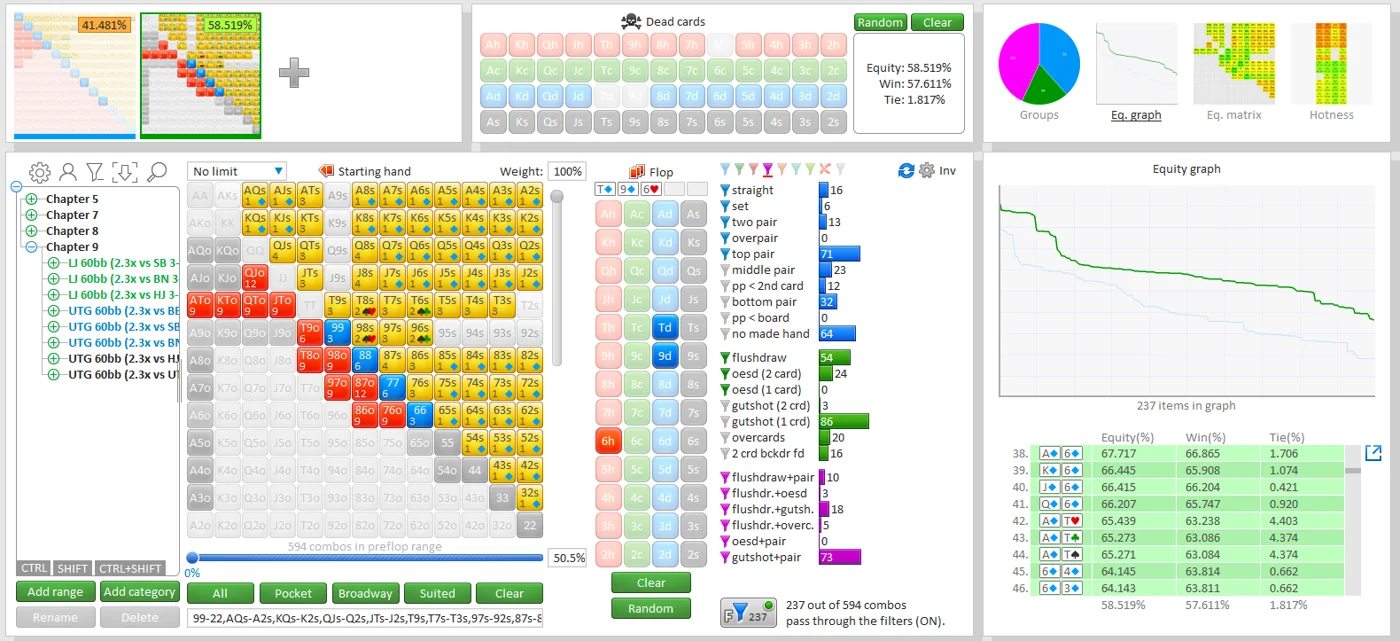
Enter a preflop range and a board, and Flopzilla shows how often that range makes each kind of hand: sets, two pair, top pair, middle pair, flush draws, open-enders, gutshots and more. Results come as percentages and combos, and the numbers update the moment you change anything, so there is no Compute button.
Flopzilla also runs heads-up and multiway equity for up to 14 players, and it calculates exact postflop equity in a three-player pot in under a second, something the developer says no other software does. You can include the bunching effect, meaning the cards folded players are likely to hold.
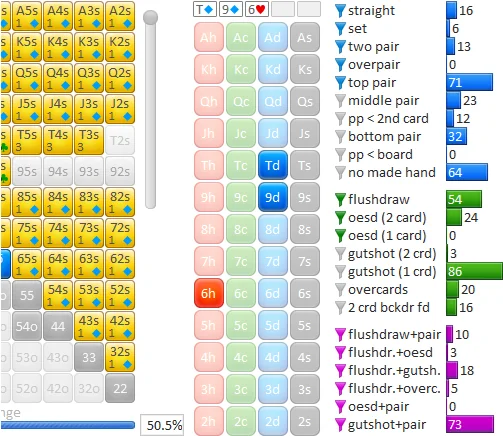
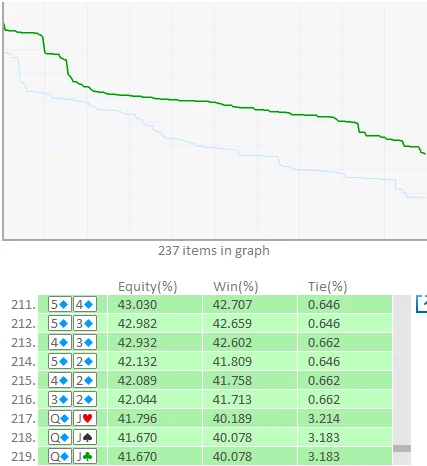

Output modes
Equity graph, equity matrix, hotness and coloured groups.
Coloured filters
Build your own hand groups and see them as combos or percentages.
Preflop breakdowns
For example, 88 makes an overpair on a rainbow board 4.2857% of the time.
Flop type stats
For example, a rainbow ace-high flop comes 7.1674% of the time.
Custom stats
Combine postflop stats in your own way.
GTO+ link
Send ranges and boards to GTO+, or receive them.
FlopzillaPro or Flopzilla v1?
One purchase covers both.
FlopzillaPro is effectively Flopzilla 2. It covers almost everything v1 did and adds new features, and all the official videos use it, so the developer recommends it for most people. Flopzilla v1 is the original that appears in many books and courses; if your study material uses it, install v1 alongside Pro.
Recent FlopzillaPro updates added hand-versus-range export to GTO+ (v2.1.8), Japanese and Korean (v2.1.5), French (v2.1.3), Monker and Pio range import (v2.0.9), plus bunching and a dark mode (v2.0.6).


Try it: count combos after the flop
The basic maths Flopzilla automates.
Card removal is the first thing Flopzilla teaches. Pick a hand and type the board ranks to see how many combinations are still possible.
GTO+ and Flopzilla prices: what you pay
One payment, no subscription.
| Item | Price | Notes |
|---|---|---|
| GTO+ main licence | $75 | One computer; all future updates |
| GTO+ second licence | $40 | Only for a second computer you own |
| GTO+ upgrade from CREV | $50 | For existing CREV owners |
| Flopzilla | $25 | Two computers; FlopzillaPro and v1 |
After paying, you request a key on the website and it arrives by email within a few minutes. In GTO+ you open Register and enter the key; in Flopzilla you enter your email and key and click Activate. Licences are personal and may not be sold, shared or gifted.
Who GTO+ and Flopzilla suit
Players on a budget
$100 covers a solver and a range tool for life.
Live and micro-stakes regs
Range analysis is the fastest way to improve hand reading.
Students of poker books
Flopzilla v1 matches many classic study sources.
Database builders
Tiny GTO+ files make large solved libraries easy to keep.
Short deck players
A 6+ version of GTO+ is offered.
Who should look elsewhere
Mac users without Windows, and players who want presolved browser libraries.
GTO+ and Flopzilla compared with PioSOLVER, GTO Wizard and ICMIZER
The $100 study pair against the solvers that cost more.
| Tool | Price | Runs on | Best for | Check first |
|---|---|---|---|---|
| GTO+ and Flopzilla | GTO+ $75 and Flopzilla $25, once | Windows | The cheapest solver and range tool pair, updates included | No presolved library; you build and save your own trees |
| PioSOLVER | Pro €450, Edge €800, one-time | Windows 7 or newer, 64-bit | Exact postflop solving on your own PC; Edge adds preflop | The Edge preflop solver needs 64 GB of RAM or more |
| GTO Wizard | Free plan; PLO Premium $139 a month on annual billing | Browser | Presolved library, GTO Wizard AI and a hand analyzer | Hold'em plan prices appear only inside the app |
| ICMIZER | Basic $99.99, Pro $179.99 a year, 7-day trial | Windows, macOS, browser for ICMIZER 3 | Preflop ICM and bounty models, MTT Coach trainer | Built for tournaments; cash players need a postflop tool |
For $100 once, GTO+ and Flopzilla give you a working solver and a range tool, and updates stay free. PioSOLVER is faster and has more tools, at €450 for Pro. GTO Wizard trades setup work for a monthly fee and a presolved library. ICMIZER is the tournament preflop tool to add if you play MTTs.
Range work pairs well with a tracker: PokerTracker 4, Holdem Manager 3. Short deck cash games run on GGPoker.
Getting started with GTO+ and Flopzilla
01
Start with Flopzilla
Build the preflop ranges you actually face and see how they hit common flops.
02
Send ranges to GTO+
The two programs connect, so ranges and boards move across without retyping.
03
Solve a spot you played
Set stacks and bet sizes from a real hand, then read the strategy hand by hand.
04
Keep a library
GTO+ files are small, so save solved spots by position and board type for later review.
GTO+ and Flopzilla FAQ: price, versions and refunds
How much does GTO+ cost?
$75 for the main licence, $40 for a second computer you own, or $50 to upgrade from CREV. It is a one-time fee with all future updates.
How much does Flopzilla cost?
$25 once. The licence covers two computers and includes FlopzillaPro and Flopzilla v1.
Is GTO+ a subscription?
No. You pay once and future updates are included.
What is the difference between GTO+ and Flopzilla?
GTO+ solves spots for equilibrium strategy; Flopzilla shows how ranges hit boards and calculates equity. They connect to each other.
FlopzillaPro or Flopzilla v1?
FlopzillaPro is the newer version and the developer recommends it; use v1 if your study material is built on it. You get both.
Does GTO+ solve multiway pots?
GTO+ solves heads-up postflop spots. Flopzilla calculates multiway equity for up to 14 players.
Does Flopzilla run on Mac?
The listed requirement is Windows 7 or newer.
Can I get a GTO+ refund?
Yes, within 14 days of purchase, and no reason is required.
What is new in GTO+?
A new trainer in v1.9.2, trainer options in v1.9.3 and hand history export in v1.9.0, all in 2026.
What is CREV?
The earlier version of GTO+; a licence comes free with every GTO+ purchase.
Is GTO+ as good as PioSOLVER?
Both solve heads-up postflop spots on Windows. PioSOLVER is faster and adds scripting and, on Edge, a preflop solver. GTO+ costs $75 once against €450 for Pio Pro.
Get GTO+ and Flopzilla
Download both from the official sites and buy a key when you are ready. If prices or features change, we update this page.
Compare with PioSOLVER and GTO Wizard, or track your play with PokerTracker 4. More in poker software. Questions? Write to HPD support on Telegram.
HotPokerDeals is a partner and may earn a commission on purchases. Solvers and calculators are study tools; using them during play breaks poker room rules.